
Alight Motion Transition Preset: Where They Come From and How to Import One
An Alight Motion transition preset is a movement someone else built and shared, imported into your project and retimed around your own clips. Alight Motion's own sharing format is the Project Package link. XML preset files are a community habit, not an official feature.

| Route | What you get | Official? |
|---|---|---|
| Project Package link or QR code | A whole project you open and strip down | Yes, documented |
| XML file from a creator | A layer with keyframes on it | No, community route |
| Effects inside the app | The moves you build yourself | Yes |
| A screen recording of a preset | Nothing you can edit | No |
What is an Alight Motion transition preset?
A set of keyframes saved as a project rather than an effect you install.
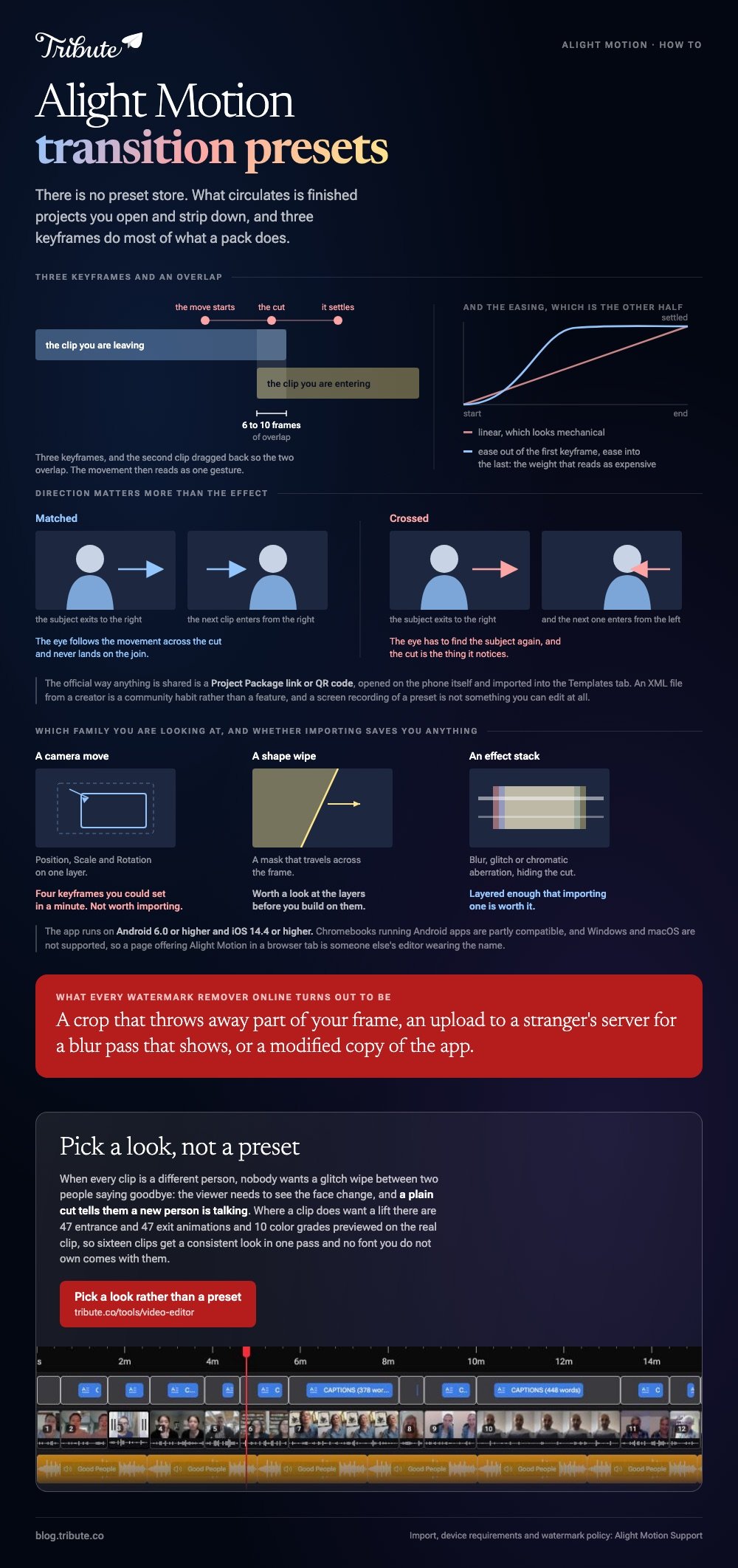
Alight Motion has no preset store. What circulates is finished projects: a creator keyframes a move, exports the project, and posts the link. You open their work and lift the part you want.
Almost all of them fall into three families.
- Camera moves built from Position, Scale and Rotation on a single layer
- Shape wipes built from a mask that travels across the frame
- Effect-driven moves that lean on blur, glitch or chromatic aberration to hide the cut
Knowing which family you are looking at tells you how much work the import saves. A camera move is four keyframes you could set in a minute, while a layered effect stack is worth importing.
How do you import an Alight Motion transition preset?
Open the shared link on the phone that has Alight Motion installed, then tap Import.
- Tap the link or scan the QR code on the device itself, not on a desktop.
- Tap Import when the app asks. The project copies into your own library.
- Look in the Templates tab, which is where imported packages land.
- Open it and copy the layer you want, then paste it into your own project.
Going the other way, open your project, tap the Export icon at the top right, choose Project Package and tap Export. You get back a link and a QR code to hand out.
On iPhone the link sometimes opens the App Store instead of the app. Alight Motion's fix is to paste the link into a separate browser such as Chrome, press and hold Open, then choose Open in Alight Motion.
Where does an Alight Motion transition effect download come from?
A person, not a company.
The packs circulate through creator accounts, chat groups and video descriptions, which means nobody is checking them.
Two cautions are worth the ten seconds. A package can carry fonts and media you have no right to publish, and some download pages push a modified copy of the app instead of a project.
Unlike an app store listing, a shared package has no review step in front of it. Open anything you import and look at the layers before you build on them.

Is there an Alight Motion online editor?
No, and there never has been.
The published minimum requirements are Android 6.0 or higher and iOS 14.4 or higher. Chromebooks that run Android apps are listed as compatible in part. Windows and macOS are listed as not supported.
So a page offering alight motion online editing in a browser tab is someone else's editor wearing the name. That matters because the phone is where this work happens anyway: Pew Research Center puts US adult smartphone ownership at 91%.
If you want a browser, pick a browser tool on purpose. Clipchamp, CapCut on the web and Canva all edit video without an install, and none of them opens an Alight Motion project.
Can you remove the Alight Motion watermark online?
Not from outside the app.
Alight Motion's support site is direct about it: a subscription removes the watermark from all your projects and opens the Pro features at the same time. That is the whole supported route.
Every alight motion watermark remover online turns out to be one of three things.
- A crop, which throws away part of your frame to hide a corner
- An upload of your video to a stranger's server for a blur pass that shows
- A modified copy of the app, which is the one that gets accounts and phones into trouble
Export at a higher resolution than you need and the watermark gets no smaller. It scales with the frame.
How do you build a smooth transition yourself?
Three keyframes and an overlap do most of what a downloaded pack does.
Set the first keyframe where the move starts, the second at the cut, the third where it settles. Then drag the second clip back so the two overlap by six to ten frames, and the movement reads as one gesture.
Direction matters more than the effect. If the subject exits to the right, start the next clip entering from the right, and the eye follows without noticing the join.
Easing is the other half. A linear move looks mechanical, while an ease out on the first keyframe and an ease in on the last gives the weight that makes a preset feel expensive.
Other phone editors take a different route: see transitions in InShot and the wider pool of downloadable transition effects.
What if the clips came from a dozen different phones?
The Tribute video editor is a browser-based group video editor: contributors record clips on their phones and Tribute assembles them on a timeline with the music balanced under the voices.
It is ours, and it is the last thing on this page.
- 47 entrance and 47 exit animations, including Slow zoom, Drift and Breathe
- 10 color grades previewed on the real clip, so a mixed set can be pulled toward one look
- Blurred edges fill the frame behind upright phone footage instead of black bars
- 9 3D layout effects for photos: Tilt, Book, Floating, Billboard, Skewed
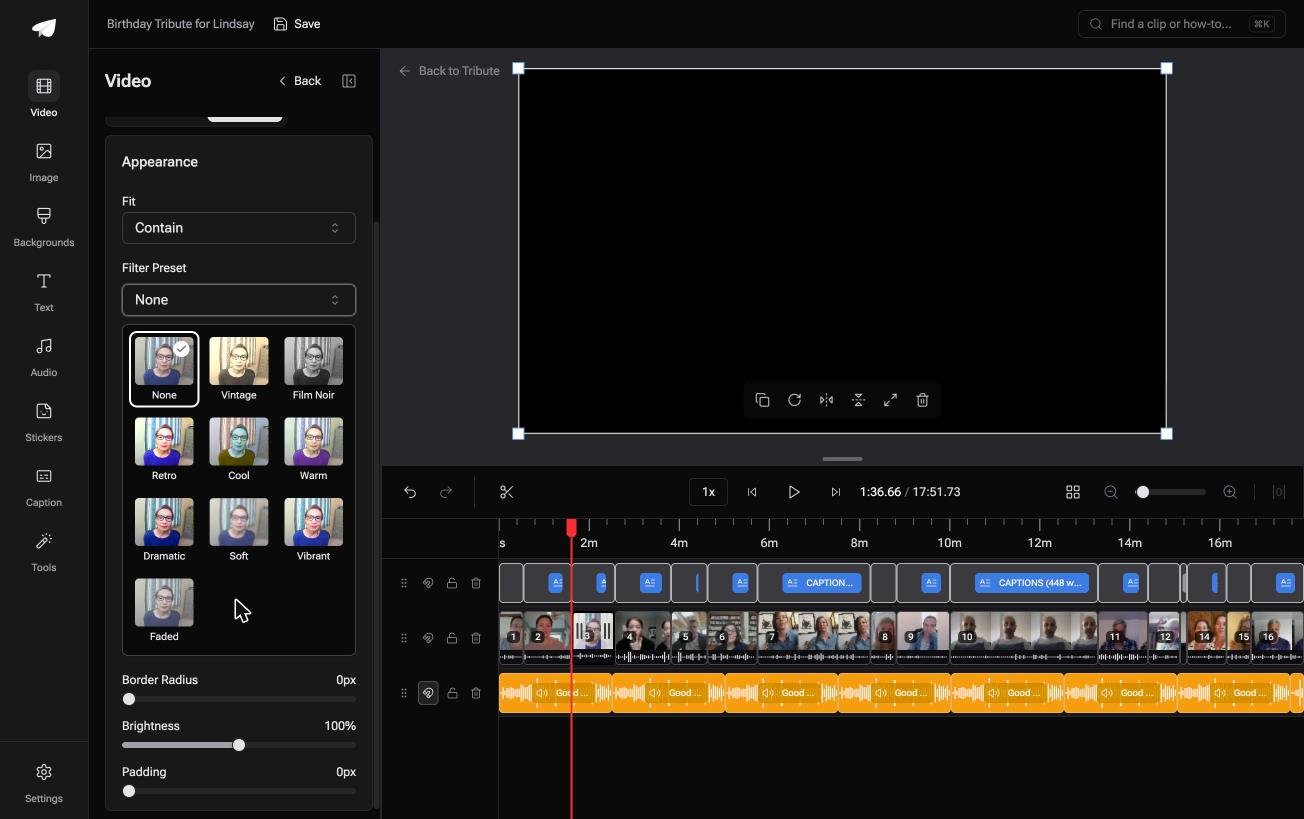
Best for: A phone-made tribute whose cuts fall between people rather than between shots.
Why it works: The animations are chosen from a list rather than built, so sixteen clips get a consistent look in one pass.
What if no clip needed a preset at all?
A preset exists to cover a cut you do not want people to notice.
That is a real problem when you are cutting between shots of the same scene, and the join is the weak point. Presets are how phone editors paper over it.
One kind of video has no weak joins, because the cut is the point.
The case: every clip is a different person
You are in it when several people each record something for one person.
A grandmother turning eighty. A colleague leaving after fifteen years. A memorial where the people who should speak are in four states.

Nobody wants a glitch wipe between two people saying goodbye. The viewer needs to see the face change, and a plain cut tells them a new person is talking.
Why the preset hunt never starts
The clips arrive in order with a tick against the ones already on the timeline, so there is no assembly step to decorate.
Where a clip does want a lift, you pick from 47 entrances and 47 exits rather than keyframing one. Compared to importing a stranger's project, choosing from a list takes seconds and carries no font you do not own.
That is how the Tribute video editor handles it: not a preset pack, but a video where the joins were never your problem.

What you do not have to do
- Import a preset. There are 47 entrance and 47 exit animations and 10 color grades in the editor.
- Chase sixteen people for files. One link, and the clips land numbered and in order.
- Match sixteen looks up. A single grade across the set does more than sixteen different moves.
- Build it, on a Concierge Tribute. Tribute's editors cut the video, and Concierge Deluxe returns it as a video book.

When this is the wrong answer: you are making a stylized edit where the movement is the content. Then Alight Motion is the right app and the import steps above are the whole job.
Our editor runs in a browser and lives inside a paid Tribute.
Further reading: making a video montage and putting together a video tribute.
Frequently Asked Questions
Can you open an Alight Motion XML file on a computer?
You can read it, but you cannot use it. The app runs on Android and iOS only, so the file has nowhere to open on Windows or macOS.
Where do imported projects appear in the app?
In the Templates tab. Imported Project Packages land there rather than in your main project list, which keeps them separate from work you started yourself.
Why does the shared link open the App Store?
iOS hands the link to the store when it does not recognize the app as the owner. Paste the link into another browser, press and hold Open, then choose Open in Alight Motion.
Does a subscription remove the watermark from old exports?
No. A video you already exported keeps its watermark. Open the project again after subscribing and export it a second time.
How long should a transition last?
Six to ten frames for a cut between shots, and longer only when the move itself is the subject. Anything over a second starts competing with the clip underneath it.
Is it safe to install a modified Alight Motion?
No. A modified build is an unsigned copy of the app from an unknown party, and it asks for the same permissions the real one does.
👉 Pick a look rather than a preset if you are cutting between faces rather than between shots, and nothing has to be imported.
