
Video Transition Effects Free Download: What You Need
Most people hunting for video transition effects to download already own an editor that has them. Clipchamp, iMovie and Premiere ship transitions built in, and a free tool on your machine beats a pack you install.

| What arrives in the zip | What it is | Where it goes |
|---|---|---|
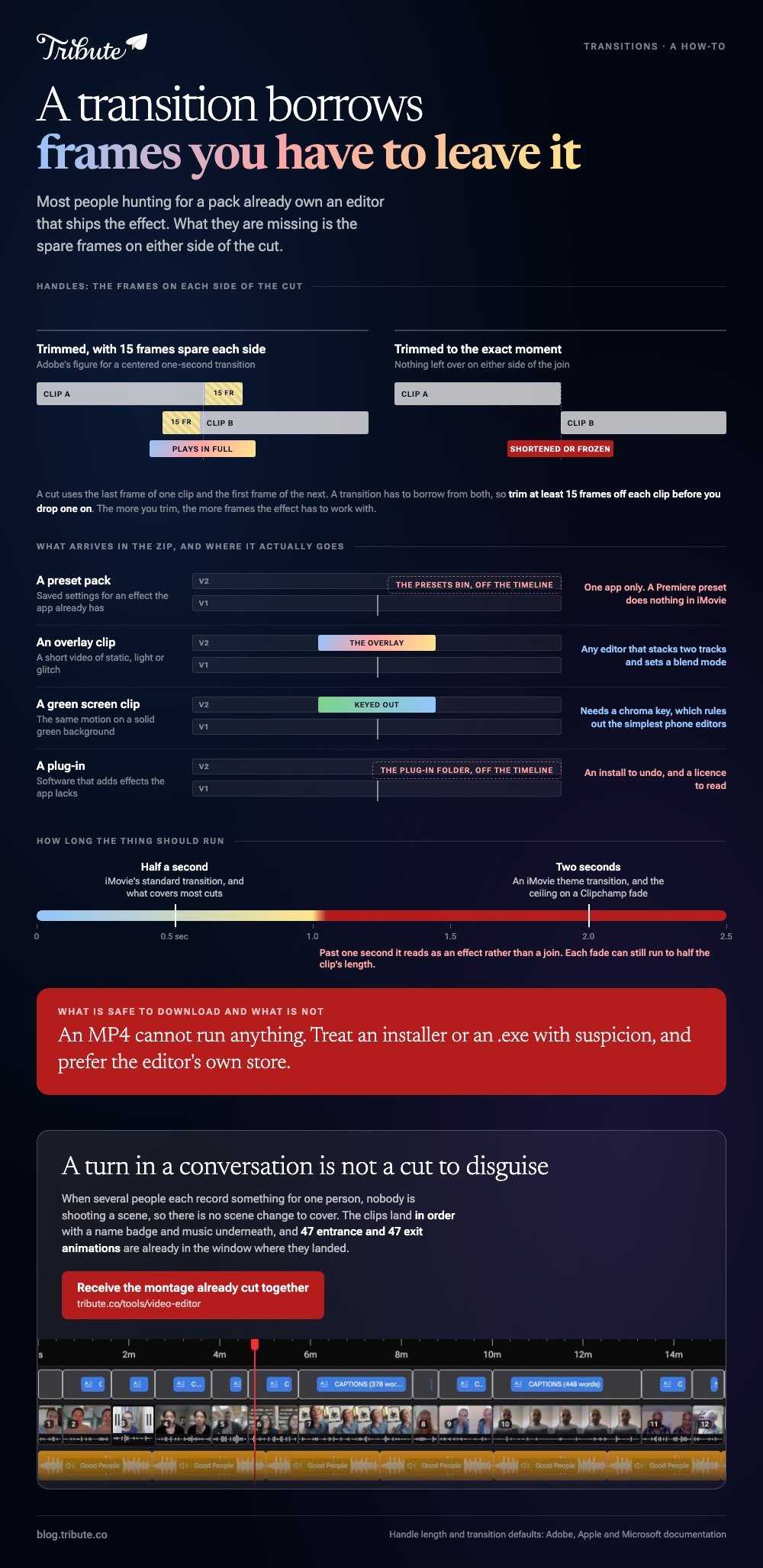
| Preset pack | Saved settings for an effect the app already has | The Presets bin, in one app only |
| Overlay clip | A short video of static, light or glitch | A track above the cut |
| Green screen clip | The same motion on a solid green background | A track above, then keyed out |
| Plug-in | Software that adds effects the app lacks | The app's plug-in folder |
Which free tools already include transition effects?
All three of the editors most people already have.
Each one ships a list you drag onto a cut. None of them asks for a card, and none of them needs a pack installed first.
Clipchamp, in any browser
Microsoft documents the sequence this way.
- Put two clips on the timeline side by side with no gap. A gap blocks the transition.
- Select the Transitions tab on the toolbar.
- Hover one to preview it, then drag it onto the timeline between the two clips.
- To swap it, select it and open the Transitions tab in the property panel.
- Drag the duration slider, or type a number in the duration box.
The Fade tab in the same panel handles fade in and fade out, up to two seconds on the slider. Each fade can run to half the clip's length.
iMovie, on a Mac
Apple puts transitions behind a browser above the timeline, and turns some on for you.
- Click Settings at the top right of the timeline and deselect Automatic content, or iMovie keeps adding its own.
- Click Transitions above the browser and skim one to preview it.
- Drag it into the gap between two clips, or select a clip and double-click a transition to put one at each end.
- For a plain dissolve, click the edge of a clip and choose Edit > Add Cross Dissolve, or press Command-T.
Apple's own page on this gives the lengths: a standard transition runs half a second, a theme transition two seconds. Change the default in iMovie > Settings, in the Transitions field.
Premiere Pro
Premiere carries both the classic list and a newer set, so a pack is seldom the gap.
You drag one from the Effects panel onto the cut line between two clips. Adobe's advice before you do: trim the clips first, because the more you trim, the more frames the transition has to work with.
Before you chase a VN transition download, or any other pack named after one app, open that app's own effects list first. It is the fastest way to find out whether you have a problem at all.

Is a video transition effects free download a free tool or a file?
Almost always a file, and the kind of file decides where it works.
Preset packs
A preset is saved settings for an effect the app already carries. Adobe's Effects panel keeps them in a Presets bin, and Premiere ships several of its own in the application's Presets folder.
Which is the catch. A Premiere preset does nothing in iMovie, and an After Effects preset does nothing in Premiere.
Overlay clips
A TV transition effect download is almost always an overlay clip rather than a preset. You put it on the track above the cut and let it cover the join.
The TV static transition download most people are after is a short burst of analog noise with a hard cut inside it.
A screen transition effect download that arrives as an MP4 works in any editor that can stack two tracks and set a blend mode.
Unlike a preset, an overlay clip is editor-agnostic. It is a video file, so anything that plays video can use it.
Green screen clips
A transition green screen download gives you that same motion on a solid green background, which you key out so your own footage shows through.
It needs a chroma key tool, which rules out the simplest phone editors. When it works, it is cleaner than a blend mode, because nothing of the overlay's own brightness survives.
Why does a downloaded transition look wrong on your timeline?
Because it needs frames you have not left it.
A cut uses the last frame of one clip and the first frame of the next. A transition has to borrow from both sides, and those spare frames are called handles.
Adobe's transitions overview puts a number on it: trim at least 15 frames off each clip for a centered one-second transition. Trim nothing and the editor either shortens the effect or freezes a frame to fill the gap.
Compared to a built-in transition, a downloaded pack also costs you a license to read and an install to undo. Download from the editor's own store or a stock site with a stated license, and skip anything that arrives as an installer.
Longer builds have the same problem at the other end. Our guide to a video montage maker covers pacing across a whole timeline, and free music downloads covers the soundtrack that sits under it.
What if ten people each sent you one clip?
The Tribute video editor is a browser-based group video editor: contributors record clips on their phones and Tribute assembles them on a timeline with the music balanced under the voices.
It is ours, and it is the last thing on this page.
- 47 entrance and 47 exit animations, including Slow zoom, Drift and Breathe
- Clips arrive in order, already on the timeline, before you open it
- 10 color grades previewed on the real clip, not on a thumbnail
- 83 occasion backgrounds grouped by occasion, for the gaps between people

Best for: A montage where every cut is a new person rather than a new scene.
Why it works: Unlike a pack you install, the animation list is already in the window where the clips landed.
Is there a version of this where nobody picks a transition?
Everything above assumes you are the one deciding where one shot becomes the next.
That choice is yours: the cut, the look on it, and the pack you went hunting for. There is one case where none of it happens.
The case: the clips arrive already in order
You are in it when several people each record something for one person.
A grandmother turning eighty. A coach retiring after twenty seasons. Nobody is shooting a scene, so there is no scene change to cover.
Which means the search that brought you here, video transition effects to download, is solving a problem the format does not have.
Why the join stops being yours to hide
A cut between two people talking is not a cut you need to disguise.
Each clip is a separate person saying a separate thing, so the join reads as a turn in a conversation.
In the Tribute video editor the clips land in order, with a name badge and music underneath, and the animation list is there if you want one.

What you do not have to do
Four jobs go away, and installing a pack is only the first.
- Download a pack. There are 47 entrance and 47 exit animations in the editor already.
- Collect the clips. Each person records from a link, and what lands is numbered and in order.
- Find the silence. A waveform under each clip shows where the first word starts.
- Cut the video, on a Concierge Tribute. Tribute's editors put it together, and Concierge Deluxe sends it back as a video book.
When this is the wrong answer: you shot the footage yourself, or the video is a travel edit that wants a whip pan on every cut. Then you are back on the list above.
More on the format itself in making a video tribute, and on pulling source clips in downloading and cropping a YouTube video.
Frequently Asked Questions
Are downloaded transition packs safe?
Media files are, since an MP4 cannot run anything. Treat an installer or an .exe with suspicion, and prefer the editor's own store or a stock site that states its license.
Why will my downloaded preset not load?
Presets are tied to the app that made them. A Premiere preset will not open in iMovie or CapCut, and an After Effects preset will not open in Premiere.
How long should a transition be?
Half a second covers most cuts, which is why iMovie uses that as its default. Anything past one second starts to read as an effect rather than a join.
Can I add a transition between every clip at once?
In iMovie yes, through the Automatic content setting, though you lose control over which ones land where. In most other editors you place them one at a time.
Do I need a green screen clip or an overlay?
An overlay if your editor has blend modes and no chroma key, which covers most browser editors. A green screen version if you want the overlay's own brightness gone.
What is a light leak transition?
It is an overlay clip of a bright flare that washes the frame out and back in, the same mechanic as the static clip with softer edges.
Why does my transition freeze a frame?
The clips had no spare frames left at the cut. Trim both clips shorter first, then apply the transition.
👉 Receive the montage already cut together if other people are each recording the clips for you, and no pack ever gets downloaded.
