
VLC Video to Audio Converter: How to Pull the Sound Out of a Clip
VLC converts a video to an audio file through Media > Convert / Save, where you pick an audio-only profile and a destination. It works, it is free software, and it fails without saying so more often than it should.

What does the VLC video to audio converter do to a file?
It keeps the sound, drops the picture, and writes a new file.
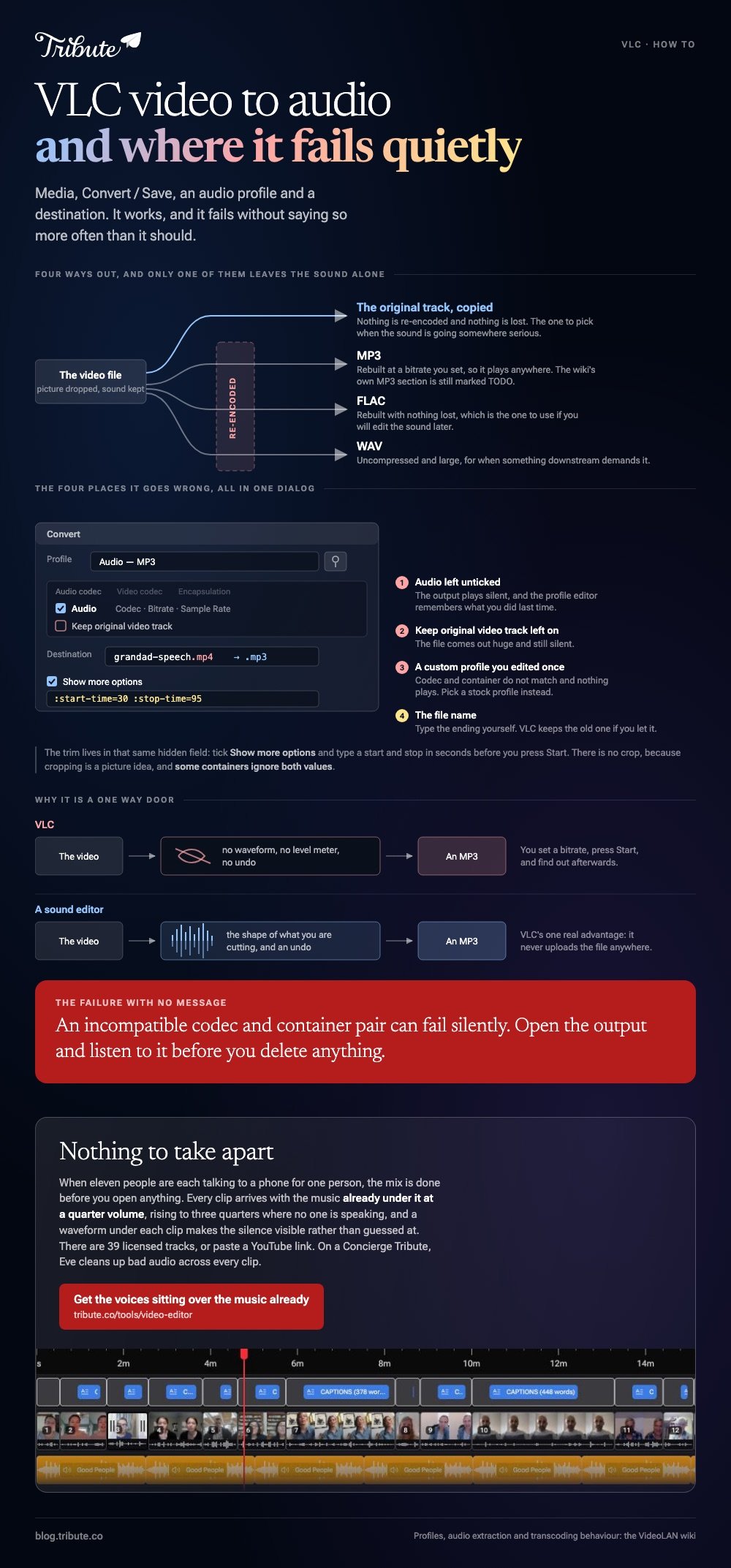
VideoLAN's own wiki on extracting audio with VLC describes four outputs: the original track copied as it is, FLAC, WAV, and MP3. The MP3 section of that page is still marked TODO.
Which tells you something about how much attention this part of VLC gets.
| Output | What happens to the sound | Use it when |
|---|---|---|
| Original track | Copied, nothing re-encoded | You want the sound untouched |
| MP3 | Re-encoded at a bitrate you set | It has to play anywhere |
| FLAC | Re-encoded with nothing lost | You will edit the sound later |
| WAV | Uncompressed, a large file | Something downstream demands it |
How do you make VLC media player convert video to audio?
Five steps on Windows, and the trap is in the file name.
- Choose Media > Convert / Save, click Add, pick your video, then click Convert / Save.
- In the Profile list choose the Audio MP3 entry.
- Click the wrench to the right of the profile. On the Audio codec tab, confirm the codec, bitrate and sample rate, and confirm the Audio box is ticked.
- Under Destination, click Browse and type a name that ends in .mp3. VLC will keep the old extension if you let it.
- Click Start. The seek bar fills as the job runs.
VideoLAN warns on its transcoding page that an incompatible codec and container pair may fail without a message, so open the output before you delete anything.
Where are the same controls on a Mac?
Behind a different menu with a different name.
Use File > Convert / Stream, drop the video into the window, choose an audio profile under Choose Profile, then click Save as File. Type the .mp3 ending into the name yourself.
The Mac dialog hides the codec detail behind Customize. Everything else matches.
Why do you end up with a VLC MP4 with no audio?
Two different problems share one symptom.
The first is playback. If a VLC MP4 has no audio when you press play, open Audio > Audio Track and check that a track is selected rather than disabled.
Then read Tools > Codec Information to see what the sound is. VideoLAN's forum carries a run of reports where an E-AC3 track in an MP4 played silent while AAC in the same container was fine.
The second is the conversion itself.
| Symptom | Usual cause | Fix |
|---|---|---|
| Output plays silent | The Audio box in the profile is unticked | Tick it and set a codec |
| File is huge and silent | Keep original video track was left on | Untick it in the Video tab |
| Nothing plays at all | Codec and container do not match | Pick a stock profile instead of a custom one |
A VLC MP4 convert with no audio is almost always the first row. The profile editor remembers what you did last time.
Can VLC media player trim audio, or crop it?
It can trim. It cannot crop.
The trim uses the same hidden field as a video cut: tick Show more options in the Convert dialog and type :start-time=30 :stop-time=95 into Edit Options before you start.
There is no VLC crop audio control, because cropping is a picture idea. For sound, the start and stop pair is the whole of it, and VLC will ignore both on some containers.
For a cut you can see while you make it, trimming video in VLC covers the record-button route and where it falls down.

When is the VLC video to audio converter the wrong tool?
When the sound is going anywhere other than straight into a player.
VLC gives you no waveform, no level meter and no undo. You set a bitrate, press Start, and find out afterwards whether the voice survived.
- Cleaning up a recording: a sound editor shows you the shape of what you are cutting.
- Putting the audio back over picture: see adding audio to a video clip.
- Grabbing one song from one video: VLC is fine, and faster than installing anything.
- Stitching the pieces back together: see building a video montage.
Compared to a sound editor, the VLC video to audio converter is a one-way door. Compared to an online converter, it has the advantage of never uploading the file anywhere.
What if the clips came from a dozen different people?
The Tribute video editor is a browser-based group video editor: contributors record clips on their phones and Tribute assembles them on a timeline with the music balanced under the voices.
It is ours, and it is the last thing on this page.
- 39 licensed tracks across 11 genres, plus a YouTube link or your own MP3, WAV, M4A or FLAC
- Music at 25% under speech and 75% under photos by default, and you can override it per clip
- A waveform under every clip, so silence is visible rather than guessed at
- Crossfade songs blends one track into the next when the video outlasts the song

Best for: Sound you were about to extract, fix and put back into the video by hand.
Why it works: The sound arrives mixed, so there is no file to pull apart and nothing to put back.
Is there a version of this with no file to take apart?
Pulling audio out of a file is a repair job, not a goal.
Nobody wants an MP3 of their uncle. They want his voice to sit above the music in something people will watch. There is one case where those two things never separate.
The case: the voices are the content
You are in it when several people each record a message for one person.
A grandmother turning eighty. A colleague leaving after fifteen years. Nobody is shooting anything: eleven people are talking to a phone, and what they said is the whole of a video tribute.

Why the conversion never comes up
Because the mix is done before you open anything.
Each clip arrives on a timeline with the music already under it at a quarter volume, rising to three quarters where there is no voice.
That is how the Tribute video editor handles it: not a better video to audio converter, but a reason to never open one.
What you do not have to pull apart
- No audio to extract. Each voice arrives over the music at a quarter volume, three quarters where nobody speaks.
- No room-by-room correction on a Concierge Tribute: Eve, the assistant inside the editor, cleans up bad audio across every clip.
- No license page. Thirty-nine tracks are cleared inside the editor, or you paste a YouTube link.
- No pass of your own on Concierge, where Tribute's editors build the video and you pass on the link.

When this is the wrong answer: you want one song out of one video file. Then go back up this page, where VLC does it in five clicks. The editor is also not a converter: it lives inside a paid Tribute.
Frequently Asked Questions
Can VLC convert MP4 to MP3?
Yes. Choose Media, then Convert / Save, add the file, pick the Audio MP3 profile and give the destination a name ending in .mp3. VLC will not add the extension for you.
Does converting video to audio in VLC lose quality?
It does if you re-encode. Choosing a profile that keeps the original audio track copies the sound across untouched, while MP3 and WAV both rebuild it at whatever settings the profile holds.
Why is my converted file the same size as the video?
The video track came along. Open the profile editor and untick the video stream, or pick a stock audio-only profile rather than a custom one you edited earlier.
How do I extract audio from part of a video in VLC?
Tick Show more options in the Convert dialog and put :start-time and :stop-time values into the Edit Options field. Both are in seconds, and some containers ignore them.
Is there a VLC batch converter for several files?
The Convert dialog accepts more than one file at a time, but it applies one profile and one destination pattern to all of them. For anything more involved, the command line version of the same job is the usual answer.
What should I use instead for a long recording?
A sound editor that shows a waveform while you work. VLC has no undo and no level meter, so a mistake means converting the original again.
👉 Get the voices sitting over the music before you touch them if several people are each recording a message for one person, and no file ever needs taking apart.
