
IG Reel Aspect Ratio: What Instagram Accepts, and What It Shows
Shoot and upload at 9:16. Instagram accepts anything from 1.91:1 down to 9:16, so a wider clip will post, and only the upright frame fills a phone. The minimum resolution Instagram names is 720 pixels.
What is the IG reel aspect ratio?
9:16 in practice, and a range on paper.
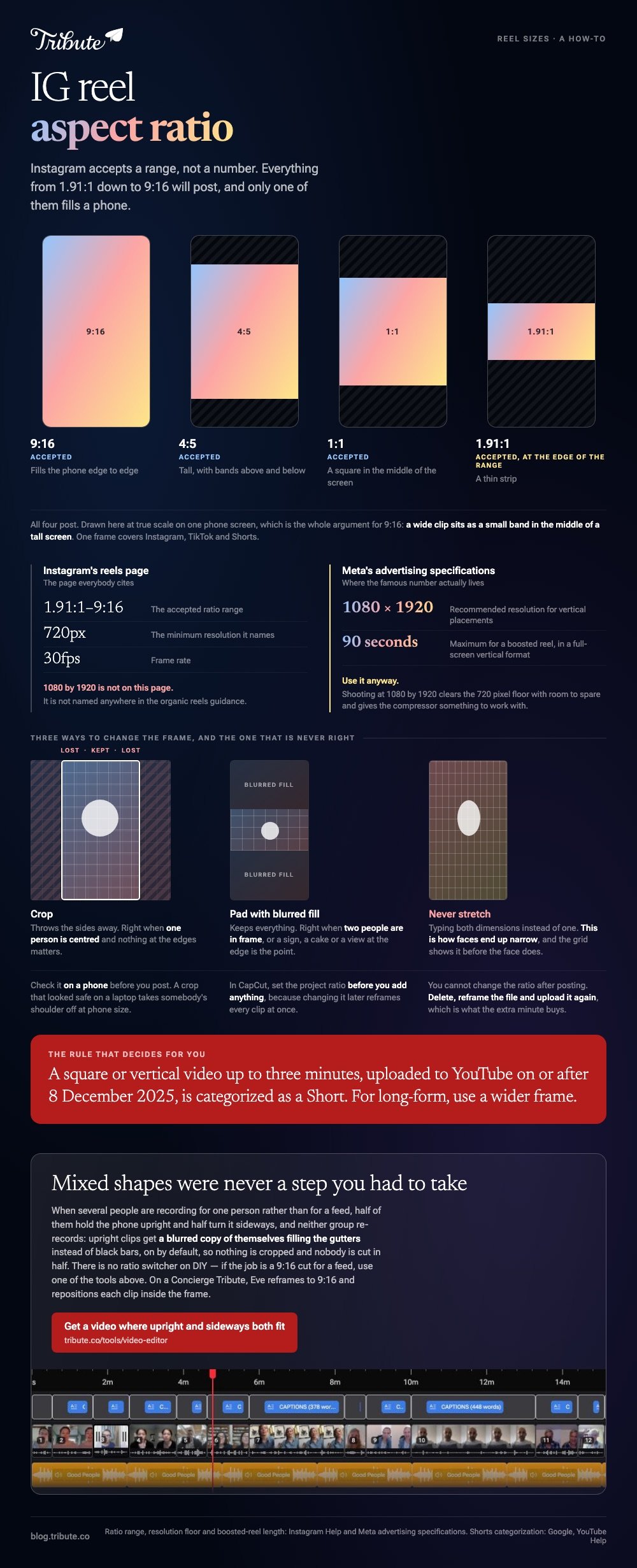
Instagram's own page on reel size and aspect ratios says uploads can fall anywhere from 1.91:1 down to 9:16, with a minimum of 720 pixels for resolution and 30 frames per second.
That is wider than most advice admits. Compared to the single number people quote, Instagram's own rule is a range, and a 16:9 clip sits inside it.
A wide clip then sits as a small band in the middle of a tall screen, which is the reason 9:16 is the answer everybody gives.
| Ratio | Accepted | What a viewer sees |
|---|---|---|
| 9:16 | Yes | Fills the phone edge to edge |
| 4:5 | Yes | Tall, with bands above and below |
| 1:1 | Yes | A square in the middle of the screen |
| 1.91:1 | Yes, at the edge of the range | A thin strip |
Is 1080 by 1920 the Instagram spec?
It is the right number, and it does not come from the page people cite.
Instagram's organic reels guidance gives a ratio range and a 720 pixel floor. It does not name 1080 by 1920 anywhere.
That figure comes from Meta's advertising specifications, where 1080 by 1920 is the recommended resolution for vertical placements. The recommendation is sound, and it is written for ads rather than for posts.
Use it anyway. Shooting at 1080 by 1920 clears the 720 pixel floor with room to spare and gives the compressor something to work with.
A second published number is worth knowing: a boosted reel has to be 90 seconds or less and in a full-screen vertical format.
Does the same frame work for Shorts and TikTok?
One frame covers all three.
Whether you searched for an IG reel aspect ratio, a youtube short aspect ratio or an aspect ratio for tik tok, the answer is the same upright 1080 by 1920.
YouTube is the one with a rule attached rather than a recommendation. Its page on three-minute Shorts says videos uploaded on or after 8 December 2025 that are square or vertical and up to three minutes are categorized as Shorts.
Which cuts both ways. If you want a long-form upload rather than a Short, YouTube's own advice is to use a wider frame such as 16:9.

How do you fix an IG reel aspect ratio that is wrong?
Two moves, and you have to choose which loss you prefer.
To change the aspect ratio of a video you either crop it, which throws away the sides, or pad it, which keeps everything and adds something in the gaps.
- Crop when one person is centered in the shot and nothing at the edges matters.
- Pad with blurred fill when two people are in frame, or when a sign, a cake or a view at the edge is the point.
- Never stretch. Typing both dimensions instead of one is how faces end up narrow.
Check the result on a phone before you post. Unlike a laptop preview, phone size is where a crop that looked safe takes somebody's shoulder off.
Which aspect ratio video converter should you use?
Any of three, and the choice follows whether you are editing as well.
- Adobe Express. Upload, pick a destination from the dropdown or type a custom size, download. Its video resizer page labels the stages Select, Resize and Continue editing.
- CapCut. Set the project ratio to 9:16 before you add anything, because changing it later reframes every clip at once.
- Clipchamp. The ratio is a project setting, and the fill option crops a mismatched clip rather than letter-boxing it.
Best for: One clip that has to fit one platform today.
Why it works: Choosing a destination rather than typing pixels keeps the arithmetic out of it.
A wider version of this question sits in changing the aspect ratio of a video, and the dimensions-versus-megabytes split in resizing a video.
What if the clips came from a dozen different people?
The Tribute video editor is a browser-based group video editor: contributors record clips on their phones and Tribute assembles them on a timeline with the music balanced under the voices.
It is ours, and it is the last thing on this page.
- There is no aspect ratio switcher on DIY. If the job is a 9:16 cut for a feed, one of the tools above is the right answer. On a Concierge or Concierge Deluxe Tribute, Eve reframes to 9:16 and repositions each clip inside the frame
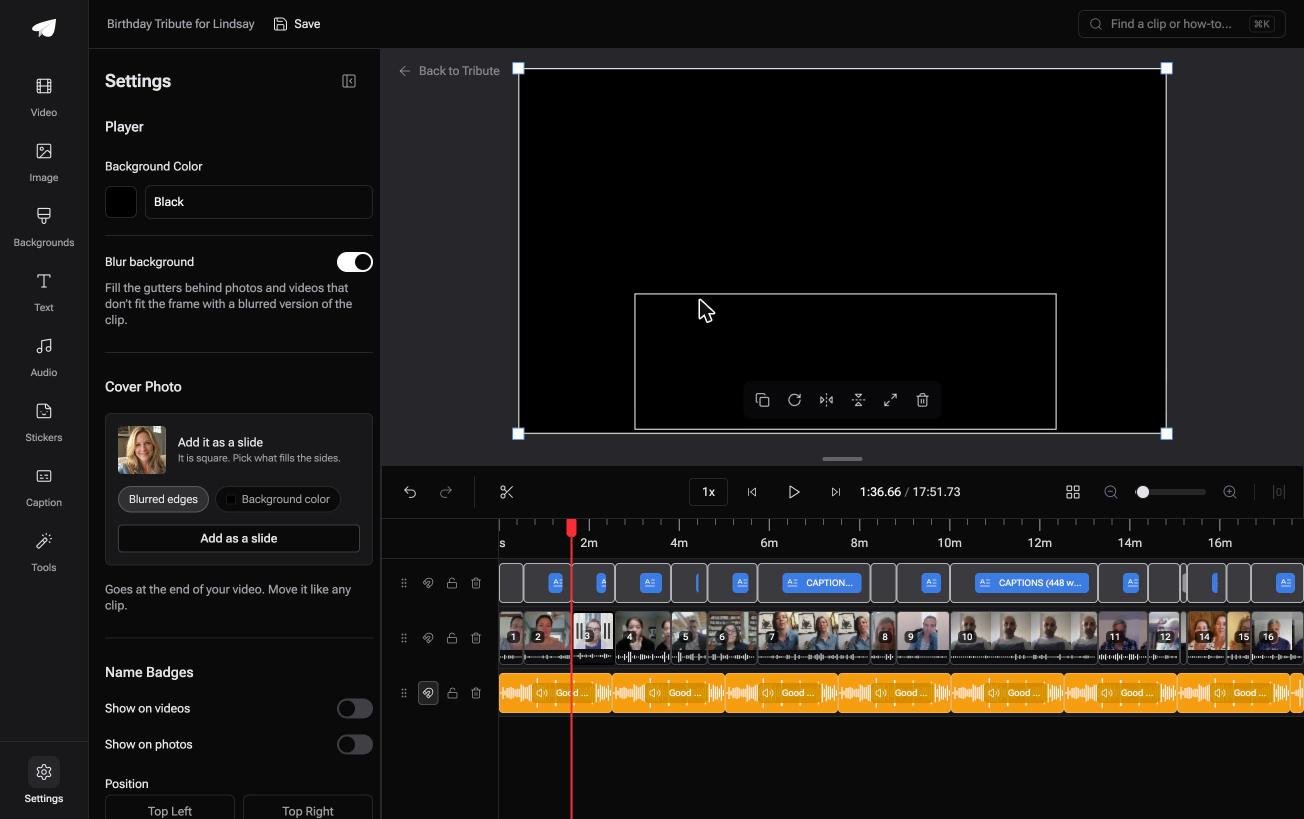
- Blurred edges fill the frame behind upright phone footage, on by default, so a vertical clip is padded rather than cropped
- Clips arrive auto-assembled in order from each person's own phone, with a tick against the ones already placed
- Music ducks to 25% under video and 75% under photos, overridable on any single clip
Best for: A video meant for one person at a table, not for a feed that wants 9:16.
Why it works: Nobody has to be told how to hold their phone, because the mismatch is padded rather than refused.
Can the aspect ratio question not come up at all?
Every answer above exists because the video is going into a feed.
A feed decides the frame, so you crop to it, check what survived and post. That is the cost of publishing into somebody else's shape.
There is one kind of video that is not going into a feed.
The case: the video is for one person
You are in it when there is no audience, only a recipient.
A grandfather turning ninety. A manager leaving after twenty-two years. A memorial watched once, together, in a living room.
Nobody is optimizing for a platform. Everyone is recording a message, and your job is assembly, not publishing.
Why the frame stops being a decision
Half the contributors hold the phone upright and half turn it sideways, and neither group is going to re-record.
Upright clips get a blurred copy of themselves filling the gutters rather than black bars, so nothing is cropped and nobody is cut in half.
That is how the Tribute video editor handles it: not a ratio control, but a video where mixed shapes were never a step you had to take.

When this is the wrong answer: the video is for Instagram, TikTok or Shorts. Then you need a 9:16 export and a tool with a ratio control, which this is not. The editor also lives inside a paid Tribute.
What it is for is covered in making a video montage and in making a slideshow in Canva.
Frequently Asked Questions
What size is a reel in pixels?
1080 by 1920 is the figure to shoot and export at. Instagram's own floor is 720 pixels, so 1080 clears it with enough margin for the compressor.
Will a 16:9 video post as a reel?
Yes. It falls inside the accepted range, and it will show as a band across the middle of the screen rather than filling it.
How long can a reel be?
Instagram publishes 90 seconds or less for a boosted reel in a full-screen vertical format. Treat 90 seconds as the planning number unless you have checked otherwise on the day.
Why does Instagram crop my video?
The clip is wider than the slot it is being shown in, so the player takes the sides. Export at 9:16 and the crop has nothing left to take.
Is a square video a bad idea?
Not a bad one, a smaller one. A square post is accepted everywhere and fills less of the screen than an upright cut, which costs attention in a feed.
Can I change the ratio after posting?
No. Delete the post, reframe the file and upload it again, which is why checking on a phone before posting is worth the extra minute.
Does changing the aspect ratio of video lower its quality?
Cropping removes pixels and padding adds them, and both involve a re-encode. Export at the highest resolution the tool offers and run the conversion once rather than twice.
👉 Get a video where upright and sideways clips both fit if several people are recording for one person, and the frame stops being something you have to police.
