
How to Make a Canva Slideshow, and the Two Settings That Decide How It Looks
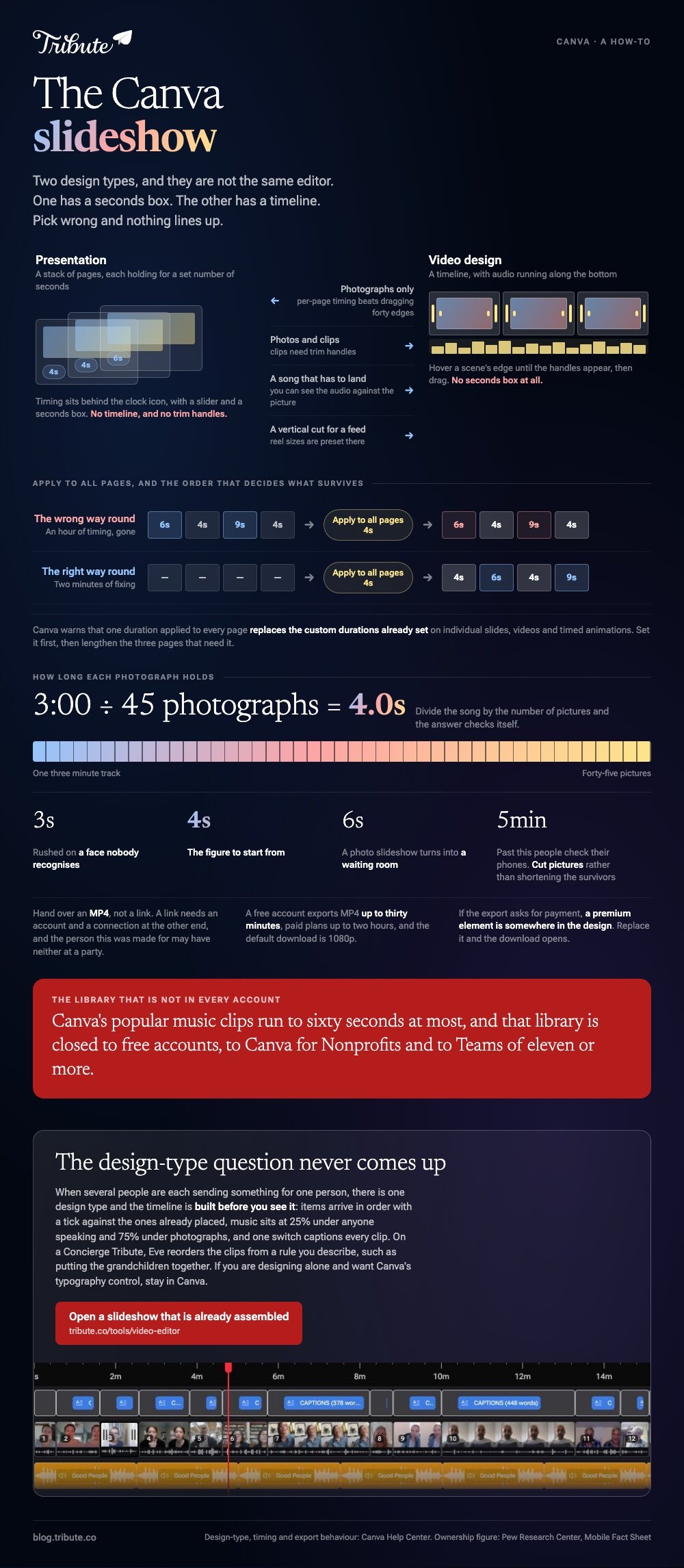
A Canva slideshow starts as one of two design types. A Presentation gives each page its own duration in the Timing panel. A Video design gives you a timeline you drag, and that is the one to pick when a song runs underneath.

Which design type should a Canva slideshow start from?
It depends on whether anything in it moves.
A Presentation is a stack of pages. Each page holds for a set number of seconds, and the stack exports as an MP4 when you are done.
The Video design is a timeline. Clips sit end to end, you drag their edges to change length, and audio runs along the bottom.
| You have | Start from | Why |
|---|---|---|
| Photographs only | Presentation | Per page timing beats dragging forty edges |
| Photos and clips | Video | Clips need trim handles |
| A song that has to land | Video | You can see the audio against the picture |
| A vertical cut for a feed | Video | Reel sizes are preset there |
Canva's help center is clear that these are not the same editor. Its documentation on creating and editing videos says slide duration controls are absent from video designs, where you change a scene's length on the timeline instead.
Canva rebuilt that timeline, and designs made before October 2025 still carry the older page-based structure. An editor that looks nothing like the tutorial you are reading is an older file.
How do you set the timing on a Canva slideshow?
In a Presentation, timing lives behind the clock icon.
- Select the page you want to time.
- Open the Timing panel from the clock icon on the floating toolbar.
- Set the seconds with the slider, or type a number in the box.
- Switch on Apply to all pages to give every page the same length.
That last switch carries a cost. Canva warns that one duration applied to every page replaces the custom durations already set on individual slides, videos and timed animations.
Do it first, then fix the three pages that need longer. The other order throws away your work.
A Video design has no seconds box at all. Hover over the start or end edge of a scene until the trim handles appear, then drag.
How long should each photo hold?
Four seconds is the figure to start from. Three feels rushed on a face nobody recognizes, and six turns a photo slideshow into a waiting room.
Divide the song length by the number of photographs to check yourself: a three minute track across forty-five pictures lands on four seconds.
Past five minutes people start checking their phones, whatever the occasion. Cut pictures rather than shortening the ones that survive.
Where do Canva slideshow templates earn their keep?
On typography, and close to nowhere else.
Canva slideshow templates are page layouts: a title treatment, a photo frame, a set of colors. Swap the pictures and the result looks designed rather than assembled.
The categories overlap more than their names suggest. A Canva video template and a slideshow layout are often the same design at a different page count, and Canva reels templates are that design turned upright.
- A Canva reel template is 1080 by 1920, which crops a horizontal photograph hard. Check faces before you commit the project to it.
- Canva video intro templates are the five second title card at the front. Worth one minute, and the piece people remember.
- Premium elements sit inside otherwise open templates, and they are the usual reason an export asks for payment.
Compared to a blank page, a template settles the layout and leaves you the pacing decisions, which decide whether anybody watches to the end.
Template routes outside Canva are in slideshow templates that cost nothing.
How do you put music under a Canva slideshow?
Audio is a panel, not a setting.

- Open the Audio tab in the side panel. Canva also surfaces it under Apps and under Elements.
- Search by title or artist, or upload your own MP3.
- Drag the track onto the timeline, then pull its handles to trim it.
Two limits catch people out. Canva's popular music clips run to sixty seconds at most, and that library is closed to free accounts, to Canva for Nonprofits and to Canva Teams of eleven or more.
Set the level low under anyone speaking. A quarter of full volume keeps a voice in front; three quarters suits photographs with nobody talking.
More on choosing the track in making a slideshow with music, and the app comparison in the best apps for a slideshow with music.
How do you export a Canva slideshow video?
Download it as MP4 rather than sending a link.

A link needs an account and a connection at the other end, and the person this was made for may have neither to hand at a party.
Canva's help center sets the ceilings: a free account exports MP4 up to thirty minutes, paid plans up to two hours, and the default download is 1080p.
Unlike a presentation file, an MP4 plays on a television, inside a message thread and on a phone with no app installed. That is the format to hand over.
Three things that go wrong at the end
- The song stops early. The video is shorter than the track. Add seconds to the closing page so the music resolves.
- A face is cropped. The reel preset is upright and the photograph was not. Reframe the picture inside its frame rather than resizing the page.
- The export asks for payment. A premium element is somewhere in the design. Replace it and the download opens.
What if the photographs came from a dozen different people?
The Tribute video editor is a browser-based group video editor: contributors record clips on their phones and Tribute assembles them on a timeline with the music balanced under the voices.
It is ours, and it is the last thing on this page.
- 83 occasion backgrounds grouped by Celebration, Retirement and Love, so a slideshow has a setting without a template hunt
- 39 licensed tracks across 11 genres, plus a YouTube link or your own MP3, WAV, M4A or FLAC
- 9 3D layout effects for photos, including Tilt, Book, Floating and Billboard
- Ready-made text styles grouped Simple, Title and Styles rather than a raw font list
- 10 color grades previewed on the real picture before you commit
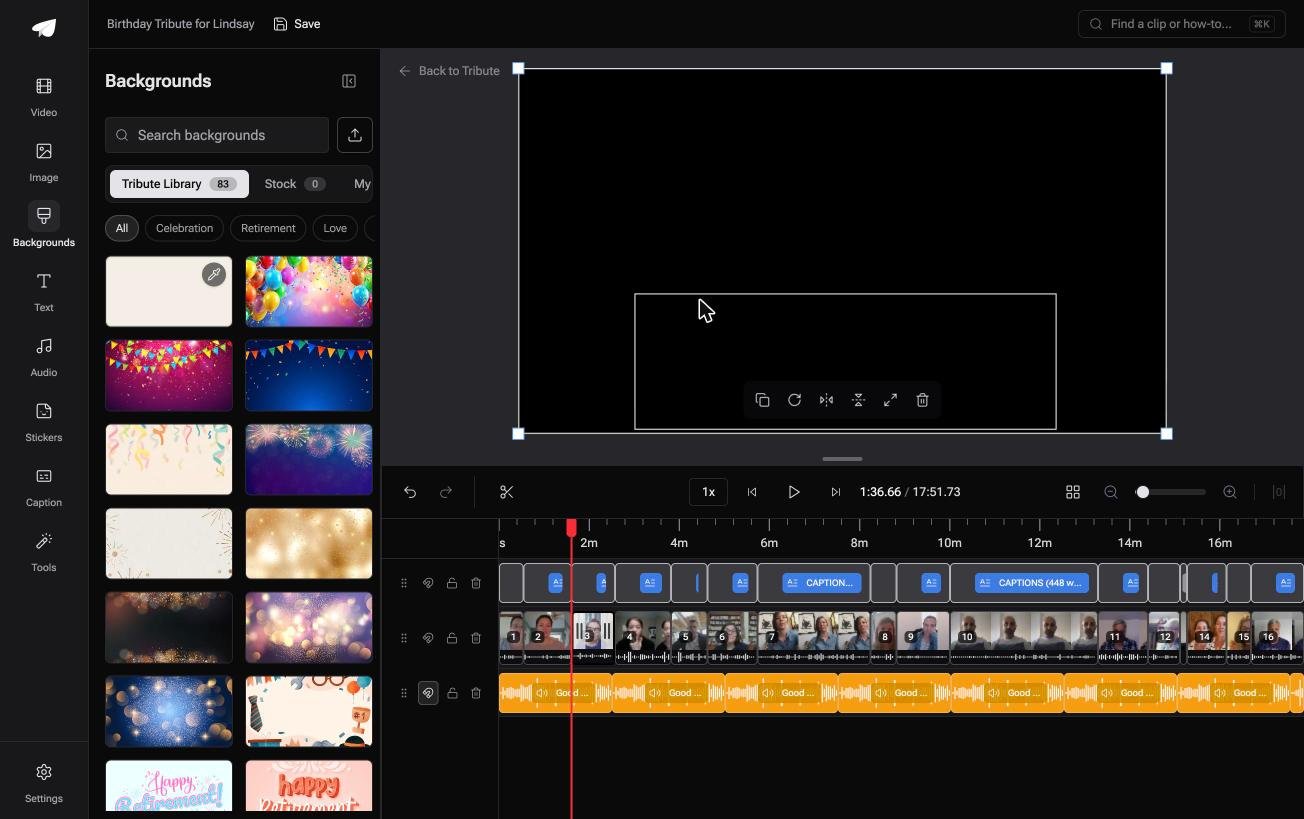
Best for: A slideshow due on Saturday with photographs still arriving from relatives.
Why it works: The order and the music level are set before you arrive, so your editing is adjustment rather than construction.
The wider version of that job is in making a video montage.
Can the slideshow be assembled before you open it?
Everything above assumes the photographs are already yours.
You picked a design type, set a duration, found a track and watched for the moment it lands. That is the work of authorship.
There is one case where almost none of it happens.
The case: the pictures are not yours to gather
You are in it when several people each send something for one person.
An eightieth birthday. A teacher leaving after twenty years. A memorial where the people who should speak live in four states.
With 91% of US adults owning a smartphone, per the Pew Research Center mobile fact sheet, those pictures are spread across a dozen devices before you start.
Nobody is designing anything. Everyone is sending one photograph or one recorded message, and your job is arrangement, not layout.
Why the design-type question never comes up
There is one design type, and the timeline is built before you see it.
Items arrive in order with a tick against the ones already placed. Music sits at 25% under anyone speaking and 75% under photographs, and you change that per clip when a room was loud.
That is how the Tribute video editor handles it: not a faster way to build a slideshow, but a slideshow that is built when you get there.

What you do not have to do
- No gathering. One link, and each person records or uploads on their own phone.
- No sequencing. On a Concierge Tribute, Eve reorders the clips from a rule you describe, such as putting the grandchildren together.
- No typing. One switch captions every clip, and a name badge carries the person and their relation.
- No design decisions. Tribute's editors build the video on Concierge and hand it back for approval.
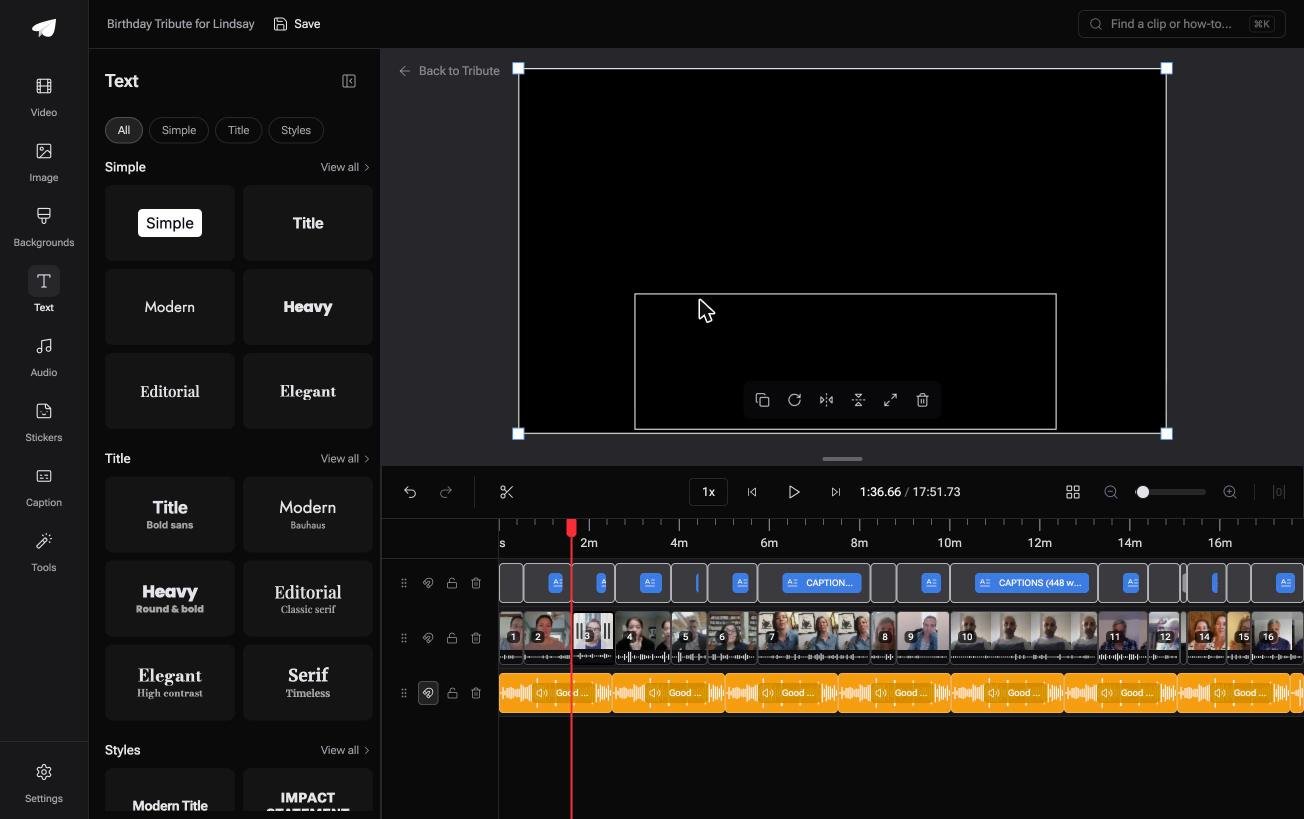
When this is the wrong answer: you are designing on your own, or you want the typography control Canva gives you. Then stay in Canva. The editor is not a standalone design tool, and it lives inside a paid Tribute.
Frequently Asked Questions
Can you make a Canva slideshow on a free plan?
Yes. The free plan covers the editor, a wide template library and MP4 export up to thirty minutes. Premium elements and the popular music library sit behind a payment.
How do I make a photo slideshow in Canva without a template?
Start a blank Video design, drop your photographs onto the timeline in order, then set one duration and apply it to every page. A slideshow in Canva built that way takes about ten minutes for thirty pictures.
Why does my Canva slideshow video stop before the song ends?
The pages run shorter than the track, so the audio stops at the last page. Trim the track with its handles, or extend the closing page.
Can I add my own music to a Canva picture slideshow?
Yes, by uploading an MP3 in the Audio panel. Use a track you hold the rights to, because uploading a song is not the same as licensing it.
What size should a Canva reel be?
1080 by 1920, which is the preset the reel templates already use. Check that faces survive the crop before you rebuild the whole project at that size.
Can several people work on one slideshow on Canva?
They can share the design and edit it together. They still have to send you their photographs first, and collecting is the part Canva does not do.
Is Canva the right tool for a memorial video?
It can be, if you are building it alone and want control over the titles. If a dozen people are each sending a photograph, the collecting is the hard part.
👉 Get the slideshow assembled before you open it if several people are each sending something for one person, and the design-type question never arises.
