
Best App to Make Slideshow With Music: Five Compared, Plus the Group Case
The best app is the one already holding the photographs. Google Photos builds a scored video from pictures you tap, iMovie adds the slow zoom that stops stills looking static, and Clipchamp hands back a clean 1080p file with nothing stamped on it.

| App | Best for | What it costs | Music |
|---|---|---|---|
| Google Photos | Pictures already backed up | Free app, preinstalled on most phones | Built in, personal use only |
| iMovie | iPhone and Mac, slow zoom | Free app from Apple | Soundtracks that fit the project length |
| CapCut | An upright cut for a feed | Free plan, paid export tier | Large library, read the export screen |
| Clipchamp | A clean file to hand over | Free plan to 1080p, no watermark | Stock audio included |
| Canva | Titles and typography | Free plan, paid Pro tier | Popular tracks are a paid library |
| Tribute video editor (ours) | Photos and clips from many people | Paid, inside a Tribute | 39 cleared tracks, balanced under voices |
What makes the best app to make slideshow with music?
Three questions settle it, and none of them is about features.
Where do the photographs live right now? Every minute spent moving files between a phone, a laptop and a cloud drive is a minute not spent choosing pictures. Start where they already are.
What does the export cost? A watermark, a resolution cap or a sign-in wall at the end is worse than one at the start, because by then the work is done.
Is the music cleared? A track that ships inside an editor is settled for use in that editor. A song from your own library is a separate question, and it is the one that gets videos muted.
Those three rule out most of the gallery before you open anything. Compared to a features list, they take about a minute and they are right more often.
Which is the best app to make slideshow with music on a phone?
Google Photos
The shortest path from a library to a finished video, because the app and the pictures are already in the same place.
- Open Google Photos, tap Create, then Highlight video.
- Pick a template and tap Use template, or tap Select content and choose the photographs yourself.
- Tap Next, then review the cut and adjust clips, music and text.
- Tap Add Music, then Section to choose which part of the song plays.
- Tap Volume to balance Video audio against Soundtrack, then tap Done.
- Tap Save.
Google documents all of it on its page about making creations in Google Photos, which also notes that older devices may not be able to create highlight videos and that the music supplied is for personal, non-commercial use.
- Look for: the Section control, which decides whether the chorus lands on the right face.
- Price: free app, on most Android phones already and available on iPhone.
- Time needed: about ten minutes for thirty photographs.
Best for: A picture slideshow built from a library that is already backed up.
Why it works: There is no import step, which removes the part where people give up.
iMovie
The best way to make a photo slideshow with music on an iPhone or a Mac, and the only one of the five that adds a slow zoom without being asked.
Tap Add Media, tap Audio, then Soundtracks, tap the track and tap Add Audio. For your own files, tap My Music instead.
Apple's guide to adding music and soundtracks says the built-in soundtracks adjust to fit the length of your project, which is the detail that matters: trim three photographs at the end and the music still resolves.
- Look for: the Ken Burns style slow zoom, on by default, which stops a still picture reading as a frozen frame.
- Price: free app from Apple.
- Time needed: fifteen minutes for forty photographs.
Best for: An Apple household where the photographs and the editing live on the same device.
Why it works: Nothing uploads, so a long slideshow renders at the speed of the hardware.
CapCut
Built for a feed rather than for a living room, which is a real distinction once you decide where the video is going.
Tap New project, select the photographs, tap Add, then open the audio panel to drop a track underneath. Captions and upright layouts are the reason most social video is cut here.
- Look for: the export screen, which is where the resolution and the paid tier appear.
- Price: free plan with a paid export tier above it.
- Time needed: ten minutes, less if you start from a template.
Best for: A ninety second upright cut for Instagram or TikTok.
Why it works: The templates are timed to the beat, so the pacing decision is made for you.

Which slideshow maker with music works best on a laptop?
Clipchamp
Microsoft preinstalls it on Windows 11 and runs the same editor in a browser on Windows, Mac, Linux and Chromebook.
Drag the photographs onto one timeline track, drop a stock track underneath, set a duration, export.
Microsoft's page on watermarks states that the editor adds no visual, audio or other watermark to an export, and a free plan on a personal account covers 480p, 720p and 1080p.
- Look for: the export dialog, where 4K asks for a Microsoft 365 subscription or the Premium plan.
- Price: free plan to 1080p.
- Time needed: twenty minutes for forty photographs with titles.
Best for: A file you are handing to somebody rather than posting.
Why it works: The rules are published, so you know at the start what the end will cost.
Canva
The best video editing software for music videos among these five, if what you mean by that is typography on screen.
Open the Audio tab in the side panel, search by title or artist, and drag the track onto the timeline.
Canva's popular music clips run to sixty seconds at most, and that library is closed to free accounts, to Canva for Nonprofits and to Canva Teams of eleven or more.
- Look for: the Timing panel behind the clock icon, where Apply to all pages sets one duration across the deck.
- Price: free plan with MP4 export up to thirty minutes, paid plans to two hours.
- Time needed: thirty minutes, most of it spent on type.
Best for: A slideshow where names, dates and captions carry as much as the pictures.
Why it works: Title layouts are designed rather than typed, which is the difference people notice without naming.
The craft behind all five is in making a slideshow with music, and the Google Photos route in a slideshow with music in Google Photos.
How do you time the photographs to the song?
Divide the track length by the number of pictures, then round down.
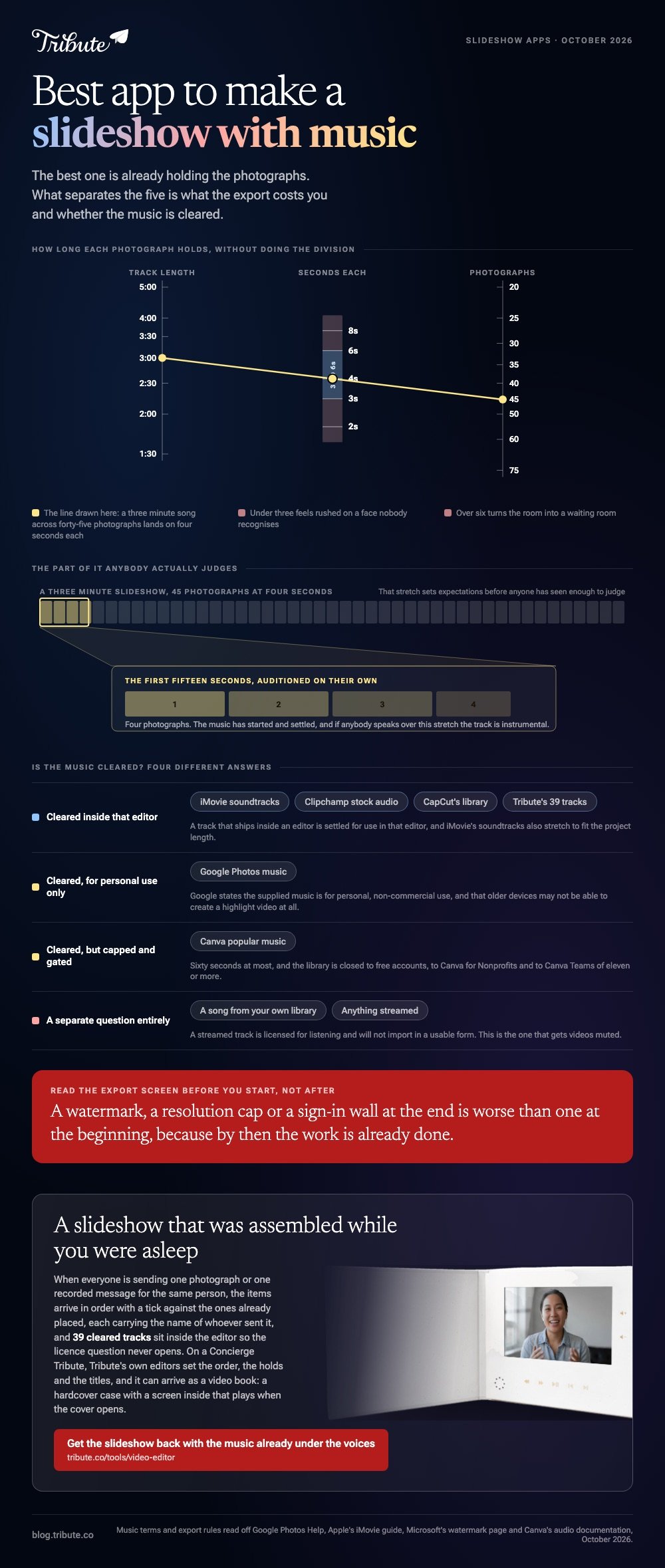
A three minute song across forty-five photographs gives four seconds each. Three feels rushed on a face nobody recognizes, six turns the room into a waiting room.
Two rules do most of the rest. Go instrumental wherever anyone speaks, because lyrics and speech compete and the speech loses. Audition the first fifteen seconds on their own, because that stretch sets expectations before anyone has seen enough to judge.
Set the music level low under a voice. A quarter of full volume keeps someone audible; three quarters suits photographs with nobody talking.
Song choice for one occasion in particular is covered in music for a graduation slideshow.
What if the photographs came from a dozen different people?
The Tribute video editor is a browser-based group video editor: contributors record clips on their phones and Tribute assembles them on a timeline with the music balanced under the voices.
It is ours, and it is the last entry on this page.
- 39 licensed tracks across 11 genres, cleared inside the editor, plus a YouTube link or your own MP3, WAV, M4A or FLAC
- 25% under video and 75% under photos by default, overridable on any single clip
- A Crossfade songs switch for a slideshow that outlasts one track, and Loop music to fill timeline in the Tools panel
- 9 3D layout effects for photographs, plus 47 entrance and 47 exit animations including the slow zoom
- 83 occasion backgrounds and 10 color grades previewed on the real picture

Best for: The one app on this page that also collects the photographs from everyone else.
Why it works: Unlike a folder of attachments, the collecting and the audio balance are finished before the editor opens.
Can the slideshow arrive already made?
Every app above answers the same question: which tool should you drive?
That question assumes you are the one driving, holding the pictures, choosing the song and setting a duration. For one kind of slideshow nobody is in that seat.
The case: the pictures are not yours to gather
You are in it when the slideshow is a collection rather than a composition.
A christening, with grandparents recording from two continents. A coach stepping down after a decade. A memorial where the speakers are scattered.
Nobody is choosing an app. Everyone is sending one photograph or one recorded message, and your job is arrangement, not production.
Why the comparison above stops mattering
The slideshow exists before you open anything.
Items arrive in order with a tick against the ones already placed, music sits under the voices at a level you can change per clip, and every item carries the name of whoever sent it.
That is how the Tribute video editor handles it: not a sixth app for the table, but a slideshow that was assembled while you were asleep.

What you do not have to do
Send one link, and the work above stops being the shape of your week.
- No app comparison. The slideshow is built where the pictures land.
- No gathering. Everyone uploads from their own phone, at full size.
- No assembly. On a Concierge Tribute, Tribute's own editors set the order, the holds and the titles.
- No music hunt. Thirty-nine tracks are cleared inside the editor.
It does not have to stay a file
The finished video can arrive as a video book: a hardcover case with a screen inside that plays when the cover opens.

When this is the wrong answer: the photographs are already on your phone and you want to build it yourself. Then open Google Photos and stop reading. The editor is not a standalone slideshow app, and it lives inside a paid Tribute.

The wider job is covered in making a video montage.
Frequently Asked Questions
What is the best way to make a picture slideshow with music at no cost?
Google Photos on a phone, Clipchamp on a laptop. Both include cleared music, neither stamps the export, and neither asks for a card.
Which are the best apps for making videos with music on a phone?
For anything already backed up, Google Photos. iMovie on Apple devices, and CapCut for an upright cut aimed at a feed. All three ship with music that is cleared for use inside them.
Can I use a song from Spotify or Apple Music?
No. A streamed track is licensed for listening, and it will not import into an editor in a usable form. A file you own outright can import, and publishing it is still a separate permission.
How many photographs should a slideshow hold?
Thirty to forty-five at four seconds each, which lands between two and three minutes. Past five minutes people start checking their phones, whatever the occasion.
What is the best slideshow maker with music for a memorial?
Whichever one you can finish. If several people are each sending a photograph and a few words, the collecting is the hard part rather than the editing, and the app you choose matters less than you would think.
Will a slideshow play on a television?
Yes, if you export an MP4 rather than sharing a link. Export at the highest resolution offered, because a television shows every shortcut a phone screen hides.
Can two people build the same slideshow?
In Canva and Clipchamp a shared project can be edited by more than one person. They still have to send each other the photographs first, which is the part none of these apps does.
👉 Get the slideshow back with the music already under the voices if everyone is sending something for one person, and the app comparison stops being your decision.
