
Slideshow with Music: Google Photos, Step by Step
To make a slideshow with music, Google Photos puts it under Create > Highlight video. Pick the photos, tap Add Music, set the volume against the clip audio, then Save. The soundtrack trims itself to the length of the video.

What happened to the Movie tool in Google Photos?
It was replaced, and the replacement is called a highlight video.
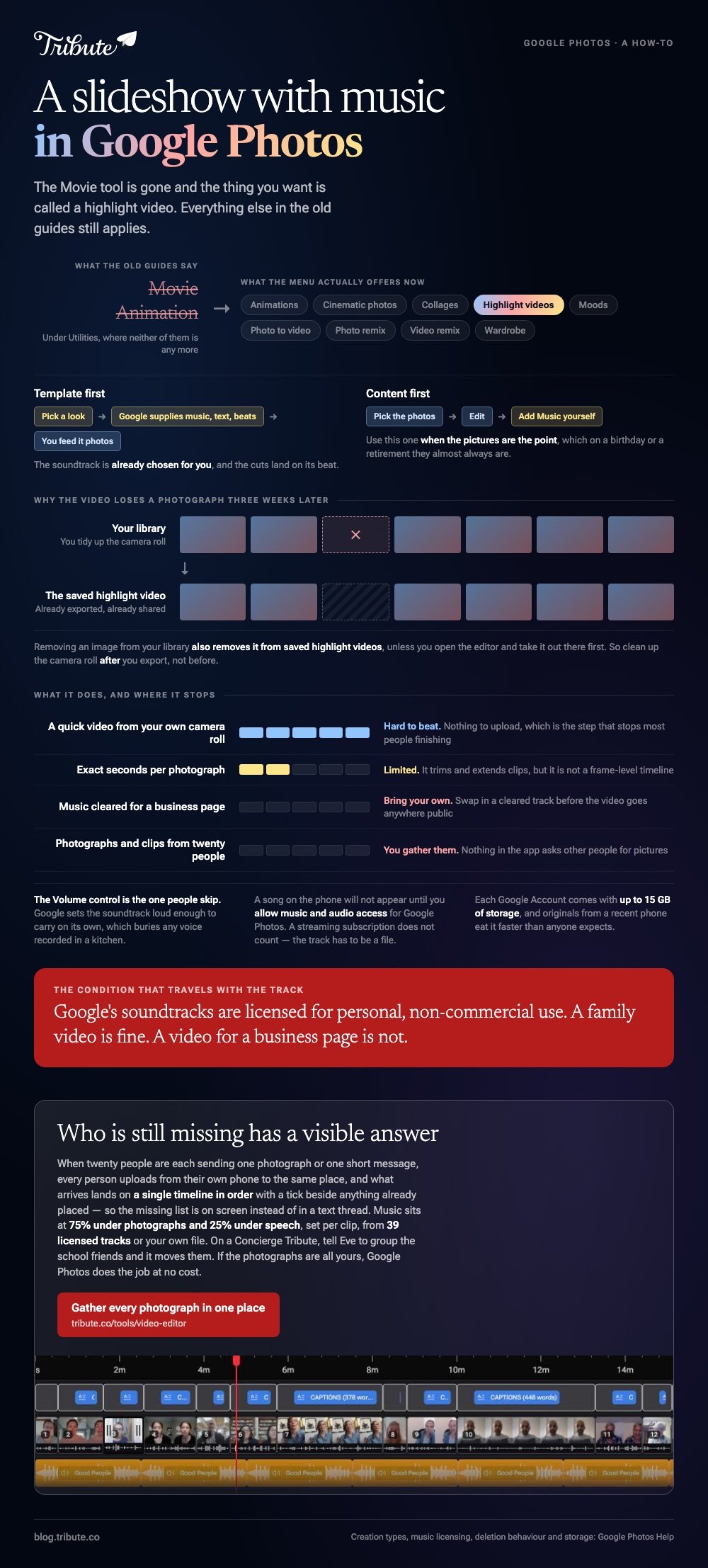
Older guides tell you to look for Movie or Animation under Utilities. Google now lists its creation types as animations, cinematic photos, collages, highlight videos, moods, photo to video, photo remix, video remix and wardrobe, and states that highlight videos replace movies.
So a Google Photos music slideshow is a highlight video with a soundtrack on it. The old name is the only thing that went away.
Two routes to the same place
Templates come with the music already chosen.
- Template first: you pick a look, Google supplies music, text and beat matching, and you feed it photos
- Content first: you pick the photos, then set the music yourself
Content first is the one to use when the pictures are the point, which on a birthday or a retirement they almost always are.
How do you make a slideshow with music, Google Photos on Android?
Six steps on the phone holding the photos.
- Open Google Photos and tap Create at the bottom, then Highlight video.
- Tap Select content at the top. Choose the photos and videos yourself, or let assisted selection search by person, place or date.
- Tap Next, then review what it built.
- Tap Edit, then Add Music. You get Section to move to a different part of the song, Change to swap it, Volume to balance the track against the clip audio, and Remove.
- Drag a clip to reorder it. Tap one and choose Remove to drop it.
- Tap Done, then Save. A notification tells you when the video is ready.
The Volume control is the one people skip. Google sets the soundtrack loud enough to carry on its own, which buries any voice recorded in a kitchen.
Why is a song from my phone missing?
Because the app has not been given access to it.
To use your own downloaded music, allow music and audio access for Google Photos in your phone's Settings. Streaming subscriptions do not count: a track has to exist as a file on the device.
How do you make a slideshow with music, Google Photos on the web?
The same creation, on a bigger screen.
- Go to photos.google.com and click Create, then Highlight video.
- Click Create your own video, then or select photos.
- Select the photos and videos, then click Create at the top.
- Click Edit. Click Music to change the track, drag a clip to reorder, or use More then Remove.
- Click Save.

Compared to the phone, the web version is better for a long run of images because you can see thirty thumbnails at once instead of six.
Other browser routes are in slideshow makers with music and the best app to make a slideshow with music.
Can you use the finished video anywhere you want?
Not quite, and this is the part worth reading twice.
Google states that any music accompanying content is for personal, non-commercial use only, and that using it for monetary gain violates its policies. A family video is fine. A video for a business page is not.
Unlike a library track you clear yourself, Google's soundtrack travels with a condition attached. Swap in your own cleared music before the video goes anywhere public.
One more thing that surprises people
Deleting a photo deletes it from the video.
Google warns that removing an image from your library also removes it from saved highlight videos, unless you open the editor and take it out there first. Clean up the camera roll after you export, not before.
Where does a Google Photos slideshow with music run out of road?
At control, at storage, and at collection.
| What you want | Google Photos |
|---|---|
| A quick video from your own camera roll | Hard to beat |
| Exact seconds per photo | Limited |
| Music cleared for a business page | Bring your own |
| Photos and clips from twenty people | You gather them |
Storage is the quiet limit. Each Google Account comes with up to 15 GB of storage, and originals from a recent phone eat it faster than anyone expects.
Collection is the loud one. Nothing in the app asks other people for pictures, so every image still has to reach your account before you start.
More options in video montage makers and music for a graduation slideshow.
What if the clips came from a dozen different people?
The Tribute video editor is a browser-based group video editor: contributors record clips on their phones and Tribute assembles them on a timeline with the music balanced under the voices.
It is ours, and it is the last thing on this page.
- 39 licensed tracks across 11 genres, cleared for use inside the editor, plus your own MP3, WAV, M4A or FLAC
- 75% under photographs, 25% under speech by default, set per clip rather than once for the whole video
- Crossfade songs blends one track into the next when the video outlasts a song
- Loop music to fill timeline sits in the Tools panel as a one-click action
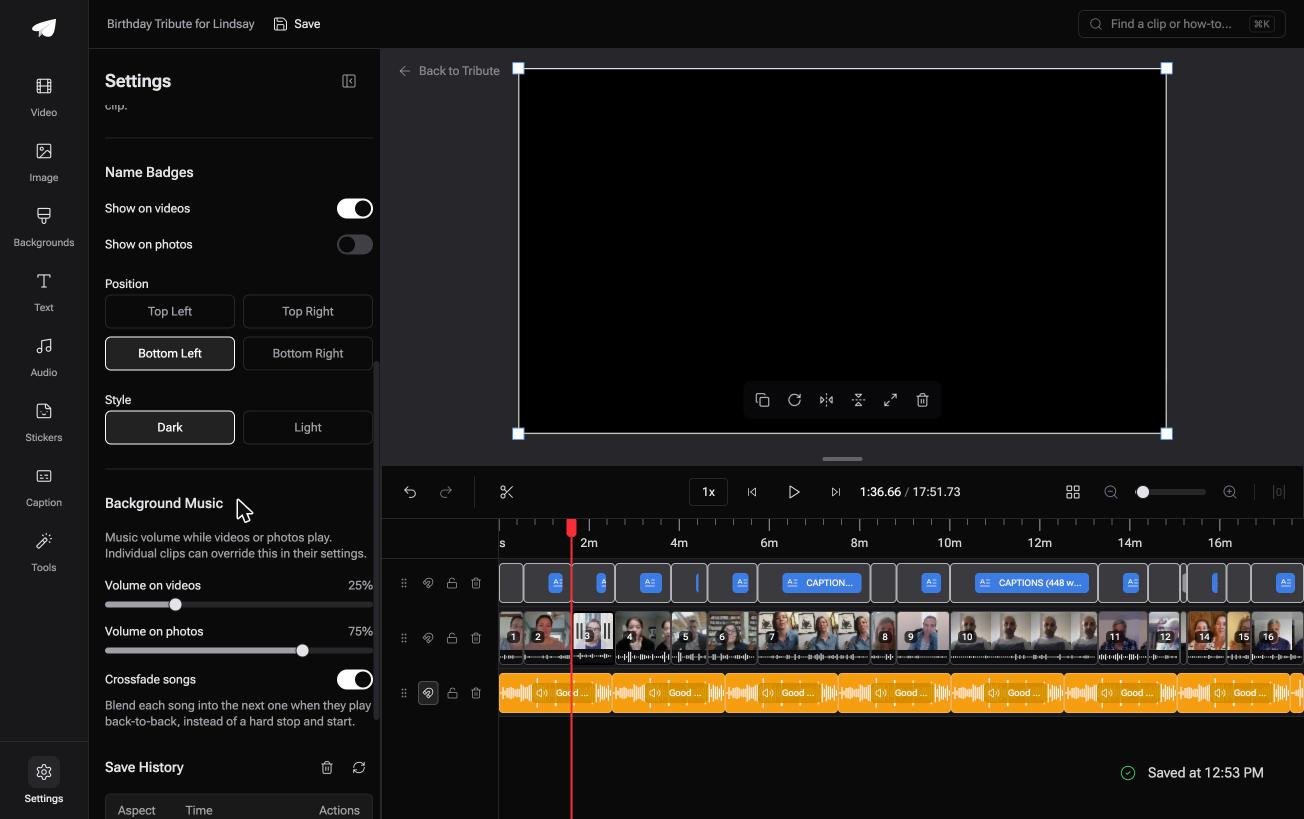
Best for: A slideshow where the photographs are yours and the voices have to come from elsewhere.
Why it works: The two volumes that matter, under speech and under photographs, are already set apart.
Can you skip the gathering step altogether?
Everything above assumes the photos reached you first.
Somebody texted them, somebody emailed a folder, somebody promised to send theirs and has not. That chase is the slow part of a Google Photos slideshow with music, and no editor shortens it.
There is one case where it does not happen at all.
The case: several people, one person being celebrated
You are in it when the material is coming from other people rather than from your camera roll.
A ninetieth birthday with cousins in three states. A colleague leaving after twenty years. Nobody is making a slideshow: everyone is sending one photo or one short message, and your job is assembly, not collection.
Why the chasing stops
Each person uploads from their own phone, to one place.
What arrives lands on a single timeline in order, with a tick beside anything already placed, so the question of who is still missing has a visible answer instead of a text thread.
That is what the Tribute video editor is for: not a better music picker, but a way of never running the collection yourself.

What you do not have to collect
- Not one photograph by text. Everyone uploads from their own phone, to the same place.
- Not the missing list. A tick sits beside anything already on the timeline.
- Not the running order on a Concierge Tribute: tell Eve, the assistant inside the editor, to group the school friends and it moves them.
- Not the assembly at all on Concierge, where Tribute's editors build the video from whatever arrives.

When this is the wrong answer: the photographs are all yours and nobody else is sending anything. Then Google Photos does the job at no cost and you are done. The Tribute editor is also not a standalone app: it lives inside a paid Tribute.

Frequently Asked Questions
Can you create a slideshow with music in Google Photos on an iPhone?
Yes. Tap Create, then Highlight video, choose your photos, then tap Edit and Add Music. The steps match Android, and the music browses by mood.
How long can a Google Photos highlight video be?
Google does not publish a maximum length or a maximum number of photos. In practice the app slows down well before you hit a wall, so keep a long video under about sixty images.
Can you set how long each photo stays on screen?
Only within limits. Google Photos trims and extends clips in the editor, but it is not a frame-level timeline. For exact timing per image, use iMovie, Clipchamp or a browser editor instead.
Why does my music stop before the video ends?
The soundtrack is cut to the length of the video, so a ten second video gets a ten second music segment. If the song ends early, the video grew after you added the track; reopen Add Music and set the Section again.
Can you download the slideshow as a file?
Yes. Save the highlight video, then open it in your library and use the share or download option to put an MP4 on the device. It behaves like any other video in your account after that.
Does the music count as copyright safe for YouTube?
Not in every case. Google's soundtracks are licensed for personal, non-commercial use, which is a narrower permission than a royalty free library gives you. Replace the track before uploading anything you plan to monetize.
👉 Gather every photograph in one place if twenty people are each sending one, and the timeline is in order when you open it.
