
MP4 Merger Download: Which Tool to Install, and When Not To Bother
Three downloads join MP4 files without re-encoding them: Avidemux, Shotcut and Clipchamp. An MP4 merger you install beats a browser uploader as soon as the files are large, because nothing has to travel to a server first.

Which MP4 merger download should you install?
The one that matches how the clips were recorded.
Every video merger software on this page is free to use, and each download still runs on Windows 10 as well as Windows 11.
Video merger software for a PC is a download that is free to use and runs offline. A video merger online needs no download at all, and the free tier caps the file size.
| Tool | Joins by | Install it when |
|---|---|---|
| Avidemux | Copying the stream | Every clip came off the same camera |
| Shotcut | A timeline | The clips differ and need trimming too |
| Clipchamp | A timeline | You are on Windows and want no install at all |
| VLC | With broken timing | Never, for this job |
Size decides it more often than features do. A browser tool has to receive the whole file before it starts, and a 4 GB afternoon of footage spends longer uploading than merging.
How does an MP4 merger download join files without re-encoding?
By copying the compressed stream across rather than decoding and rebuilding it.
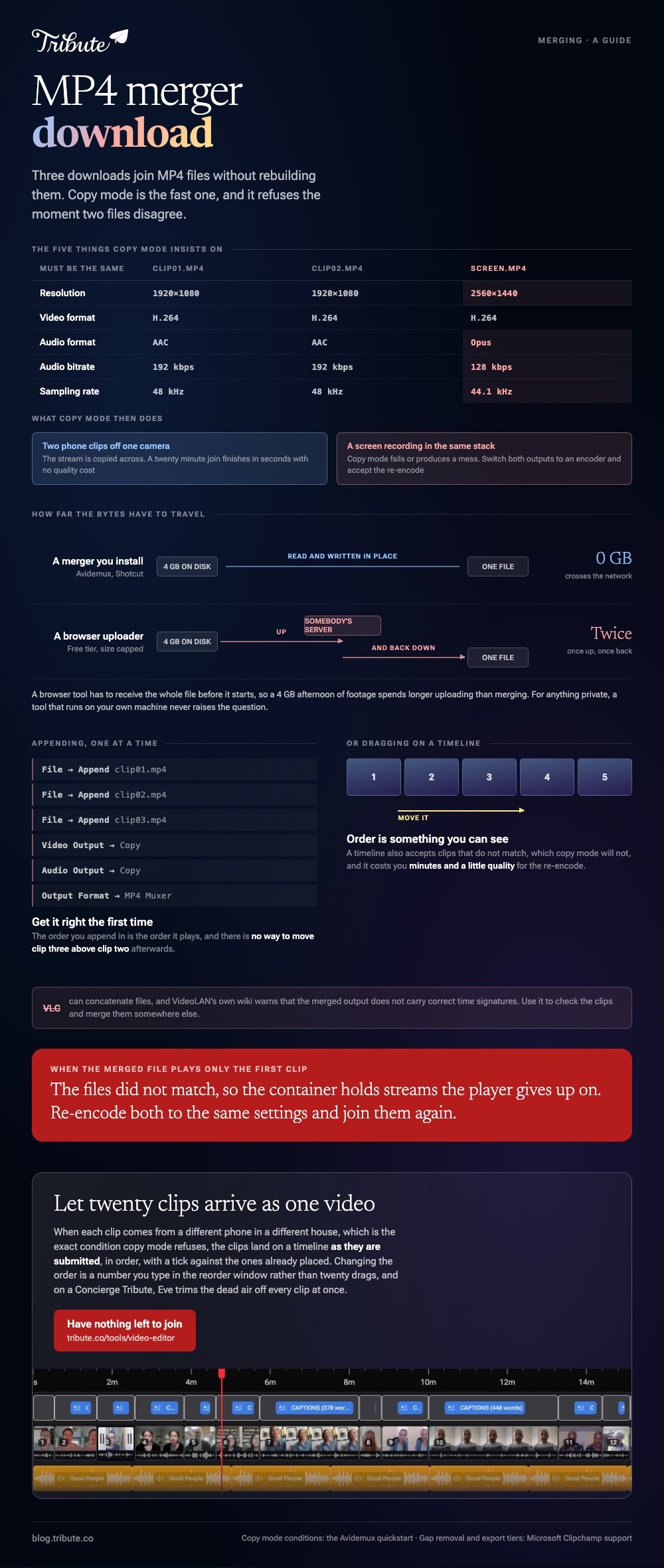
Avidemux calls that copy mode, and it is the reason a twenty minute join finishes in seconds with no quality cost. The catch is that the clips have to match.
- Open the first clip.
- Choose File, Append for each later clip, in the order you want them.
- Set Video Output and Audio Output to Copy.
- Set Output Format to MP4 Muxer.
- Choose File, Save and give the result a new name.
The Avidemux quickstart is blunt about the conditions: the resolution, the video format, the audio format, the audio bitrate and the sampling rate have to be the same across every file.
Mix a phone clip with a screen recording and copy mode fails or produces a mess. Switch both outputs to an encoder and accept the re-encode.
Best for: A stack of clips from one camera, one card or one phone.
Why it works: Nothing is decoded, so the output is the same picture you shot rather than a second-generation copy.
How do you merge MP4 files in Clipchamp?
On a timeline, with no download at all on Windows 11.
- Import the clips, then drag them onto the timeline in order.
- Push each one up against the last so no gap is left between them.
- Trim the ends where someone fumbles for the stop button.
- Export at 1080p and save the single file.
Microsoft's guide to combining videos covers the gap removal that closes those spaces for you.

Compared to copy mode, a timeline re-encodes everything, which costs minutes and a little quality. It also accepts clips that do not match, which copy mode will not.
Best for: Clips from several phones, or any job that needs a trim as well as a join.
Why it works: Order is something you can see and drag, rather than a sequence of append commands you have to get right first time.
Is Shotcut worth the download?
Yes, if the job will come back next month.
Shotcut installs on Windows, macOS and Linux, costs nothing and opens the same timeline every time. Add the first file, append each next one, set the export preset and let it run.
It is a heavier install than Avidemux and a slower first hour. What you get for that is an editor rather than a joiner, so trims, audio and titles are all in the same window.
If the clips started life on an iPhone, the export half of the problem is covered in exporting an MP4 from iMovie.
Why not VLC?
Because VideoLAN says so.
VLC can concatenate files, and its own wiki warns that the merged output does not carry correct time signatures. The result plays, then seeks to the wrong place and reports the wrong length.
Unlike a broken export, this one looks fine until somebody drags the scrubber. Use VLC to check the clips and merge them somewhere else.
For clips pulled from YouTube, the trimming question comes first: see trimming a YouTube MP4.
What if twenty people each send one clip?
Then merging is the smallest part of the job. Collecting, ordering and labeling twenty files is the rest of it.
The Tribute video editor is a browser-based group video editor: contributors record clips on their phones and Tribute assembles them on a timeline with the music balanced under the voices.
- Clips arrive already in order on the timeline, with a tick showing which ones are on it
- A reorder window where every clip is numbered, with move to front, move to back and move to position
- Bulk tools for finding duplicate photos, flattening text rows and looping music to fill the timeline
- Autosave and restorable history, so a removed clip is recoverable rather than gone

Best for: Twenty clips from twenty phones that have to end up in one file, in a sensible order.
Why it works: Reordering is a number you type rather than twenty drags, and nothing has to match for it to work.
Does anything need merging when twenty people send clips?
A merge tool assumes the files are already yours: in a folder, named, in order, all shot the same way.
That assumption is the work. Chasing the last three people, renaming files so you know who is who, then appending them one at a time and hoping the formats agree.
There is one job where the folder never exists.
The case: the files are arriving, not sitting on a drive
You are in it when several people each record a message for the same person.
A grandmother turning ninety. A colleague's last Friday. Each clip comes from a different phone in a different house, which is the exact condition copy mode refuses and the exact condition that makes renaming files a chore.
If the clips are already on your drive and came off one camera, Avidemux at the top of this page is where this ends for you.

Why there is no merge step
Because the clips land on a timeline as they are submitted.
Order, mismatched formats and the missing third of people who have not recorded yet are handled before you open the Tribute video editor. What you open is a sequence, not a folder.
Changing the order is the reorder window: every clip numbered, with move to front, move to back, or move to position.
What takes the place of the merge
Four jobs, and none of them is an append command.
- Not the chasing. People record from one link, on the phone they already hold.
- Not the appending. Clips land in order, with a tick against the ones already placed.
- Not the dead air at the front of each one. Eve, the assistant on Concierge and Concierge + Video Book, trims it off every clip at once.
- Not the edit. On a Concierge Tribute, Tribute's editors set the running order and render it.

When this is the wrong answer: the footage is yours, it is on your drive, and you want one file in the next five minutes. Then copy mode in Avidemux is the fastest thing on this page.
The editor is not a standalone joiner either: it lives inside a paid Tribute.
For the wider job, see making a video montage, and for the occasion version, making a video tribute.
Frequently Asked Questions
Can I merge MP4 files without losing quality?
Yes, when every clip shares a resolution, codec and audio format. Copy mode in Avidemux passes the stream through untouched. Mismatched clips have to be re-encoded.
Why does my merged file play only the first clip?
The files did not match, so the container holds streams the player gives up on. Re-encode both clips to the same settings and join them again.
Is an online merger safe for family footage?
It means uploading the footage to somebody else's server. For anything private, a tool that runs on your own machine avoids the question.
How do I merge clips on a Mac?
Shotcut runs there, and iMovie joins clips on a timeline and exports an MP4. Avidemux has a macOS build too, with the same copy mode rules.
Does merging change the audio?
In copy mode, no. On a timeline the audio is re-encoded with the video, which is also your chance to even out the levels between clips.
How long should the finished video be?
Under five minutes for twenty clips. Thirty seconds each is enough for a message, and anything past that gets watched on fast forward.
👉 Let twenty clips arrive as one video somebody else finishes if they are coming in one at a time from different phones, and there is nothing left to join.
