
YouTube to MP4 Trim: Where the Cut Should Happen
A YouTube to MP4 trim is two jobs, and the order decides how much work it is. Trim inside YouTube Studio and nothing is downloaded. Pull the MP4 down first and you need an editor, plus the right to that video.

Is a YouTube to MP4 trim one job or two?
Two, and the trimming is the easy half.
The hard half is the file. YouTube is a streaming service, not a download service, so whether you are allowed an MP4 at all depends on whose video it is.
Three routes cover almost everyone, and they differ in what they cost you rather than in how the cut looks.
| Route | What it needs | What happens to the original |
|---|---|---|
| Trim in YouTube Studio | Your own upload | Same URL, same view count |
| Download the MP4, trim, re-upload | Your own upload | A second video at a new URL |
| Someone else's video | Their permission | Nothing you can act on alone |
How do you trim a YouTube video without downloading it?
In the editor built into YouTube Studio, which cuts the published video in place.
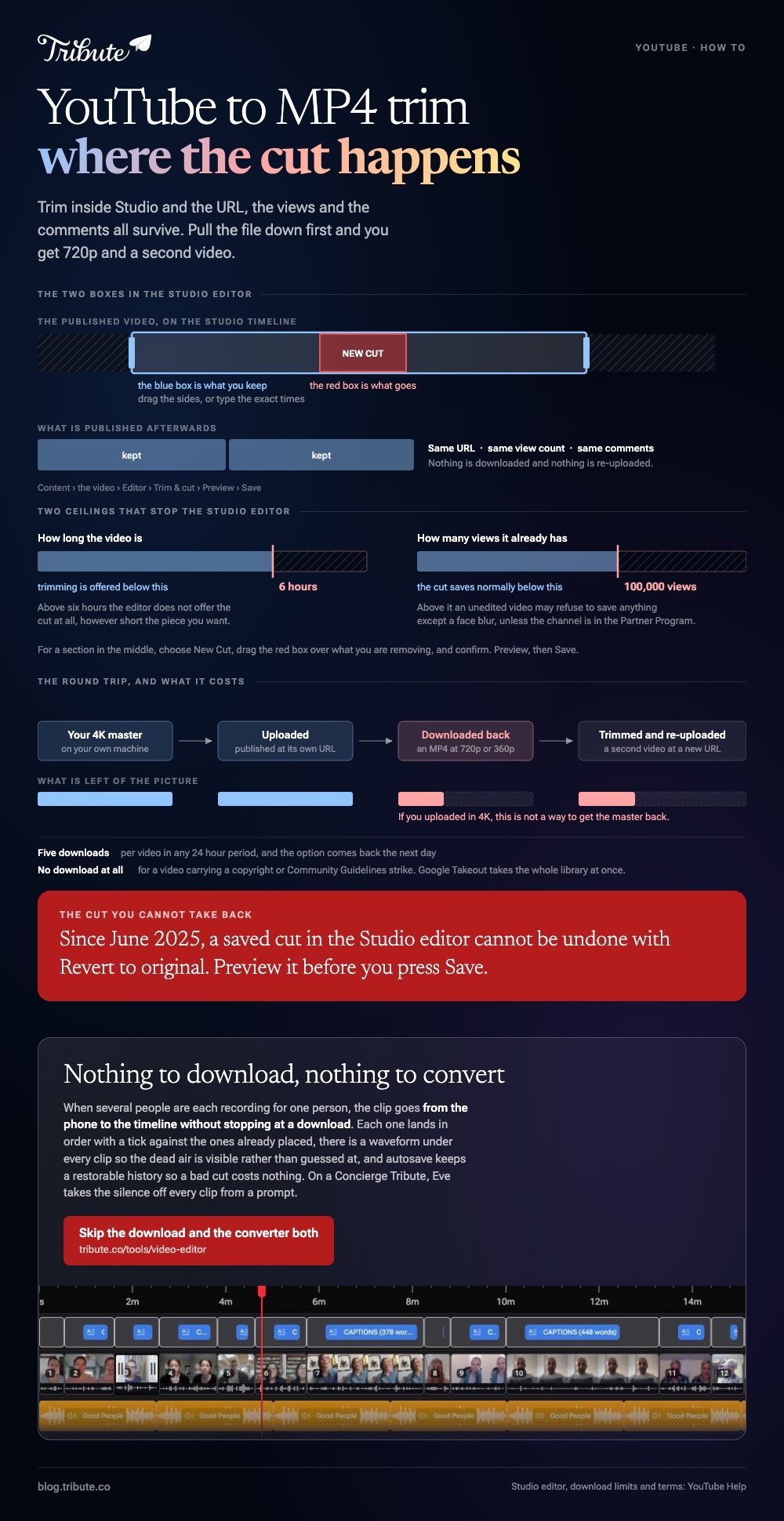
Nothing leaves YouTube and nothing is re-uploaded. Google's help page for editing videos in YouTube Studio is blunt about it: the URL, the view count and the comments all stay the same.
- Sign in to YouTube Studio and select Content in the left menu.
- Click the title or thumbnail of the video you want to trim.
- Select Editor in the left menu, then Trim & cut.
- Drag the sides of the blue box over the part you are keeping, or type the exact times into the boxes.
- For a section in the middle, choose New Cut, drag the red box over what you are removing, and confirm.
- Click Preview, then Save.
Three limits worth knowing before you start
Each one has stopped somebody halfway through.
- Six hours. Trimming is offered on videos shorter than that.
- 100,000 views. Above that, an unedited video may refuse to save anything except a face blur, unless the channel is in the Partner Program.
- No going back. Since June 2025, a saved cut cannot be undone with Revert to original.

How do you do a YouTube to MP4 trim on a file instead?
Download your own upload from Studio, then cut it in a browser editor.
The download sits in the same place as the editor. Google documents the path on its page about downloading your own videos: Content, then the menu icon on the video, then Download.
What arrives is an MP4 at 720p or 360p depending on the size of the original, which is the detail that catches people out. If you uploaded in 4K, this is not a way to get your 4K master back.
- Five downloads per video in any 24 hour period
- No download for a video with a copyright or Community Guidelines strike
- Google Takeout for the whole library at once
Cutting the MP4 once you have it
Microsoft Clipchamp runs in a browser tab and takes the file as it is.
Drop the MP4 into the media panel, drag it onto the timeline, then drag the green handles at either end until the clip starts and ends where you want.
The split button cuts one clip into two at the playhead, which is how you take a lump out of the middle.
Unlike the Studio editor, this route gives you a frame you can see and a file you keep. It also gives you a second video rather than a corrected one, so the view count on the first stays where it is.
What about a YouTube to MP3 trim?
Same rule, different container.
A YouTube trim to MP3 on your own upload means downloading the MP4 and pulling the audio out of it in an editor.
Doing a YouTube to MP3 trim on a video somebody else made is the thing the terms are written to stop, and no converter site changes that.
If what you want is music rather than a particular recording, the YouTube Audio Library hands you an MP3 on purpose. Hover a track, click DOWNLOAD, and filter for Attribution not required if you would rather not write a credit line.
Can you download a video somebody else uploaded?
Not without their permission.
YouTube's terms bar downloading any part of the service or its content except where the service itself offers it.
That carve-out is the offline button inside the YouTube app on a Premium membership, which saves the video for the app and not as a file you can edit.
Compared with a converter site, asking the creator is slower and it is the only route that leaves you with something you can publish. Most people say yes to a clip of their own work.
More on the neighboring jobs in trimming a video without the guesswork, cropping a YouTube MP4, getting an MP4 out of iMovie, and building a montage once the pieces are the right length.
What if the clips were never on YouTube at all?
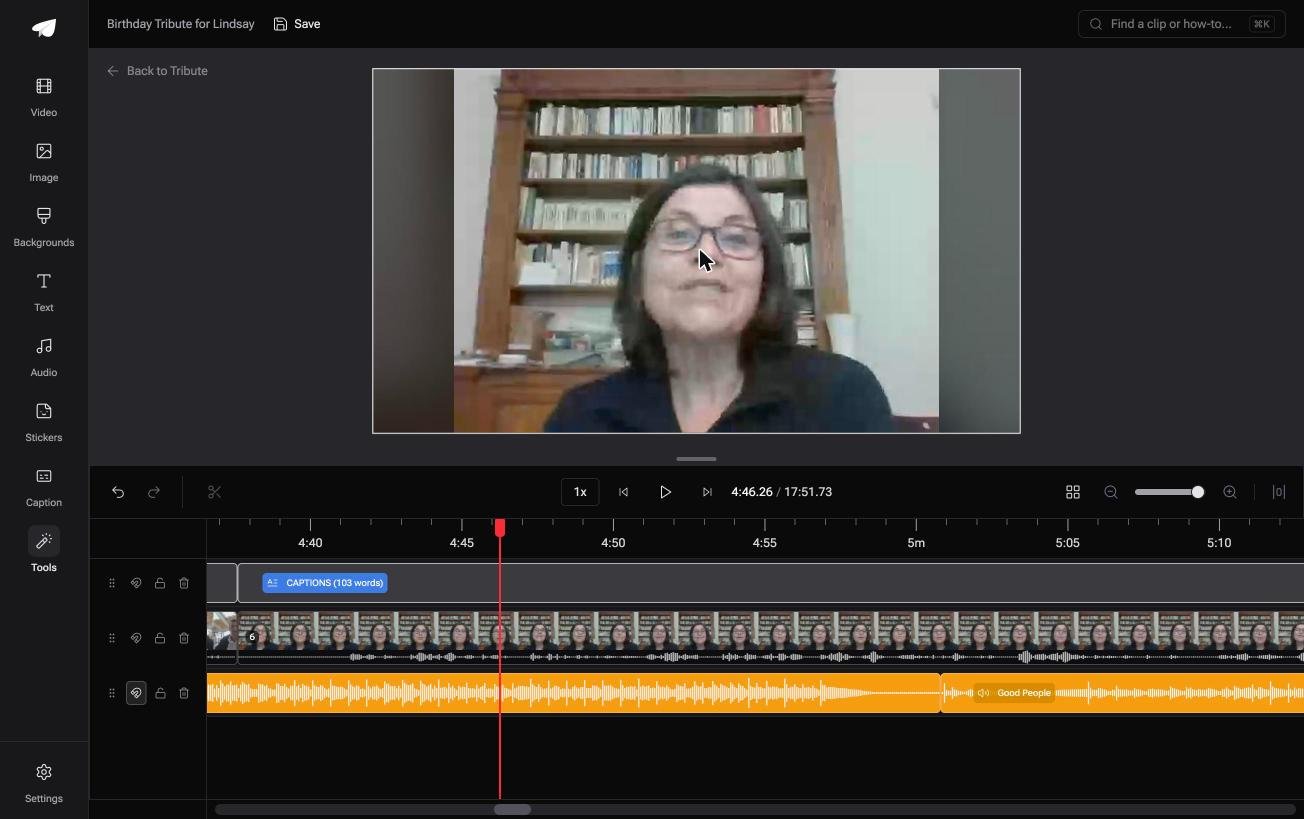
The Tribute video editor is a browser-based group video editor: contributors record clips on their phones and Tribute assembles them on a timeline with the music balanced under the voices.
It is ours, and it is the last thing on this page.
- A waveform under every clip, so the dead air before the first word is visible rather than guessed at
- Autosave and a restorable save history, so a bad cut costs nothing
- 39 licensed music tracks across 11 genres, plus a YouTube link import and MP3, WAV, M4A or FLAC upload
- Reorder media, with every clip numbered and bulk moves to front, back or any position
Best for: A YouTube video you need forty seconds of and nothing else.
Why it works: The clips arrive in order with the sound already balanced, so trimming is the only job left.
Who does the downloading step for you?
Nobody searches for a YouTube to MP4 trim because they enjoy file formats.
You are there because the thing you want is stuck inside a player and the only way to shorten it is to get it out first. There is one kind of video where that step never exists.
The case: the clips are sent to you, not published
It arrives when several people each record something for one person.
A grandmother turning eighty. A colleague leaving after fifteen years. A memorial where the people who should speak are in four time zones. Nobody uploads anything to a channel, so there is nothing to convert back out of one.

Why the file format question never arrives
Because the clip goes from the phone to the timeline without stopping at a download.
Each one lands in order, with a tick against the ones already placed. That is how the Tribute video editor handles it: not a faster converter, but a route with no conversion in it.
What you do not have to do
- Download a thing. Each clip arrives from the phone it was recorded on.
- Convert a format. Tribute renders one video on its servers and the preview matches it.
- Cut the dead air, on a Concierge Tribute. Eve, the AI assistant inside the editor, takes the silence off every clip from a prompt.
- Make the video yourself. Concierge means Tribute's editors build it, and Concierge Deluxe returns it as a video book.

When this is the wrong answer: the video you want shortened is already published on a channel. Then go back up this page and use the Studio editor. The Tribute editor is not a converter either: it lives inside a paid Tribute.
Frequently Asked Questions
Does trimming in YouTube Studio reset my views?
No. Google states that the URL, the view count and the comments survive the edit. Nothing is re-uploaded, so the video keeps its history.
Can I trim a YouTube video and download the trimmed version?
On your own upload, yes. Save the trim in the Studio editor, wait for it to process, then download the video from the Content list. The download comes back as an MP4 at 720p or 360p.
Why is my download only 720p?
That is the ceiling Studio offers, and it depends on the size of the original rather than the quality you uploaded. Keep your own master file if you need anything higher.
How many times can I download the same video?
Five times in a rolling 24 hour period. The option comes back the next day, and Google Takeout is the route for a whole library at once.
Is a converter site safe to use?
Setting the software question aside, downloading a video you did not upload sits outside YouTube's terms. That is true whether the site looks clean or not.
Can I cut a section out of the middle instead of the ends?
Yes. In the Studio editor choose New Cut and drag the red box over the part you are removing. In a browser editor you split the clip twice and delete the piece between the cuts.
What is the fastest way to shorten a clip somebody sent me?
Open it in the editor on your phone or in a browser tab and drag the ends in. A file somebody sent you is already a file, so none of the download question applies.
👉 Skip the download and the converter both if several people are each recording for one person, and the only cut made is the one you meant.
