
Video Montage for Birthday Parties: A Running Order That Holds
A birthday video montage should run three to four minutes and open with the person everyone recognizes. Length is the decision that makes or breaks it, and almost every montage that loses the room is too long rather than too plain.

How long should a video montage for birthday parties run?
Three to four minutes, and five is the outer edge.
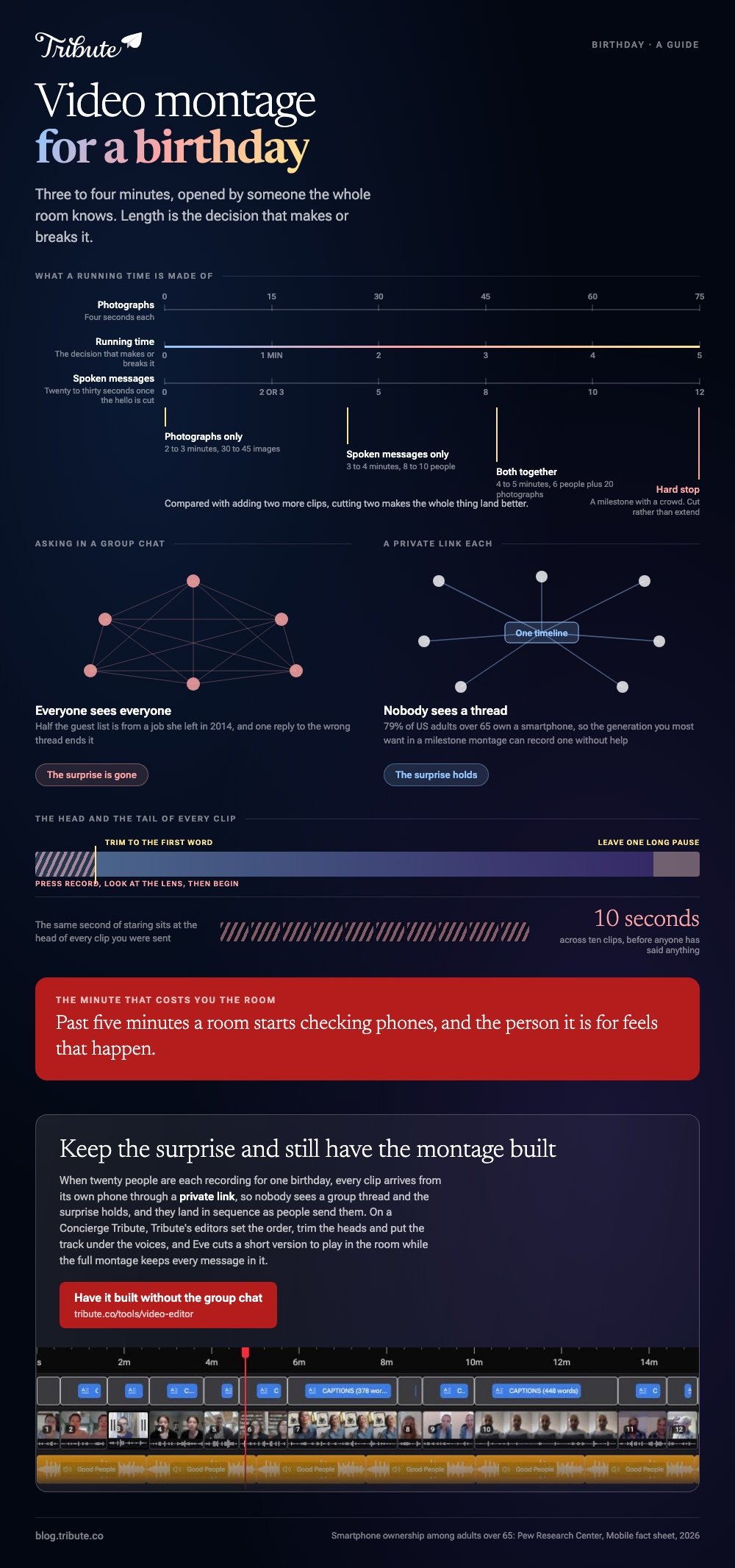
The arithmetic is simple. At four seconds a photograph, three minutes holds about forty five images, and a spoken message from one person runs twenty to thirty seconds once the hello is trimmed off.
| What you have | Sensible length | Works out as |
|---|---|---|
| Photographs only | 2 to 3 minutes | 30 to 45 images |
| Spoken messages only | 3 to 4 minutes | 8 to 10 people |
| Both | 4 to 5 minutes | 6 people plus 20 photographs |
| A milestone with a crowd | 5 minutes, hard stop | Cut rather than extend |
Past five minutes a room starts checking phones, and the person it is for feels that happen. Compared to adding two more clips, cutting two makes the whole thing land better.
What goes into a birthday video montage, and in what order?
Open with somebody the whole room knows.
A running order that works for most birthday video montage ideas, whether it is a fortieth or a ninetieth:
- The anchor. A partner, a sibling, the oldest friend. Thirty seconds, warm, sets the tone.
- The far-away ones. People who could not be there. This is the part that surprises.
- Photographs. A short run through decades, oldest first, four seconds each.
- The funny one. Middle of the video, where attention dips.
- The children. Grandchildren, nieces, anyone under ten. Short and unedited.
- The close. Family together, or everyone in the room saying the same line.
Trim every head. Everyone presses record, looks at the lens, then begins, so ten clips carry about ten seconds of staring.
Leave one long pause at the end rather than cutting on the last word. A montage that stops dead feels unfinished even when it is not.
How do you make a video montage for birthday celebrations on a phone?
iMovie on an iPhone, CapCut on Android, and neither needs an account.
In iMovie, tap Start New Project, tap Movie, select the clips and photographs on the Moments screen, then tap Create Movie. They arrive in the order you tapped them.
Drag a clip sideways to move it, or tap it and pull a yellow edge in to cut the dead air. To finish, tap Done, tap the Share button, tap Share Video, choose a resolution and tap Save Video.
In CapCut, tap New project, select everything, tap Add, then press and hold any clip to move it. Set a level for a single clip with Volume, and tap Export at the top right.
Best for: A montage built the night before from photographs already on the phone.
Why it works: Nothing uploads, so a long set exports at the speed of the handset.
Phone routes are compared in video montage apps for iPhone.
How do you build one on a laptop instead?
Use a laptop once there are more than fifteen pieces.
On a Mac, iMovie takes a whole selection onto the timeline in one go. The export is File > Share > File, then Resolution, Quality, Next and Save.
Apple's page on exporting a movie as a file lists every option in that dialog.
In a browser, Microsoft's guide to combining videos in Clipchamp covers importing, dragging clips side by side on one track, trimming with the handles and deleting the gaps between them.

More on building the whole thing in photo montage video makers.
What music works under a birthday montage?
One track, instrumental wherever anyone speaks.
Lyrics and speech compete for the same attention and the speech loses. Save the song with words for the photograph run, where there is no voice to bury.
Set the level per clip rather than once for the whole video. A quarter of full volume under a voice and three quarters under photographs is a reliable starting point, because every clip was recorded in a different room.
Pick the track before you cut, not after. Unlike a song chosen at the end, one chosen first gives every photograph something to land on.
What if twenty people each want to be in it?
The Tribute video editor is a browser-based group video editor: contributors record clips on their phones and Tribute assembles them on a timeline with the music balanced under the voices.
It is ours, and it is the last thing on this page.
- Clips arrive auto-assembled in order, with a tick against the ones already on the timeline
- 39 licensed tracks across 11 genres, ducking to 25% under a voice and 75% under a photograph
- 83 occasion backgrounds grouped by occasion, including Celebration
- Name badges built from an uploader name and relation, so the room knows who is speaking
- One switch captions every clip: 17 minutes across 16 contributors in under a minute
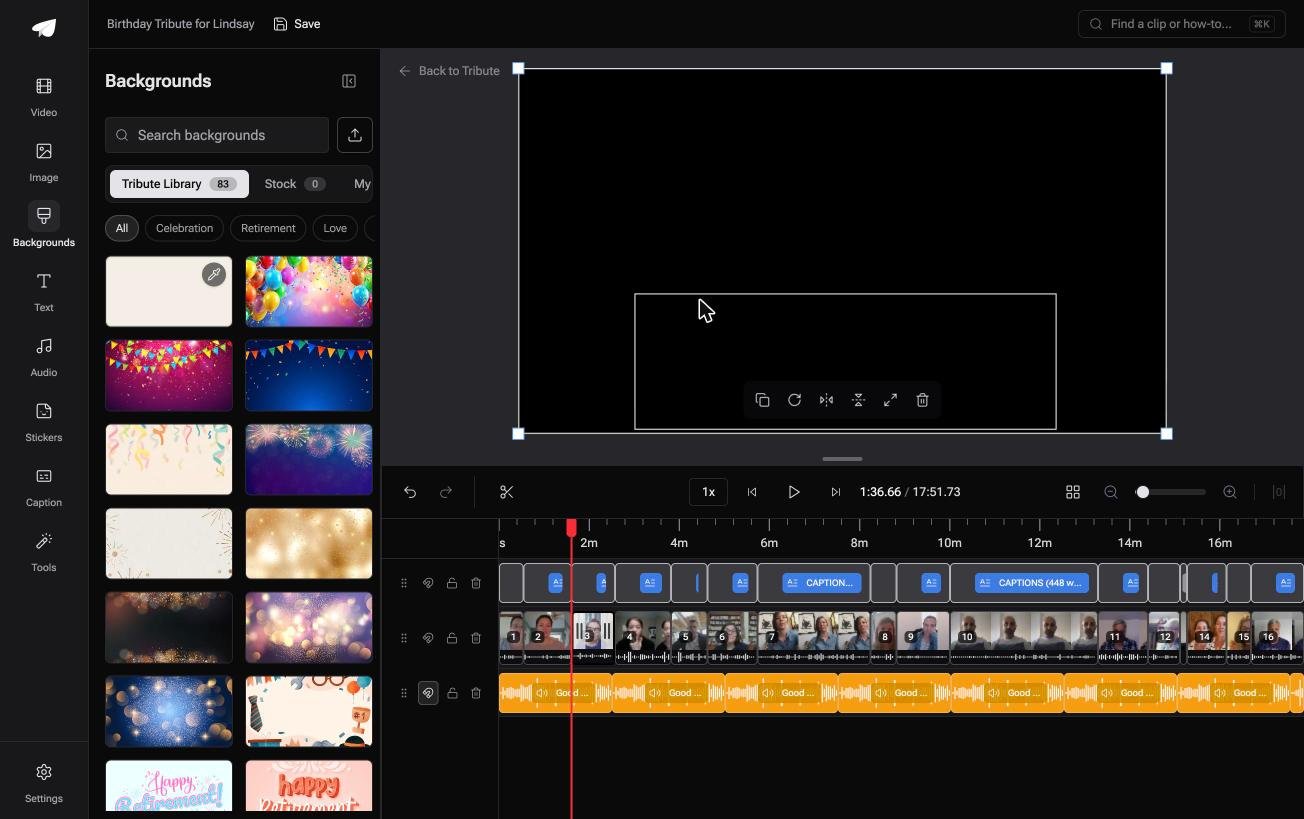
Best for: A milestone birthday where the guest list is bigger than the room.
Why it works: Twenty clips recorded in twenty kitchens arrive at one volume, with the names already on screen.
Who gathers the clips when the birthday is a surprise?
The montage is the easy half.
Collecting twenty clips in secret is the hard half: the chasing, the people who promise and forget, the aunt who records a two-second test and sends that instead.
One arrangement removes the chase from your side of it.
The case: everyone records, one person receives
You are in it when the clips were never on your phone.
An eightieth where the grandchildren are in four states. A fortieth where half the guest list is from a job she left in 2014. A surprise party where asking in a group chat would give the whole thing away.
Pew Research Center's mobile fact sheet puts smartphone ownership among US adults over 65 at 79%, so the generation you most want in a milestone montage can record one without help.
Why the running order stops being your problem
Clips land in sequence as people send them.
Each arrives from its own phone through a private link, so nobody sees a group thread and the surprise holds. Your job becomes moving three of them and trimming the heads.
That is how the Tribute video editor handles a birthday montage: the gathering happens without you, and the editing is twenty minutes.

What is taken off you
- Not the chasing. Each clip arrives from its own phone through a private link.
- Not the edit. On a Concierge Tribute, Tribute's editors set the order, trim the heads and put the track under the voices.
- Not the long version at the party. Eve, the assistant on Concierge and Concierge + Video Book, cuts a short one to play in the room, and the full montage keeps every message in it.
Where it ends up at the party
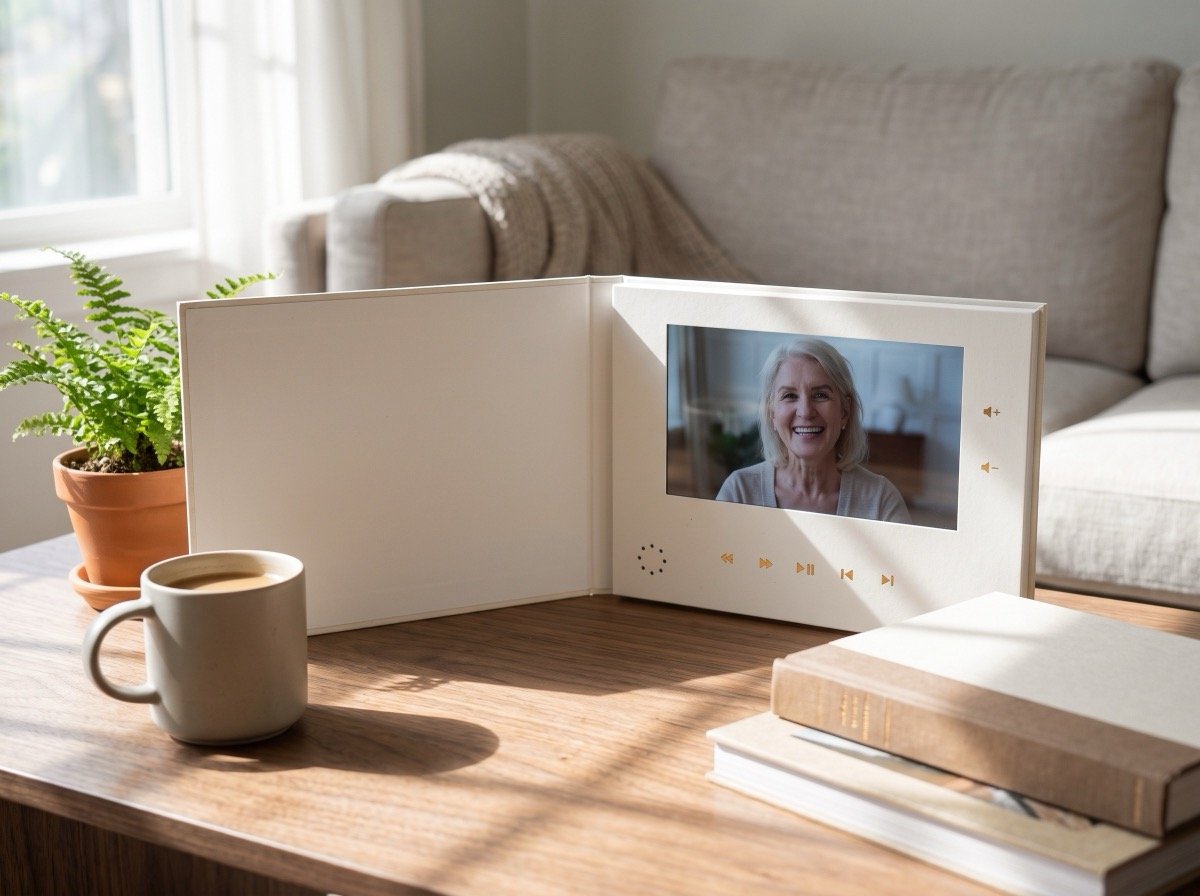
A link works on a television, and for a milestone the better answer is often a video book: a hardcover case with a screen inside that starts playing when the cover opens.
There is no phone to hand round and no link to lose, which matters when the present gets opened in a room full of people.
When this is the wrong answer: the montage is photographs rather than people, or you already hold every clip. Then iMovie does the job. Tribute's editor is not a standalone montage tool and it lives inside a paid Tribute.
The wider job is covered in making a video montage.
Frequently Asked Questions
How many photographs should a birthday montage have?
About forty five for a three-minute video at four seconds each. Cull hard: ten strong photographs beat forty that include three of the same afternoon.
What should people say in their clip?
Give everyone the same prompt, because an open request produces either silence or four minutes. Ask for one memory and one wish, and say thirty seconds out loud.
Can I make a birthday video montage in one evening?
Yes, if the material already exists. Collecting clips from other people is the part that takes a week, so start the asking long before you start the editing.
Should the clips have captions?
Captions help in a noisy room and help anybody hard of hearing follow a quiet recording. On a montage played at a party, they are worth the extra step.
What format should I export for a television?
An H.264 MP4 at 1080p plays on almost any television, straight from a USB stick or a laptop. Test it on the actual screen the day before.
How do I handle a clip someone recorded sideways?
Rotate it before adding it, since the project takes its frame from the first clip. Where it has to stay upright, blurred fill behind it reads better than black bars.
What is a good birthday video montage maker for someone who has never edited?
Whatever is already on the device holding the photographs: iMovie on Apple, Google Photos or CapCut on Android, Clipchamp in a browser. None of them needs anything installed beyond what is there.
👉 Keep the surprise and let Tribute's editors build the montage if twenty people are each recording for one birthday, and your evening is twenty minutes rather than a week.
