
Best Computer for Audio Recording and Editing: Why the Answer Is Often the One You Own
The best computer for audio recording and editing is almost always the one on your desk. Audio is among the lightest work you can hand a machine, and Audacity publishes no CPU or GPU requirement. The money belongs in the microphone and the room.

| Machine | Best for | Typical price |
|---|---|---|
| The laptop you own | Almost everyone starting out | Nothing |
| Mac mini, Apple silicon | A desk setup that stays put | From around $600 |
| MacBook Air, Apple silicon | Recording away from the desk | From around $1,000 |
| Windows laptop, 16GB, SSD | Reaper, Audition or Pro Tools | $700 to $1,200 |
| Desktop PC, 32GB | Large sessions, many plugins | $1,000 and up |
Prices as of October 2026.
What makes the best computer for audio recording and editing?
Four things, and processor speed is the last of them.
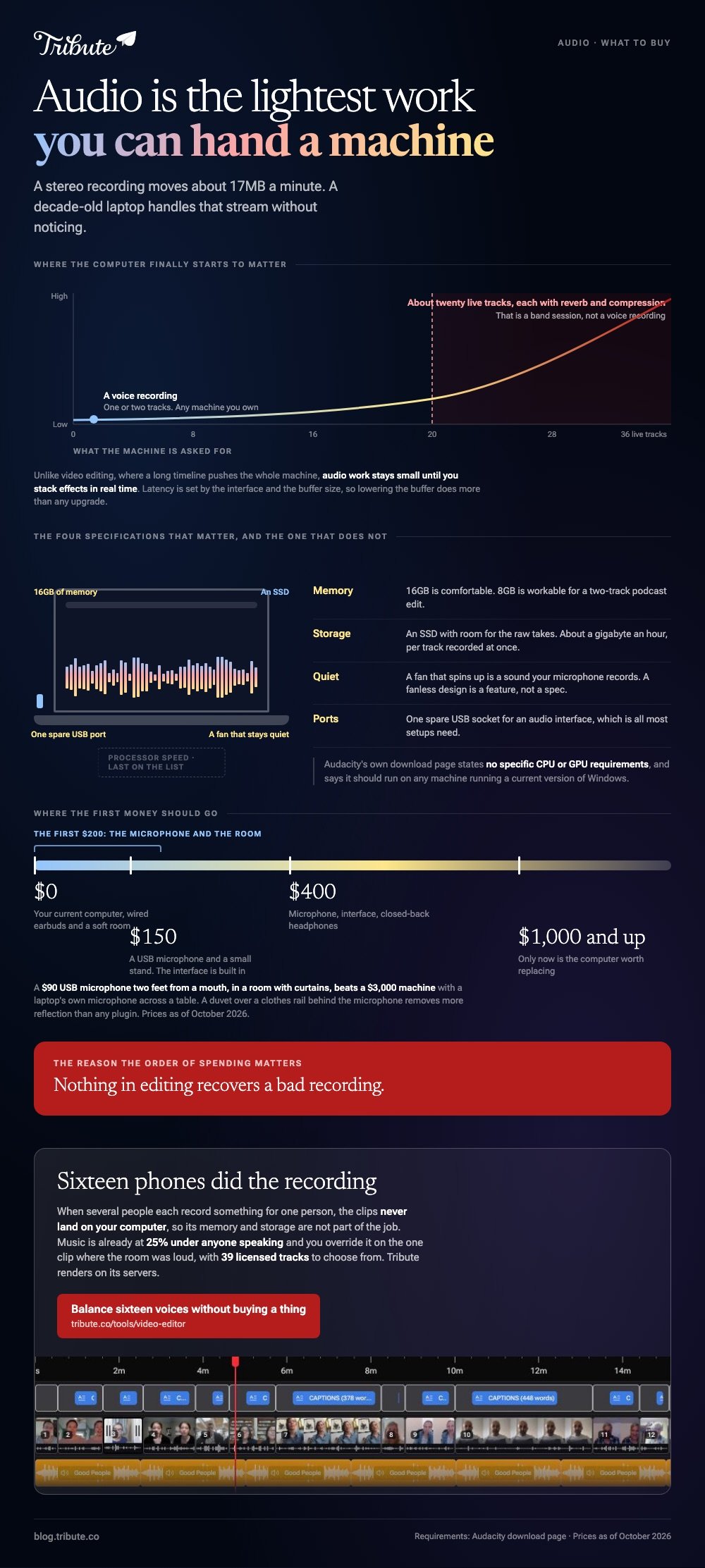
A stereo recording at 48 kHz and 24-bit moves about 17MB a minute, which is about a gigabyte an hour. A decade-old laptop handles that stream without noticing, which is why the specs that matter are the unglamorous ones.
- Memory. 16GB is comfortable, 8GB is workable for a two-track podcast edit
- Storage. An SSD, with room for the raw takes you will want to keep
- Quiet. A fan that spins up is a sound your microphone records
- Ports. One spare USB socket for an audio interface, which is all most setups need
Audacity's own download page is blunt about the rest: it states no specific CPU or GPU requirements and says it should run on any machine that runs a current version of Windows.
What about latency?
Latency comes from the audio interface and the buffer size, not the processor.
If your voice arrives in the headphones a beat late, lower the buffer in your recording software or switch to an interface with direct monitoring. Buying a faster computer seldom changes that number.
When does the machine start to matter?
At about twenty live tracks with reverb and compression on each.
That is a band session, not a voice recording. Unlike video editing, where a long timeline pushes the whole machine, audio work stays small until you stack effects in real time.
Which machine should you buy?
Start at the top of this list and stop at the first one that fits.
1. The computer you already own
A five-year-old laptop with 8GB records and edits a podcast without complaint. Try it for a month before you spend anything, and let the thing that annoys you pick the upgrade.
Look for: a working USB port, 20GB of space, and headphones you can borrow.
Price: nothing.
Best for: Anyone whose first recording has not happened yet.
Why it works: The gap between a bad microphone and a good one is audible, and the gap between two computers is not.
2. Mac mini with Apple silicon
The cheapest route into a machine that will not be the weak link. It sits under the desk, stays near silent at a normal workload, and takes whatever monitor and keyboard you already have.
Look for: 16GB of unified memory and 512GB of storage rather than the base drive.
Price: from around $600, more once you add the drive.
Best for: A permanent recording corner in a spare room.
Why it works: You pay for the computer and nothing else, because the screen and keyboard are already yours.
3. MacBook Air with Apple silicon
The fanless design is the feature. No fan means nothing for the microphone to pick up when a session runs long, which is a real problem on machines that cool themselves with air.
Look for: 16GB of unified memory, and a USB-C hub if your interface is USB-A.
Price: from around $1,000.
Best for: Recording interviews somewhere other than your own desk.
Why it works: Battery life measured in a working day, and silence while it works.
4. Windows laptop with 16GB and an SSD
The software choice is wider here, and Reaper, Audition and Pro Tools all run well on a mid-range machine. Check the fan noise in a shop before you commit.
Look for: 16GB of memory, an SSD, and a review that mentions how loud it gets under load.
Price: $700 to $1,200.
Best for: Anyone whose studio software is Windows only.
Why it works: The same money buys more memory and more storage than it does elsewhere.
5. Desktop PC with 32GB
For sessions with thirty tracks and a plugin on each one. A tower is also the one machine you can keep upgrading, which matters more than its starting speed.
Look for: 32GB of memory, two drives, and a quiet case fan.
Price: $1,000 and up.
Best for: Music production rather than spoken word.
Why it works: Memory and storage are replaceable parts instead of a reason to buy again.
What is the best video and audio editing software for PC?
It depends on which half of the job is harder for you.
Audacity is free software and does spoken word well. Reaper is cheap, deep and fast. For picture and sound together, DaVinci Resolve runs on Windows and carries a full audio page inside it.
| Tool | Strongest at | Cost |
|---|---|---|
| Audacity | Cleaning up a voice recording | Nothing |
| Reaper | Multitrack music and podcasts | Low one-time license |
| DaVinci Resolve | Picture and sound in one project | Nothing, with a paid tier |
| Clipchamp | Quick edits with no install | Nothing, with a paid tier |
The best video and audio editing app for most people is whichever one they will open on a Tuesday evening. A tool you half understand beats one you keep meaning to learn.
Beginners are better served by the shortlist in video editing software for beginners.
Which is the best video audio editing app on a phone?
The one that shows you a waveform.
That single feature separates an app you can fix a recording in from one that only plays it back. Without a waveform you cannot see the silence, the clipping or the moment somebody closed a door.
Searches for a best video recorder with audio mean one of two things: the camera app on a phone, or a handheld recorder with a built-in microphone. For spoken word, a phone plus a clip-on microphone beats either on its own.
Mixing for other people is worth a thought here. The NIDCD reports disabling hearing loss in 55% of adults aged 75 and older, and in 22% of those aged 65 to 74, so keep speech forward and music low.

What is the best phone for video and audio recording?
A current iPhone or a current flagship Android, and the difference between them is smaller than the difference a microphone makes.
Both record clean audio at arm's length in a quiet room. Both fall apart in a hall with hard walls, because the problem is the room rather than the phone.
Pew Research Center puts US adult smartphone ownership at 91%, which is the real argument for recording on a phone: the person you need a recording from already has one in their hand.
- Record close. Two feet away halves most room sound
- Record somewhere soft. A room with curtains and a rug beats a kitchen
- Record a test. Ten seconds played back on headphones catches most of it
When the sound is missing on playback, the cause is usually a setting rather than a fault: see an iPhone video with no audio.
How much should you spend, and on what?
Put the first $200 into the microphone and the room, not the computer.
A $90 USB microphone two feet from a mouth, in a room with curtains, beats a $3,000 machine with a laptop's own microphone across a table. Nothing in editing recovers a bad recording.
| Budget | Where it goes |
|---|---|
| $0 | Your current computer, wired earbuds, a soft room |
| $150 | A USB microphone and a small stand |
| $400 | Microphone, interface, closed-back headphones |
| $1,000 and up | Now the computer is worth replacing |
Compared to upgrading a machine, treating the room costs almost nothing. A duvet over a clothes rail behind the microphone removes more reflection than any plugin.
Once the recording is clean, joining it to picture is covered in adding audio to a video clip.
What if the recording was never yours to make?
The Tribute video editor is a browser-based group video editor: contributors record clips on their phones and Tribute assembles them on a timeline with the music balanced under the voices.
It is ours, and it is the last thing on this page.
- Music ducks automatically to 25% under video and 75% under photos, overridable on a single clip
- 39 licensed tracks across 11 genres, plus a YouTube link import and MP3, WAV, M4A or FLAC upload
- A waveform under every clip, so the silence before the first word is visible
- Tribute renders the video on its servers, so nothing depends on your machine's speed

Best for: A recording job spread across sixteen phones instead of one microphone and one room.
Why it works: Sixteen phones did the recording, and the balancing was done before anyone opened an editor.
Does the machine matter when nobody is mixing anything?
This whole page assumes you are the person holding the microphone.
Buying advice follows from that. You record, you clean it up, you mix it, and the computer is the room you do all three in.
One kind of project has no recordist and no mix.
The case: sixteen people, sixteen phones
You are in it when several people each record something for one person.
A grandmother turning eighty. A colleague leaving after fifteen years. A memorial where the people who should speak are in four states.

Nobody is buying a machine for this. Each person records where they are, on what they have, and the only audio decision left is how loud the music sits under them.
Why the specs stop mattering
The clips never land on your computer, so its memory and storage are not part of the job.
Music is already under the voices at 25% while anyone speaks, and you override that on the one clip where the room was loud. Rendering happens on Tribute's servers rather than yours.
That is how the Tribute video editor handles it: not a lighter editor for a slow laptop, but a job your laptop never does.

What you do not have to do
- Buy a machine for it. The editor runs in a browser and the render happens on Tribute's servers.
- Level sixteen voices. Music ducks to 25% under anyone speaking, and moves per clip.
- Clear a track. There are 39 cleared ones, plus a YouTube link import and your own files.
- Do the edit, on a Concierge Tribute. Tribute's editors build the video, and Concierge Deluxe returns it as a video book.

When this is the wrong answer: you are recording music, a podcast or anything you will mix yourself. Then the list above is the right list and the microphone is still the first purchase.
Our editor runs in a browser and lives inside a paid Tribute.
The wider craft is in making a video montage.
Frequently Asked Questions
Is a Mac better than a PC for audio?
Not by much, and not for spoken word. Macs ship with a capable audio engine and quieter cooling, while Windows machines give you more memory per dollar and a wider software list.
How much RAM do you need for audio editing?
16GB is comfortable for almost everything, and 8GB handles a two-track podcast edit. Memory becomes the limit when you stack plugins across many live tracks.
Does a faster processor reduce latency?
Not in a way you will hear. Latency is set by the audio interface and the buffer size, so lowering the buffer in your software does more than any upgrade.
Can you record studio audio on a phone?
You can record broadcast-quality spoken word on one, with a clip-on microphone and a soft room. Music with several sources at once is where a phone runs out.
How much storage do audio projects take?
About a gigabyte an hour for stereo at 24-bit and 48 kHz. A multitrack session takes that figure once per track you record at the same time.
Do you need an audio interface?
Only for microphones with an XLR plug. A USB microphone has the interface built into it, which is why it is the sensible first purchase.
👉 Balance sixteen voices without buying a thing if everyone is recording on whatever they already own, and the machine on your desk stays out of it.
