
iPhone Video Has No Audio: Six Causes and the Fix for Each
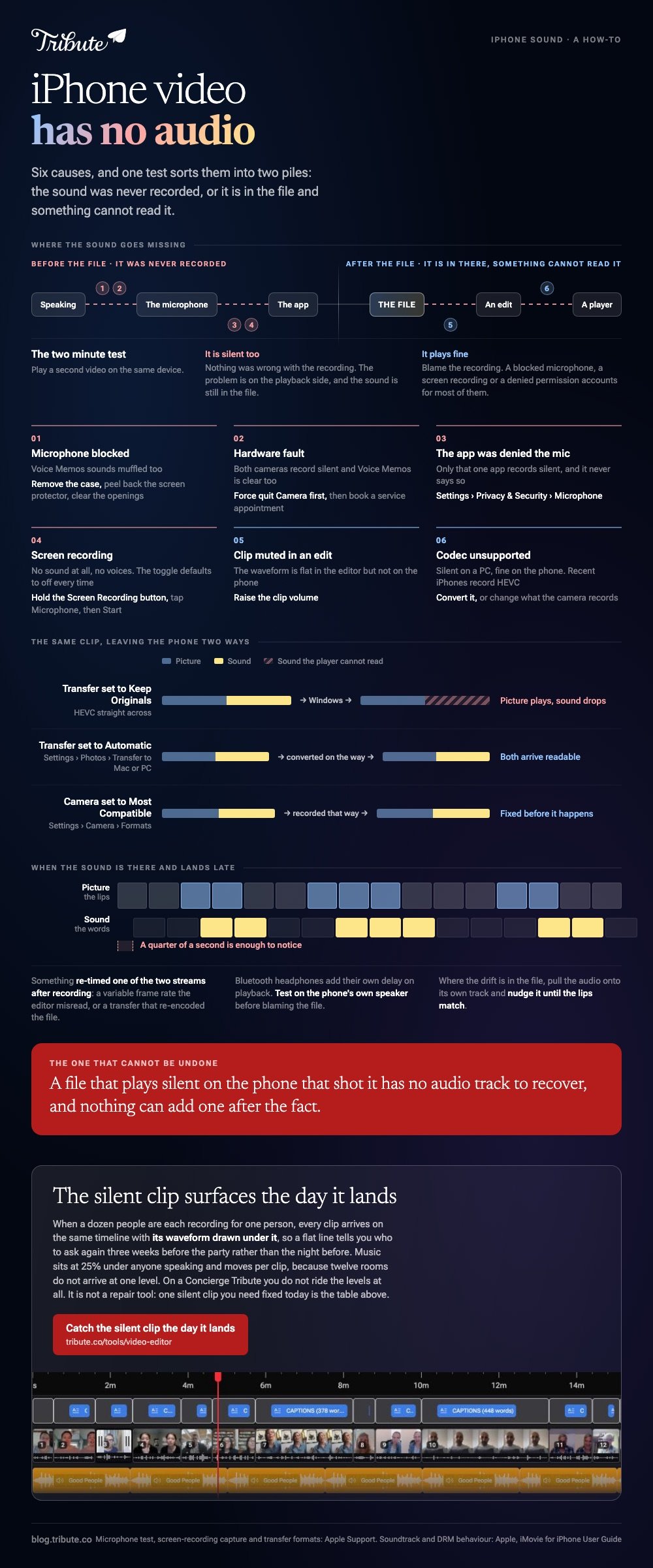
When an iPhone video has no audio, the sound is missing from the file or missing from playback, and a second video tells you which. If that one plays fine, blame the recording: a blocked mic, a screen recording, or an unreadable codec.

What does it mean when an iPhone video has no audio?
It means one of six things, and two minutes of testing tells you which.
The split that matters is recording against playback. A file recorded without sound will be silent everywhere, on every device. A file that plays silent in one place and fine in another was recorded right and is being read wrong.
| Cause | How you spot it | Fix |
|---|---|---|
| Microphone blocked | Voice Memos sounds muffled too | Remove the case, clear the ports |
| App denied the mic | Only that app records silent | Settings, Privacy and Security, Microphone |
| Screen recording | No sound at all, no voices | Turn the Microphone toggle on first |
| Codec unsupported | Silent on a PC, fine on the phone | Convert, or change capture format |
| Clip muted in an edit | The waveform is flat in an editor | Raise the clip volume |
| Hardware fault | Both cameras record silent | Service |
How do you test the iPhone microphone?
Apple publishes a short test and it rules out half the list in a minute.
- Take the case off and peel back any screen protector. Clear debris out of the openings.
- Open Voice Memos and record yourself speaking near the bottom of the phone, then play it back.
- Open Camera and record a short video speaking near the top of the phone.
- Switch to the other camera and record the same thing again.
- Compare the two. One silent and one fine points at one microphone, not at the phone.
That same sequence is set out in Apple's guide to what to do when the microphones are not working, which adds the one setting people miss: open Settings, tap Privacy & Security, then Microphone, and check the app is turned on.
An app denied the microphone records a video with a silent track and never says so.
If both cameras record silent and Voice Memos is clear, the camera app is at fault rather than the hardware. Force quit it and try again before booking anything.
Why does a screen recording have no sound?
Because the microphone is off until you turn it on, every time.
The toggle is hidden behind a long press. Open Control Center, touch and hold the Screen Recording button, tap Microphone to turn it on, then tap Start Recording.
Apple documents the sequence in its page on recording the screen, along with a caveat worth knowing: some apps block audio or video capture outright.
That caveat explains the recordings that come back silent even with the toggle on. Streaming apps and some banking apps refuse to be captured, and the phone does not warn you until you play the result back.

What if the iPhone video has no audio only on a computer?
Then nothing is wrong with the recording. The other machine cannot read the audio track.
Recent iPhones record in HEVC by default, and a Windows machine without the matching codec will show the picture and drop the sound. The same thing happens in older editing software that predates the format.
Three ways out, in order of effort:
- Change how the file transfers. Settings, Photos, Transfer to Mac or PC, then Automatic converts to a compatible format on the way out.
- Change what the camera records. Settings, Camera, Formats, then Most Compatible.
- Convert the file you already have with a desktop converter, which rewrites the audio into something the player understands.
Compared with a microphone fault, this one is reassuring: the sound is in the file the whole time. More on the sibling symptom in no volume on iPhone videos and YouTube videos playing without sound.
How do you add audio to a video on iPhone?
Photos cannot do it. iMovie can, and it ships with the phone.
To add audio to video on iPhone, start a project from the clip and bring the sound in as a separate layer.
- Open iMovie, start a Movie project and pick your clip.
- Tap Add Media, then Audio.
- Choose Soundtracks for the built-in music, My Music for songs synced to the phone, or iCloud Drive for a file.
- Tap the track, then tap Add Audio. Apple notes that a soundtrack lands at the start and fits itself to the project length.
- Drag the clip's own volume down if the music has to sit on top of speech.
One trap is flagged in Apple's guide to adding music and soundtracks in iMovie: a song bought from the iTunes Store is yours to listen to, not to publish inside a video, and anything with DRM on it will not import at all.
Why are the video and audio out of sync on an iPhone?
Because something re-timed one of the two streams after recording.
The usual culprits are a variable frame rate recording that an editor misread, a transfer that re-encoded the file, or Bluetooth headphones adding their own delay on playback. Test with the phone's own speaker before blaming the file.
Where the drift is in the file itself, the fix is to pull the audio onto its own track in an editor and nudge it until the lips match. A quarter of a second is enough to notice.

What if a dozen people each sent you a clip?
Then the sound problem multiplies. Twelve rooms, twelve distances from the phone, twelve different levels, and one of them recorded with a case over the microphone.
The Tribute video editor is a browser-based group video editor: contributors record clips on their phones and Tribute assembles them on a timeline with the music balanced under the voices. It is ours, and it is the last thing on this page.
- Music sits at 25% under speech and 75% under photos by default, and the level is overridable per clip
- A waveform under every clip, so a silent one is visible before anybody watches it
- 39 licensed tracks across 11 genres, plus a YouTube link or an MP3, WAV, M4A or FLAC of your own
- Crossfade songs blends one track into the next when the video outlasts a song
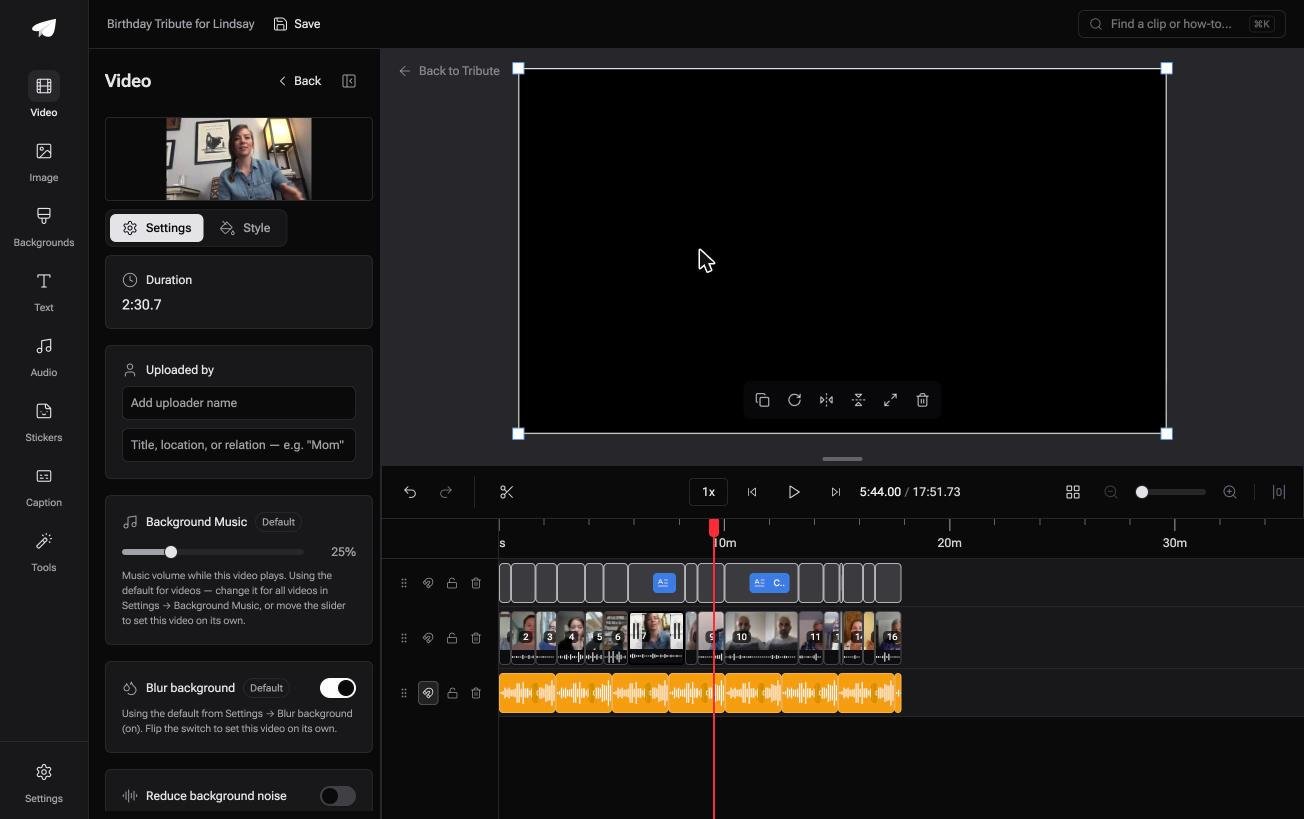
Best for: A clip that plays in silence, with the party it recorded already over.
Why it works: The level is set per clip rather than once for the whole video, which is the only way twelve rooms end up sounding alike.
Can you skip the audio problem altogether?
Most of this page is about one phone and one file.
The harder version is a pile of clips from people you cannot stand over, where you find the silent one three days before the party. There is one case where that discovery happens on day one instead.
The case: you are collecting, not shooting
That case arrives when several people each record something for one person.
A grandmother turning eighty. A colleague leaving after fifteen years. A memorial where the people who should speak are in four time zones.

Why the silent clip surfaces at once
Because every clip arrives on the same timeline, with its waveform drawn under it.
A flat line is a silent recording and you can see it without pressing play. That is how the Tribute video editor handles it: not a fix for an iPhone that recorded no sound, but an early warning that one did.
What you do not have to do
- Find the silent clip the night before. Every clip shows its waveform the day it lands.
- Test anybody else's microphone. A flat line tells you who to ask again.
- Ride the levels. Music sits at 25% under anyone speaking, and moves per clip.
- Edit it, on a Concierge Tribute. Tribute's editors build the video, and Concierge Deluxe returns it as a video book.
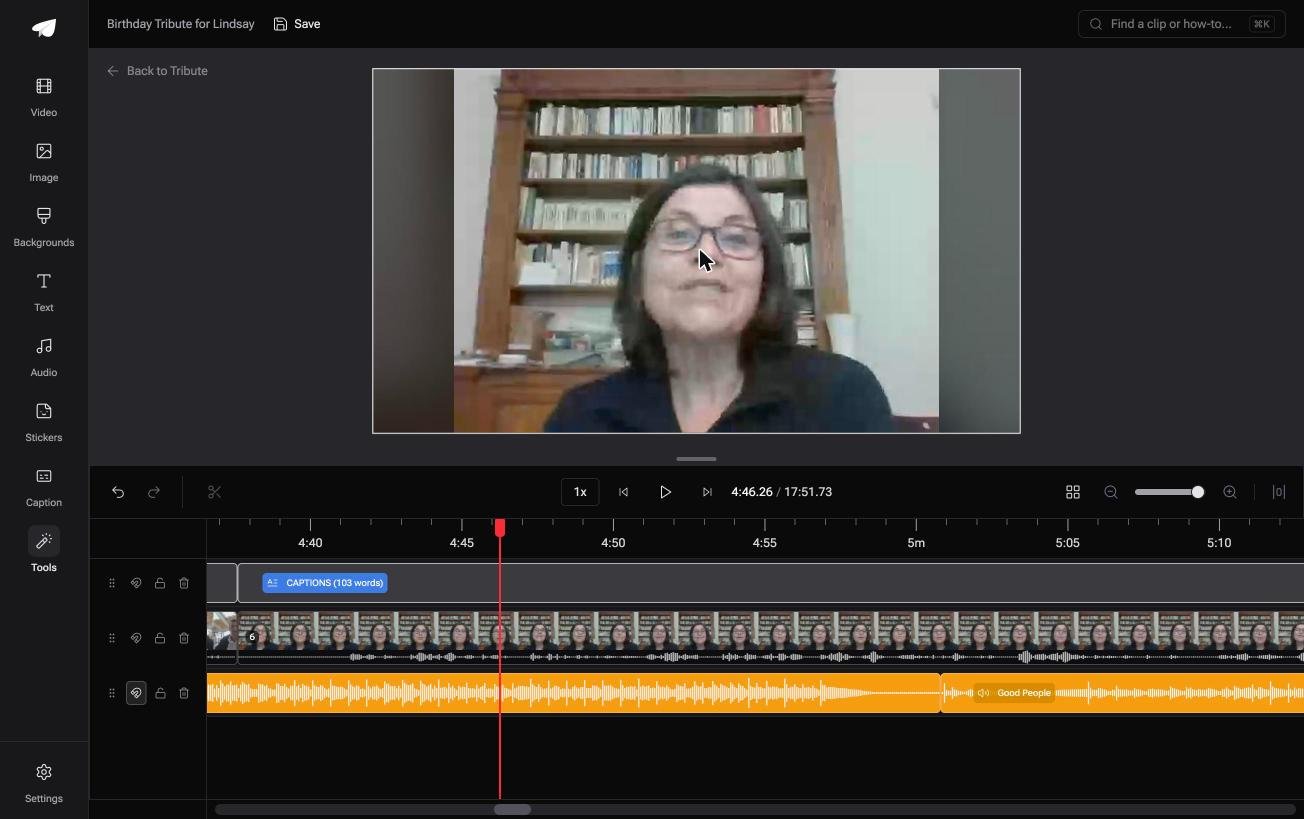
When this is the wrong answer: you have one silent clip and need it fixed today. Then work down the table at the top of this page.
The Tribute editor is not a repair tool and it lives inside a paid Tribute. Joining your own footage instead? See merging videos on an iPhone and making a video montage.
Frequently Asked Questions
Why does my iPhone video play with no sound?
Play another video. If that one is silent too the problem is playback, and if it is fine the recording is at fault. A blocked microphone, a denied app permission and a screen recording with the mic off account for most cases.
Can I recover the audio from a silent iPhone video?
Only if it was recorded and is being read wrong. A file that plays silent on the phone that shot it has no audio track to recover, and nothing can add one after the fact.
Why does my iPhone video have sound on the phone but not on Windows?
Windows is missing the codec. Set Settings, Photos, Transfer to Mac or PC to Automatic so the file converts on the way across, or convert the copy you already have.
How do I add audio to an iPhone video without iMovie?
Any editor with an audio track will do it, including CapCut and Clipchamp. Photos is the one app that will not: it trims and adjusts the clip you have and cannot layer a second sound on top.
Why is there no sound on my screen recording?
The microphone toggle defaults to off and resets. Long press the Screen Recording button in Control Center and turn Microphone on before each recording, and remember some apps block capture altogether.
How do I stop videos recording with no audio in future?
Take the case off before anything that matters, check the app has microphone permission, and record ten seconds as a test. Unlike a missed photo, a silent video cannot be salvaged later.
👉 Catch the silent clip the day it lands if a dozen people are each recording for one person, and nobody finds out the night before.
