
YouTube Videos Have No Audio: Is It You, the Player or the File?
When YouTube videos have no audio, the cause sits in one of three places: your device, the player, or the uploaded file. Playing a second video from another channel tells you which one in about ten seconds.

| Where the fault is | The test | What fixes it |
|---|---|---|
| Your device | Every video is silent | Output device, tab mute, volume mixer |
| The player | Sound returns in another browser | Player volume, extensions, a reload |
| The file | One video is silent for everyone | The codec, a claim, or a muted track |
Do all YouTube videos have no audio, or only one?
Open a second video from a different channel before you change a single setting.
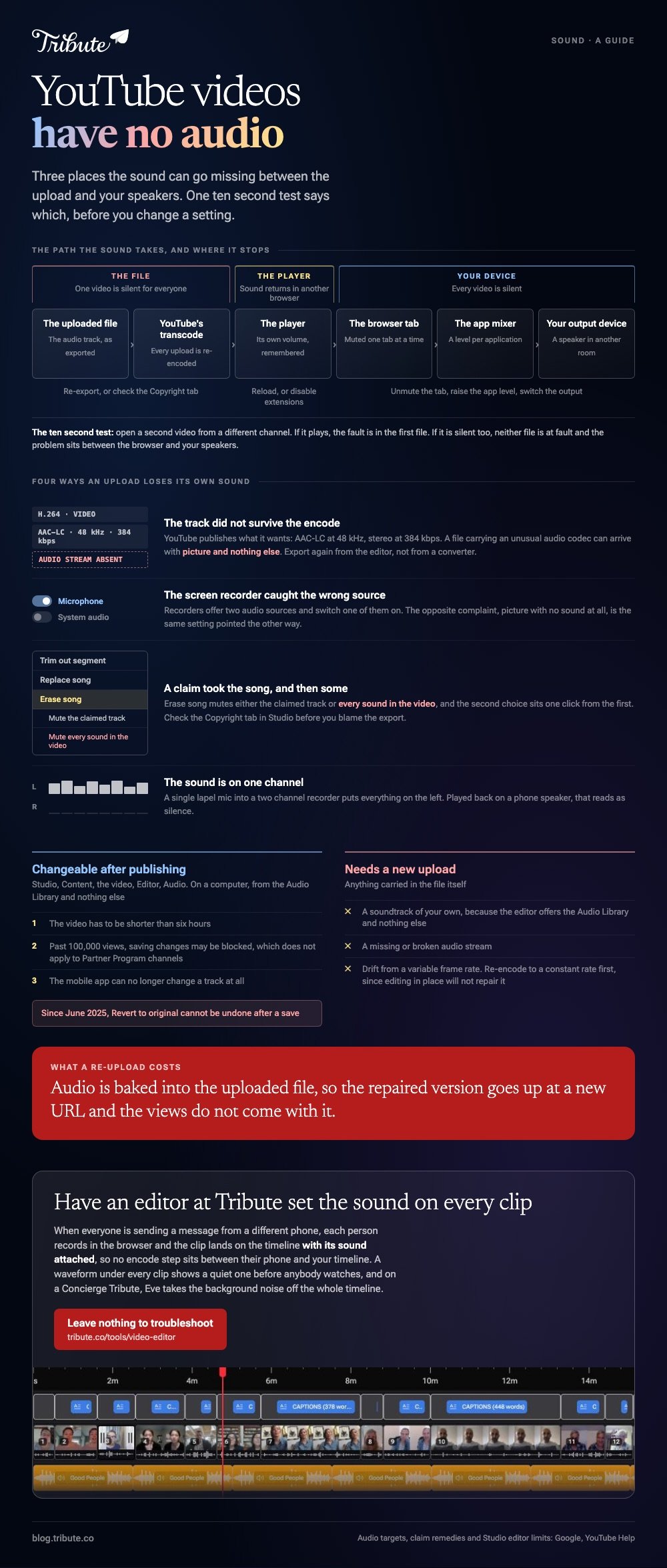
If both are silent, neither file is at fault and the problem sits between the browser and your speakers. If the second one plays, the first file is the suspect.
That one test cuts the work in half. People spend an hour reinstalling audio drivers for a video that was silent for every viewer on earth.
Then ask someone else to open the same link. No audio on my YouTube video and no audio for YouTube videos in general are two problems with no overlap in the fix.
Which settings on your own device make YouTube videos have no audio?
Five, and they are worth checking in this order.
- The player's own volume. Hover the speaker icon inside the YouTube player. It remembers a muted state between sessions.
- The browser tab. Chrome, Edge, Safari and Firefox each mute one tab at a time, and the tab keeps that state after a reload.
- The output device. A laptop still paired with a speaker in another room is playing the sound somewhere you cannot hear it.
- The app volume mixer. Windows holds a level per application, so the browser can sit at zero while every other sound is loud.
- An extension. Ad blockers and volume boosters sit in the audio path. Test in a private window with extensions off.
Most silent playback resolves before step four, and the whole list takes two minutes.
What silences a video you uploaded yourself?
Four things, and none of them is your speakers.
1. The audio track did not survive the encode
YouTube publishes what it wants: AAC-LC audio at a 48 kHz sample rate, stereo at 384 kbps. A file carrying an unusual audio codec can arrive with picture and nothing else.
Export again from the editor rather than from a converter, and confirm the file plays with sound on your own machine first.
2. A screen recording caught the microphone and not the system
Screen recorders offer two audio sources and switch one of them on. The opposite complaint, YouTube no video only audio, comes from the same setting pointed the other way.
3. A copyright claim took the song, and then some
When a claim lands, YouTube offers Erase song, Trim out segment and Replace song. Erase song mutes either the claimed track or every sound in the video, and the second choice sits one click from the first.
Check the Copyright tab in YouTube Studio before you blame the export.
4. The sound is on one channel
An interview recorded with a single lapel mic into a two channel recorder puts everything on the left. Played back on a phone speaker, that reads as silence.
Why are YouTube audio and video out of sync?
Because the frame rate changed somewhere between the camera and the upload.
Phones and screen recorders write a variable frame rate to save space. YouTube asks for content encoded at the rate it was recorded, and for interlaced footage to be deinterlaced first, and drift is what you get when neither happens.
Re-encode to a constant frame rate, then upload the new file. Editing the published video in place will not repair a drift that is baked into the upload.
Bluetooth is the other half of this. Compared to a wired connection, a wireless speaker adds a delay that looks like a sync fault and follows you from video to video.
Can you add audio to a YouTube video that is already published?
Yes, from one library, on a computer.
The YouTube Studio editor audio tab holds the Audio Library, and YouTube documents the route: Content, then the video, then Editor, then Audio. Search for a track, press Play to preview, press Add, drag it where you want it, then Save.
Four limits are worth knowing before you start.
- The video has to be shorter than six hours.
- Past 100,000 views, saving changes may be blocked, which does not apply to Partner Program channels.
- The mobile app can no longer change a track at all.
- Since June 2025, Revert to original cannot be undone after a save.
So you can add audio to a YouTube video after it is live. You cannot change audio on a YouTube video to a file of your own, because the editor offers the Audio Library and nothing else.
Put your own music under it before upload instead. The same fault takes a different shape elsewhere: a silent clip on an iPhone and a track that vanished in Premiere Pro both begin further back than YouTube does.
What if the audio came from a dozen different phones?
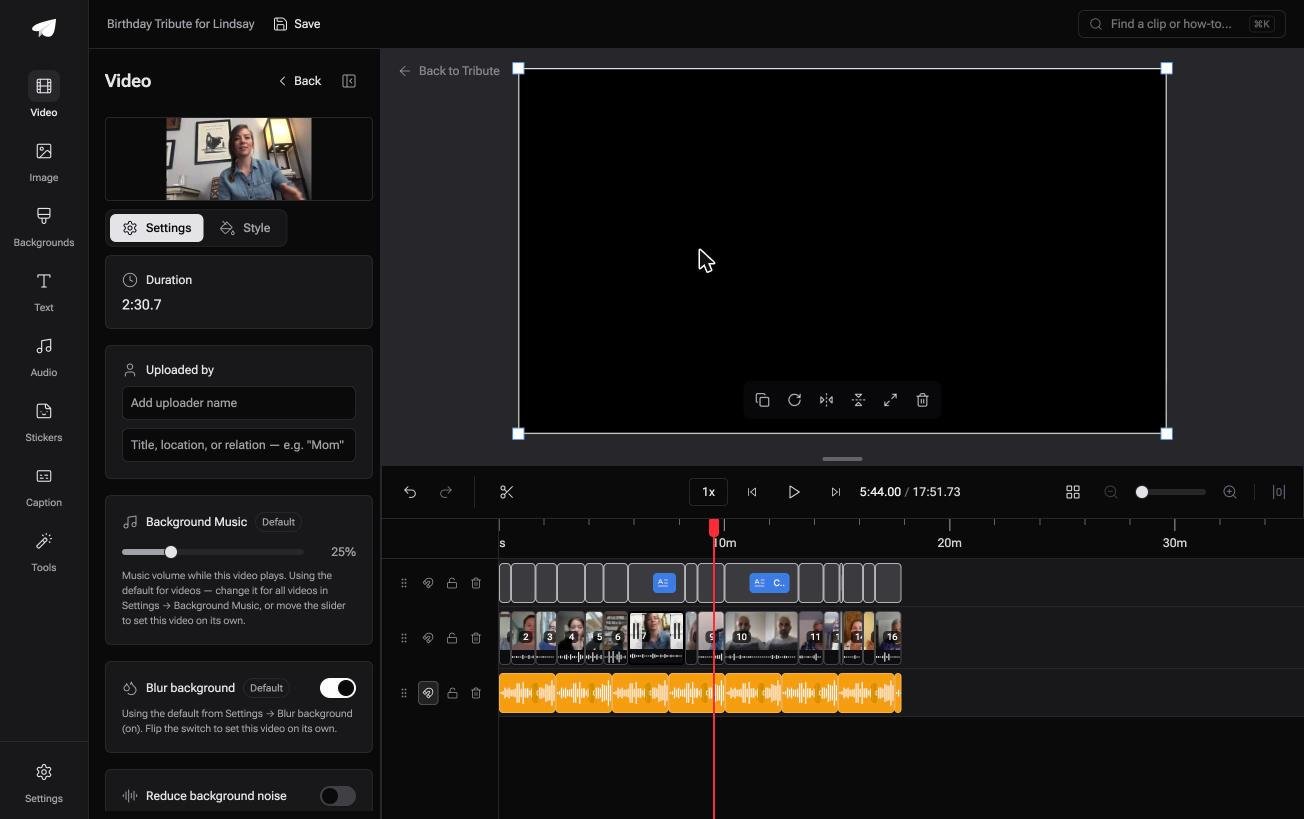
The Tribute video editor is a browser-based group video editor: contributors record clips on their phones and Tribute assembles them on a timeline with the music balanced under the voices.
It is ours, and it is the last thing on this page.
- Music ducks on its own: 25% under video and 75% under photos by default, and overridable per clip
- A waveform under every clip, so a quiet recording is visible before you press play
- 39 licensed tracks across 11 genres, plus a YouTube link or an MP3, WAV, M4A or FLAC of your own
- A frame-accurate preview, so what you hear in the browser is what the rendered video sounds like
Best for: A pile of clips where you cannot tell which ones are silent until you press play on each.
Why it works: Unlike a file you export, upload and then test, the level under each voice is set before you arrive.
What if the sound was never yours to fix?
Every fix above starts with a file somebody else recorded.
Each of those checks assumes the audio reached you sealed inside a finished video. There is one case where it never does.
The case: people are recording messages, not sending you files
You are in it when several people each record something for one person.
A grandfather turning ninety. A teacher leaving after twenty years. A memorial where the people who should speak live in four time zones. Nobody exports anything, so no export can go wrong.

Why a silent clip never reaches you
Each person records in the browser on their own phone, and the clip lands on the timeline with its sound attached.
No encode step sits between their phone and your timeline, and the encode step is where most silent uploads are made. The Tribute video editor draws a waveform under each clip, so a quiet one shows up before anyone watches.
What stops being your job
Three jobs, and troubleshooting is not one of them.
- Not the checking. Each clip lands with its sound attached and a waveform drawn under it.
- Not the edit. On a Concierge Tribute, Tribute's editors reorder, trim and set the levels.
- Not the clip recorded beside a dishwasher. Eve, the assistant on Concierge and Concierge + Video Book, takes the background noise off the whole timeline.
Where it ends up
On a screen in a room with people in it, or as a video book: a hardcover case with a screen inside that plays when you open it.
The wider job is covered in building a video montage, and the group version in making a video tribute.

When this is the wrong answer: the silent video is a lecture, a stream or a clip somebody else published. Then you are back on the list above, and the Studio editor is the only place to change what viewers hear.
Frequently Asked Questions
Why do YouTube videos have no audio in Chrome but sound fine in Safari?
A muted tab or an extension in the audio path explains almost every case. Open the same link in a private window with extensions disabled and compare.
My uploaded video is silent. Can I fix it without losing the views?
No. Audio is baked into the uploaded file, so a repaired version has to go up as a new upload with a new URL. Only the Audio Library track added in the editor can change after publishing.
How do I tell whether a claim muted my video?
Open YouTube Studio, then the Copyright tab. A claim appears there with the claimed stretch and the options for removing it.
Why is the YouTube audio ahead of the picture on my TV?
Television sets take longer over the picture than the sound, and many offer an audio delay setting measured in milliseconds. Adjust it on the set rather than in the video.
Does YouTube re-encode my audio when I upload?
Yes. Every upload is transcoded, which is why YouTube publishes target settings rather than accepting anything. Give it the format it asks for and the transcode has less to guess at.
Can I replace the whole soundtrack of a published video?
You can add Audio Library tracks in the Studio editor and mute the original with Erase song. Anything beyond that means a new upload.
👉 Have an editor at Tribute set the sound on every clip if everyone is sending a message from a different phone, and there is nothing left to troubleshoot.
