
No Volume on iPhone Videos: Why It Happens and How to Fix It
No volume on iPhone videos comes down to four things: Silent mode, the volume buttons set to the ringer, audio routed to Bluetooth, or a blocked speaker. Check them in that order. Most cases end at the first one.

Why is there no volume on iPhone videos you play?
Because the phone is sending the sound somewhere you are not listening.
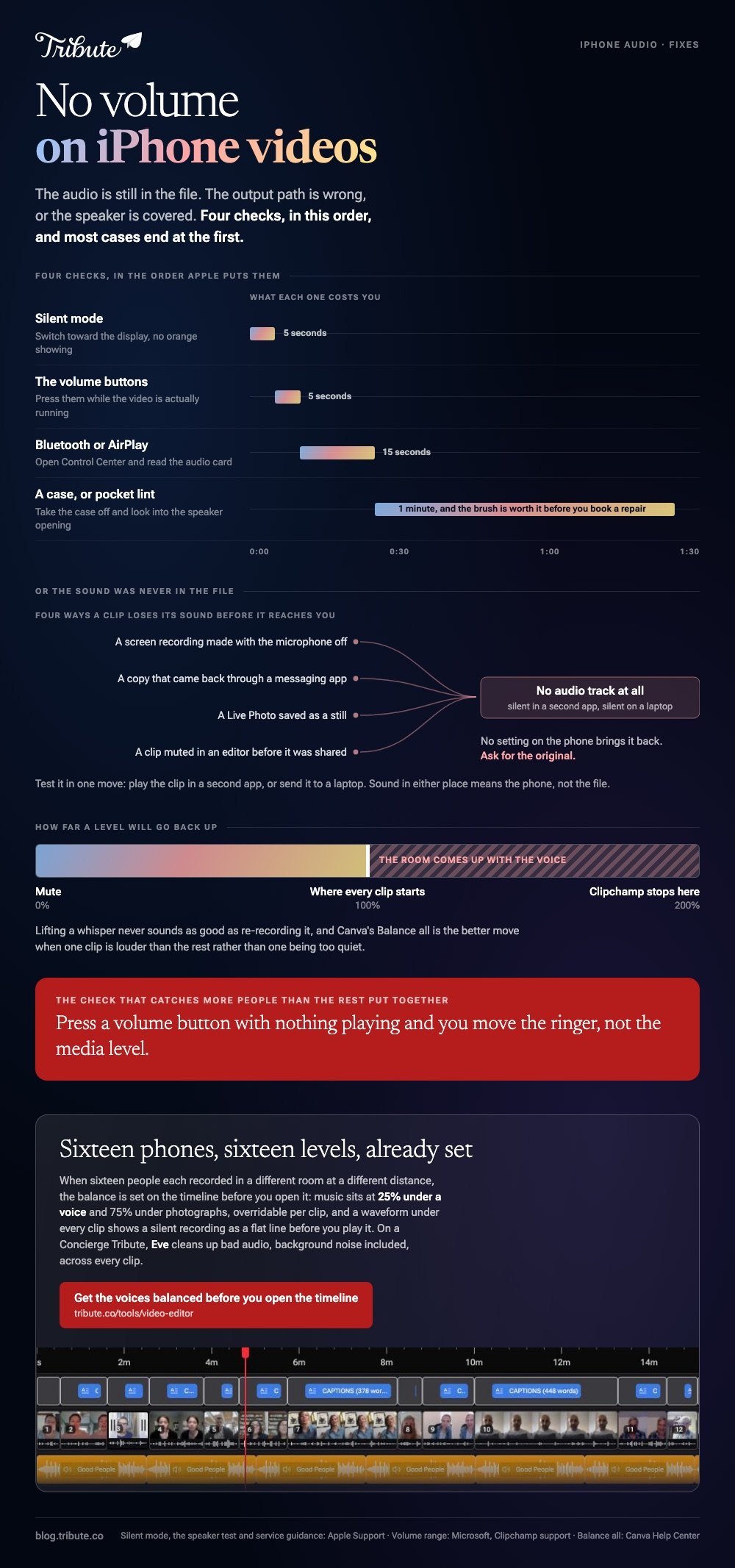
The audio is still in the file. The output path is wrong, or the speaker is covered. Four checks cover almost every report of no volume on videos.
| Check | What to do | Takes |
|---|---|---|
| Silent mode | Switch toward the display, no orange showing | 5 seconds |
| Volume buttons | Press them while the video is running | 5 seconds |
| Bluetooth or AirPlay | Open Control Center, check the audio card | 15 seconds |
| A case or dirt | Take the case off, look at the speaker opening | 1 minute |
Check two catches more people than the rest put together.
Press a volume button with nothing playing and you move the ringer, not the media level.
Start the video, then press the button. The slider that appears on screen shows which level you are moving.
Apple's own order starts with Silent mode and Do Not Disturb, then removing cases and screen protectors, then checking the speaker opening for dirt.
Does no volume on iPhone videos mean the speaker is broken?
Not often, and there is a two minute test that settles it.
Open Settings > Sounds, or Sounds & Haptics, and drag the Ringtone and Alerts slider back and forth. You should hear the ringtone move with it.
- You hear it: the speaker works. The problem is routing or a cover.
- You hear nothing, or the speaker button is dimmed: Apple says the speaker may need service.
Second test: make a call with speakerphone on. Static or silence there points at the hardware rather than at any one app, and it is the evidence a repair desk will ask for.
Clean the opening with a dry, soft-bristled brush before you book anything. Pocket lint packs into the grille and muffles everything, which reads as no volume on videos long before it reads as a fault.
What if the sound is missing from the file and not the phone?
Then no setting on the phone will bring it back.
Test it in one move. Play the clip in a second app, or send it to a laptop and play it there. Silence in both places means the file has no audio track to play.
Four ways a clip loses its sound before it reaches you:
- A screen recording made with the microphone off. It captures what the app played and none of your voice.
- A copy that came through a messaging app. Re-encoding can drop the audio track on the way through.
- A Live Photo saved as a still. The moving part and its sound are both gone.
- A clip muted in an editor before it was shared, which is invisible once the video is exported.
Unlike a routing problem, this one does not get fixed on your end. Ask for the original.
More in when an iPhone video has no audio, and in adding music to a video on an iPhone if the plan is to cover the silence.
How do you reduce the volume of a video online?
In a browser, with nothing to install and nothing to pay.
Two tools do this well, and both let you edit video volume online rather than make you re-record anything. Each keeps the picture untouched.
Clipchamp
- Click the clip on the timeline so it is highlighted.
- Open the audio tab in the property panel.
- Drag the volume slider left to lower it, right to raise it.
- Export at the resolution you want.
Microsoft documents the range on its volume page: new clips start at 100%, you can mute one or push it to 200%, and dragging back to 100% undoes the change.
To split a voice from its picture, right-click the clip, hover audio and click detach. The sound drops onto its own row.
Canva
- Select the track on the timeline or the video on the canvas.
- Click the volume icon on the toolbar above the editor.
- Set the level with the slider or type a number.
- Use Balance all when one clip is louder than the rest.
Canva's audio help page puts fades on a separate Fade control, and notes that the video fade sliders need a recent app version on iOS.

Compared with an app install, a browser tool costs you an upload and a download instead of a gigabyte of storage. Either way, to reduce the volume of a video online you are changing one slider and exporting.
Why is there no volume on a Messenger video call?
Because a call is not a file, so none of the fixes above apply to it.
A call routes through the app in real time. Three things break it: the wrong audio output picked during the call, a revoked microphone permission, and a headset the phone is still paired to.
Work the output first. Open the call's own settings and send the audio to the phone speaker, then check the app's microphone permission in Settings before you reinstall anything.
Meta does not publish one troubleshooting page for call audio, so treat any step list you find as a guess until it works on your handset.
What if the clips came from sixteen different phones?
Then levels stop being one slider and become sixteen of them.
The Tribute video editor is a browser-based group video editor: contributors record clips on their phones and Tribute assembles them on a timeline with the music balanced under the voices. It is ours, and it is the last thing on this page.
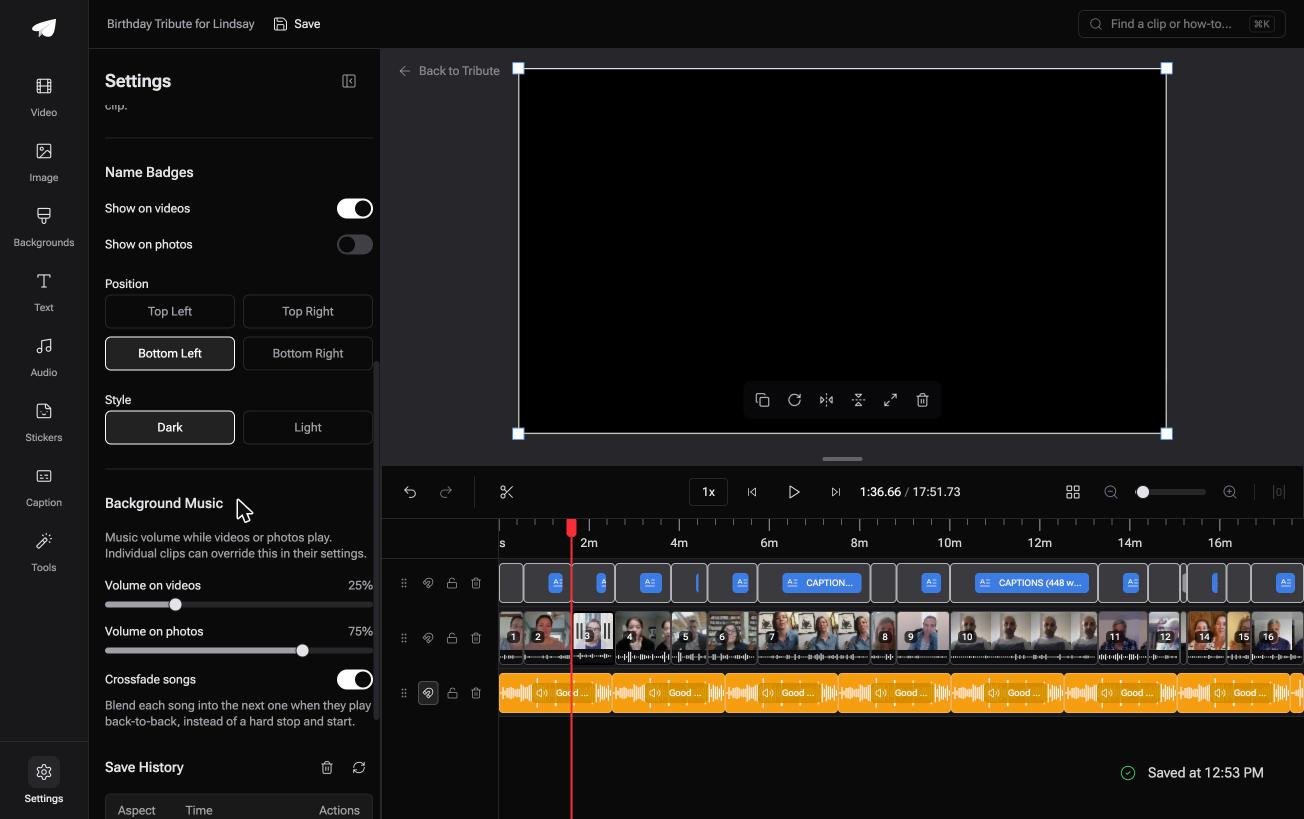
- Music sits at 25% under a voice and 75% under photos by default, and you can override either per clip
- A waveform under every clip, so a silent recording shows as a flat line before you play it
- Crossfade songs blends one track into the next when the video outlasts a song
- 39 licensed tracks across 11 genres, plus a YouTube link or your own MP3, WAV, M4A or FLAC
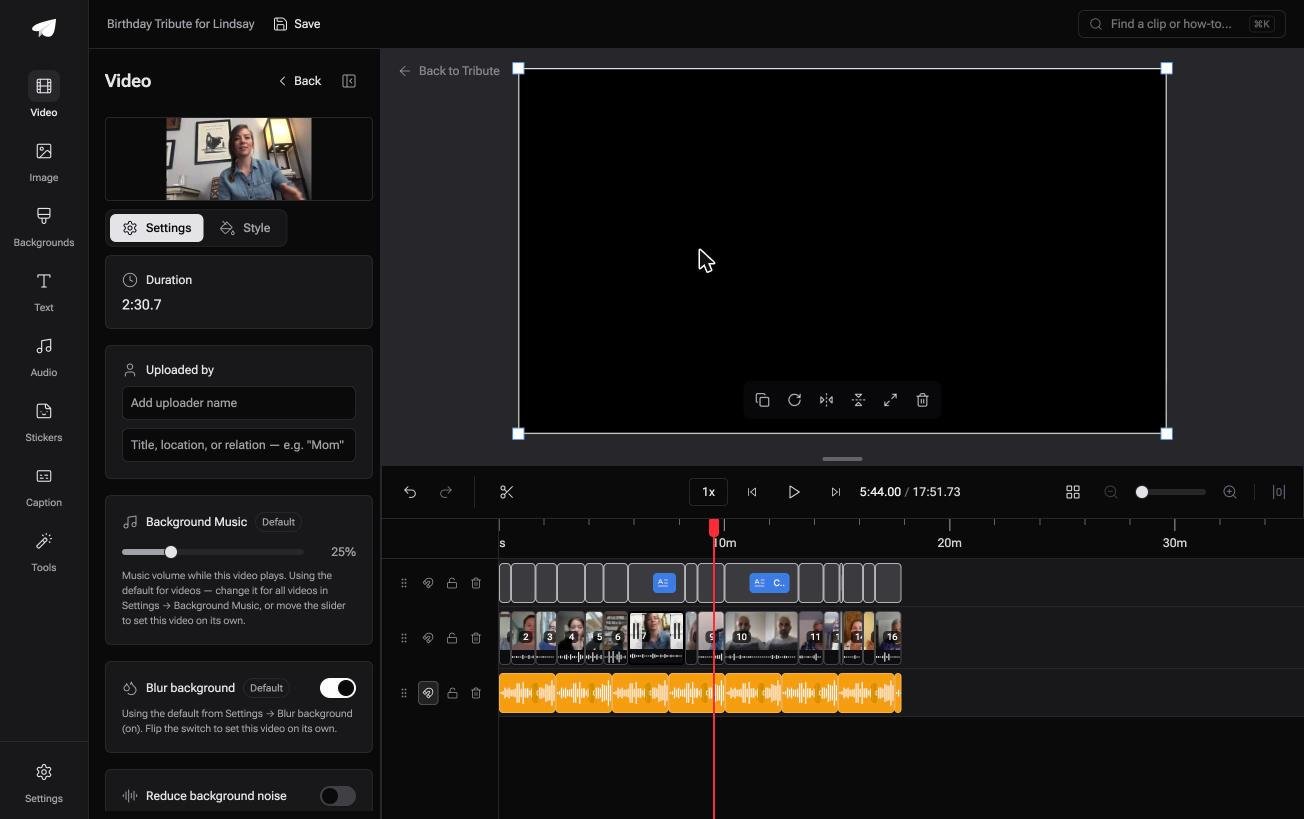
Best for: Sixteen phones, sixteen levels, and one of them recorded through a case.
Why it works: Each clip was recorded in a different room at a different distance, and each one gets its own level.
Who sets the levels when sixteen people recorded in sixteen rooms?
Every check on this page assumes one video and one phone.
Change that assumption and the work changes shape. One clip with no sound is a two minute fix. Sixteen clips at sixteen volumes is an afternoon.
The case: the recordings are coming to you
You are in it when several people each record something for one person.
A grandmother turning eighty. A colleague leaving after fifteen years. A memorial where the people who should speak are in four time zones.
Nobody is shooting a video. Everyone is recording a message, and your job is balance, not production.
Why the volume question never reaches you
Because the balance is set on the timeline before you open it.
Music sits underneath at a quarter of its level while anyone speaks, and rises under photographs where no voice competes with it.
That is how the Tribute video editor handles it: not another slider to find, but a level that was right when the clips landed.
What you do not have to do
- No level hunt. Music ducks to 25% under anyone who is speaking.
- No audio repair by hand. On a Concierge Tribute, Eve cleans up bad audio, background noise included, across every clip.
- No edit of your own. Tribute's editors build the video on that same tier.
It does not have to stay a file
The finished video can arrive as a video book: a hardcover case with a screen inside that plays when you open it.
No phone to hand around, no link to lose, and no relative asking why there is no sound on the copy they were sent.

When this is the wrong answer: you have one clip and one phone. Then the four checks at the top of this page are the whole job.
For everything after that, see merging clips on an iPhone and the wider video montage maker guide. The editor is not a repair tool: it lives inside a paid Tribute.
Frequently Asked Questions
Why is there no volume on YouTube videos but sound everywhere else?
Check the player's own mute button before anything on the phone. A muted YouTube player stays muted between videos, which makes it look like a device fault.
Why is there no volume on Prime Video on my iPhone?
Same two suspects as any other app: Silent mode and an audio route to a paired speaker. Open Control Center during playback and confirm the output is the iPhone itself.
Does Silent mode stop video sound?
It stops ringtones and alerts, and some apps respect it for autoplay audio as well. Switching it off removes the variable in five seconds, which is why Apple lists it first.
Can I turn the volume of a video up after recording?
Yes, up to a point. Clipchamp goes to 200% of the original, and past that you amplify the room noise along with the voice. Lifting a whisper never sounds as good as re-recording it.
How do I edit volume video online without losing quality?
Changing the level re-encodes the audio, not the picture, so the visible quality holds. Export at the same resolution you imported and the difference is inaudible.
Why is one clip quiet when the others are fine?
Distance. A phone two feet from a speaker records a voice far louder than one across a room. Set the level per clip rather than once for the whole timeline.
Should I fix the volume before or after joining clips?
Before, where each clip is still its own object. After a merge you are balancing one long track with a dozen different levels baked into it.
👉 Get the voices balanced before you open the timeline if sixteen people are each recording for one person, and no clip arrives silent.
