
Add Transition iMovie: Where the Browser Is and How Long to Make It
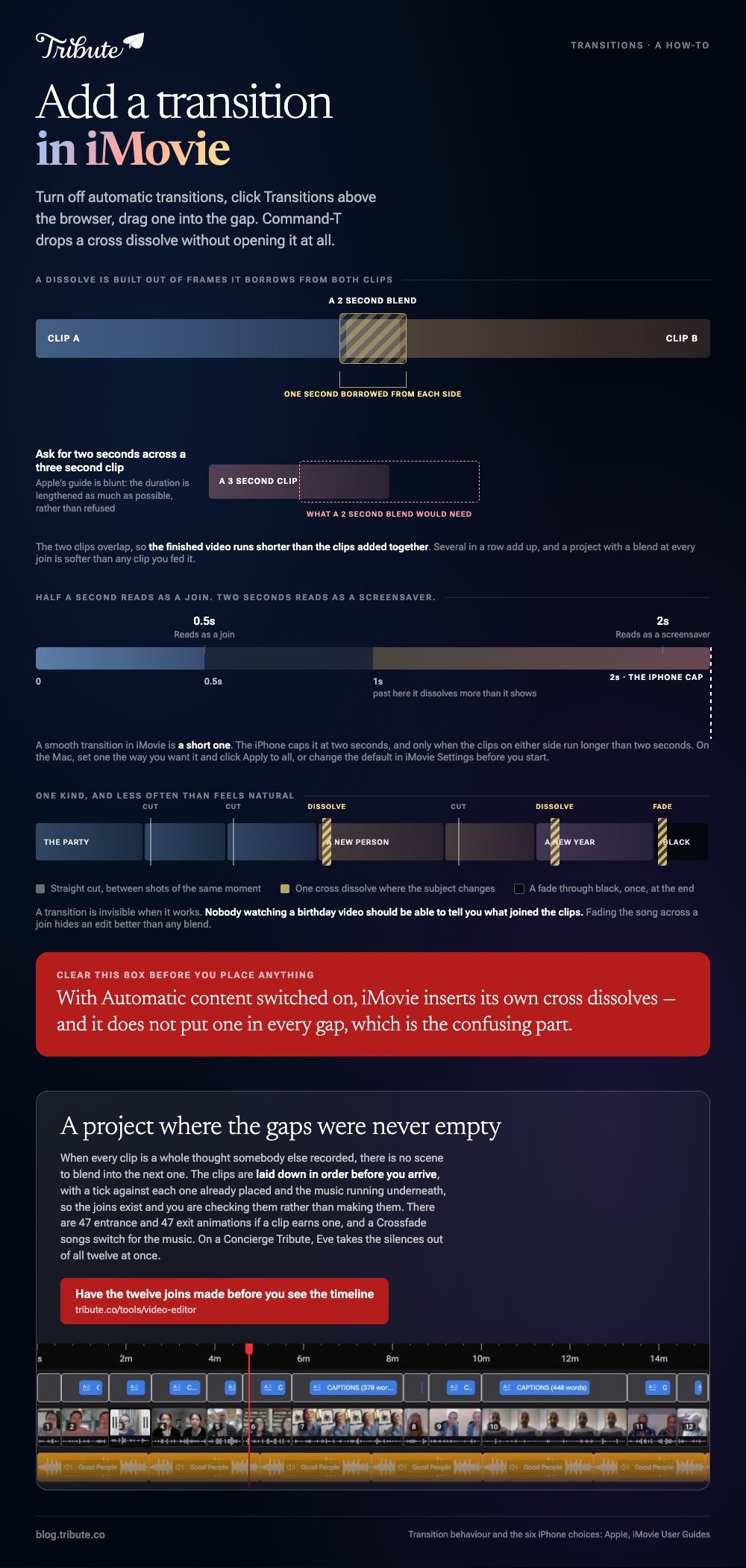
To add a transition in iMovie on a Mac, turn off automatic transitions, click Transitions above the browser, and drag one into the gap between two clips. Command-T drops a cross dissolve without opening the browser at all.

Where do you add transition iMovie controls on a Mac?
Above the browser, in the row of buttons next to Audio and Titles.
- Turn off automatic transitions first. Click Settings at the upper right of the timeline and clear the Automatic content checkbox.
- Click Transitions above the browser. Skim across one with the pointer to preview it.
- To add a transition between clips in iMovie, drag it into the gap where the two clips meet. An icon appears at the join.
- To put the same one on both ends of a single clip, select the clip, then double-click the transition in the browser.
There is a route with no browser at all. Click the edge of either clip and choose Edit > Add Cross Dissolve, or press Command-T.
Why the automatic ones have to go first
Because iMovie owns them and you do not.
With Automatic content switched on, iMovie inserts its own cross dissolves and, where a theme is applied, theme transitions as well. It does not put one in every gap, which is the confusing part.
Clear the checkbox and the automatic ones come out. What you place by hand after that stays where you put it.
How do you change the length of one?
Double-click the icon in the timeline and type a number.
- Double-click the transition icon. A small set of controls opens.
- Double-click the Duration field and type a number of seconds.
- Click Apply.
Apple's guide is blunt about the ceiling: ask for longer than the clips on either side allow and the duration is lengthened as much as possible rather than refused.
That ceiling exists because a dissolve is built out of frames it borrows from both clips. A two second blend needs a second of spare picture at each end, and a three second clip does not have it.
A smooth transition in iMovie is a short one. Half a second reads as a join. Two seconds reads as a screensaver.

How do you apply one to all the gaps at once?
Set one the way you want it, then copy it everywhere.
Double-click the transition you like and click Apply to all. Every gap in the project takes that style and that length.
To change the default before you start instead, choose iMovie > Settings and double-click the number in the Transitions field. New transitions in any project come in at that length.
Can you add transition iMovie effects on an iPhone?
Yes, and the control is already sitting in the timeline.
A transition in iMovie on iPhone starts from the small icon between two clips. Tap it and an inspector opens along the bottom of the screen.
Apple lists six choices there: None, Theme, Cross-dissolve, Slide, Wipe, and Fade through black or white. Slide and Wipe each ask for a direction.
| Choice | What it looks like | Use it |
|---|---|---|
| None | A straight cut | Between clips of the same scene |
| Cross-dissolve | One clip melts into the next | Almost everywhere else |
| Slide or Wipe | A moving edge pushes the picture | A deliberate change of subject |
| Fade through black | A beat of darkness | The end of a section |
To change the length, tap the duration shown and tap another. Apple caps it at two seconds, and only when the clips on either side run longer than two seconds.
Cross-dissolve goes missing from the list when the neighbors are too short to lend it frames. Lengthen one of them and the option comes back.
Compared to the Mac browser, the phone inspector is harder to get wrong: six choices, one duration, nothing to drag.
Which transition should you use, and how often?
One kind, and less often than feels natural.
iMovie video transitions all cost frames from the clips on either side, so a project with a blend at every join is shorter than the clips you fed it and softer than any of them.
- Straight cuts between shots of the same moment.
- One cross dissolve where the subject changes: a new person, a new room, a new year.
- A fade through black once, at the end.
Unlike a title or a music track, a transition is invisible when it works. Nobody watching a birthday video should be able to tell you what joined the clips.
Sound does the same job underneath. Fading a song across a join hides the edit better than any blend: see adding audio to a video clip and adding music on an iPhone.

What if a dozen people each recorded their own piece?
The Tribute video editor is a browser-based group video editor: contributors record clips on their phones and Tribute assembles them on a timeline with the music balanced under the voices.
It is ours, and it comes last on this page.
- 47 entrance and 47 exit animations, including Slow zoom, Drift and Breathe
- Clips arrive in order on the timeline, with a tick marking the ones already placed
- Crossfade songs, a switch that blends one track into the next across a join
- 9 3D layout effects for photographs, among them Tilt, Book and Floating

Best for: A video made of whole messages, where each clip is a person rather than a shot.
Why it works: The joins are already made, so the only decision left is whether a clip needs an entrance at all.
What joins the clips when nobody opens the transition browser?
Every step above assumes you are the one deciding where one person stops and the next begins.
That is a real job when you shot the footage. It is a strange job when you did not. There is one case where the joins are made before you see them.
The case: twelve messages, not twelve shots
You are in it when every clip is a whole thought somebody else recorded.
A grandmother turning eighty. A colleague leaving after fifteen years. Each clip is a whole thought with a beginning and an end, so there is no scene to blend into the next one.
Why the gap never needs filling
Because the clips were laid down in order before you arrived.
The timeline comes assembled, with a tick against every clip already on it and the music running underneath. The joins exist; you are checking them rather than making them.
That is how the Tribute video editor handles it: not a longer list of blends, but a project where the gaps were never empty.
What you do not have to do
- Not the joins. The clips are laid down in order with the music running under them.
- Not the dead air at either end of a message. Eve, the assistant on Concierge and Concierge + Video Book, takes the silences out of all twelve at once.
- Not the edit. On a Concierge Tribute, Tribute's editors decide where an entrance earns its place and leave the talking clips alone.
When this is the wrong answer: you shot the footage and want a wipe between two scenes you planned. iMovie does that better than any list of presets. The editor is also not a standalone app: it lives inside a paid Tribute.

Frequently Asked Questions
Why can I not drag a transition into the gap?
Automatic transitions are still switched on, or the clips on either side are too short to lend frames. Clear the Automatic content checkbox and lengthen one neighbor.
How do I delete a transition I already added?
Click the icon between the clips and press Delete. The clips close back up and the frames the blend borrowed come back.
What is the default transition length in iMovie?
Every transition you add comes in at the same length, and that number lives in iMovie Settings. Change it there and later projects follow.
Does a transition make the video shorter?
Yes. A blend overlaps the two clips, so the finished video runs shorter than the clips added together. Several in a row add up.
Can I use a different transition at every join?
You can, and the result looks like a demo reel. Pick one and repeat it, the way a montage tool does in making a video montage.
Do transitions carry the music across the join?
No. Picture and sound are separate, and a song keeps playing through a blend. Fade the audio by hand, as in adding music to a video on iPhone.
👉 Have the twelve joins made before you see the timeline if each clip is a whole message rather than a shot, and the only blend you think about is the one you want.
