
Clideo Slideshow Maker: What It Does, What It Caps, and When to Use Something Else
The Clideo slideshow maker is a browser tool that turns photos and clips into one video with music under it. Nothing installs. The limits that matter are a 500 MB cap per file and one slide duration for every photograph.

What does the Clideo slideshow maker do?
Three steps, and the middle one is the whole tool.
- Add your files. From the computer, an Android phone, an iPhone or cloud storage.
- Build the slideshow. Add more files, reorder them, drop in an audio track and trim it, then click Export.
- Download the result. Preview it, go back to editing if it is wrong, then save to the device or to cloud storage.
Clideo lists the formats it takes on its slideshow maker page, read in October 2026.
| What you bring | Formats named |
|---|---|
| Photos | JPG, JPEG, PNG, TIFF, GIF |
| Video clips | MP4, MOV, AVI |
| Music | MP3, WAV, M4A |
| What comes out | MP4, MOV or AVI, your pick |
Crossfade is the named transition. Cropping is there. Slide timing can be set to match the rhythm of the music, and one duration is applied to every photo slide at once.
Best for: Thirty or forty photographs, one song, and a result you need tonight.
Why it works: There is no project to learn. The page does the ordering, the music and the export in one pass.
The part that catches people
One duration for all the photos is a design decision, not a bug.
It keeps the tool simple, and it means a photograph nobody needs to study sits on screen as long as the one everybody does. If some images need longer, you are in the wrong tool.
Is the Clideo slideshow maker online worth the upload?
That depends on how much you are sending and how fast your connection is.
Clideo caps each file at 500 MB on the free plan, and editing a saved project again is a premium feature.
Prices and the watermark rule are not stated on the slideshow maker page itself. Compared to a tool that names its limits up front, that puts the checking on you: read the export screen before you commit an evening.

Upload is the hidden cost. Photographs are small, video clips are not, and 16% of US adults own a smartphone with no home broadband at all, per the Pew Research Center mobile fact sheet.
| Route | Install | Per photo timing | Watch out for |
|---|---|---|---|
| Clideo | None | One duration for all | 500 MB per file |
| Clipchamp | None on Windows 11 | Per slide | Premium items marked |
| The phone | Already there | Per slide | Small screen, long list |
How do you build the same slideshow in Clipchamp?
Five steps, and every photograph can hold for a different length.
- Open My media on the toolbar and use import media to bring in the photographs and clips.
- Drag them onto the timeline, side by side on one track, in the order you want them seen.
- Drag the edge of any image to set how long it holds. Hold Shift to select several and move them together.
- Hover over a gap between two items and press delete this gap, because a gap renders as blank video.
- Click Export at the top right and choose 480p, 720p, 1080p or 4K.
Microsoft's page on combining clips in Clipchamp carries the gap warning, which is the usual reason a first slideshow has a black flash in it.
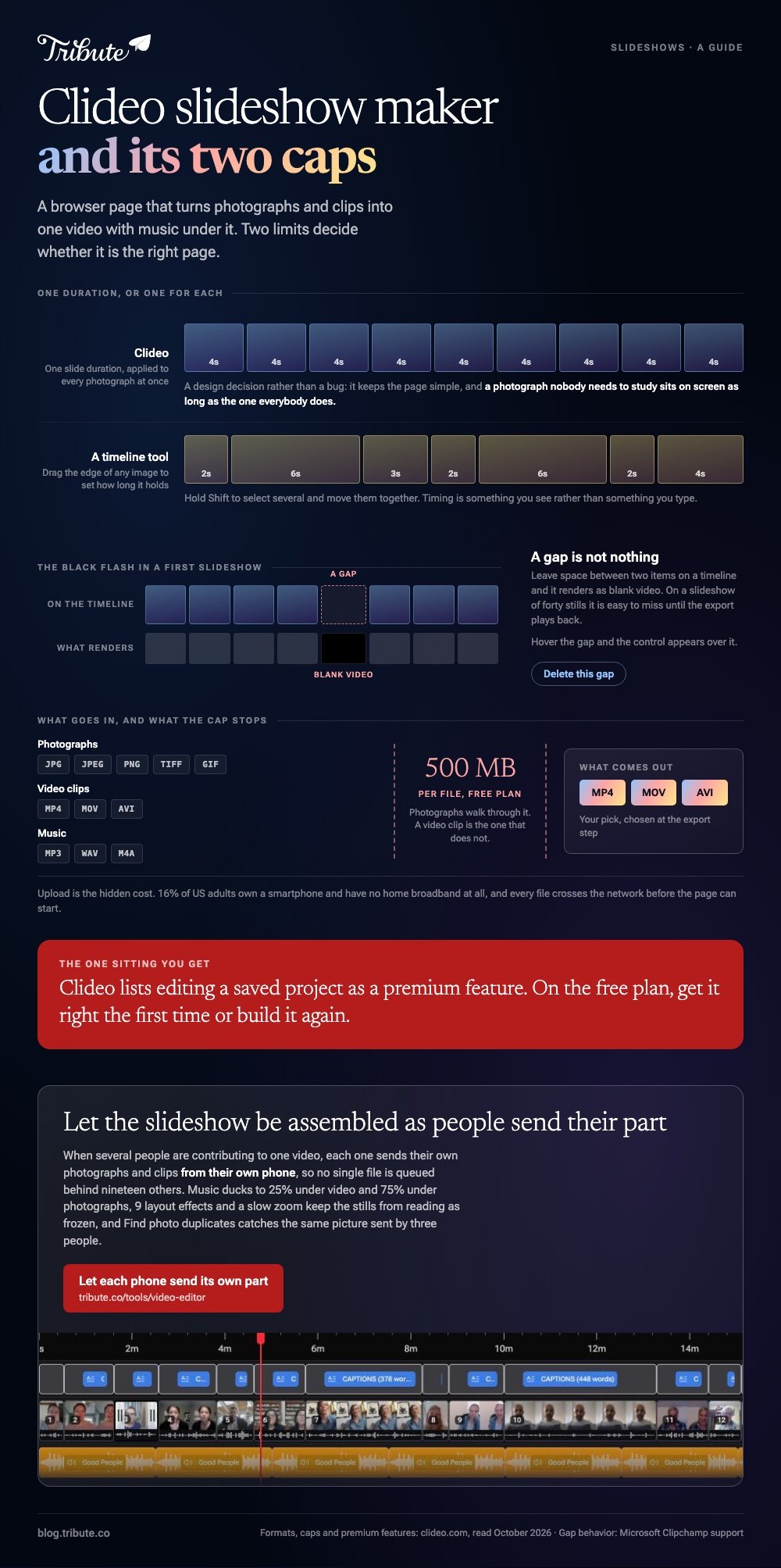
Best for: A slideshow where some photographs deserve six seconds and others deserve two.
Why it works: Unlike a one-page tool, the timeline is the interface, so timing is something you see rather than something you type.
The wider field is compared in slideshow makers with music, Canva slideshows and the Animoto slideshow maker.
How long should a slideshow be, and how loud the music?
Divide the song, then cut the slideshow down until it fits.
Three minutes carries about forty photographs at four seconds each. Past sixty images the thing becomes a queue and people start checking their phones.
- Pick the track first. Cutting to a song works; fitting a song to a finished cut does not.
- Go instrumental if anyone speaks. Lyrics and speech compete, and the speech loses.
- Let the last image hold while the music resolves rather than cutting to black on a beat.
- Fade in and out. A two second fade reads as a decision; a hard stop reads as a mistake.
Where any clip has a voice in it, drop the music to about a quarter of full volume underneath and lift it back up over the silent photographs.
Who handles it when the material comes from twelve phones?
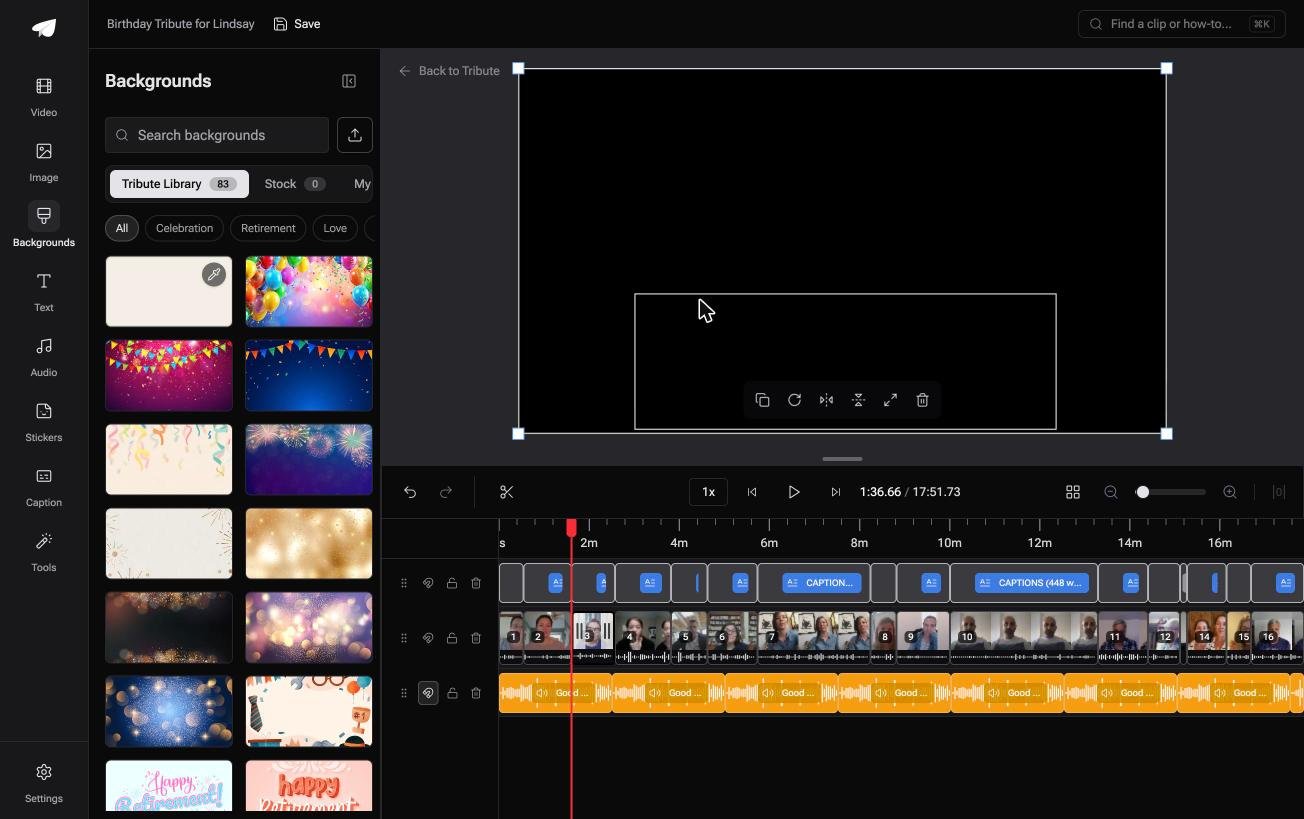
The Tribute video editor is a browser-based group video editor: contributors record clips on their phones and Tribute assembles them on a timeline with the music balanced under the voices.
Ours, and the last thing on this page.
- 39 licensed tracks across 11 genres, plus a YouTube link import or your own MP3, WAV, M4A or FLAC
- Music ducks to 25% under video and 75% under photos, which is the levelling a mixed slideshow needs
- 9 3D layout effects for photographs, including Tilt, Book, Floating and Billboard
- 47 entrance and 47 exit animations, including the slow zoom that keeps a still from reading as frozen
- Find photo duplicates in the Tools panel, for the same picture sent by three people

Best for: Old photographs scanned at the kitchen table and new recordings from a dozen relatives.
Why it works: Photographs and talking heads want different music levels, and that is already the default rather than a setting to find.
What if the slideshow built itself out of what people sent?
All of it assumes the photographs are already yours.
You gathered them, named them, put them in order and chose how long each one holds. That gathering is most of the evening and none of the craft.
One kind of slideshow arrives assembled.
The case: several people are contributing to one video
You are in it when the material is coming from other people's phones.
A grandmother turning eighty. A colleague leaving after fifteen years. A memorial where the people with the photographs are in four states.

Nobody is uploading a folder. Each person adds what they have, and the ordering happens as it arrives rather than afterward.
Why the upload cap stops mattering
Nothing goes through one browser tab on one connection.
Each person sends their own photographs and clips from their own phone, so no single file is queued behind nineteen others. Music is already underneath, and the 83 occasion backgrounds sit behind anything that does not fill the frame.
That is how the Tribute video editor handles it: not a faster slideshow maker, but a slideshow that was never one person's upload.
What you are not asked to do
- Not the gathering. Each person adds their own photographs and messages from a link.
- Not the order or the look. On a Concierge Tribute, Tribute's editors set the sequence, the background and the grade.
- Not the clip sitting wrong in the frame. Eve, the assistant on Concierge and Concierge + Video Book, crops and repositions it for you.
- Not the handing over. It can arrive as a video book, a hardcover case with a screen inside.

When this is the wrong answer: the photographs are all yours and nobody else is involved. Then Clideo in a browser is twenty minutes, and Clipchamp is forty with better timing. The editor runs inside a paid Tribute.
The broader craft is in making a video montage.
Frequently Asked Questions
Is the Clideo slideshow maker free to use?
There is a free plan with a 500 MB cap on each file, and premium features sit behind a subscription. Clideo does not state its watermark rule on the slideshow maker page, so check the export screen before you rely on the result.
Can I set a different duration for each photo in Clideo?
No. One slide duration applies to every photograph in the project. Per image timing needs a timeline tool such as Clipchamp or iMovie.
What file types does the Clideo slideshow accept?
JPG, JPEG, PNG, TIFF and GIF for images, MP4, MOV and AVI for clips, and MP3, WAV and M4A for music. The output is MP4, MOV or AVI.
Can I edit a Clideo slideshow after saving it?
Clideo lists editing a saved project as a premium feature. On the free plan, plan to get it right in one sitting or rebuild it.
How many photos should go in a slideshow?
About forty for a three minute song at four seconds each. Sixty is the point where attention starts to go, whatever the music is doing.
Can I put video clips in a slideshow as well as photos?
Yes, in Clideo and in every tool named here. The thing to watch is volume: a clip with a voice needs the music pulled down underneath it.
What is the best slideshow maker if several people are sending material?
None of the single page tools, because each one assumes one person with one folder. Something that collects from each phone saves the gathering, which is the part that takes the evening.
👉 Let the slideshow be assembled as people send their part if several of them are contributing to one video, and nobody waits on a 500 MB upload.
