
Auto Captions: How Automatic Captioning Works and When to Trust It
Auto captions are speech recognition: the tool listens and guesses the words. On one clear speaker in a quiet room the guess is close enough to publish after a read-through. On a name, two people talking over each other, or a voice under music, it is a draft.
How do auto captions work?
Every auto caption tool reads the video's audio as sound, breaks it into small slices, and matches those slices against the patterns it learned from thousands of hours of recorded speech.
A second model then picks the most probable sequence of words, which is how "their" becomes "there" and back again depending on the rest of the sentence.
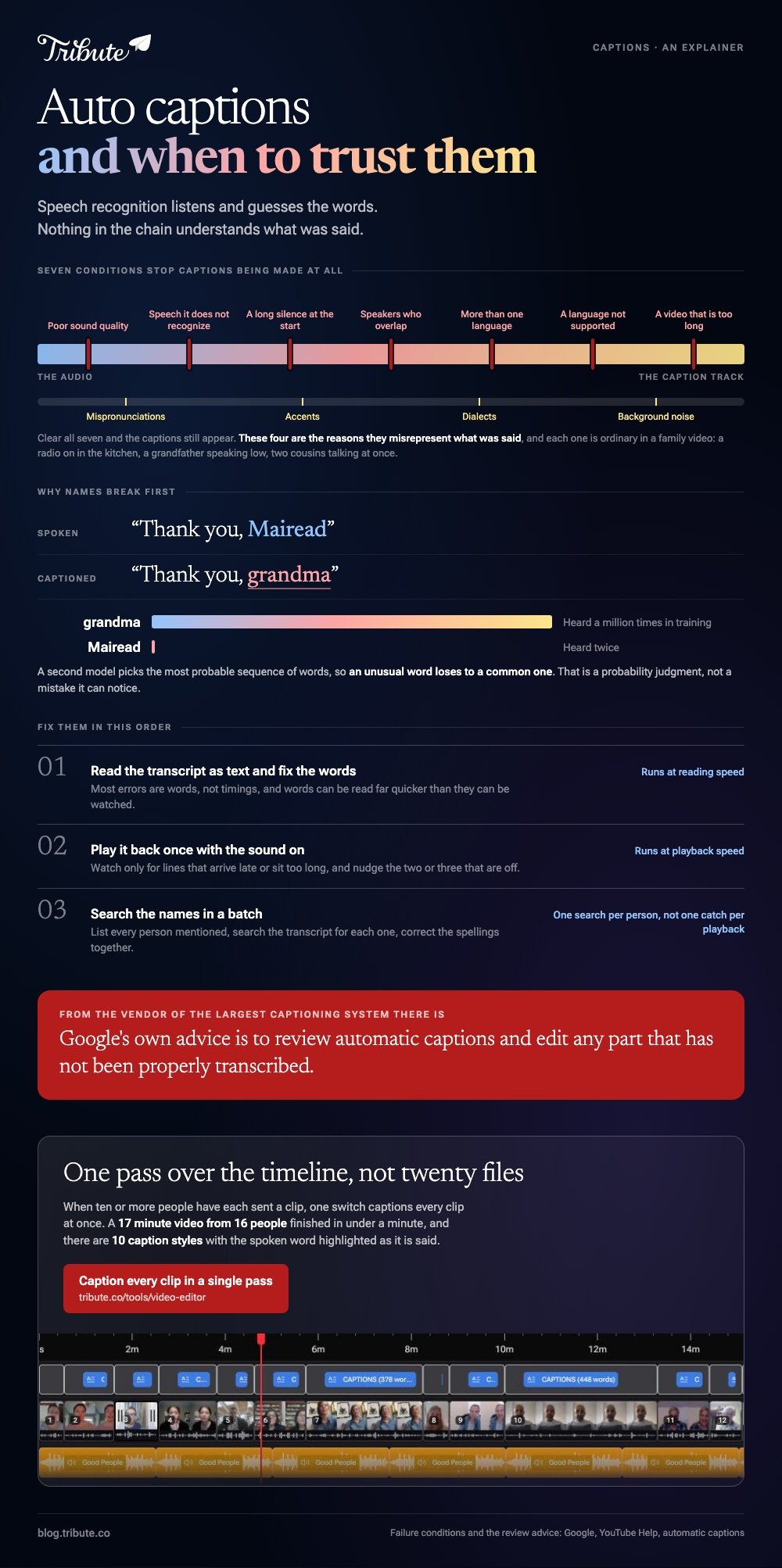
Nothing in that chain understands what was said. YouTube says so in its own documentation: automatic captions are "generated by machine learning algorithms, so the quality of the captions may vary".
The system is making a probability judgment, and an unusual word loses to a common one.
That is why names break first. A model that has heard the word "grandma" a million times and the name "Mairead" twice will pick the first one.
When do automatic captions fail?
Google lists the conditions where YouTube cannot produce captions at all, and they are the same conditions every other tool struggles with.
From its page on automatic captions: poor sound quality, speech the system does not recognize, a long period of silence at the start, several speakers whose speech overlaps, more than one language at once, a language that is not supported, or a video that is too long.
Even where captions do appear, the same page warns they "might misrepresent the spoken content due to mispronunciations, accents, dialects, or background noise". Each of those is normal in a family video.
Someone videos in a kitchen with a radio on, a grandfather with a strong accent speaks in a low voice, two cousins talk at once, and the first thirty seconds are someone working out how to hold the phone.
Canva's help pages flag the same three causes when captions come out wrong: unclear speech, background noise, and music that overlaps the voice. Lower the music, then regenerate.
How accurate are auto captions in practice?
Accurate enough to save you an hour, never accurate enough to send unread. No vendor publishes a figure you can hold them to, because the answer depends on your audio and not on their model.
Use a simpler test. Caption the clip, read the first minute, and count the errors. Clean audio gives you a handful of punctuation problems and the odd name.
Noisy audio gives you lines that mean the opposite of what was said, and at that point retyping is faster than correcting.
The one rule that holds across every tool: Google's own advice is that you "should always review automatic captions and edit any parts that haven't been properly transcribed". That is the vendor of the largest captioning system in the world telling you to proofread.
Which tool should caption your video?
Four options, and the choice follows where the video ends up rather than which model is cleverest.
YouTube Studio
Upload the video and YouTube captions it on its own, in the video's default language, across dozens of languages, with live streams limited to English. You then edit the text in Studio and the viewer can switch it off.
Best for: Anything you are uploading to YouTube regardless.
Why it works: The captions are a separate track, so they stay editable after the video is public.
Microsoft Clipchamp
Autocaptions run from the captions icon beside the preview. You pick the language, choose whether to filter offensive words, click the transcribe media button, and get an editable transcript with timestamps that you fix by double-clicking a word.
Microsoft's guide to autocaptions in Clipchamp says the transcription runs on Azure speech-to-text, allows one language per video, and needs an asset with a voice in it.
Best for: A browser edit where you also want the .SRT file.
Why it works: The transcript sits beside the picture, which makes the proofread a reading job rather than a scrubbing job.
CapCut
Tap Captions in the bottom menu, choose Auto Captions, confirm the language and generate. Each subtitle box is editable where it sits, and the styling options are the reason most social video is captioned here.
Best for: Short, vertical video for a feed.
Why it works: Caption styles are built in, so the text looks deliberate rather than typed over the top.
The Tribute video editor
The Tribute video editor is a browser-based group video editor: contributors record clips on their phones and Tribute assembles them on a timeline with the music balanced under the voices.
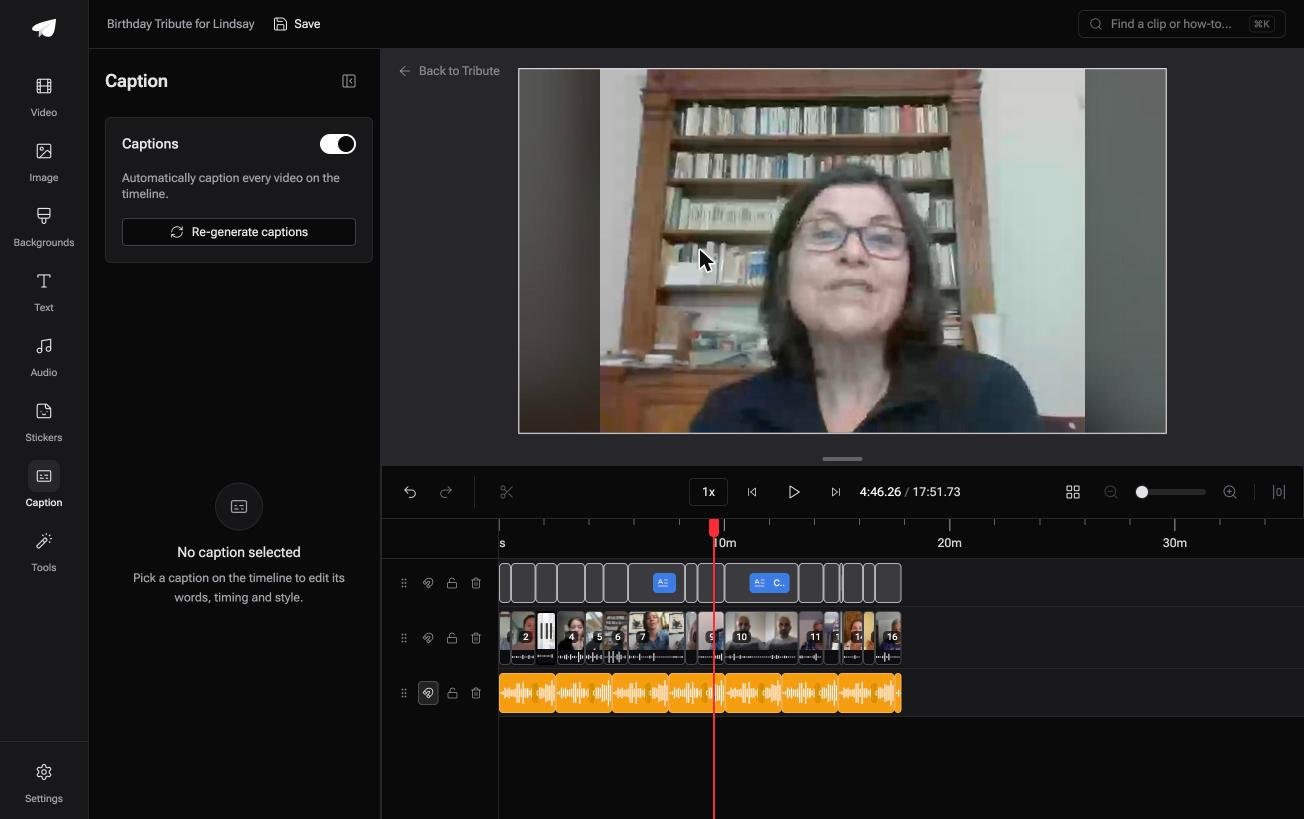
One switch captions every clip at once, and a 17 minute video from 16 people finished captioning in under a minute.
There are 10 caption styles with the spoken word highlighted as it is said, and it lives inside a paid Tribute rather than as a standalone captioner.
Best for: A timeline of twenty clips, where captioning them one by one would take an evening.
Why it works: Unlike captioning twenty files one at a time, the whole timeline is captioned in a single pass.
More on that case in how a group video maker handles thirty phones, and on the whole edit in making a video montage.
How long does fixing a set of auto captions take?
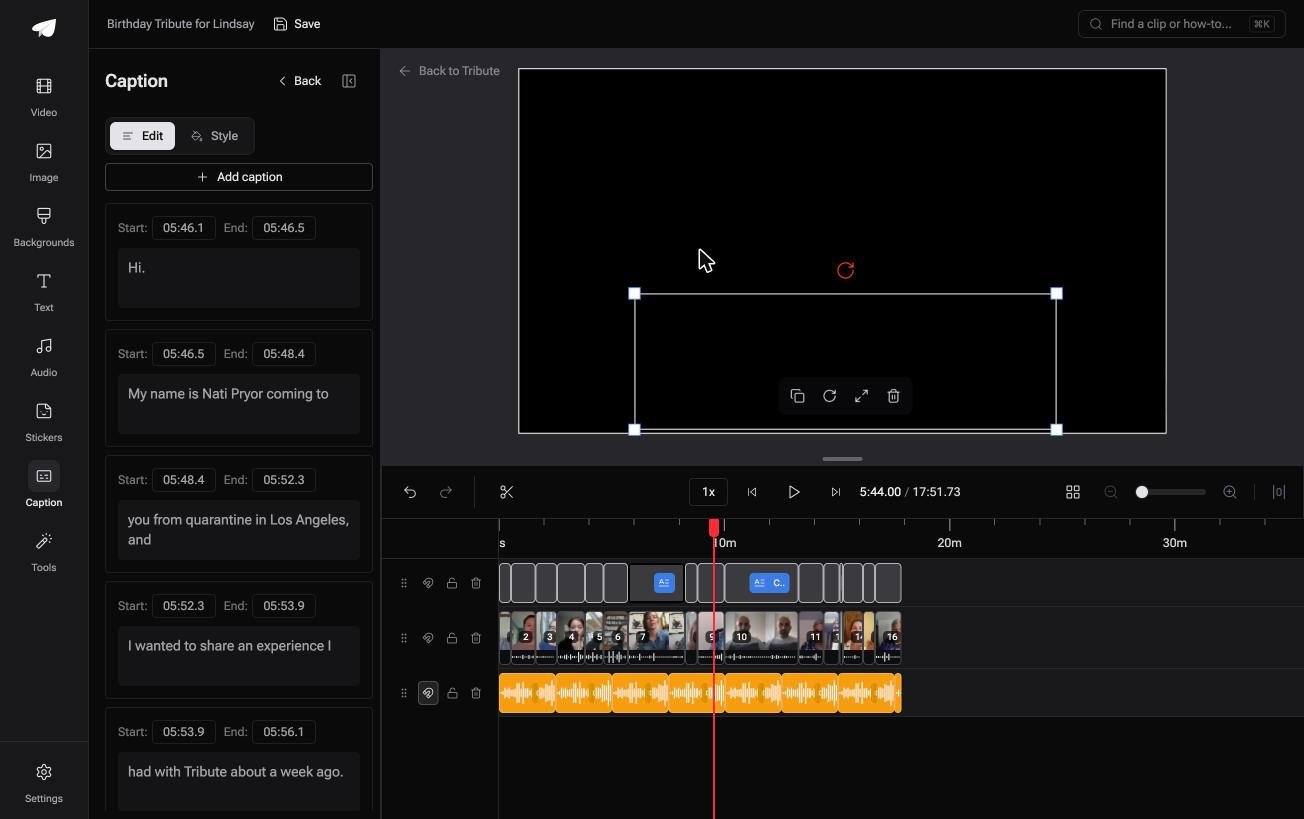
Less time than you fear, if you work in the right order. Read the transcript as text first and fix the words, because most errors are words rather than timings, and a text pass runs at reading speed instead of playback speed.
Then play it back once at normal speed with the sound on and watch for lines that arrive late or sit too long.
Editors that give each line its own start and end timecode let you nudge the two or three that are off without touching the rest.
Names deserve a pass of their own. Make a list of every person mentioned in the video, search the transcript for each one, and correct the spellings in a batch.
Compared to catching them as they fly past in playback, that takes a fraction of the time.
Fixing the text itself is a job with its own method: editing subtitles when the transcription gets a name wrong goes through it line by line.
Do you still need captions when the sound is good?
Yes, for two groups of people. Around 15% of American adults report some trouble hearing, about 37.5 million of them, according to the NIDCD hearing statistics, and a family video is watched by the generations where that figure is highest.
The second group is everyone watching with the sound off.
A phone opened in an office, a waiting room or a kitchen with other people in it plays muted by default or by choice, and automatic subtitles are the difference between a video someone watches now and one they mean to watch later.

If you would rather not run the edit at all, easy video editing covers the tools that do most of it for you, and cropping a clip handles the framing side.
Frequently Asked Questions
Do auto captions cost anything?
On most tools, no. YouTube captions uploads at no cost, and CapCut, Clipchamp and Canva all include automatic captioning on a free plan. The paid tier tends to buy you export formats or longer videos rather than better transcription.
Why are my auto captions not appearing?
The common causes are a clip with no speech in it, an unsupported language, a long silence at the start, or audio too quiet for the model to read. Raise the voice level and generate again before you blame the tool.
Can auto captions handle two people talking at once?
Not well. Overlapping speech is one of the conditions Google names for captions failing altogether, and other tools produce a single garbled line. Cut between the speakers rather than letting them overlap.
Do auto captions work in other languages?
In many of them. YouTube lists more than sixty languages for automatic captions, and desktop editors support fewer. Only one language per video is recognized, so a clip that switches language mid-sentence needs manual work.
Will auto captions get my accent right?
Sometimes. Accents and dialects are listed by Google among the reasons captions misrepresent what was said, and recognition is weakest on the accents least represented in the training data.
Should I upload an .SRT file or burn the captions in?
Upload the file where the platform accepts one, because viewers can turn it off and the text stays searchable. Burn them in for a video you are sending as a file to one person.
👉 Run one automatic pass over the whole timeline if the audio is a pile of birthday messages from different rooms, and sixteen of them are captioned in under a minute.
