
Editing Subtitles: How to Fix a Name the Transcription Got Wrong
Editing subtitles means opening the line that holds the wrong word, retyping it and saving. In YouTube Studio that is Subtitles, then Edit, then a click on the line. In CapCut it is a double-click on the caption block, and in an SRT file it is the text between two timestamps.

What does editing subtitles involve?
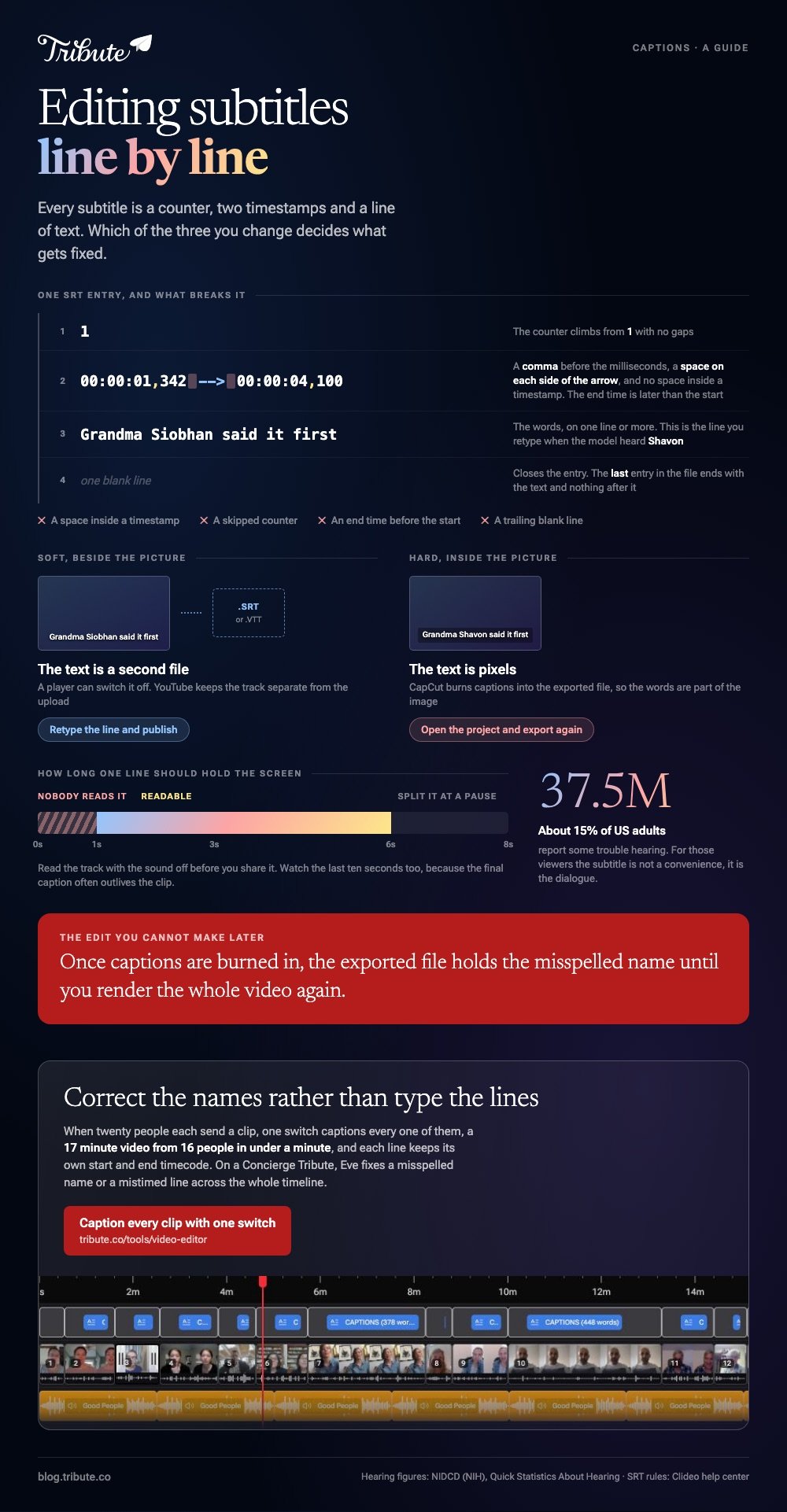
Every subtitle is three things: a number, a start and end time, and a line of text. Change the text and you fix a word. Change the times and you fix the sync. Nothing else in the video moves.
Two kinds exist. Soft subtitles sit beside the video as a separate file, most often SRT or VTT, and a player can switch them off.
Hard subtitles are burned into the picture and stay there, so the only way to change subtitles later is to render the video again.
Names are where transcription breaks. The model guesses from sound, so a grandmother called Siobhan comes out as Shavon and an uncle named Nguyen comes out as Win.
Nothing in the audio corrects it, which is why you fix subtitles by hand instead of running the transcription a second time.
How do you edit subtitles on YouTube?
YouTube generates captions for most uploads and lets you overwrite them. The one step people miss is that auto captions are read-only until you duplicate them.
It is also where an older audience will watch: 65% of US adults aged 65 and over use YouTube, per the Pew Research Center.
- Sign in to YouTube Studio and select Subtitles in the left menu.
- Click the video, then select Edit next to the language.
- If the track came from auto captions, choose Duplicate and edit, then Continue. Your version becomes a new caption track.
- Click the line that holds the wrong name and retype it.
- To move a line in time, change the two timestamp boxes beside it. If you cannot see them, select Edit timings.
- Select Publish.
Google documents the whole path, including deletion, in its guide to editing or removing captions. The same screen has an Options menu with Download subtitles, which is how you get the SRT out.
Best for: A video that is already on YouTube and does not need re-uploading.
Why it works: The edit lands on the live video with no re-upload, and the original file on your laptop never changes.
How do you fix a wrong name in CapCut captions?
CapCut keeps the caption text in a panel rather than in the picture, so a wrong word is a text field and not a render. The route differs between the desktop app and the browser version, and CapCut's own help page spells both out.
- On desktop, double-click the caption block in the timeline, or right-click it and choose Edit Captions.
- In the browser version, click the subtitle block, then Edit captions in the panel on the right.
- Click the line with the wrong name and type the correct spelling. CapCut saves the change as you type.
- If one line runs across two sentences, put the playhead at the pause and press Ctrl+B on Windows or Cmd+B on a Mac to split it.
- If most of the track is wrong, delete the captions, mute the music and effects, and run Auto Captions again on the voice alone.
Unlike YouTube, CapCut burns the result into the exported file, so you cannot change subtitles after the export. Get the names right before you hit export rather than after.
Best for: A video you are still editing, where the captions are part of the look.
Why it works: The caption panel and the timeline sit on one screen, so you can hear the word and read the line at the same moment.

How do you edit an SRT file by hand?
An SRT file is plain text. Notepad, Notepad++, TextEdit and Sublime Text all open one, and so does any editor that saves without formatting. This is the fastest way to fix twenty instances of the same misspelled surname, because you can use find and replace.
The format is strict, and Clideo's help center lists the rules that break an upload: a counter that climbs from 1 with no gaps, timestamps written as hours:minutes:seconds,milliseconds with an end time later than the start, the text on one or more lines, then one blank line.
Spaces inside a timestamp break it. Spaces around the arrow are required.
One entry is four lines: the counter 1, then 00:00:01,342 --> 00:00:04,100, then the words that are spoken, then nothing. The last entry in the file ends with the text and no trailing blank lines.
Save the file with the .srt extension, then upload it again wherever the video lives. You can also edit subtitles online in a browser tool that imports SRT, which saves you from the formatting rules.
Best for: One name repeated through a long video, or a track you want to keep as a separate file.
Why it works: Find and replace fixes every instance in one keystroke, and the timings stay untouched.
Why do transcriptions get names wrong?
Google is blunt about the limits of its own system: automatic captions "might misrepresent the spoken content due to mispronunciations, accents, dialects, or background noise". Proper nouns carry all four risks at once.
A name has no dictionary entry to fall back on, and family names are often pronounced the way one family says them rather than the way a model expects.
Room noise compounds it. A clip recorded in a kitchen with a dishwasher running gives the model less signal than the same sentence in a quiet hallway, and the first word after a pause is the one that suffers.
Getting it right matters more than it looks. About 15% of American adults, some 37.5 million people, report some trouble hearing, according to the National Institute on Deafness and Other Communication Disorders.
For those viewers the subtitle is not a convenience, it is the dialogue.
What if the video is twenty clips from twenty different people?
Here the subtitle problem multiplies. Twenty speakers means twenty accents, twenty rooms and twenty first names the model has never met, and every one of them needs a pass.
The Tribute video editor is a browser-based group video editor: contributors record clips on their phones and Tribute assembles them on a timeline with the music balanced under the voices.
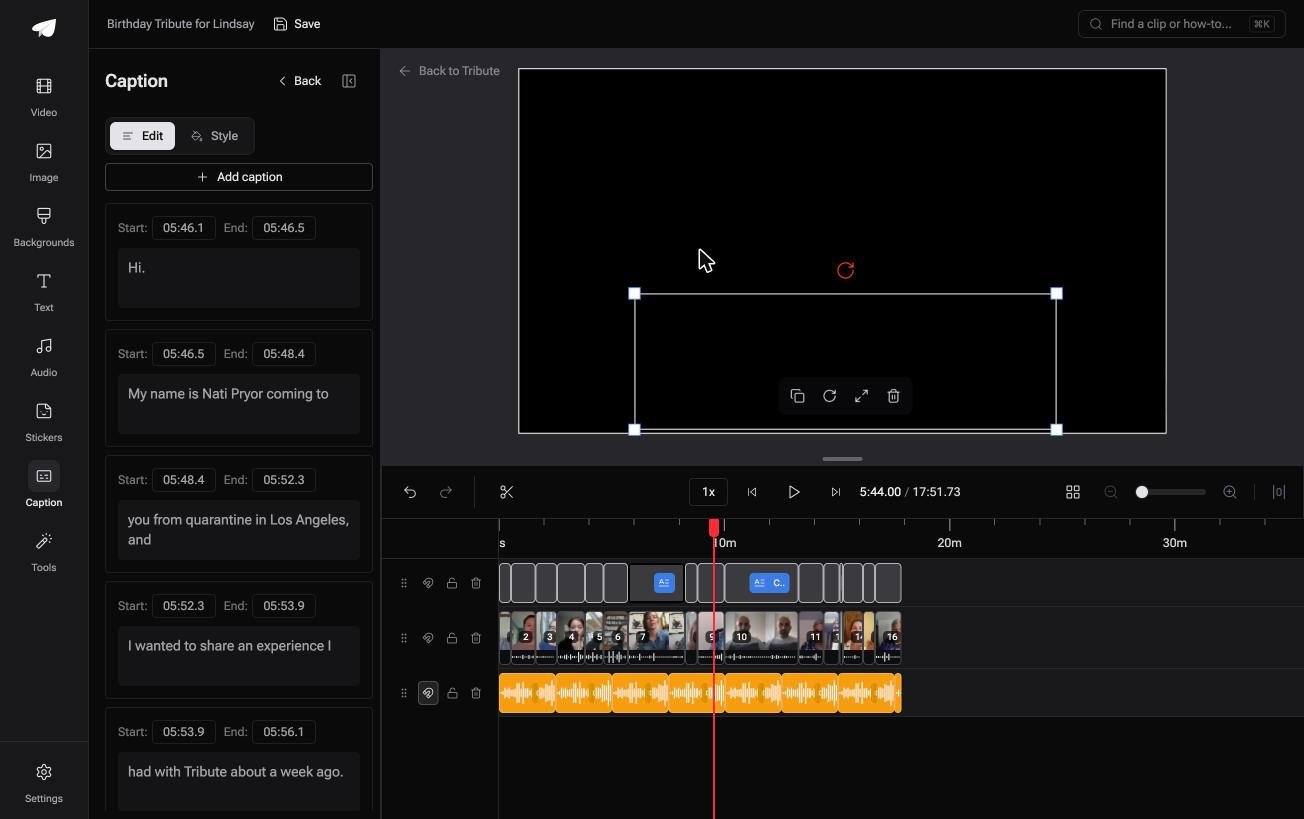
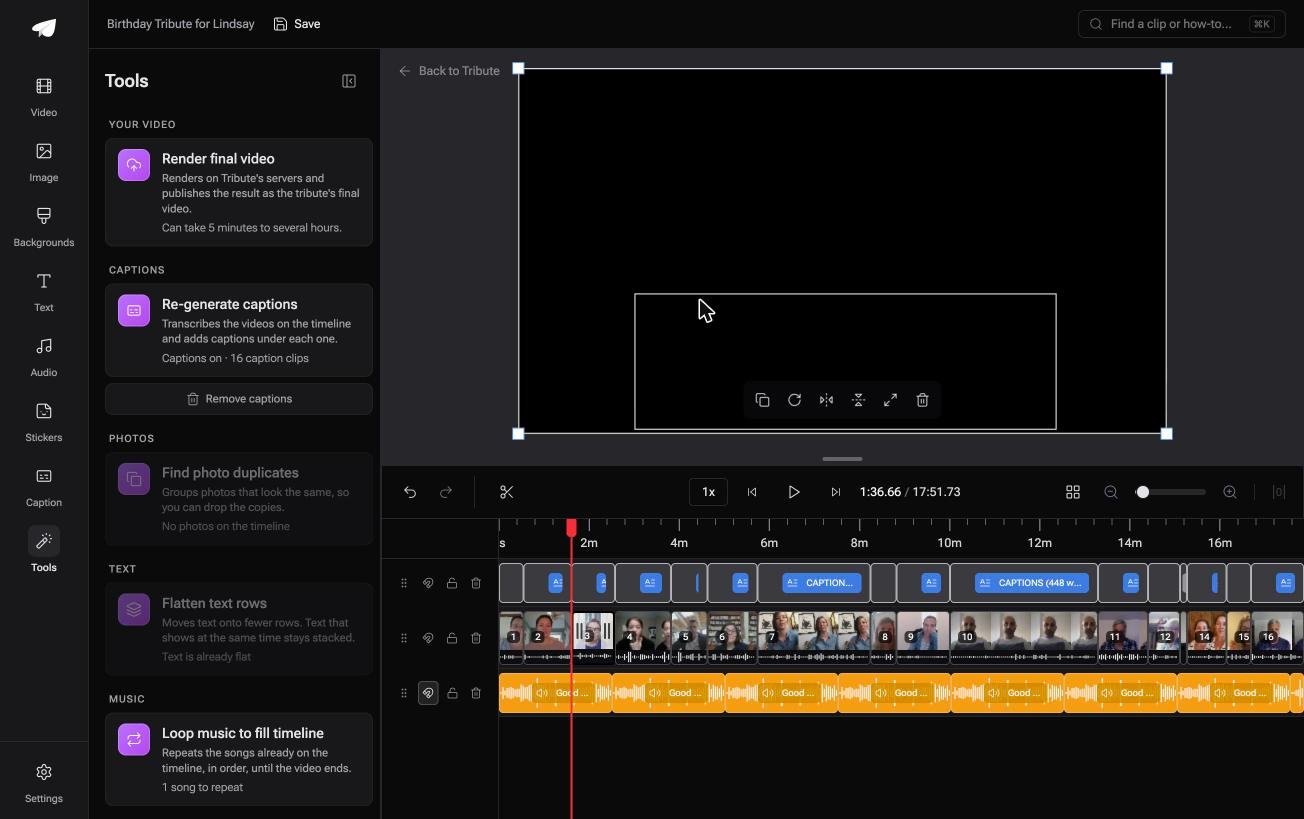
One switch captions every clip on that timeline, a 17 minute video from 16 people in under a minute, and each line stays editable with its own start and end timecode.
It lives inside a paid Tribute, so it is not a general purpose subtitle tool.
Best for: A video made for a person whose name no transcript has ever spelled right.
Why it works: The transcription runs on every clip at once, so your job shrinks to reading through and correcting the names.
More on how the automatic pass behaves is in our guide to auto captions and when to trust them, and the wider job is covered in adding subtitles to videos.
How do you check subtitles before you share the video?
Read them with the sound off. Errors that your ear forgives on playback become obvious when the text is all you have, and that is how a deaf viewer will see the video.
Work through a short list. Write down every proper noun in the video first, then search the caption track for each one. Check that no line sits on screen for less than a second, since a line that flashes is a line nobody reads.
Watch the last ten seconds, because the final caption often outlives the clip.
Compared to fixing captions after you publish, a pass before upload costs you five minutes and nobody sees the error. Our guide to easy video editing covers the rest of the finishing list, and making a video montage covers the assembly.
Frequently Asked Questions
Can I edit subtitles without re-uploading the video?
On YouTube, yes. The caption track is separate from the video file, so you can edit subtitles and publish the change while the video stays where it is. Burned-in subtitles need a new export.
How do I change subtitles that are burned into the picture?
You cannot change the text in the exported file. Go back to the project that made it, correct the caption line there and export again. If the project is gone, you would have to cover the old text, which never looks right.
Why are my subtitles out of sync?
Either the file was made for a different cut of the video, or the start point drifted. Most editors let you shift the whole track by a fixed amount rather than moving each line, which fixes a consistent offset in one step.
What is the difference between captions and subtitles?
Captions describe everything a viewer needs who cannot hear, including sound cues such as [applause]. Subtitles carry the dialogue alone. In most consumer tools the two words are used for the same feature.
Can I edit subtitles online without installing anything?
Yes. Browser tools import an SRT file, show every line with its timecodes and let you retype any of them. They burn the result into the video, so download the corrected SRT as well if you want to keep a separate file.
How long should one subtitle line stay on screen?
Around one second for a short phrase and up to six for a long sentence. If you are splitting a long caption, split it at a natural pause in the speech rather than at a fixed word count.
Do I need to caption a family video?
It helps more people than you expect, and it also makes the video watchable with the sound off. Older relatives are the viewers who need it most and ask for it least.
👉 Correct the names rather than type the subtitles if twenty people each sent a clip, and on a Concierge Tribute Eve fixes the misspelled ones for you.
