
Easy Video Editing: What to Use When You Do Not Want to Learn Video Editing
Easy video editing means four actions: put the clips in order, cut the dead air off the front of each, even out the volume, and export. iMovie's Magic Movie, Clipchamp and Google Photos each do that in half an hour. Everything past those four is a hobby.

What makes video editing easy or hard?
Not the software. The difficulty in a first edit comes from the material: twenty clips of uneven length, recorded in different rooms at different volumes, each starting with four seconds of someone finding the record button.
A good tool shortens that work and no tool removes it.
Simple video editing is subtraction more than anything else. You are deciding what to lose, and the controls you need for that are a trim handle and a volume slider.
Effects, color and transitions are the part that looks like editing and contributes least to whether the video is watchable.
So judge a tool by how fast it gets you to those two controls. An editor with nine panels and a tutorial is not harder because it does more; it is harder because the two things you need are four clicks further away.
One more thing shapes the job before you open anything.
With 91% of US adults owning a smartphone, according to the Pew Research Center mobile fact sheet, a family video is footage from a dozen handsets across three generations of camera, and the mismatch between them is what you spend the evening smoothing out.
Which easy video editing tools ask the least of you?
Magic Movie in iMovie
Apple's Magic Movie mode is the shortest route to a finished video on an iPhone or iPad, and most people never find it because they tap Movie instead.
Tap Start New Project, then Magic Movie, choose your clips and photos, and iMovie assembles the whole thing with a soundtrack and transitions between clips.
What you get back is a first cut to react to rather than a blank timeline to fill, which is a different and much smaller job. Apple's iMovie for iPhone guide covers the project types and what each one expects from you.
Best for: An iPhone owner who wants a watchable video this evening.
Why it works: The machine does the arranging and you do the editing, which reverses the order most tools put you through.
Microsoft Clipchamp
Clipchamp comes with Windows 11 and also runs in Edge or Chrome at app.clipchamp.com, so there is nothing to install and no license to think about.
Click create a new video, open My media, click import media, select all your files and drag them onto the timeline together.
Both controls that matter are one click deep.
Trim by dragging the green bars at either end of a clip, and set volume by selecting a clip and opening the audio tab in the property panel, as Microsoft describes in its guide to editing a video in Clipchamp.
Best for: Windows machines, Chromebooks and work laptops.
Why it works: Exports reach 1080p with no watermark on the free tier, and edits save as you work, so a closed tab does not cost you the evening.

Google Photos
On Android, the gentlest option is already installed. Tap Create, tap Highlight video, tap Select content, choose your photos and videos, tap Next, then Create video, and Google fits music to what you picked.
Its limits are real and worth knowing before you start. You can reorder by touching and holding a clip, remove clips, add music and add text, and there is no fine trimming of individual clips inside a Highlight video.
For a photo-led video that is enough; for twenty talking heads it is not.
Best for: A montage of photos and short clips already in your library.
Why it works: The gathering step vanishes, because the material and the tool are in the same place.
CapCut
CapCut is a step up in control and still friendly. Tap New project, pick your clips, drag them into order, and tap Export at the top right. The reason to choose it over the three above is audio and captions.
Tap a clip, tap Volume, and set that clip on its own. Then run the automatic captions and spend ten minutes correcting names rather than typing sentences. If a transcription mangles someone's name, our guide to fixing subtitles covers the repair.
Best for: Anything with speech in it, on either phone platform.
Why it works: Per-clip volume is two taps from the timeline, and uneven volume is the single flaw people notice in a home-made video.
The Tribute video editor
This is the paid entry, and the case against it comes first: if the footage is yours and it is on your own phone, the four tools above are a better answer.
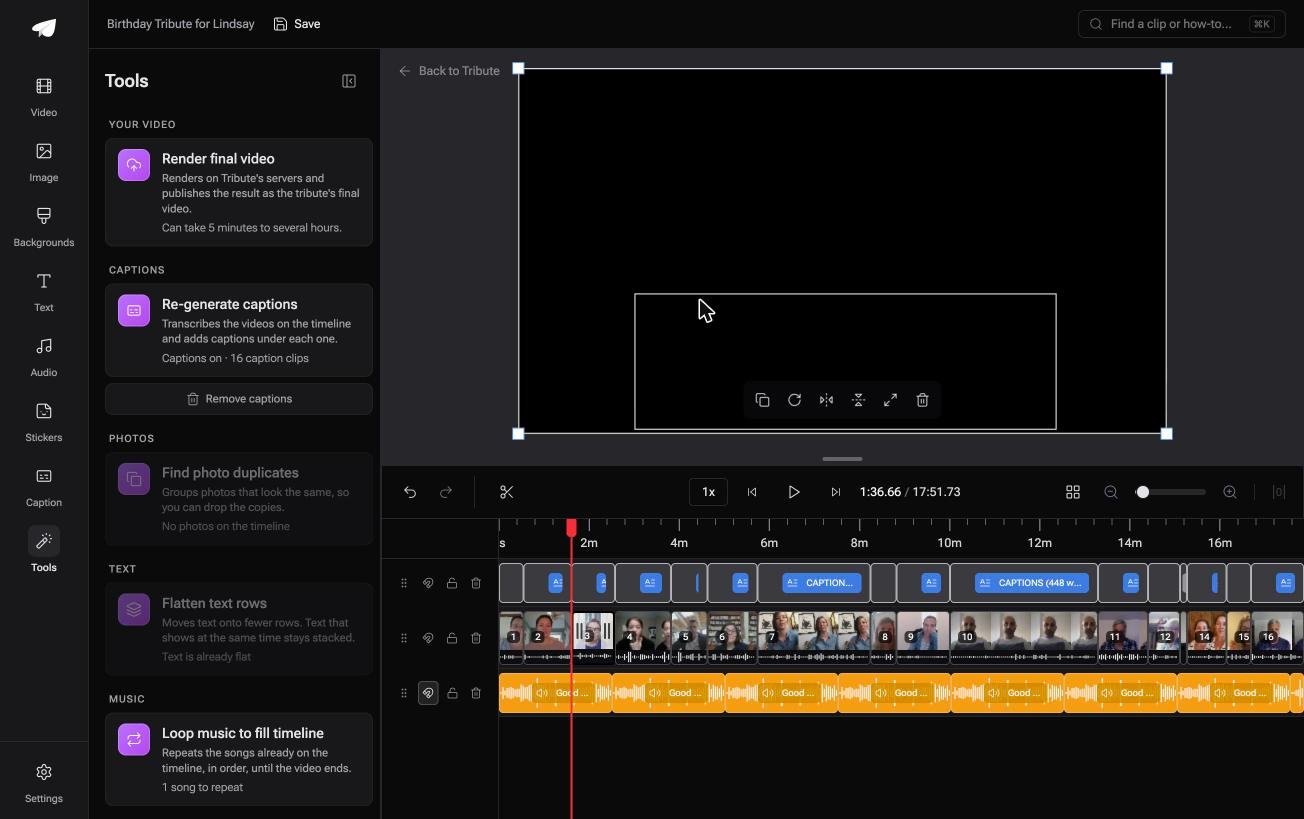
The Tribute video editor is a browser-based group video editor: contributors record clips on their phones and Tribute assembles them on a timeline with the music balanced under the voices. It lives inside a paid Tribute and it will not open an unrelated video.
The job it removes is the one that makes an edit hard. Clips arrive in order with a tick showing which are already on the timeline, music ducks to 25% under speech on its own, and one switch captions every video on the timeline.
If even that is more than you want, Tribute's own editors will build the video and hand it back for approval.
Best for: A person who has no wish to edit at all, with thirty clips from others waiting.
Why it works: Unlike a general editor, the arranging and the audio balance are done before you sit down. DIY starts at $35 and a Concierge edit is $99.

What are the four edits that do most of the work?
Do these in order and stop. In testing a first cut against a polished one, these four account for almost all of the difference an audience can hear or see.
- Trim the front of every clip to the first word. People press record, look at the lens, then begin. Twenty clips with four seconds of nothing at the front is eighty seconds of a video starting over and over.
- Set volume per clip. One person recorded in a kitchen and the next in a car. A level set once for the whole video cannot fix that.
- Put the best clip second and the funniest one last. Opening with the strongest material leaves nowhere to go; opening with something warm and following it with the strongest does.
- Add music under the speech, not over it. Drop the track until you can hear every word, then drop it a little further.
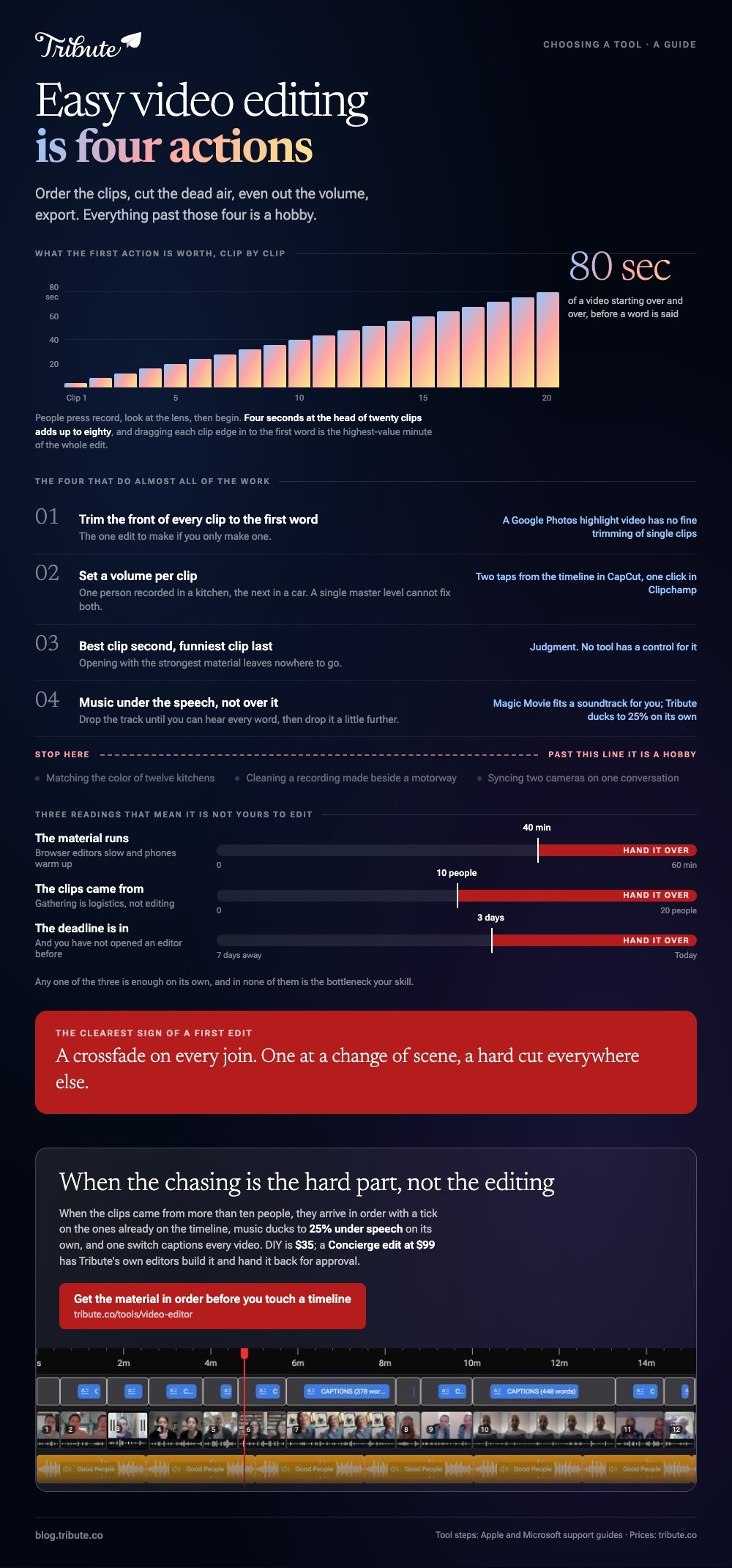
Skip transitions. A hard cut is the professional default and a crossfade on every join is the clearest sign of a first edit. One at a change of scene, none anywhere else.

When should you not edit it yourself?
Three signals, and any one of them is enough. The material runs past forty minutes, the clips came from more than ten people, or the deadline is inside three days and you have not opened an editor before.
In those cases the bottleneck is not skill.
Gathering files at full quality from a dozen phones and putting them in a sensible order is a logistics problem, and a better editor is the wrong tool for it, as we set out in how a group video maker handles thirty phones.
Paying someone is the other honest answer, whether that is a Tribute Concierge edit, a freelancer, or a relative who edits as a hobby. Compared with a weekend spent learning an interface, a hundred dollars is often the cheaper line item.
Where do easy video editing programs run out?
At the point where you want something specific rather than something good.
Matching the color of twelve clips shot in twelve kitchens, cleaning a recording made next to a motorway, or syncing two cameras on one conversation are real skills, and the tools above will not do them for you.
Length is the other wall. Past about forty minutes, browser editors start to feel slow and phone apps start to warm up, and the work moves to a desktop whether you wanted it to or not.
Our list for that stage is editing software for beginners, and the phone-first version is what to use on an iPhone.
For the whole job end to end, from collecting clips to a finished video, start with our main guide to making a video montage.
Frequently Asked Questions
What is the easiest video editing software to learn?
iMovie on Apple hardware and Clipchamp on Windows, because both hide everything you do not need on a first project. Google Photos is easier still on Android and gives you less room to change the result.
How long does a simple edit take?
About twenty minutes of work for every five minutes of finished video, once the files are in one place. Gathering the files is the part that takes days, not the editing.
Can I edit a video without a timeline?
Yes. Magic Movie in iMovie, Highlight videos in Google Photos and most template-led apps build the sequence for you and let you adjust it. You trade fine control for an hour of your evening.
Do easy video editing tools add a watermark?
iMovie, Clipchamp and Google Photos do not. Phone apps outside those three sometimes do, and the export screen tells you before you render rather than after.
What is the one edit worth doing if I only do one?
Trim the silence off the front of every clip. Nothing else you can do in ten minutes improves a home-made video as much.
Should I add captions?
Yes, on anything with speech. Automatic captions are good enough now that the work is correcting names, and a captioned video survives being watched with the sound off on a phone.
Is a paid editor worth it for one video?
Seldom. A single project is better served by a tool that costs nothing or by paying someone to do the edit, since a monthly subscription for one weekend is the worst of both.
👉 Get the material in and in order before you touch a timeline if the hard part is the chasing rather than the editing, because no simpler editor fixes that.
