
iMovie Join Clips: The Command Does Not Do What You Think
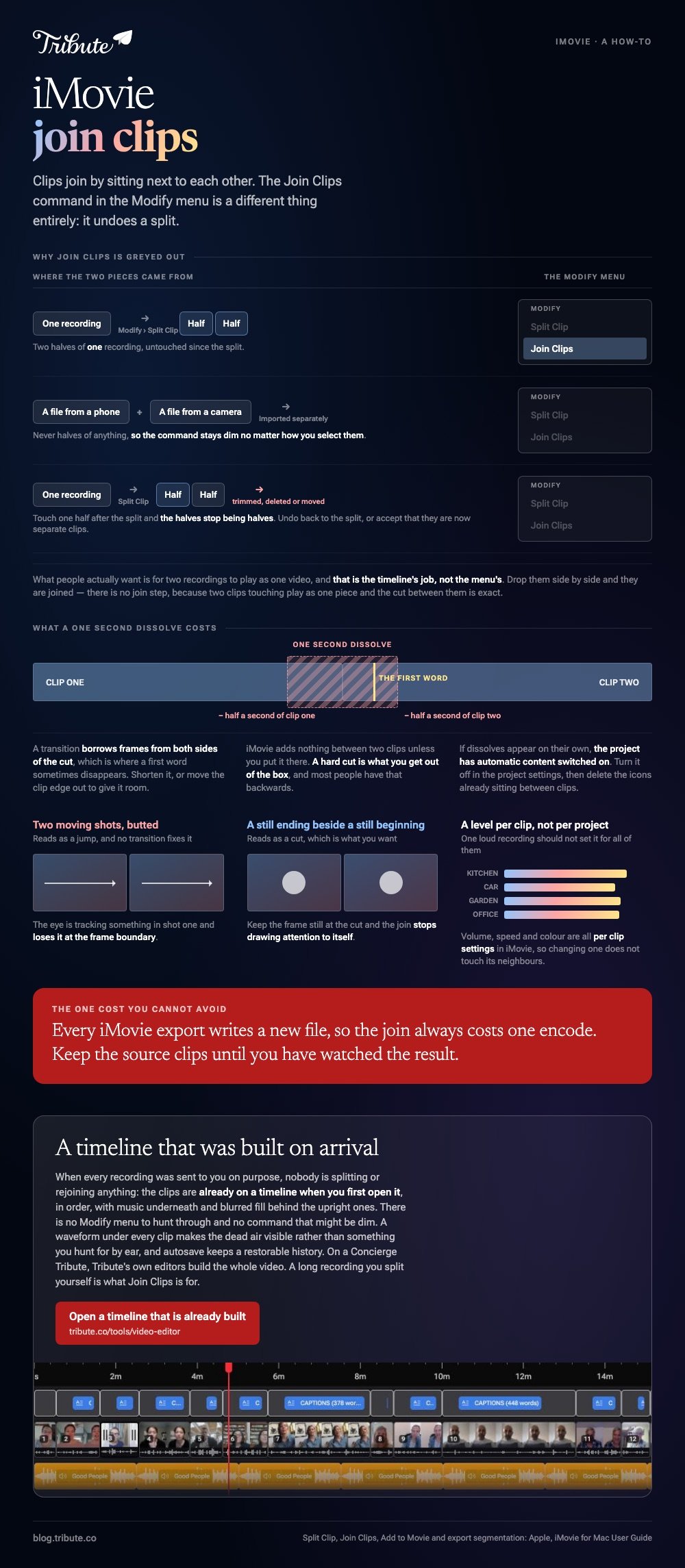
In iMovie, clips join by sitting next to each other on the timeline. Nothing is placed between them. The Modify menu's Join Clips command is a separate thing: it rejoins a clip you split yourself.

Why is iMovie Join Clips grayed out?
Because the two things you selected were never one clip.
Join Clips undoes a split. Put the playhead somewhere and choose Modify > Split Clip, as Apple describes in moving and splitting clips, and you now have two halves of one recording. Join Clips puts those halves back.
Two files you imported from a phone and a camera are not halves of anything, so the command stays dim no matter how you select them.
It also goes dim after a split if you then trimmed, deleted or moved one of the halves. Undo back to the split, or accept that the two pieces are now separate clips.
What people mean when they search for it
Almost always: make these two recordings play as one video.
That is the timeline's job, not the menu's, and iMovie does it without asking.
How do you join two clips in iMovie on a Mac?
Drop them on the timeline in order and they are joined.
- Open iMovie, click Create New, then click Movie.
- Choose File > Import Media and bring in every clip. They appear in the browser above the timeline.
- Select the first clip and choose Edit > Add to Movie, or click the Add (+) button on the clip. Apple's page on adding clips notes that it lands at the end of the timeline.
- Repeat for each clip, in the order you want them to play.
- To slot one into the middle, park the playhead there and choose Edit > Insert. If the playhead sits over a clip, that clip splits and the new one goes between the halves.
- Drag any clip sideways to reorder it.
- Choose File > Share > File, set Resolution and Quality, click Next, then Save.
There is no join step in that list because there is no join step. Two clips touching on the timeline play as one piece, and the cut between them is exact.
Best for: Any number of recordings you want in one file, with full control of order and volume.
Why it works: Each clip keeps its own volume, speed and color settings, so one loud recording does not set the level for all of them.
The same job on an iPhone
iMovie for iPhone calls every project a movie, which is why the search wording shifts around.
Tap Start New Project, tap Movie, tap each clip in the order you want it, then tap Create Movie. To get the file out, tap Done, then Share, then Share Video, then Save Video.
Best for: Two to ten clips already sitting in the camera roll of the phone in your hand.
Why it works: Nothing uploads and nothing is added to the picture, so the output looks like the source.
Can iMovie join clips without a transition?
That is the default, and most people have it backwards.
iMovie adds nothing between two clips unless you put something there. A hard cut is what you get out of the box.

If dissolves are appearing on their own, the project has automatic content switched on. Open the settings for the project and turn it off, then delete the dissolve icons already sitting between clips.
A transition also eats frames from both sides of the cut. Unlike a straight join, a one second dissolve costs you half a second of each clip, which is where a first word sometimes disappears.
When a cut reads as a mistake
Three fixes do most of the work, and none of them is a transition.
- Trim the heads. People press record, look at the lens, then begin. Pull the clip edge in to the first word.
- Match the volume. Set a level per clip rather than once for the project.
- Keep the frame still at the cut. Two moving shots butted together read as a jump; a still ending next to a still beginning does not.
Why does the joined video look worse than the clips did?
Because the export rebuilt everything to one standard.
Clips that share a codec, a resolution and a frame rate survive the round trip. Mix 4K at 60 fps with 1080p at 30 and iMovie re-encodes the lot, with the weakest file setting the ceiling.
Export at the top resolution offered, and check the first and last clip before sending it anywhere. On an Apple silicon Mac running macOS Sonoma or later, Allow export segmentation speeds up anything over about three minutes.
Compared to a browser tool, iMovie never uploads your footage, so the only quality loss is the one export.
Other routes to the same result are in merging video clips online, joining two videos together and joining clips in Adobe Premiere.
Who assembles it when sixteen people each send a clip?
The Tribute video editor is a browser-based group video editor: contributors record clips on their phones and Tribute assembles them on a timeline with the music balanced under the voices.
It is ours, and it is the last thing on this page.
- Clips arrive already in order, with a tick against the ones on the timeline
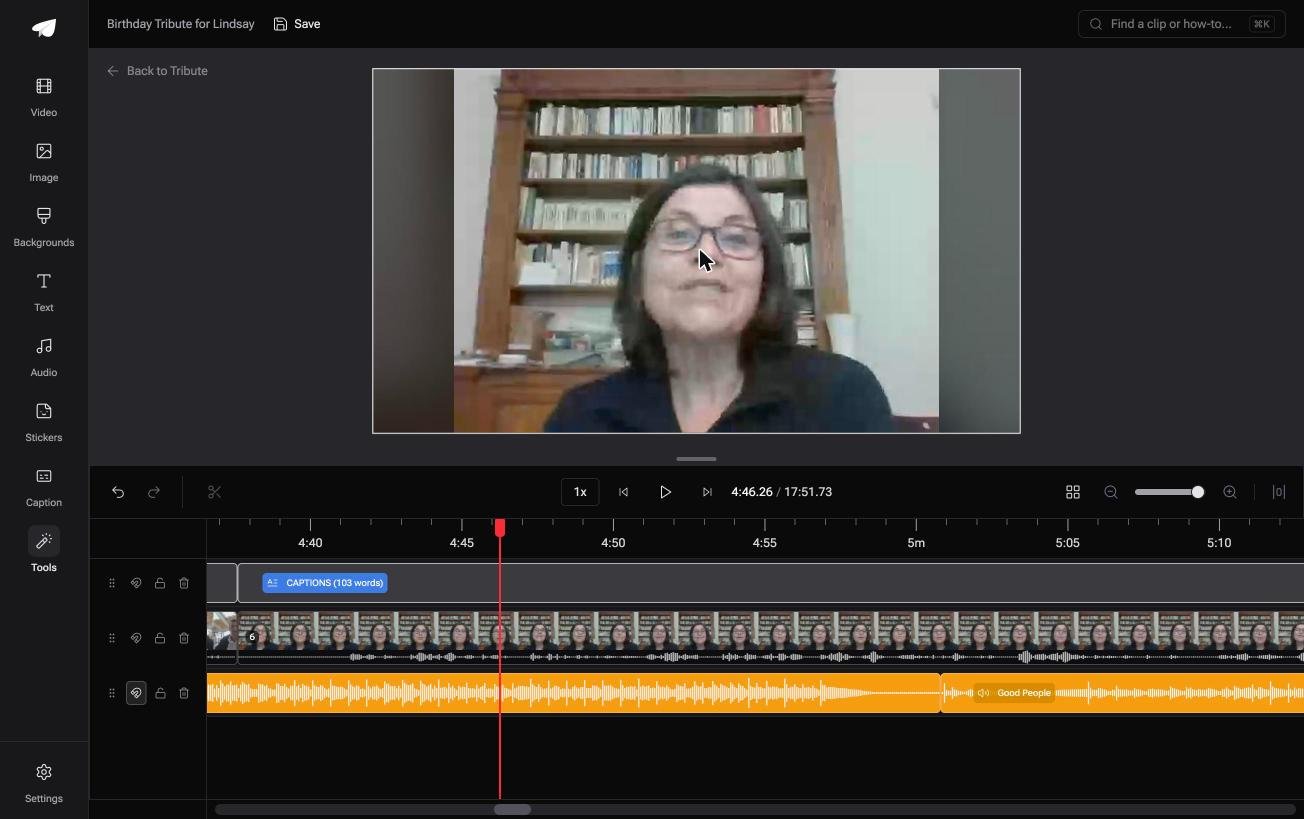
- A waveform under every clip, so the silence before the first word is visible rather than guessed
- Music ducks to 25% under video and 75% under photos, overridable on a single clip
- 47 entrance and 47 exit animations, including the slow zoom used on still photographs
- Autosave with a restorable version history, and removed clips recoverable rather than deleted
Best for: A timeline you want someone else to have built before you open it.
Why it works: The dead air at the head of a clip is something you can see before you drag the edge in, rather than something you hunt for by ear.
Is there a version of this with no timeline at all?
Import, order, trim, level, export.
That sequence is four evenings on a set of twenty recordings, and the skill it asks for is why people go hunting for a join command at all.
One kind of video skips the building.
The case: the clips were made for one person
You are in it when every recording was sent to you on purpose.
A grandmother turning eighty. A colleague leaving after fifteen years. A memorial where the people who should speak are in four states.

Nobody is splitting or rejoining anything. Everyone recorded one message, and the ordering is the only real decision.
Why there is nothing to join
The clips are already on a timeline when you first open it.
They arrive in order, with music underneath and blurred fill behind the upright ones. There is no Modify menu to hunt through and no command that might be dim.
That is how the Tribute video editor handles it: not a smarter join command, but a timeline that was built on arrival.

When this is the wrong answer: you shot the footage yourself, or you split one long recording and want the halves back. Then iMovie is the right tool and Join Clips is the right command.

One more limit worth stating: the editor runs in a browser and lives inside a paid Tribute.
The wider job is covered in making a video montage.
Frequently Asked Questions
Where is Join Clips in iMovie?
In the Modify menu on a Mac. It appears only when the selection is two or more pieces of a clip you split, and it dims for separate imported files.
How do I join two clips in iMovie without re-encoding them?
You cannot. Every iMovie export writes a new file, so the join always costs one encode. Keep the source clips until you have watched the result.
Can I join clips in iMovie and keep the original audio levels?
Yes. Volume is a per clip setting, so leaving each clip alone keeps the level it was recorded at. Changing one does not touch its neighbors.
Why did my first word disappear after I added a transition?
A transition borrows frames from both clips either side of the cut. Shorten it, or move the clip edge out to give it room, then put the words back in view.
How many clips can iMovie hold in one project?
Apple publishes no count. The practical ceiling is the drive and your patience, and on a long set the slow part is dragging clips into order rather than the join.
Does iMovie on iPhone have a Join Clips command?
No. On a phone the clips you select at the start are already placed one after another when you tap Create Movie, and you drag them to change the order.
Can I join clips shot in portrait and landscape together?
Yes, with a caveat. The project frame follows the first clip you add, so the odd ones sit between black bars unless you rotate them or fill the gutters first.
👉 Open a timeline that is already built if several people are recording for one person, and the join command stops mattering. On a Concierge Tribute, our editors build the whole video instead.
