
Compress Video for YouTube: The Bitrate That Matters and the Step You Can Skip
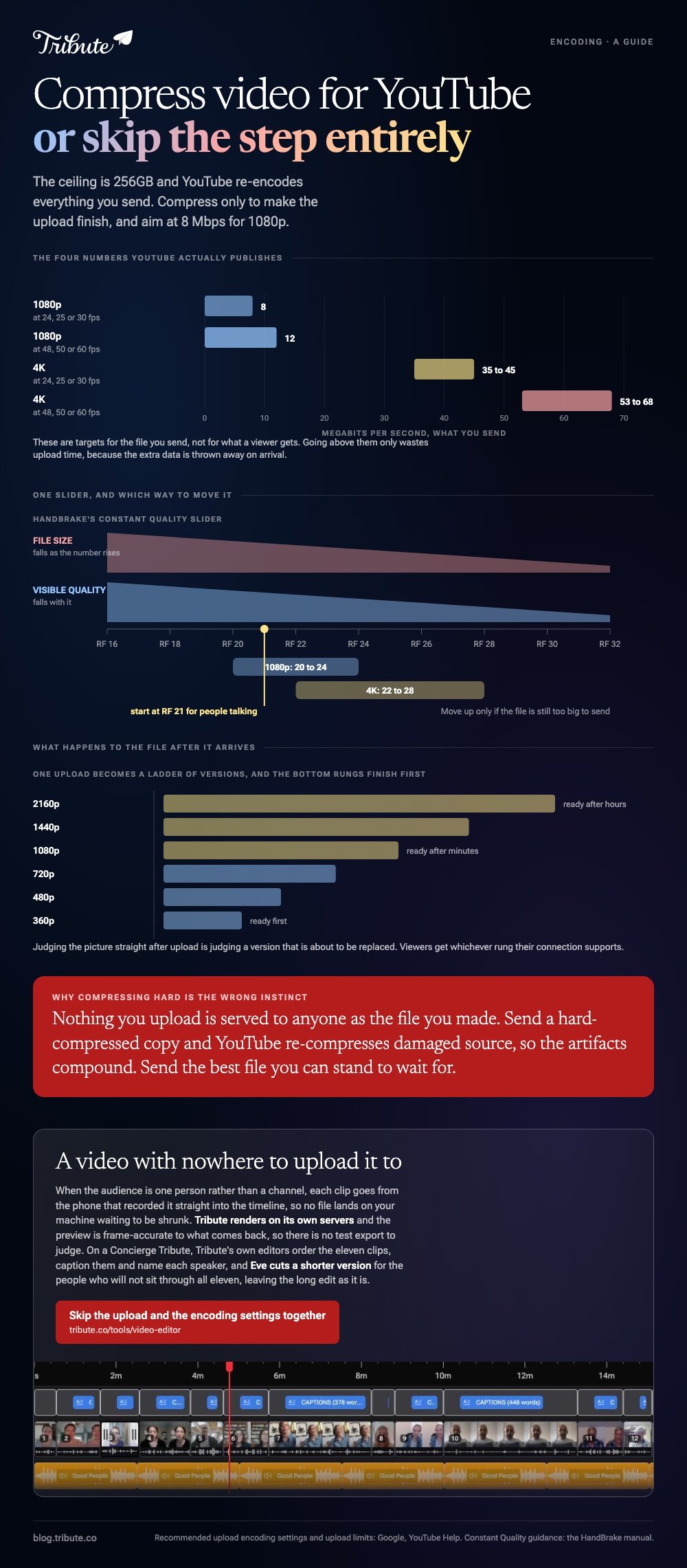
Most people do not need to compress video for YouTube at all. The upload limit is 256GB and YouTube re-encodes everything you send, so compress only to make the upload finish, and aim at 8 Mbps for 1080p.

| Your file | What to do | Why |
|---|---|---|
| Under 10GB | Upload it as it is | Well inside the limit |
| Large, slow connection | Encode to 8 Mbps at 1080p | Shorter upload, no visible loss |
| 4K you want kept | Encode to 35 to 45 Mbps | YouTube's own recommendation |
| Over 256GB | Compress or split it | The hard ceiling |
Do you need to compress video for YouTube at all?
In most cases, no.
YouTube accepts 256GB or 12 hours, whichever is less, and a new account is held to 15 minutes until it is verified. An hour of 4K from a phone is a few dozen gigabytes, so the ceiling is not what you are hitting.
The real reason to shrink a file is the upload itself. A slow connection turns a 40GB export into an overnight job, and a smaller file gets the video live today.
Five phrases describe the same task: youtube compress mp4, mp4 compressor youtube, a video compressor for youtube upload, youtube to compressed mp4, and compressing before upload. All of them mean reducing the bitrate before sending.
What does YouTube ask for?
An MP4 holding H.264 video and AAC audio, with the index at the front of the file.
YouTube publishes its recommended upload encoding settings, and the useful parts are short.
- Container: MP4, no edit lists, moov atom at the front, which encoders call Fast Start
- Video: H.264, progressive scan, High Profile, CABAC, 4:2:0, variable bitrate
- Audio: AAC-LC at 48 kHz, 384 kbps for stereo
| Resolution | 24, 25 or 30 fps | 48, 50 or 60 fps |
|---|---|---|
| 1080p | 8 Mbps | 12 Mbps |
| 4K | 35 to 45 Mbps | 53 to 68 Mbps |
Those are targets for what you send, not what viewers get. Going above them wastes upload time, because the extra data is thrown away on the other side.
How do you compress video for YouTube in HandBrake?
Six steps, once, and you can save the result as a preset.
- Open the file in HandBrake and leave the format set to MP4.
- Pick the Video tab and set the encoder to H.264.
- Choose Constant Quality and set the RF slider. HandBrake suggests RF 20 to 24 for 1080p and RF 22 to 28 for 4K.
- Set the framerate to Same as source and choose Constant Framerate, which prevents drift.
- Check Web Optimized so the index lands at the front of the file.
- Set the audio to AAC at 48 kHz and start the encode.
A lower RF number means better quality and a larger file. Start at RF 21 for a video of people talking and move up only if the file is still too big to send.
Longer walkthroughs of the same tool are in compressing video with HandBrake.
Is an online YouTube MP4 compressor worth it?
For a short clip with nothing private in it, yes.
A browser-based youtube mp4 compressor saves you installing anything and handles a two minute video in about a minute. The trade is that your footage goes to somebody else's server and comes back through a queue.
Three things to check before you upload to one.
- The size cap, which is often 500MB on the tier that costs nothing
- How long files are kept, which should be hours rather than never stated
- Whether it adds a watermark, which some do at the point of download
Unlike a local encoder, a browser tool cannot show you the result until it has finished the whole file. The options are compared in compressing a video file online.

What happens to your file after you upload it?
YouTube re-encodes it, every time, whatever you sent.
Your upload becomes a ladder of versions at different resolutions, and viewers get whichever one their connection supports. Nothing you upload is served to anyone as the file you made.
That has one practical consequence. Compressing hard before upload means YouTube re-compresses an already damaged copy, and the artifacts compound.
So the rule is to send the best file you can stand to wait for. Compared to shaving a gigabyte off, giving the encoder clean source material does far more for how the video looks on a phone.
Why your video looks soft for the first few minutes
Processing finishes at low resolution first.
Higher versions appear over the following minutes or hours, depending on length. Judging quality straight after upload is judging a version that will be replaced.
What if the video was made by a dozen people at once?
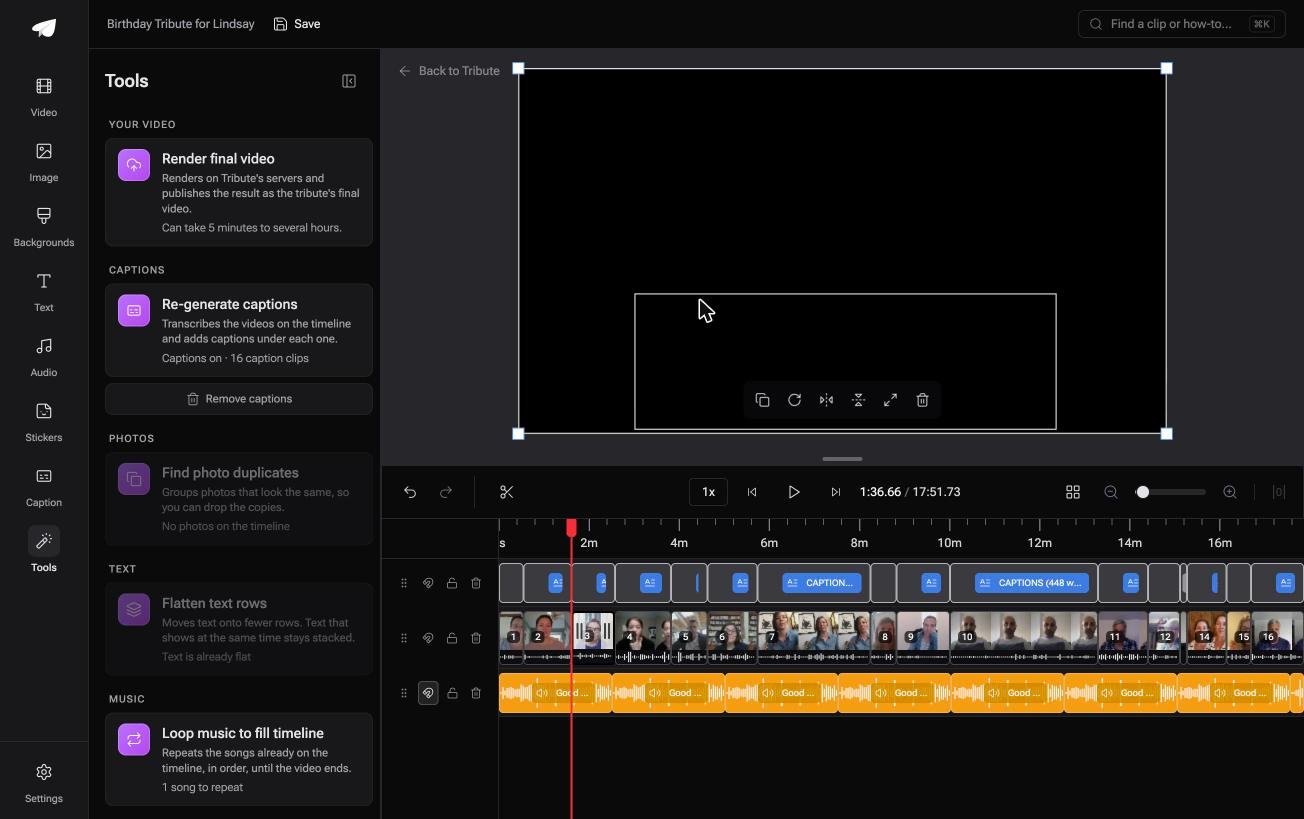
The Tribute video editor is a browser-based group video editor: contributors record clips on their phones and Tribute assembles them on a timeline with the music balanced under the voices.
It is ours, and it is the last thing on this page.
- Tribute renders the final video on its servers, so no export sits on your machine waiting to be shrunk
- Each person uploads from their own phone, and the clips arrive in order on the timeline
- Preview is frame-accurate to the delivered video, so there is no test export to judge
- The Tools panel carries Render final video, Re-generate captions and Find photo duplicates
Best for: A video meant for one family rather than a channel and an upload queue.
Why it works: The upload happens sixteen times from sixteen phones rather than once from yours.
Where does the video go if not to YouTube?
The steps above all end at a public page with a comments box under it.
That is the right destination for a channel. It is a strange one for a video of eleven people saying goodbye to a colleague, which is why so many of them get uploaded as unlisted and then shared by link anyway.
One kind of video skips the upload step altogether.
The case: the audience is one person
You are in it when several people each record something for one person.
A grandmother turning eighty. A colleague leaving after fifteen years. A memorial where the people who should speak are in four states.

Nobody is chasing views. The video has one viewer who matters, and the whole bitrate question exists to serve an audience this video does not have.
Why there is nothing to compress
Each clip goes from the phone that recorded it straight into the timeline, so no file lands on your machine.
Rendering happens on Tribute's servers, and what you hand over at the end is a link.
It can also arrive as a video book, a hardcover case with a screen inside that plays when you open it. That version needs no connection at all.
That is how the Tribute video editor handles it: not a faster upload, but a video with nowhere to upload it to.

What you do not have to do
- Not the upload. Each clip goes from the phone that recorded it into the timeline.
- Not the encode. Tribute's servers build the video and hand back a link at full quality.
- Not the edit. On a Concierge Tribute, Tribute's editors order the eleven clips, caption them and name each speaker.
- Not a trimmed-down version for the people who will not sit through all eleven. Eve, the assistant on Concierge and Concierge + Video Book, produces one without touching the long edit.

When this is the wrong answer: the video is for a channel and the audience is strangers. Then YouTube is the destination and the encoding settings above are the whole job.
Our editor runs in a browser and lives inside a paid Tribute.
The wider craft is in making a video montage.
Frequently Asked Questions
Does compressing hurt YouTube quality?
Beyond a point, yes. YouTube re-encodes your upload, so a hard compressed source is compressed twice and the second pass has less to work with.
What resolution should you upload?
The one you shot. Uploading 4K gets a better 1080p version than uploading 1080p does, because YouTube assigns a higher bitrate to the ladder it builds.
Why is my upload taking so long?
Upload speed is the usual cause rather than file size. Check your connection's upload figure, which on home broadband is often a tenth of the download figure.
Does YouTube accept MOV files?
It does, along with several other containers. MP4 with H.264 is still the recommended one, because it needs the least work on arrival.
What bitrate should a 1080p video be?
8 Mbps at 24, 25 or 30 frames per second, and 12 Mbps at 48, 50 or 60. Those are YouTube's published figures for standard dynamic range.
Can you compress a video after uploading it?
No. You replace it instead: delete the video and upload a new file, which also resets the view count and the link.
👉 Skip the upload and the encoding settings together if the video is for one person rather than a channel, and the bitrate stops being your decision.
