
Filmora Crop Video: The Crop and Zoom Panel, the Presets, and the Export
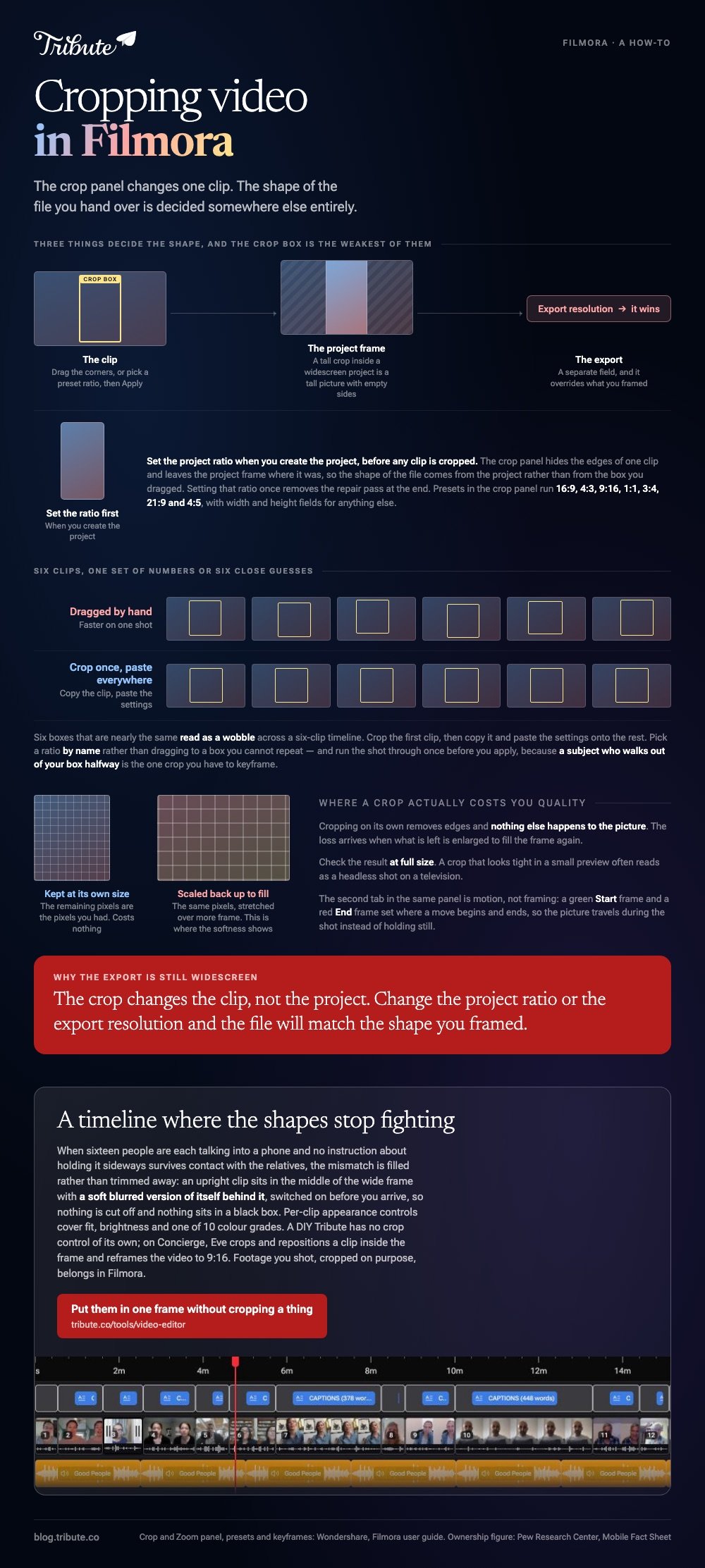
Filmora crops one clip at a time in the Crop and Zoom panel: select the clip, pick a preset ratio or drag the corners, then press Apply. The project keeps its own frame size, which is why a cropped clip can still export wide.
What does the Filmora crop video panel do?
It hides the edges of one clip and leaves the project frame where it was.
Wondershare's own Crop and Zoom guide has you select a clip in the timeline and click the crop icon to open the panel. The same panel opens from a right-click on the clip.
Two things follow from that, and both surprise people on the first attempt.
| What you expect | What Filmora does | Where the real control is |
|---|---|---|
| The picture gets narrower | The frame keeps the project's shape | Project settings |
| The crop covers the timeline | It covers the one clip you selected | Copy and paste the clip |
| The export matches the crop | The export matches the project | The export resolution |
How do you crop a clip in Filmora without guesswork?
Pick a ratio by name rather than dragging to a box you cannot repeat.
Dragging the corner handles is faster for one shot. It also leaves every clip cropped to a different box, and on a six-clip timeline that reads as a wobble.
- Drop the clip on the timeline and select it.
- Click the crop icon, or right-click the clip and choose Crop and Zoom.
- On the crop tab, choose a preset: 16:9, 4:3, 9:16, 1:1, 3:4, 21:9 or 4:5.
- For anything else, type your own numbers in the width and height fields.
- Drag the box over the part of the picture you are keeping.
- Press Apply.
The Filmora Crop and Zoom panel carries a second tab for motion. A green Start frame and a red End frame set where a move begins and ends, so a still photo can drift across the screen rather than sit there.
Run the shot through once before you apply it. A subject who walks out of your box halfway is the one crop you have to keyframe.
Check the result at full size too. A crop that looks tight in a small preview often reads as a headless shot on a television.

Does a Filmora crop video export match what you framed?
Not on its own.
A tall crop inside a widescreen project gives you a tall picture sitting inside a widescreen file, with empty space on both sides. The shape of the file comes from the project, not from the crop box.
- Set the project ratio first. Choose it when you create the project, before any clip is cropped.
- Check the export resolution. It is a separate field, and it wins.
- Crop once, paste everywhere. One set of numbers across six clips beats six close guesses.
Unlike the crop box, the project ratio decides what the person watching ends up with. Compared with cropping clip by clip, setting that ratio once removes the repair pass at the end.
When is a crop and zoom in Filmora the wrong move?
When the job is one clip and the app is not open yet.
Most of the footage people want to crop was shot on a phone, held however the person holding it felt like holding it.
The Pew Research Center puts smartphone ownership at 91% of US adults, which makes mixed shapes the normal case rather than the exception. A desktop crop panel is a heavy answer to a problem that arrives this often.
Say your sister sends one upright clip for a shared birthday video. Installing a desktop editor, building a project and setting a ratio is twenty minutes of work for a ten second fix.
A browser handles that in one pass: see cropping a video online and the browser croppers worth opening. The same job in Premiere Pro runs on an effect rather than a panel, and building a montage comes after the shapes agree.
What if the footage came from a dozen different phones?
The Tribute video editor is a browser-based group video editor: contributors record clips on their phones and Tribute assembles them on a timeline with the music balanced under the voices.
It is ours, and it is the last thing on this page.
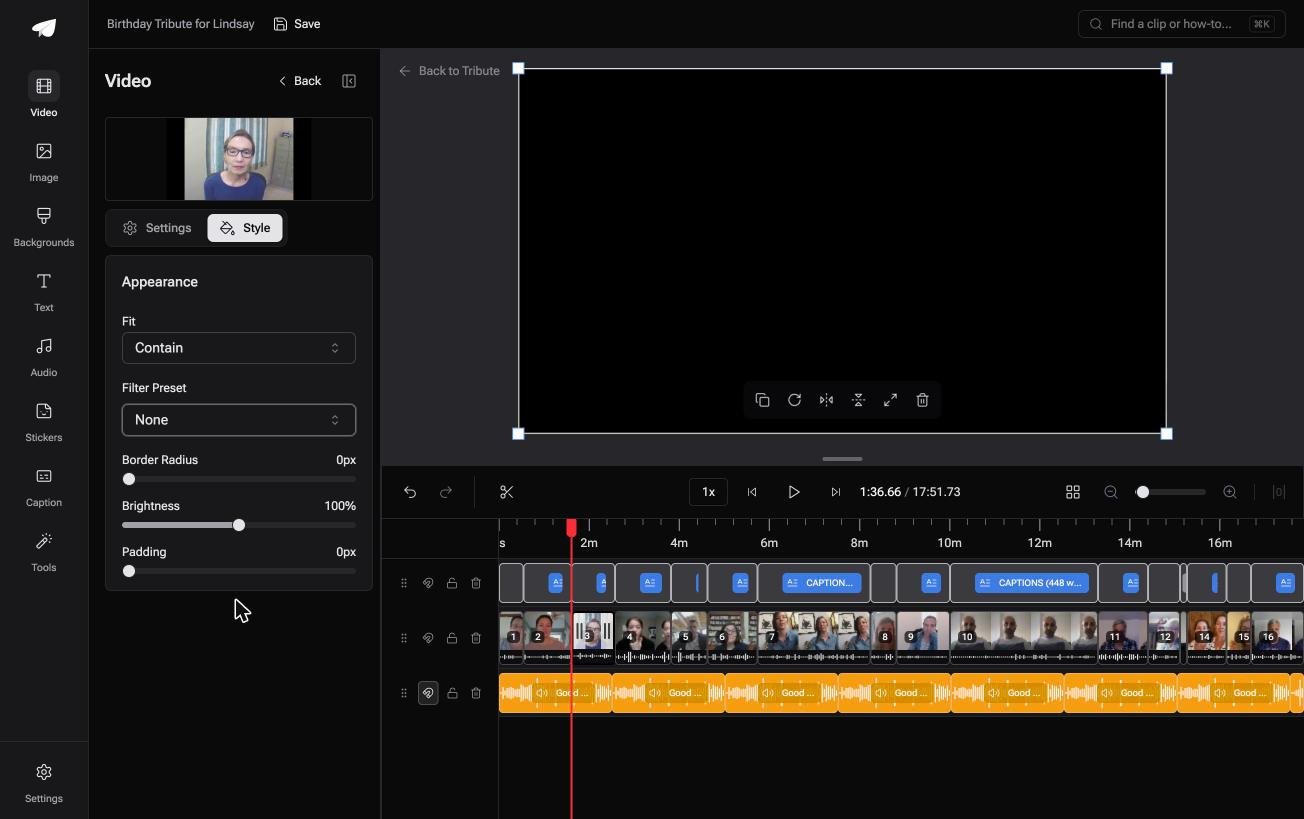
- Blurred edges fill the frame behind upright phone footage, on by default, so nothing arrives in black bars
- Per clip appearance controls for fit, brightness and one of 10 color grades, previewed on the real clip
- 47 entrance and 47 exit animations, including the slow zoom look
- Music at 25% under speech and 75% under photos, overridable per clip
Best for: A shared video where ten people held ten phones ten different ways and nobody agreed on a shape.
Why it works: Mixed shapes land in one frame without a crop pass, because the gutters are filled rather than cut away.
Does anyone have to open Filmora at all?
A crop is a repair, not a creative decision.
Someone held the phone upright, or there is a doorway in the shot you would rather lose, and you are closing the gap between what was recorded and what has to play. There is one kind of video where that gap never opens.
The case: the clips are sent to you
You are in it when several people each record something for one person.
A grandfather turning ninety, with cousins recording from three countries. A coach leaving a club after twenty seasons. A memorial where half the family speaks into a phone held upright at the kitchen table.
Nobody is shooting coverage. Everyone is talking into a phone, and no instruction about holding it sideways survives contact with sixteen relatives.

Why the frame stops needing a repair
Because the mismatch is filled rather than trimmed away.
An upright clip sits in the middle of the wide frame with a soft blurred version of itself behind it, switched on before you arrive. Nothing is cut off and nothing sits in a black box.
That is how the Tribute video editor treats mixed footage: not a quicker way to crop in Filmora, but a timeline where the shapes stop fighting.
What you do not have to do
- No files to chase. One link, and each person records on their own phone however they hold it.
- No frame to repair. Blurred edges fill the space behind an upright clip, on by default.
- No names to type. A badge carries the name and relation in one of four corners.
- No edit at all, on Concierge. Tribute's editors crop, reorder and caption, then hand it back for approval.

When this is the wrong answer: you shot the footage and the crop is a choice you are making on purpose. Then stay in Filmora, where the keyframes live.
A DIY Tribute has no crop control of its own, and it sits inside a paid Tribute rather than standing alone.
On a Concierge or Concierge Deluxe Tribute, Eve crops and repositions a clip inside the frame, and reframes the video to 9:16 or another aspect ratio.
Frequently Asked Questions
Where is the crop button in Filmora?
Above the timeline as a crop icon, once a clip is selected. A right-click on the clip opens the same Crop and Zoom panel from the menu.
Can I crop every clip at once in Filmora?
Not from one panel. Crop the first clip, then copy it and paste the settings onto the rest so every shot uses the same numbers.
Does cropping in Filmora lose quality?
Only when you scale what is left back up to fill the frame. A crop that keeps the remaining pixels at their original size costs nothing, and a heavy enlargement is where the softness shows.
What ratios does the crop panel offer?
Presets for 16:9, 4:3, 9:16, 1:1, 3:4, 21:9 and 4:5, plus width and height fields for anything else. Pick the one that matches where the video is going.
Why is my cropped clip still widescreen after export?
The crop changes the clip, not the project. Change the project ratio or the export resolution and the file will match the shape you framed.
What is the difference between crop and zoom?
Cropping removes edges and holds still. Pan and Zoom moves between a Start frame and an End frame, so the picture travels during the shot.
Is a desktop editor worth installing for one crop?
Not often. A browser tool crops a single clip in under a minute and asks you to build nothing first.
👉 Put them in one frame without cropping a thing if half the clips are upright and none of them are yours, and the repair pass never starts.
