
Subtitle Editor for Windows: Subtitle Edit, Clipchamp, and Which One You Need
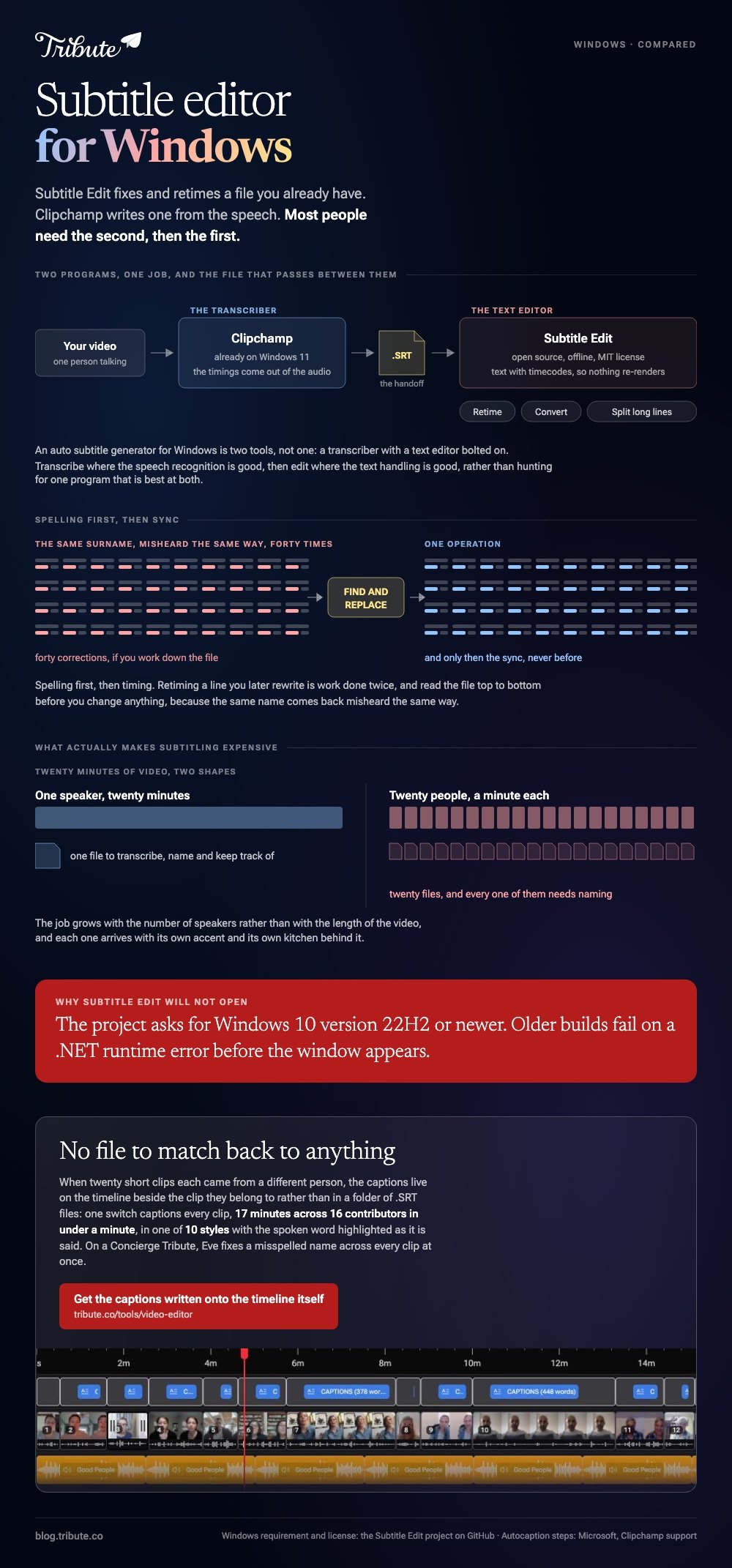
A subtitle editor for Windows does one of two jobs. Subtitle Edit fixes and retimes a subtitle file you already have. Clipchamp writes one from the speech in your video. Most people need the second, then the first.

| Tool | What it does | Cost |
|---|---|---|
| Subtitle Edit | Edit, retime and convert subtitle files | Open source, MIT license |
| Clipchamp | Transcribe speech, style the text, export an SRT | Already on Windows 11 |
| YouTube | Caption an unlisted upload and hand back the track | An account |
| By hand | Type each line against a waveform | About six times the runtime |
Which subtitle editor for Windows should you install?
Subtitle Edit is the subtitle software for Windows most people land on.
It is an offline, open source application under an MIT license, and the project asks for Windows 10 version 22H2 or newer.
Older builds fall over on a .NET runtime error at launch, which is the most common reason it will not start at all.
What it is good at is everything that happens after the words exist.
- Retiming. Shift a whole track by half a second, or stretch it to match a different frame rate.
- Converting. Move between subtitle formats without retyping a line.
- Splitting long lines. Two short lines read better than one that runs off the frame.
- Translation and speech to text, through the optional outside services it can call.
The project page on GitHub carries the downloads, the license and the Windows requirement.
Best for: A subtitle file that is out of sync, in the wrong format, or full of lines that are too long.
Why it works: It treats subtitles as text with timecodes rather than as a layer inside a video project, so nothing re-renders while you work.
How do you get the words in the first place?
Let a machine transcribe them, then correct the names.
To add subtitles to a video on Windows 10 or Windows 11, Clipchamp is already there, and it hands back an SRT you can open in Subtitle Edit afterward.
- Import the video from My media on the toolbar and drag it onto the timeline.
- Click the captions icon in the video preview, or open the captions tab in the property panel.
- Choose the transcription language, set the offensive-language filter, then click transcribe media.
- Double-click any misheard word in the transcript and retype it.
- Click download captions to save the .SRT, then export the video.
Microsoft documents that sequence in its guide to using autocaptions in Clipchamp.
Best for: A video of someone talking, where nobody has typed anything yet.
Why it works: The timings come out of the audio, so the only thing left to fix is spelling.

An auto subtitle generator for Windows is two tools, not one
It is a transcriber with a text editor bolted on.
Knowing that saves an evening. Transcribe where the speech recognition is good, then edit where the text handling is good, rather than hunting for one program that is best at both.
More on the editing side in subtitle editing programs and the cutting side in clip and cut video editors.
Fix the text before you touch the timing
Spelling first, then sync.
A pass for names and numbers takes ten minutes and removes the errors a viewer will see. Retiming a line you later rewrite is work done twice, and on a long track that adds up fast.
Read the whole file top to bottom before you change anything. The same name is misheard the same way every time, which makes it one find and replace rather than forty corrections.
Should the subtitles be a file or burned into the picture?
A file, unless the destination gives you no choice.
| Form | Good for | Trade |
|---|---|---|
| SRT alongside | YouTube, a player, a delivery spec | The viewer can switch it off |
| Burned in | Social video, a file sent to family | Permanent, and re-rendered to change |
| Both | One master, two destinations | Two exports instead of one |
Compared to burned-in text, a sidecar file stays editable after someone spots the misspelled surname. Keep the SRT even when you burn the text in, because it is the only copy you can correct in ten seconds.
It is worth doing either way. The National Institute on Deafness and Other Communication Disorders reports that about 15% of American adults report some trouble hearing, which is before you count anyone watching with the sound off.
What if the video is sixteen people rather than one speaker?
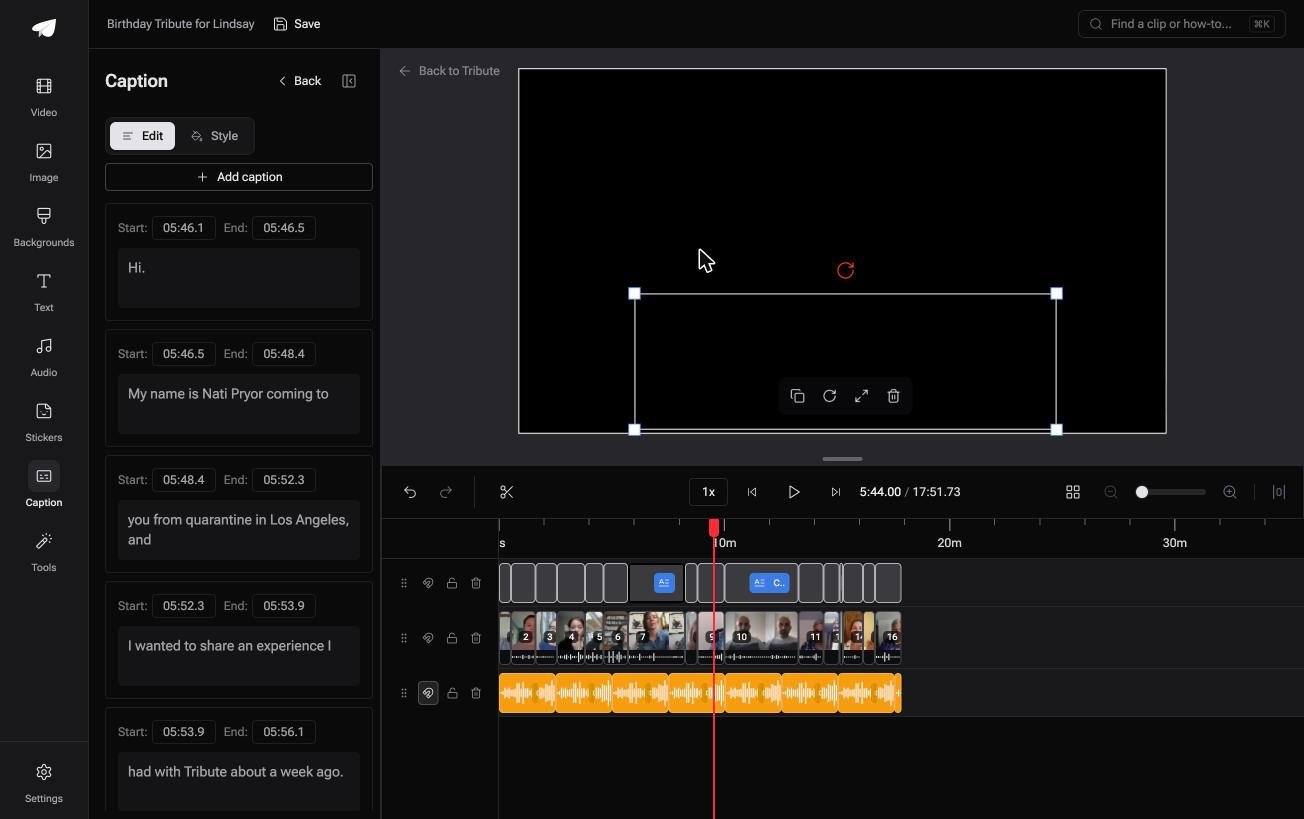
The Tribute video editor is a browser-based group video editor: contributors record clips on their phones and Tribute assembles them on a timeline with the music balanced under the voices.
It is ours, and it is the last thing on this page.
- One switch captions every clip: 17 minutes across 16 contributors in under a minute
- 10 caption styles, with the spoken word highlighted as it is said
- Every line editable, each with its own start and end timecode
- Re-generate captions and Remove captions sit in the Tools panel as bulk actions
Best for: Twenty short clips from twenty speakers, where the subtitle files would outnumber the videos.
Why it works: The captions and the clips stay in the same place, so no file has to be matched back to a video later.
Who writes the subtitles when sixteen people are speaking?
Everything above is one person typing what another person already said.
That job grows with the number of speakers rather than the length of the video. Twenty minutes of one voice is an hour's work. Twenty people at one minute each is twenty separate files to transcribe, name and keep track of.
The case: short clips, each from a different person
It applies when the footage was recorded by the people appearing in it.
A graduation. A nurse retiring after twenty-eight years. Each person sent a minute from their own kitchen, with their own accent and their own background noise.
Nobody is grading or scoring this. Captions are the only post-production the video needs.
Why the file handling disappears
There is no SRT to keep track of.
Captions in the Tribute video editor live on the timeline beside the clip they belong to, each line with its own start and end timecode, in one of ten styles.
Unlike a sidecar file, nothing has to be matched back to the right video at the end.

What you do not have to do
- No file to keep track of. The captions live on the timeline itself.
- No name correction by hand. On a Concierge Tribute, Eve fixes a misspelled name across every clip at once.
- No style decision per clip. One of the ten covers the whole video.
- No edit of your own. Tribute's editors build the video on that same tier.
When this is the wrong answer: you are delivering to a spec that names a subtitle format, translating into a second language, or fixing a file that already exists. Then Subtitle Edit is the tool.
The editor is not a standalone subtitle program either: it lives inside a paid Tribute.

Assembly is covered in making a video montage, and the wider app question in video editors for Windows.
Frequently Asked Questions
Is Subtitle Edit safe to install?
It is open source under an MIT license, and the source and releases sit on its GitHub project page. Download from there rather than from a mirror.
Why will Subtitle Edit not start?
The usual cause is an old Windows 10 build. The project asks for version 22H2 or newer, and older builds fail with a .NET runtime error before the window appears.
Does Windows still have its old Video Editor?
Clipchamp is the video editor Microsoft ships now, and it is where captions live. Anything written about the Photos app video editor predates that change.
What is the difference between SRT and VTT?
SRT is the plain, universal one and VTT carries styling for the web. Convert between them in Subtitle Edit rather than retyping anything.
How long does subtitling take by hand?
Budget around six times the runtime for a first pass typed from scratch. Transcribing first and correcting afterward cuts that to about the runtime itself.
Can I caption a language other than English?
Clipchamp offers a list of transcription languages at the point you start, one per video. For anything it does not cover, transcribe elsewhere and bring the file into Subtitle Edit.
How many characters fit on a line?
Around 42 per line, two lines at a time, and under seven seconds on screen. Subtitle Edit will flag the lines that break those limits for you.
👉 Get the captions written onto the timeline itself if you are tracking more subtitle files than you want to, and there is nothing to match back to anything.
