
Subtitle Edit Program: The One Named That, and Three Alternatives
Search for a subtitle edit program and two things come back: Subtitle Edit, an open source app for .srt files, and any video editor that burns text onto the picture. Which you want depends on where the subtitles live.

What is a subtitle edit program?
A tool for writing lines of text against timecodes.
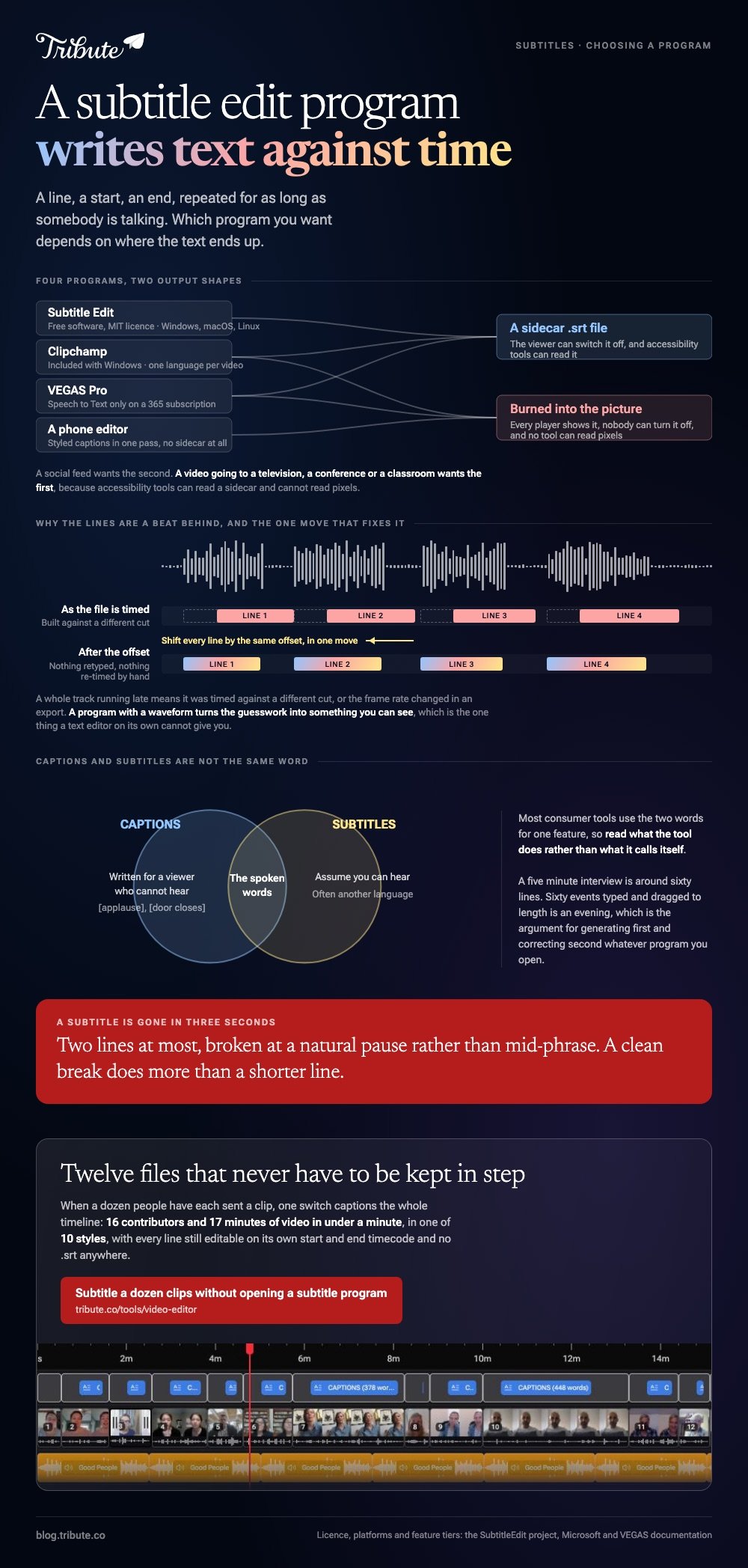
That is the whole job. A line of dialogue, a start time, an end time, repeated for as long as somebody is talking. Everything else a subtitles program offers is a way of doing that faster.
The split that decides your choice is where the text ends up:
- A sidecar file, most often .srt, that sits beside the video and can be switched off by the viewer.
- Burned in, painted into the picture at export, where nobody can turn it off and every player shows it.
Social feeds want the second. A video going to a television, a conference or a classroom wants the first, because accessibility tools can read a sidecar and cannot read pixels.
| Program | Output | Cost | Runs on |
|---|---|---|---|
| Subtitle Edit | .srt and many others | Free software, MIT licensed | Windows, macOS, Linux |
| Clipchamp | Burned in, plus .srt | Included with Windows | Browser, Windows |
| VEGAS Pro | Burned in, .srt export | Subscription | Windows |
| A phone editor | Burned in, styled | An app you already have | iOS, Android |
Which subtitle edit program should you use?
The one whose output shape matches where the video is going.
1. Subtitle Edit, when you have an .srt to fix
This is the program the search term is named after, and it does one job to an unusual depth. It opens a subtitle file beside the video, shows the audio as a waveform, and lets you retime every line against what you can see.
It is free software under an MIT license, it runs offline, and it now ships builds for all three desktop systems: Windows 10 22H2 or newer, macOS 12 at minimum with 14 recommended, and Linux as a Flatpak or a tarball.
Best for: Repairing, retiming or translating a subtitle file somebody else generated.
Why it works: The waveform turns guesswork about timing into something you can see.
2. Clipchamp, when you want both at once
Microsoft's browser editor generates the lines and hands you the file.
Import the clip, click the captions icon in the preview, pick the transcription language, and click transcribe.
Fix the words in the editable transcript, then download the .srt and export the video with the text burned in.
Microsoft states two limits: the clip has to contain a voice, and you get one transcription language per video.
3. VEGAS Pro, when the subtitles are part of a bigger edit
The route here is Speech to Text, which transcribes the audio and drops timed subtitles onto the timeline. It is not in the base product: VEGAS states that the feature is available to VEGAS Pro 365 and 365+ subscribers.
Without the subscription you are back to the Titles and Text generator, typing each line and setting its length by hand on its own track.
4. A phone editor, when the video is going to a feed
CapCut and the rest generate styled captions in one pass and burn them in on export. You get no sidecar file, which is fine when the only destination is a feed that plays muted.

How do you use VEGAS Pro to add subtitles?
Two routes, and the fast one costs money.
- Drop the clip on the timeline and listen through once, noting where speech starts and stops.
- Open Speech to Text if you subscribe. It transcribes the audio and places timed lines for you.
- Correct names and numbers in the generated text, which is where machine transcription fails.
- Without the subscription, add a Titles and Text event on its own track and type the first line.
- Set each event's length to the span of speech it covers, then copy it along the track for the next line.
Compared with a dedicated subtitle program, the manual route in any video editor is slow. A five minute interview is around sixty lines, and sixty events dragged to length is an evening.
That is the argument for generating first and correcting second, whatever program you use. More on the browser side in making subtitles online.
Is there a subtitle program for Mac?
Yes, and the obvious one is no longer Windows-only.
Subtitle Edit publishes a macOS build that bundles its own media playback and conversion pieces, so there is no separate install to chase. The project sets macOS 12 as the floor and recommends 14 or newer.
Beyond that, a Mac has Clipchamp in a browser tab and iMovie on the dock, though iMovie has no subtitle feature: a caption in iMovie is a title you type and time by hand.
More in subtitle software for Mac and video editing programs for Mac.
What if a dozen people each sent you a clip?
Then subtitling is not one file. It is twelve transcriptions, twelve corrections, and twelve exports that have to match each other in style.
The Tribute video editor is a browser-based group video editor: contributors record clips on their phones and Tribute assembles them on a timeline with the music balanced under the voices. It is ours, and it is the last thing on this page.
- One switch captions every clip on the timeline: 16 contributors and 17 minutes of video in under a minute
- Every line editable, with its own start and end timecode, the way a subtitle program does it
- 10 caption styles, with the word being spoken picked out as it is said
- Re-generate captions and Remove captions run across the whole timeline from the Tools panel
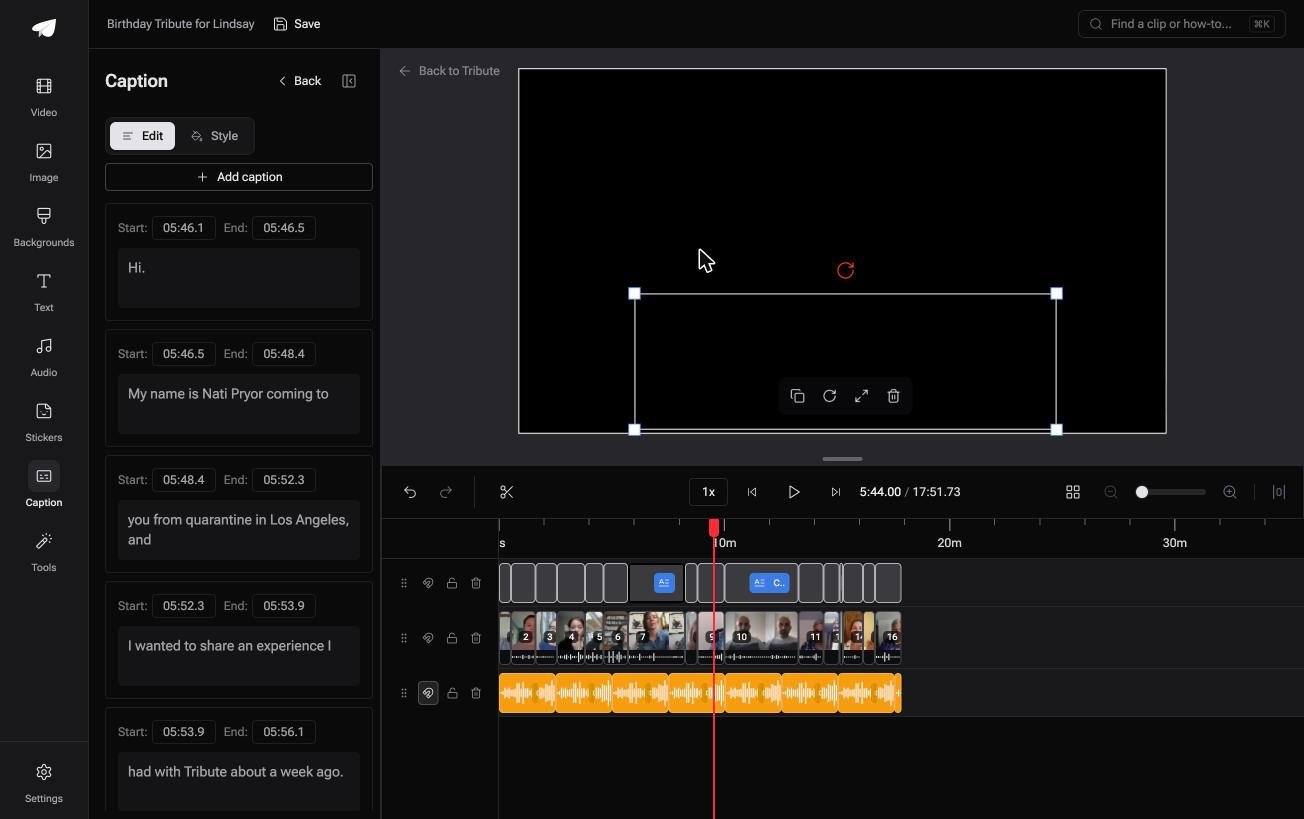
Best for: Twelve subtitle files that have to match each other in style and timing.
Why it works: One style and one pass across every contributor, rather than twelve files kept in step by hand.
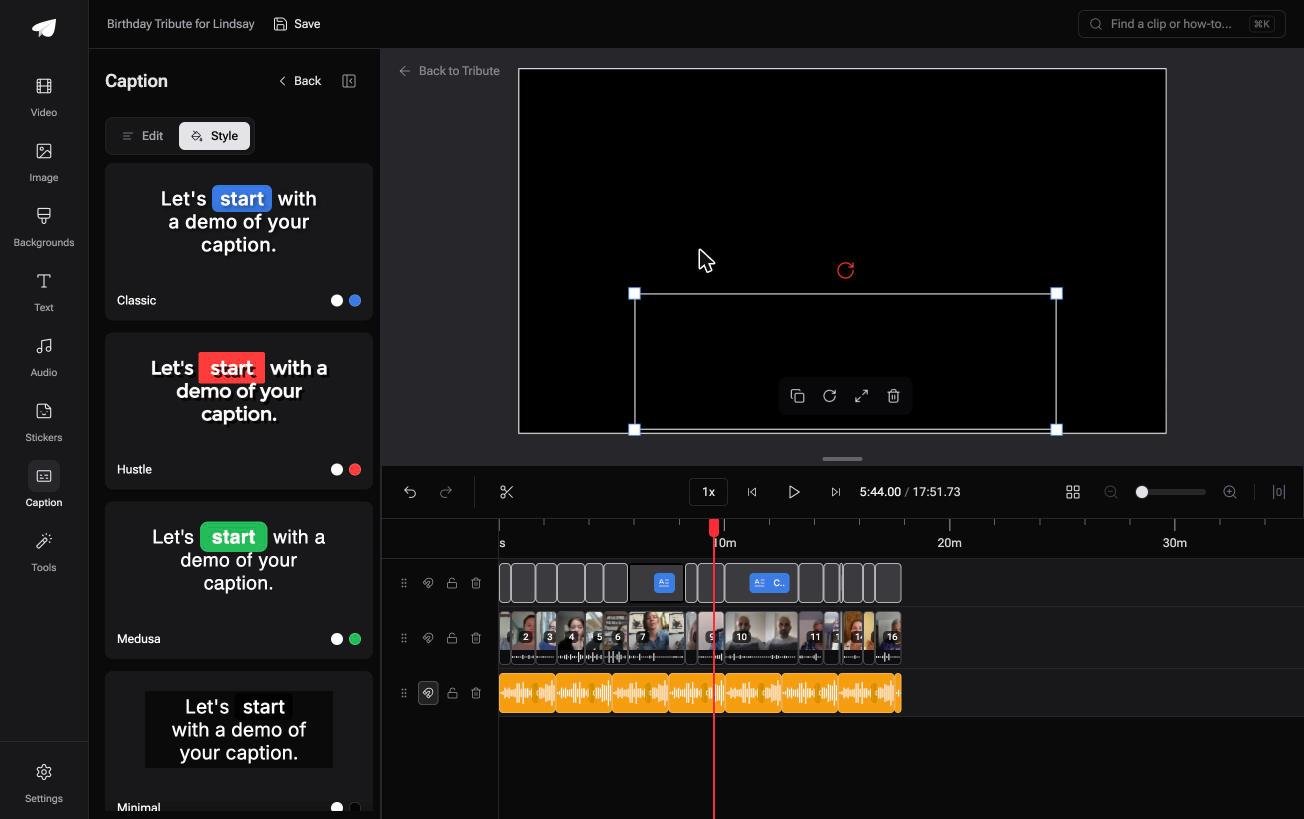
Can you skip the subtitle program altogether?
Every option above assumes you are holding video files.
You export, you transcribe, you correct, you re-export, and you keep twelve .srt files in a folder named after a party. There is one case where none of that happens.
The case: you are collecting, not shooting
That case arrives when several people each record something for one person.
A grandmother turning eighty. A colleague leaving after fifteen years. A memorial where half the people who should speak are in other time zones and one of them has a hearing aid.

Why the program question never comes up
Because the captions belong to the timeline rather than to each file.
Turn them on once and every clip gets them, in one style, with every line still retimeable on its own. That is how the Tribute video editor handles it: not a fifth program for the table, but a reason to need none of them.
What you do not have to do
- No program to install. Each person records on their own phone and the captions run in the browser.
- No file to keep in step. One switch, every clip, ten styles, and no .srt anywhere.
- No retyping. On a Concierge Tribute, Eve fixes a misspelled name or a mistimed line across the whole timeline.
- No render to sit through. The preview matches the delivered video.
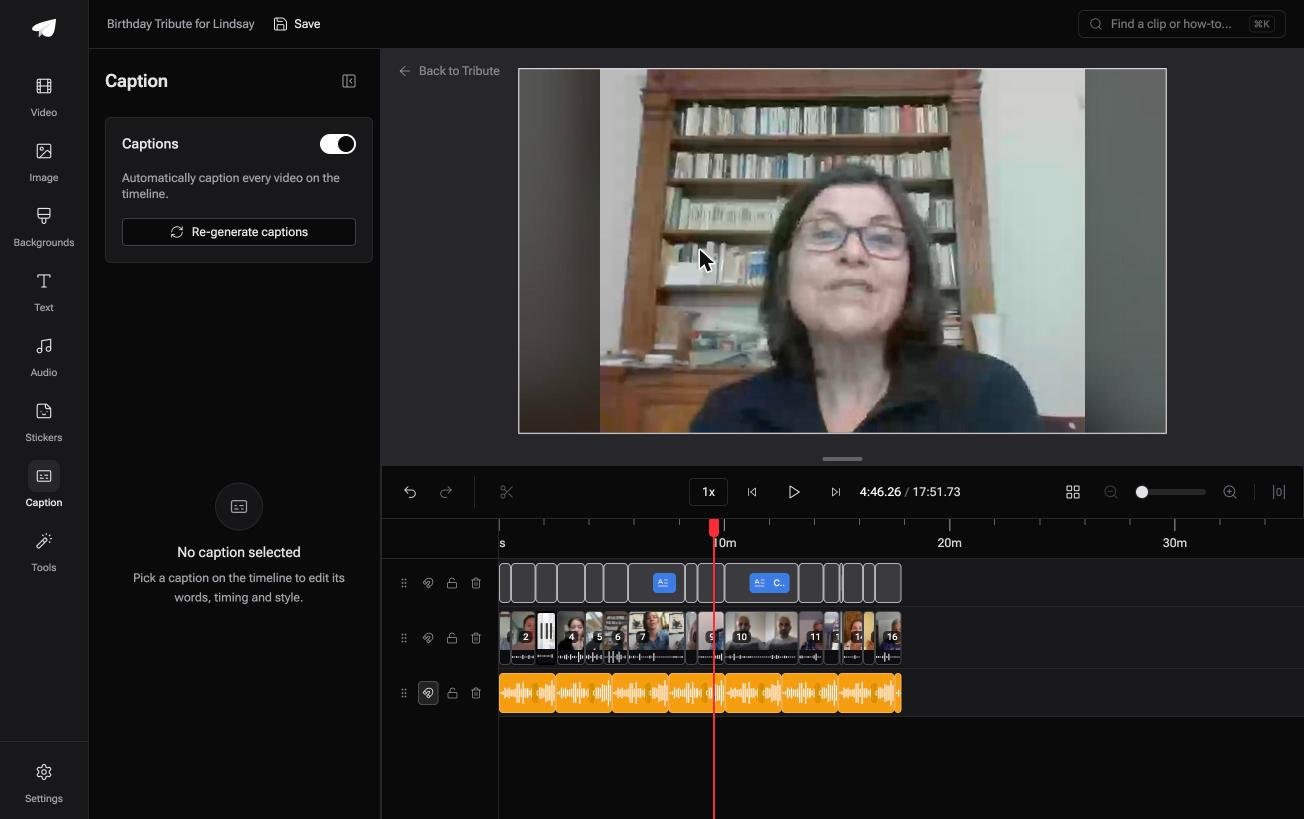
When this is the wrong answer: you have an .srt that needs retiming, or one video and one deadline. Then Subtitle Edit or Clipchamp at the top of this page is the right tool.
The Tribute editor is not a subtitle program on its own: it lives inside a paid Tribute, and making a video montage covers the rest of that edit.
Frequently Asked Questions
What is the best program for subtitles?
Subtitle Edit if you are working with .srt files, Clipchamp if you want the text generated and burned in, a phone editor if it is going to a feed. The choice is about output shape rather than quality.
Does Subtitle Edit cost anything?
No. It is free software under an MIT license and runs offline, with builds for Windows, macOS and Linux published by the project.
What is the difference between captions and subtitles?
Captions carry speech plus relevant sound for a viewer who cannot hear. Subtitles assume you can hear and carry the words, often in another language. Day to day the two terms get used for the same thing.
Can I add subtitles to a video without an editing program?
Yes, by uploading to a platform that generates them. YouTube produces automatic captions on upload, and you can correct them in Studio and download the track for use elsewhere.
Why are my subtitles out of sync?
The file was timed against a different cut of the video, or the frame rate changed in an export. A subtitle program with a waveform lets you shift every line by a fixed offset in one move.
Should subtitles be one line or two?
Two at most, broken at a natural pause rather than mid-phrase. Unlike text on a page, a subtitle is gone in three seconds, so a clean break does more for readability than a shorter line.
👉 Subtitle a dozen clips without opening a subtitle program if a dozen people each sent one, and no .srt file has to be kept in step with anything.
