
Subtitle Edit Software for Mac: Six Tools and What Each One Costs
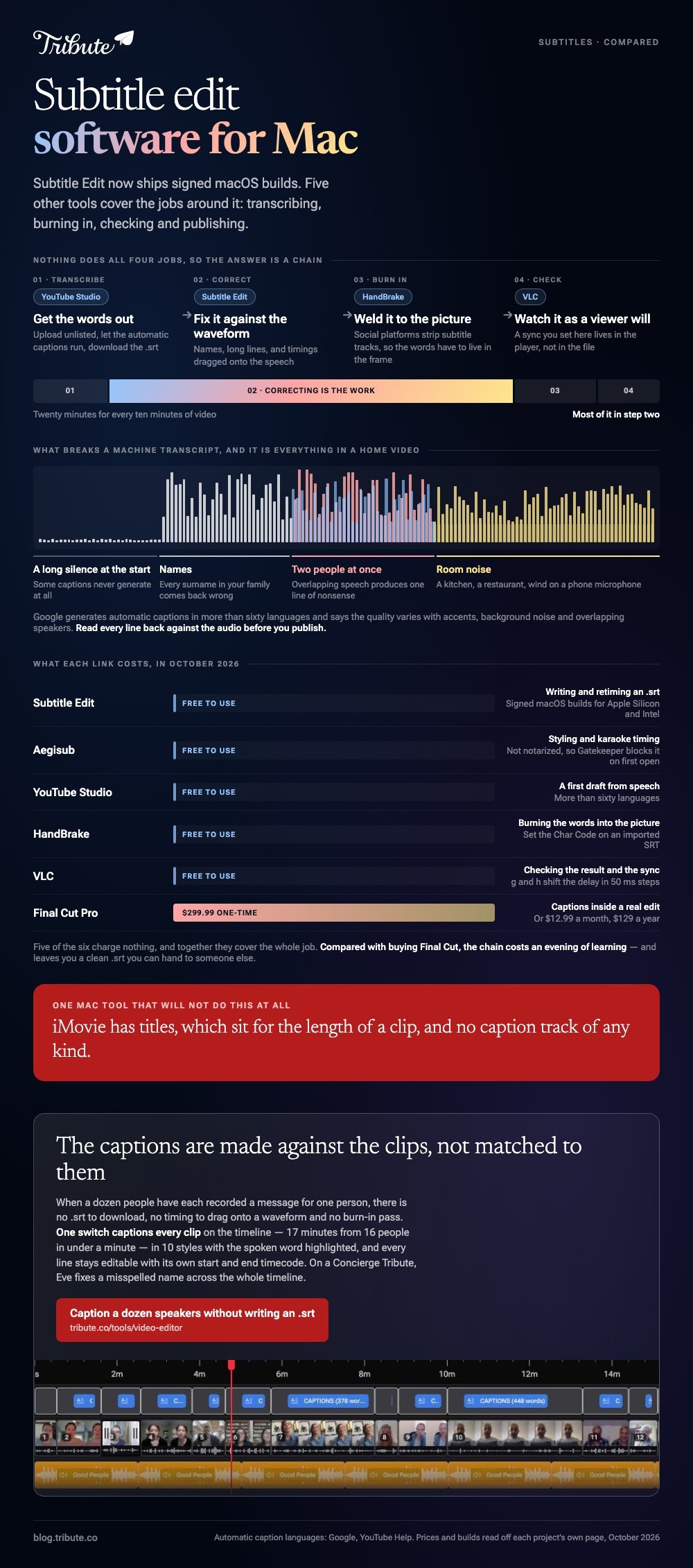
The best subtitle edit software for Mac is Subtitle Edit itself, which now ships signed macOS builds for Apple Silicon and Intel. Five other tools cover the jobs around it: transcribing, burning in, checking and publishing.

| Tool | Best for | Price |
|---|---|---|
| Subtitle Edit | Writing and retiming an .srt | Free to use |
| Aegisub | Styling and karaoke timing | Free to use |
| YouTube Studio | A first draft from speech | Free to use |
| HandBrake | Burning the words into the picture | Free to use |
| VLC | Checking the result and the sync | Free to use |
| Final Cut Pro | Captions inside a real edit | $299.99 one-time |
What should subtitle edit software for Mac be able to do?
Four things, and most tools do two of them.
A subtitle file is a list of lines with a start and an end. Everything useful is either producing that list, fixing its timing, styling it, or welding it to a video.
- Read and write .srt. The format every platform accepts, and the only one you can open in a text window.
- Show a waveform. Timing a line against a picture of the speech is faster than guessing against a clock.
- Shift and stretch timings. A whole track that is two seconds late is one command, not three hundred edits.
- Burn in on request. Social platforms strip subtitle tracks, so the words have to live in the frame.
No single subtitle tool for Mac does all four. The list below is a chain, and most people use two links of it.
Which subtitle edit software for Mac should you pick?
Start at the top and stop as soon as one of them covers what you are doing.
1. Subtitle Edit
The one the search is named after, and the one Mac users went without for years.
It reads more than two hundred subtitle formats, shows a waveform, fixes common timing errors in a batch, and translates.
Version 5.3.0, from October 2026, ships a macOS ARM64 and a macOS x64 .dmg. The release notes say the app is signed and notarized by Apple.
- Look for: the waveform pane and the Tools menu, where the batch fixes live
- Price: Free to use
Best for: Anyone who has a subtitle file and needs it correct.
Why it works: It treats subtitles as the job rather than a tab inside a video editor, so the keyboard shortcuts are built for hundreds of lines.
2. Aegisub
The one fansubbing built, and still the best at how a line looks.
Aegisub works in .ass, where a subtitle carries position, font, outline and timing per syllable. Nothing else on this list gets near it for karaoke or for text that has to sit around a face.
The Mac side has a catch. Builds are not notarized, so Gatekeeper blocks the app on first open and you have to allow it in System Settings by hand.
- Look for: the audio timing pane, which is where the speed comes from
- Price: Free to use
Best for: Styled subtitles, songs, and anything where position matters.
Why it works: The .ass format carries the design with the words, so the look survives being handed to somebody else.
3. YouTube Studio
A subtitle generator for Mac that is not software at all.
Upload the video as unlisted, wait for processing, then open Subtitles in YouTube Studio and download the automatic track as an .srt. Google generates these in more than sixty languages and says the quality varies with accents, background noise and overlapping speakers.
Treat the result as a first draft. It is a much better starting point than an empty file and a much worse finished product than ten minutes of correcting.
- Look for: the three dots beside the published track, which is where Download sits
- Price: Free to use
Best for: Getting the words out of the audio without typing them.
Why it works: The hard part of subtitling is transcription, and this does it while you make a cup of tea.

4. HandBrake
Not an editor. The thing you run at the end.
Open the video, go to the Subtitles tab, import your .srt through Tracks, and tick Burn In. The words become part of the picture, which is the only way they survive Instagram, a text message or a television that ignores subtitle tracks.
Set the right Char Code on an imported SRT. HandBrake's manual warns that the wrong one can produce a file with no subtitle track at all.
- Look for: the millisecond offset field, for a track that is a touch early
- Price: Free to use
Best for: Making the subtitles permanent before you share the video.
Why it works: It does one conversion at a time, shows you what it is about to do, and leaves the source alone.
5. VLC
The checker, and nothing more than that.
Drop an .srt onto a playing video and VLC picks it up. Press g or h during playback to shift the delay in 50 ms steps, or type a number into Tools > Track Synchronization.
What it will not do is save any of that. The sync you set lives in the player, not in the file, which is why it belongs at the end of your chain rather than the middle.
- Look for: the Subtitle menu, and Sub Track inside it
- Price: Free to use
Best for: Watching the result the way a viewer will.
Why it works: It plays almost anything, so a file that behaves in VLC has one fewer reason to fail elsewhere.
6. Final Cut Pro
The paid answer, for people already editing on the same Mac.
Captions are a track type in Final Cut rather than an import, so they ride with the clips when you move things. It exports as an embedded track, a sidecar .srt, or burned in.
Apple sells it as a $299.99 one-time purchase, with a $12.99 monthly or $129 yearly subscription through Apple Creator Studio and a 30 day free trial on the subscription. Prices as of October 2026.
- Look for: the Captions tab in the inspector, beside the audio controls
- Price: $299.99 one-time, or $12.99 a month
Best for: Subtitles that are one part of an edit you are doing anyway.
Why it works: Nothing has to be matched up afterwards, because the captions were never a separate file.
One tool that will not do this: iMovie. It has titles, which sit for the length of a clip, and no caption track of any kind.
How do you add subtitles to a video on Mac without paying?
Chain three of the tools above and the whole thing costs nothing.
- Transcribe. Upload the video to YouTube as unlisted, let the automatic captions run, and download the .srt.
- Correct. Open it in Subtitle Edit. Fix names, split long lines, and use the waveform to drag the timings onto the speech.
- Burn in. Run the video and the corrected .srt through HandBrake with Burn In ticked.
- Check. Play the output in VLC at the size people will watch it.
Budget twenty minutes for every ten minutes of video, most of it in step two. A subtitle maker for Mac that promises less than that is either charging you or guessing.
Compared to buying Final Cut, this chain costs an evening of learning and nothing else. Unlike Final Cut, it also leaves you with a clean .srt you can hand to someone else.
More on the tools around this in subtitle edit programs in general, making subtitles in a browser and video editing software for beginners.

Is a subtitle machine accurate enough to publish?
Not on its own, and the failures are predictable.
A subtitle machine, in the sense most people mean the phrase, is machine transcription: a model listens and writes the lines. Google says its automatic captions are generated by machine learning and that the quality may vary.
The things that break it are the things in every home video.
- Names. Every surname in your family comes back wrong.
- Two people at once. Overlapping speech produces one line of nonsense.
- Room noise. A kitchen, a restaurant, wind on a phone microphone.
- A long silence at the start. Some captions never generate at all.
Read every line back against the audio before you publish. The correction pass is the work, and the machine only saves you the typing.
What if the clips came from a dozen different people?
The Tribute video editor is a browser-based group video editor: contributors record clips on their phones and Tribute assembles them on a timeline with the music balanced under the voices.
It is ours, and it is the last thing on this page.
- One switch captions every clip on the timeline: 17 minutes from 16 people in under a minute
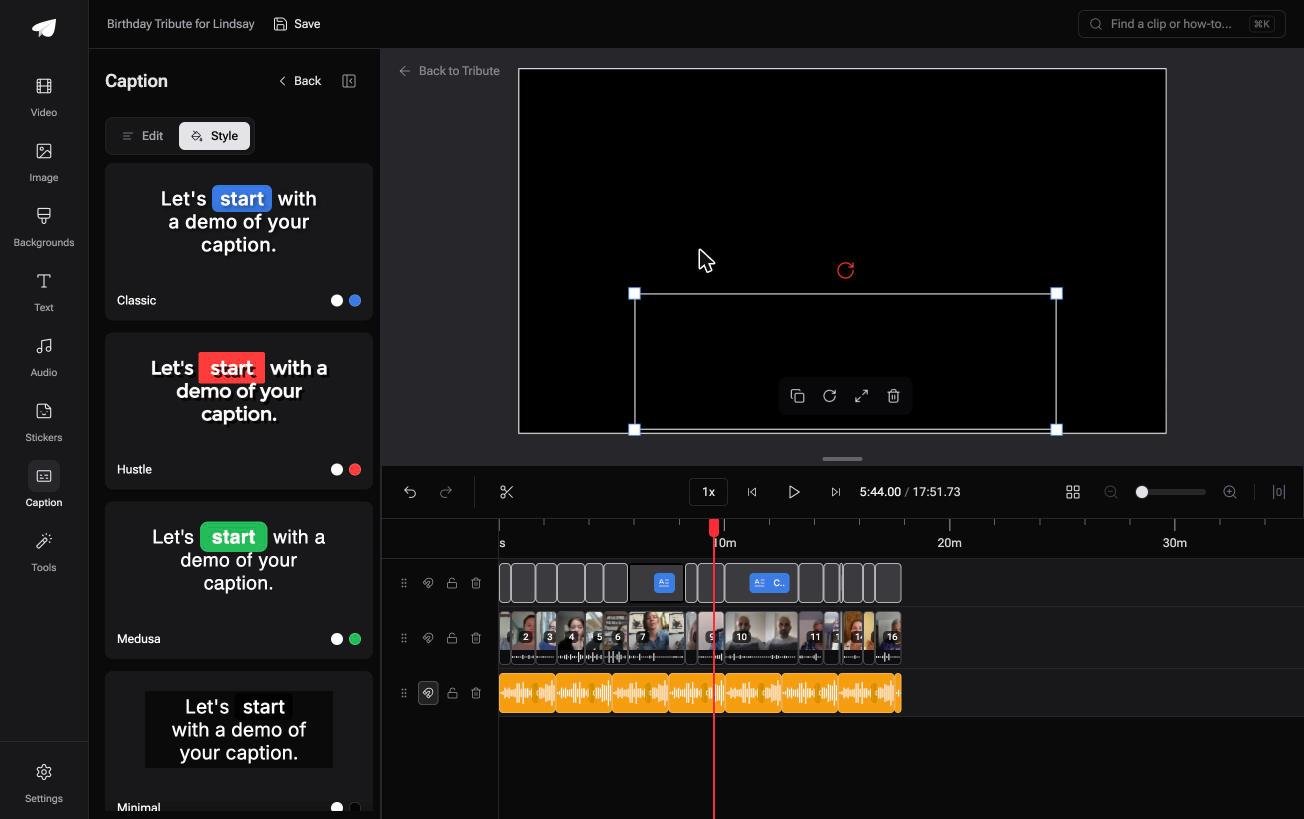
- Every line editable, with its own start and end timecode, so a misheard surname is a two-second fix
- 10 caption styles, with the word being spoken highlighted as it lands
- Name badges from an uploaded-by name and a relation, in 4 corner positions, dark or light
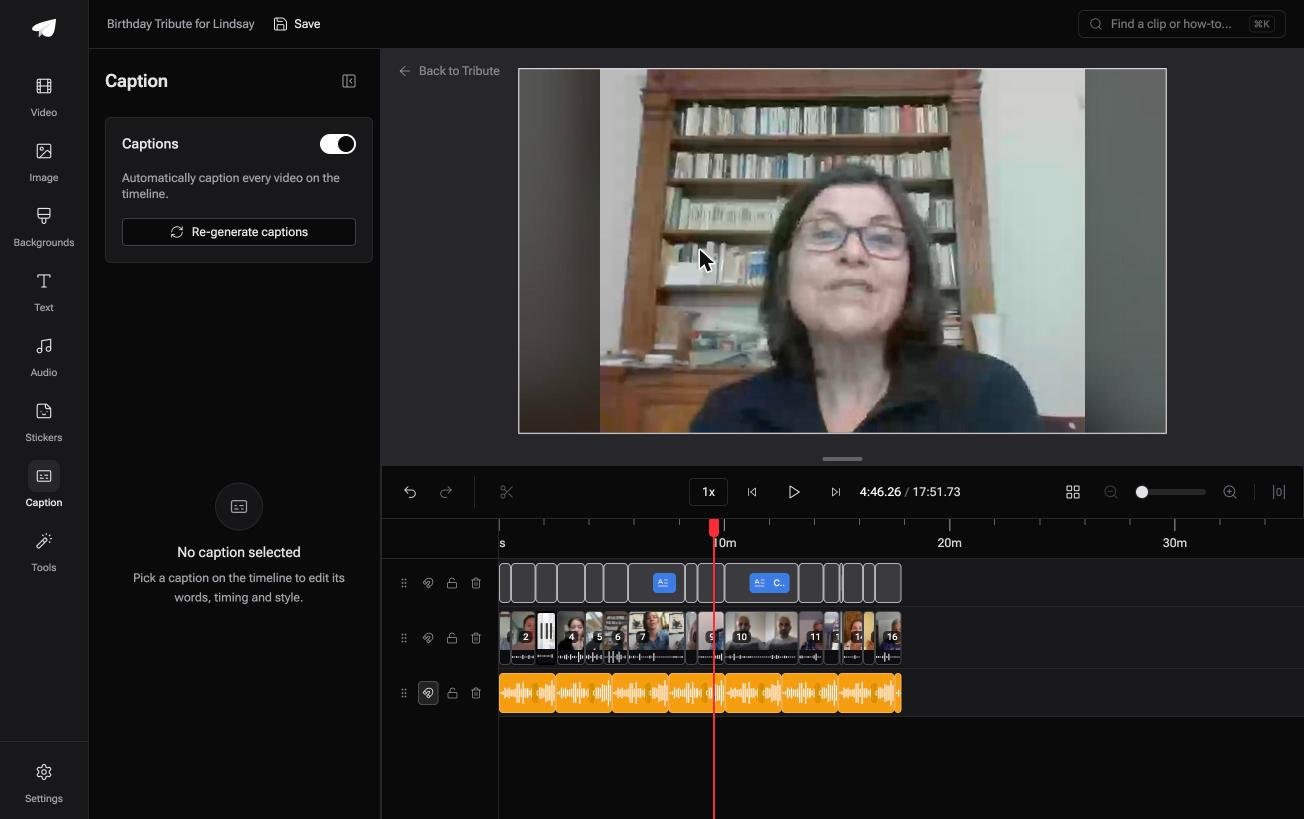
Best for: Captions on a video made of twelve people's messages rather than one recording.
Why it works: The captions are made against clips that are already on the timeline, so there is no file to import and nothing to line up.
Could the captions arrive with the clips?
Every tool above assumes you own the video and the evening to sit with it.
Upload, transcribe, correct, burn, check. Five steps and four applications, which is a reasonable price for one video you care about. There is one case where that chain never gets built.
The case: the video is twelve people talking
You are in it when several people each record a message for one person.
A grandmother turning eighty. A colleague leaving after fifteen years. A memorial where the people who should speak are in four time zones, and every clip is a face and a voice and nothing else.

Why the chain never gets built
Because the captions are generated against the clips, not matched to them afterwards.
There is no .srt to download, no timing to drag onto a waveform, and no burn-in pass, because the words were never a separate file. That is how the Tribute video editor does captions: one switch for the whole timeline.
What you do not have to do
Send one link, and the chain of six tools above never gets built.
- No export and reimport. One switch captions every clip that has arrived.
- No surname hunt. On a Concierge Tribute, Eve fixes a misspelled name or a mistimed line across the whole timeline.
- No burn in step. The captions are on the video that comes back.
- No edit of your own. Tribute's editors build it on that tier, and on Concierge Deluxe it returns as a video book.
When this is the wrong answer: you have a downloaded movie and a translation file, or a documentary to subtitle for work. Then the six tools above are the whole page. The editor will not open a stray video: it lives inside a paid Tribute.
Frequently Asked Questions
Does Subtitle Edit run on a Mac?
Yes. Recent releases include signed .dmg builds for Apple Silicon and Intel, and the release notes say to drag the app to Applications and open it. Older versions were Windows only, which is why much of the advice online still says so.
Which free tool is best for subtitles on a Mac?
Subtitle Edit for writing and retiming, YouTube Studio for the first transcript, HandBrake for burning in. None of the three charges anything, and together they cover the whole job.
Can I edit subtitles in QuickTime or iMovie?
No. QuickTime plays an embedded track and edits nothing, and iMovie has titles rather than captions. Both send you back to a dedicated tool.
How do I burn subtitles into a video on a Mac?
Use HandBrake. Import the .srt on the Subtitles tab, tick Burn In, and encode. The words become part of the picture and survive any platform that strips subtitle tracks.
Why does my .srt not show up in a player?
Check the file name matches the video and the extension is .srt rather than .txt. Players that auto-load subtitles do it by matching names, and support for plain text files was dropped in VLC 3.
What is the difference between captions and subtitles?
Captions assume the viewer cannot hear and include sounds as well as speech. Subtitles assume they can hear and carry only the words, which is what most of these tools write.
How long does subtitling ten minutes of video take?
About twenty minutes if you start from an automatic transcript, and an hour or more if you type it. The correcting is the work, whichever route you take.
Can I subtitle a video made from lots of short clips?
You can, and the files pile up fast. One .srt per clip is the usual mess, and a montage tool that captions the whole timeline at once avoids it.
👉 Caption a dozen speakers without writing an .srt if each of them recorded a message for the same person, and nothing is downloaded, corrected or burned in.
