
Subtitle Maker Online: Three Tools That Write and Time Your Lines
A subtitle maker online listens to your video and hands back timed lines, as an .SRT file or burned into the picture. YouTube Studio, Clipchamp and CapCut's web editor all do it at no cost. Budget five minutes to fix the names.

What does a subtitle maker online give you back?
One of two things, and the difference decides everything after it.
A sidecar file sits beside the video and the player switches it on. Burned-in text is part of the picture and cannot be turned off by anyone.
| Tool | Output | Edit after | Best when |
|---|---|---|---|
| YouTube Studio | Sidecar, downloadable | Any time | The video lives on YouTube |
| Clipchamp | Burned in, plus .SRT | Before export | You want both outputs at once |
| CapCut web | Burned in, styled | Before export | The video is going to a feed |
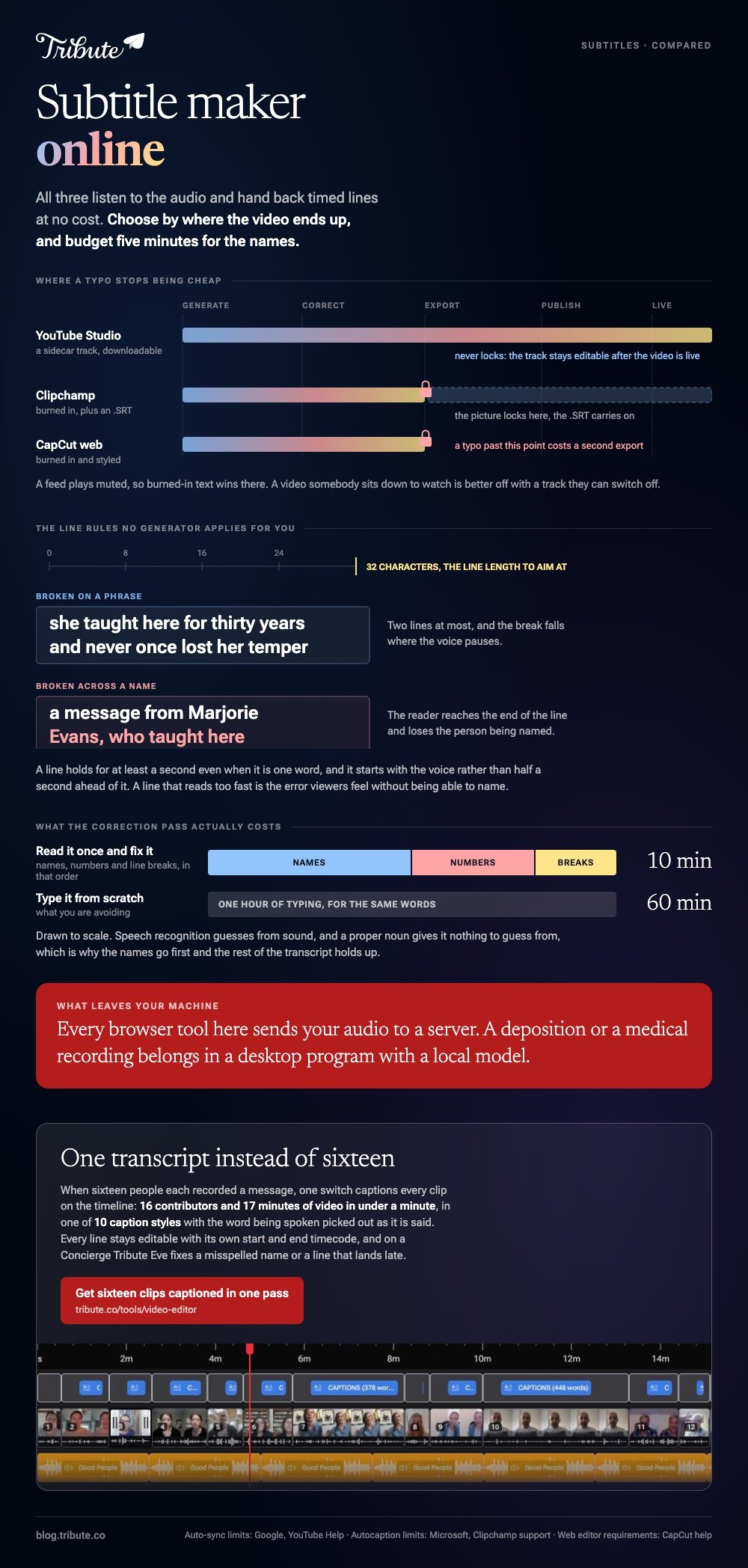
Choose by destination rather than by feature count. A feed plays muted, so burned-in wins there, and a video a relative will sit down and watch is better off with the sidecar they can switch off.
Which subtitle maker online should you use?
Whichever one is attached to where the video ends up.
All three create subtitles online from the audio alone, with no transcript for you to type first.
1. YouTube Studio
- Sign in to Studio and select Subtitles in the left menu, then your video.
- Click ADD LANGUAGE and pick one, then click ADD under Subtitles.
- Choose Upload file, Auto-sync or Type manually.
- With Auto-sync, paste the spoken words and YouTube times them for you.
- Select EDIT, then SAVE AND CLOSE, and download the track when it publishes.
Google's subtitles page warns against Auto-sync on videos over an hour or with poor audio, and asks you to include sound cues such as [applause] when you type lines yourself.
Best when: The video is going on YouTube, or you want a transcript to reuse somewhere else.
2. Clipchamp
- Add the clip through My media and drag it onto the timeline.
- Turn on autocaptions from the captions icon in the preview, or the captions tab in the property panel.
- Pick the transcription language, tick the offensive-language filter if you want it, then click transcribe media.
- Double-click any word in the transcript to rewrite it.
- Click download captions for the .SRT, then export the video.
Microsoft's autocaptions page sets two limits: the clip has to contain a voice, and you get one transcription language per video.
Best when: You want burned-in text and a file to keep from the same pass.
3. CapCut in a browser
- Open the project in the web editor and select the clip.
- Go to Captions, then Auto Captions.
- Choose the language spoken in the video.
- Click Generate and wait for the lines to appear.
- Click any line to correct it before you export.
CapCut recommends Chrome or Edge for the web editor and lists five reasons generation fails, starting with noisy audio and the wrong language selected.
Best when: The same project will finish on a phone in the CapCut app.

How do you fix the timing in an online subtitle editor?
Line by line, against a format that has not changed in twenty years.
An .SRT is plain text. Each block carries a number, a start and end timecode, the words, and a blank line.
- Two lines at most, around 32 characters each.
- At least one second on screen, even for a single word.
- Break on a phrase, never across a name.
- Start a line with the voice, not half a second ahead of it.
Any online subtitles editor lets you drag those timings. What none of them fix is a line that reads too fast, and that is the error viewers feel without being able to name.
Words on screen that are not speech follow different rules. Song text is its own job, covered in making a lyrics video.
What does a subtitle maker online get wrong?
Names, numbers and line breaks, in that order.
Speech recognition guesses from sound, and a proper noun gives it nothing to guess from. Everything else on the list is a known weakness every vendor documents.
- Accents and dialects, and two people talking over each other.
- Background noise, which is normal in a kitchen and fatal in a transcript.
- A long silence at the start, which can stop generation altogether.
- More than one language in the same clip, which no online subtitle generator handles in one pass.
Read the transcript once and correct the proper nouns and the digits. Compared with typing from scratch, that pass is ten minutes against an hour.
When is a desktop subtitle editor the better answer?
When the footage is private, or when the retiming is heavy.
Every browser tool here sends your audio to a server for recognition. For a deposition, a medical recording or anything you would not email, a desktop program with a local model keeps the audio on your machine.
Heavy retiming is the other case. Shifting a whole track by 800 milliseconds, or reflowing 400 lines, is a keyboard job and a desktop editor is built for it. Unlike a browser panel, it gives you a waveform, shortcuts and batch operations.
More on those in desktop subtitle programs.
What if the speaker changes every forty seconds?
Then subtitling stops being one transcript and becomes sixteen of them.
The Tribute video editor is a browser-based group video editor: contributors record clips on their phones and Tribute assembles them on a timeline with the music balanced under the voices. It is ours, and it is the last thing on this page.
- One switch captions every clip on the timeline: 16 contributors and 17 minutes of video in under a minute
- Every line editable, with its own start and end timecode
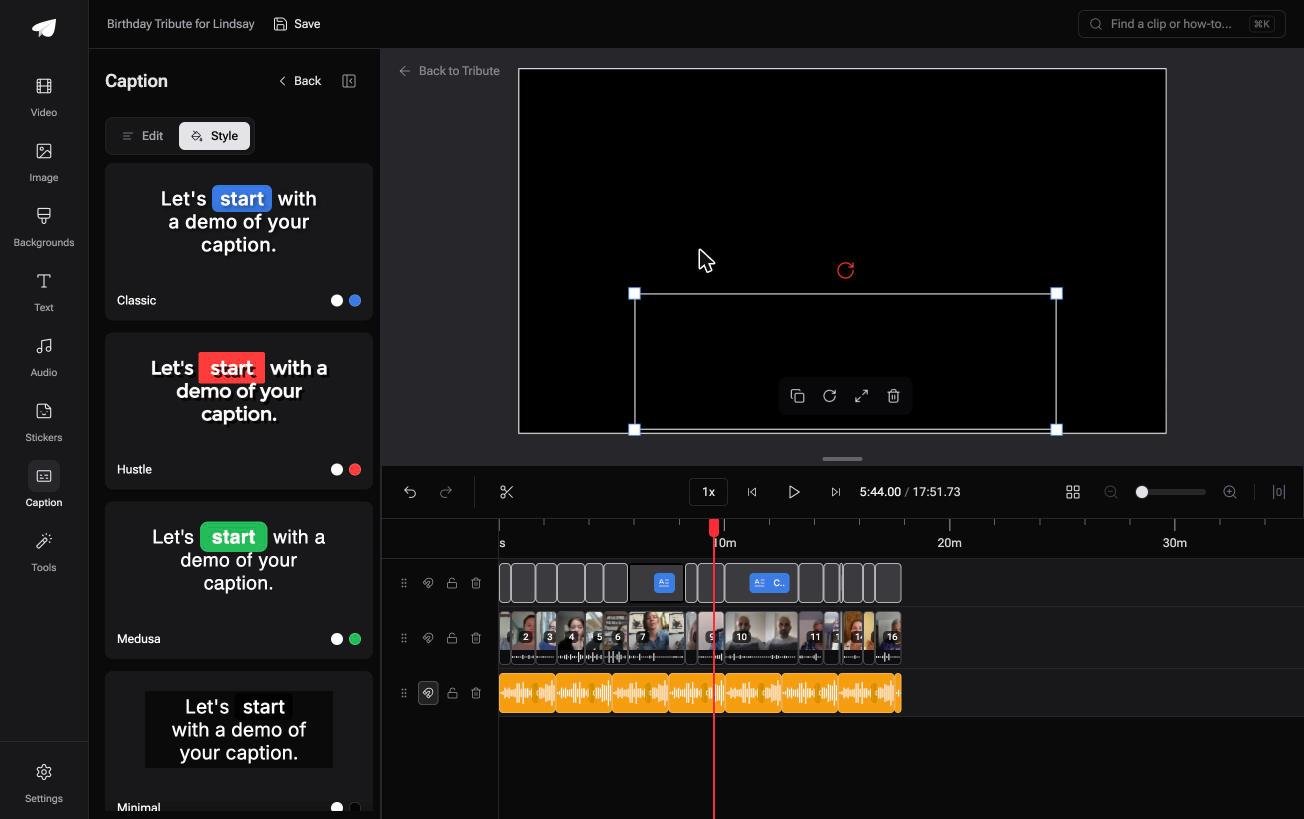
- 10 caption styles, with the word being spoken picked out as it is said
- Re-generate captions and Remove captions are bulk actions in the Tools panel
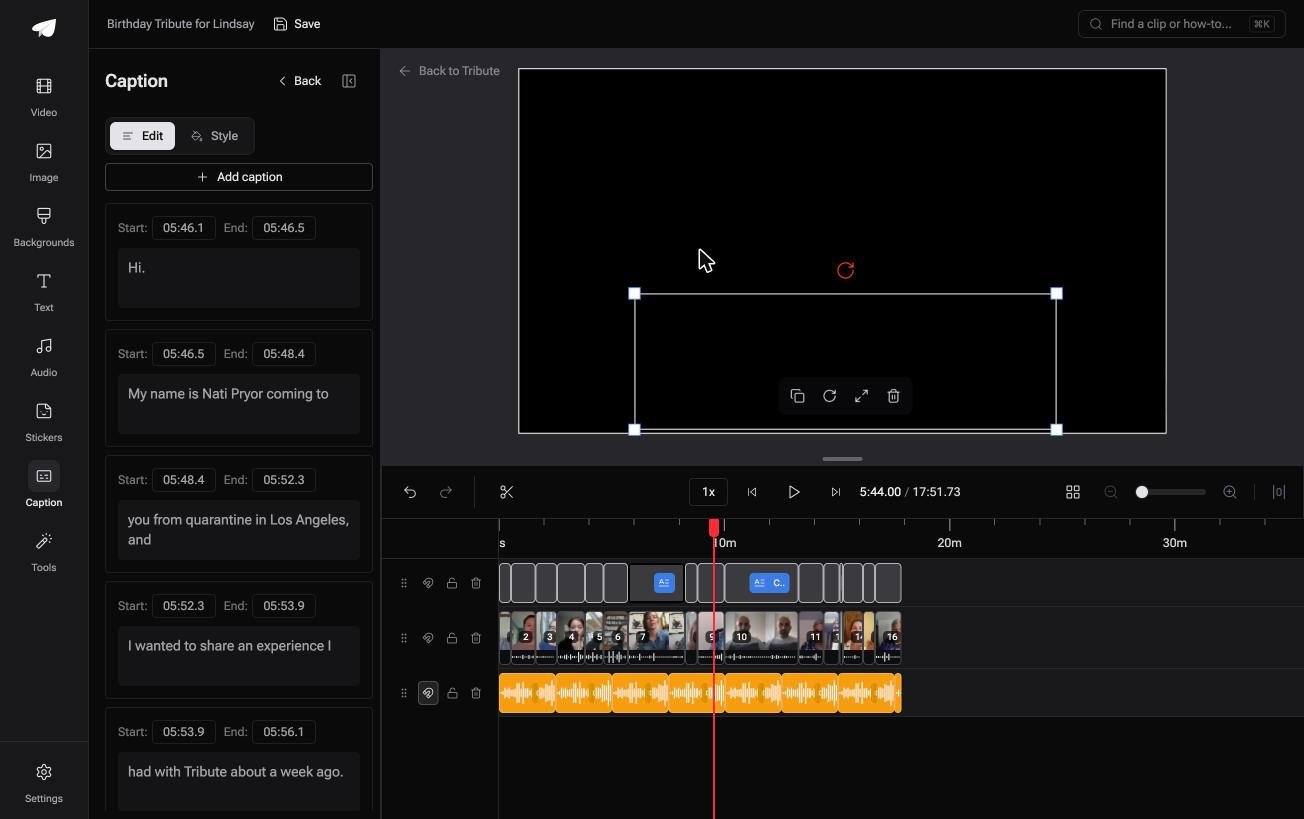
Best for: Seventeen minutes of speech from sixteen people, all of it needing lines on screen.
Why it works: One correction pass over one timeline replaces sixteen uploads, sixteen transcripts and sixteen exports.
Who reads sixteen transcripts if you do not?
This page has assumed one video with one voice in it.
Pick a tool, generate, correct, export. That loop is right once and painful sixteen times.
The case: the clips are arriving, not sitting on your desk
You are in it when several people each record something for one person.
A grandmother turning eighty. A colleague leaving after fifteen years. A memorial where the people who should speak are in four time zones.
Every message needs the same treatment, and the reason captions matter is sitting in the room: somebody who will watch with the sound low.
Why the file question never arrives
Because the words are attached to the timeline rather than to each clip.
One switch captions all of them at once, in one style, under one set of timing rules. That is how the Tribute video editor handles it: no .SRT to download, name and reattach, because there is no separate file.
What you do not have to do
- Not the collecting. Each person records from the link on their own phone.
- Not the transcribing. One switch captions all sixteen clips in one style.
- Not the corrections. On a Concierge Tribute, Eve, the AI assistant inside the editor, fixes a misspelled name or a line that lands late.
- Not the render. Tribute builds it, and the preview matches the delivered video.

When this is the wrong answer: you have one clip and one place to post it. Then pick a tool from the table above and you are done in twenty minutes.
The editor is not a standalone subtitler: it lives inside a paid Tribute. For an edit that mixes clips and photographs, see the video montage maker guide.
Frequently Asked Questions
What is the difference between captions and subtitles?
Captions carry speech plus relevant sound for a viewer who cannot hear. Subtitles assume you can hear and carry the words, often in another language. In everyday use the terms get swapped.
Can I create subtitles without uploading my video?
Not with a browser tool. Every option here sends audio to a server for recognition, so private footage belongs in a desktop program with a local speech model.
How accurate is an online subtitle generator?
Good on clear sentences, poor on names. Accents, background noise and overlapping speakers are the documented causes of error, and all three are normal in a home video.
Can I edit the timings after the subtitles are made?
Yes. An online subtitle editor exposes a start and end time per line, and an .SRT is plain text you can open and retime in any text editor.
Which file format should I keep?
.SRT, because every platform accepts it. Keep the original file even when you burn the words in, so a typo costs a re-export rather than a retype.
Do subtitles need to match the speech word for word?
Match the meaning and tidy the speech. Cut the false starts, keep every name and number as spoken, and the lines stay readable at the speed people watch.
How long should one subtitle stay on screen?
At least a second, and longer for a full two-line block. A line that disappears before it is read is worse than no line at all.
👉 Get sixteen clips captioned in one pass and the names fixed for you if sixteen people each recorded for the same person, and you read one transcript instead of sixteen.
