
Video Song Lyrics Maker: Putting Words on Screen in Time With the Track
A video song lyrics maker is any editor that holds a line of text on screen for a set number of seconds. The tool is the easy part. Timing each line to the music, and knowing which words you may use, is the work.
| Approach | Best for | Time needed |
|---|---|---|
| Auto captions, then corrected | A song you recorded yourself | Around 15 minutes |
| Text boxes timed by hand | Any track, full control | An hour or two per song |
| A template with text animations | A short social post | Around 30 minutes |
| Photos under the track | A birthday or anniversary gift | Around 30 minutes |
What does a video song lyrics maker have to get right?
Timing, above everything else.
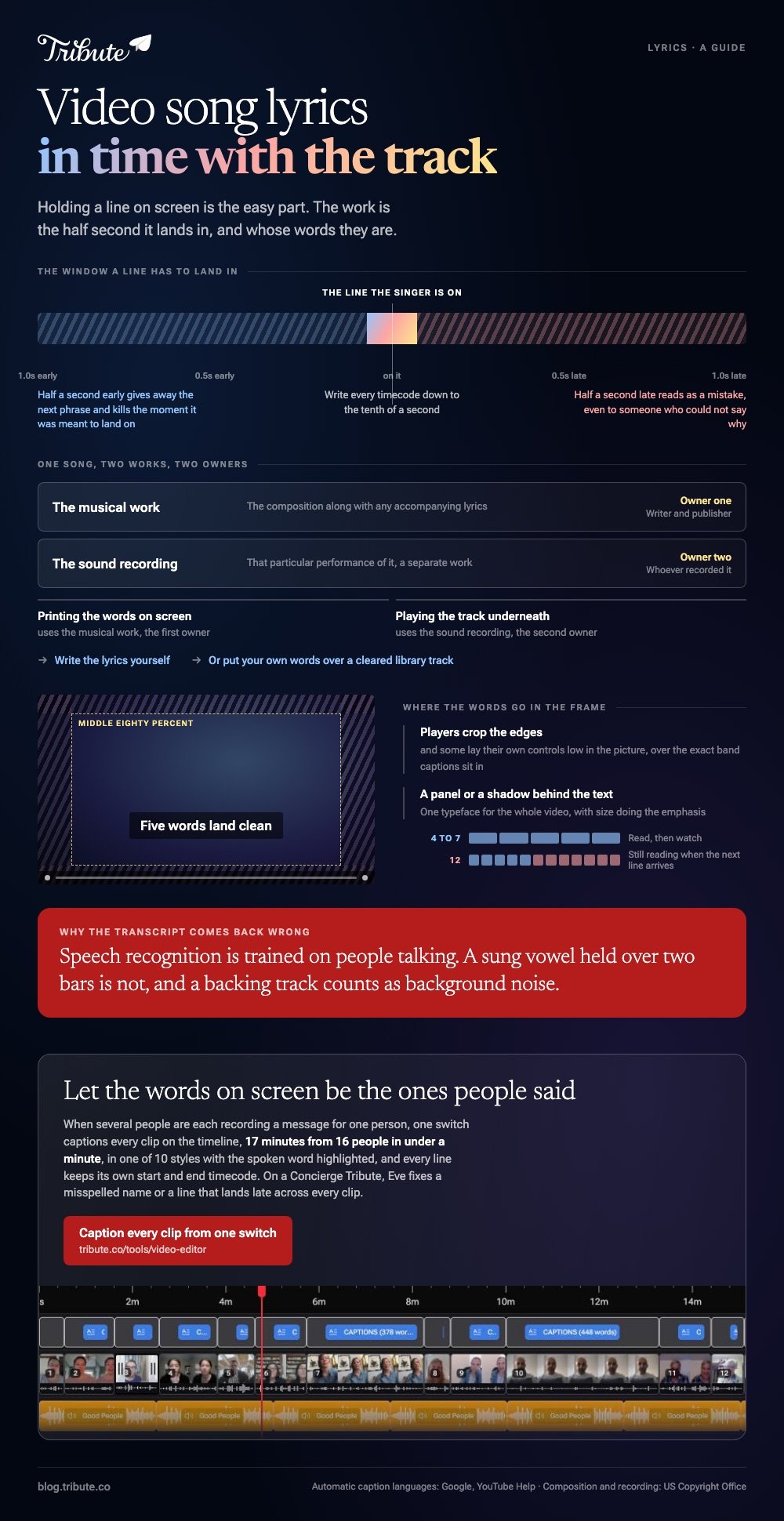
A line that appears half a second late reads as a mistake even to someone who could not say why. A line that appears half a second early gives away the next phrase and kills the moment it was meant to land on.
Line length is the second thing. Four to seven words on screen at once is the ceiling, because a viewer reads a line and then watches, and a long line means they are still reading when the next one arrives.
- One phrase per card, broken where the singer breathes
- High contrast, with a shadow or a panel behind the text
- Away from the edges, since players crop and captions sit low
- One typeface for the whole video, with size doing the emphasis
Everything else is decoration. A karaoke style word highlight is lovely when the timing is right and unwatchable when it is not.
Can auto captions write the lyrics for you?
For speech, often. For singing, seldom.
Speech recognition is trained on people talking, and a sung vowel held over two bars is not that. Put a track with instruments behind it and the transcript comes back as a list of near misses.
Google supports automatic captions in 67 languages and states that quality varies, and that accents, pronunciation and background noise all throw it off. A backing track is background noise as far as the model is concerned.
Where auto captions do earn their place is a recording of your own voice: a cover sung into a phone, a spoken verse, a toast. Run them, then correct the words and nudge the timings.
Which video song lyrics maker should you open?
Whichever editor you already have, because the method matters more than the brand.
- Put the song on the timeline first. Every timing decision after this depends on it.
- Play it through once and note where each line starts. Write the timecodes down, to the tenth of a second.
- Add a text box and type one line. One phrase, no more than seven words.
- Set its start and end to the two timecodes you noted, then duplicate it for the next line.
- Watch the whole thing at full speed. Mistimed lines show up at speed and hide when you scrub.
- Export once, at the highest quality the destination accepts.
Compared with a dedicated karaoke app, Canva and Clipchamp give you a plain text layer whose ends you drag on the timeline, which is the part that matters here.
CapCut adds word by word animation presets, which look right on a chorus and busy on a verse.
People search for a song adder to video, and the honest answer is that no tool guesses where the words go. Something has to tell it, and that something is you with a notepad of timecodes.

Are you allowed to put a song's lyrics on screen?
That depends on the song and on who sees the result.
The US Copyright Office explains that a musical work is the composition along with any accompanying lyrics, and that the recording of it is a separate work with a separate owner.
Printing the words on screen uses the first one; playing the track uses the second.
A video you make for one person and show at a party is a different proposition from one you upload. Uploads get matched against a database, and the owner decides what happens next.
Two routes avoid the question. Write the lyrics yourself, or use a track from a cleared library and put your own words on screen over it.
Apple applies the same logic inside its own tools: its guide notes that songs carrying digital rights management cannot be used in iMovie and asks that you hold permission for anything bought from the store.
What if you want photos under the song instead?
Then the lyrics stop being the point and the pictures take over.
A three minute track carries about forty five photos at four seconds each. Past sixty images a slideshow with song underneath becomes a queue, and people start checking their phones.
Put the song on first here too, then drop images in and let the music decide where they change. Unlike a lyric video, a slideshow forgives a half second of drift.
There is a walk through for making a photo video with a song online, a comparison of photo video makers with music, and the longer form in building a video montage.
What if the clips came from a dozen different people?
The Tribute video editor is a browser-based group video editor: contributors record clips on their phones and Tribute assembles them on a timeline with the music balanced under the voices.
It is ours, and it is the last thing on this page.
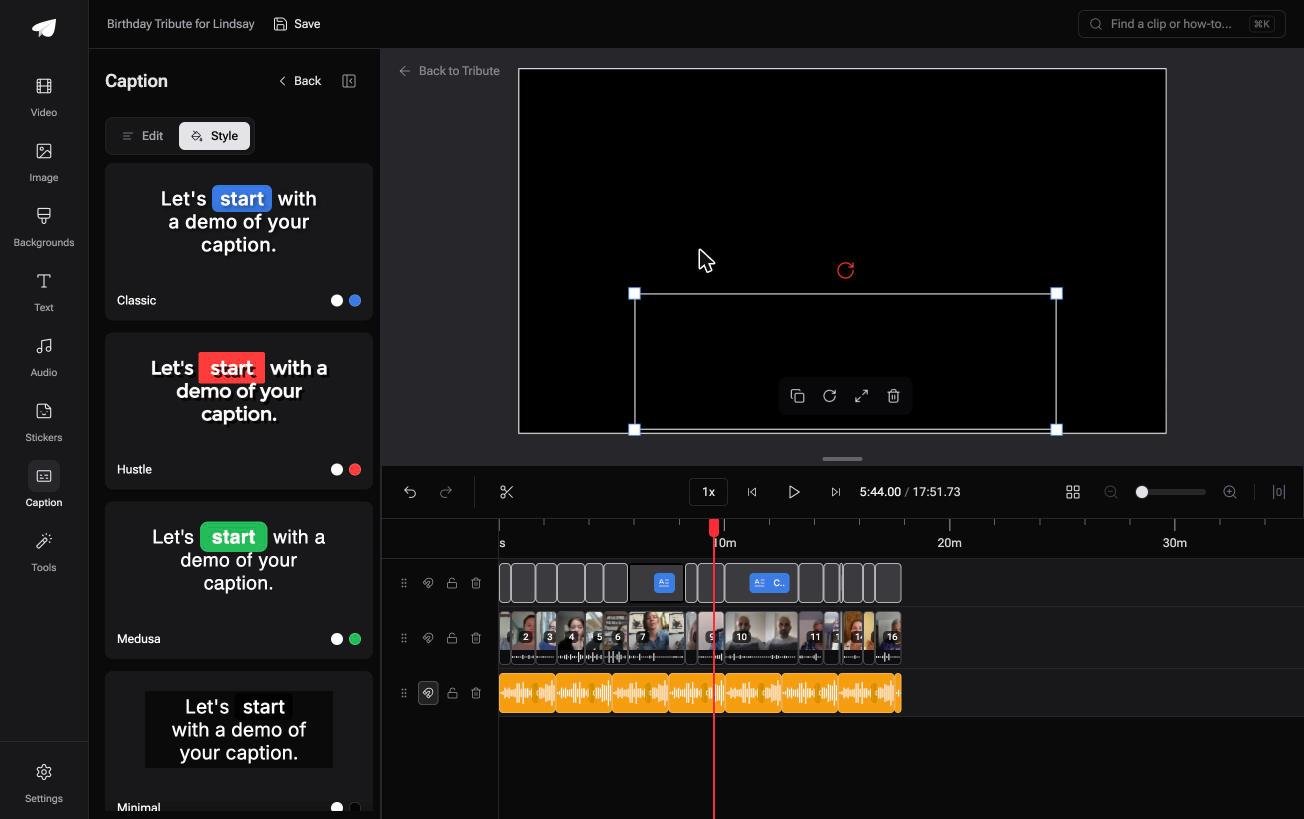
- One switch captions every clip: 17 minutes of video from 16 people in under a minute
- 10 caption styles, with the word being spoken highlighted as it is said
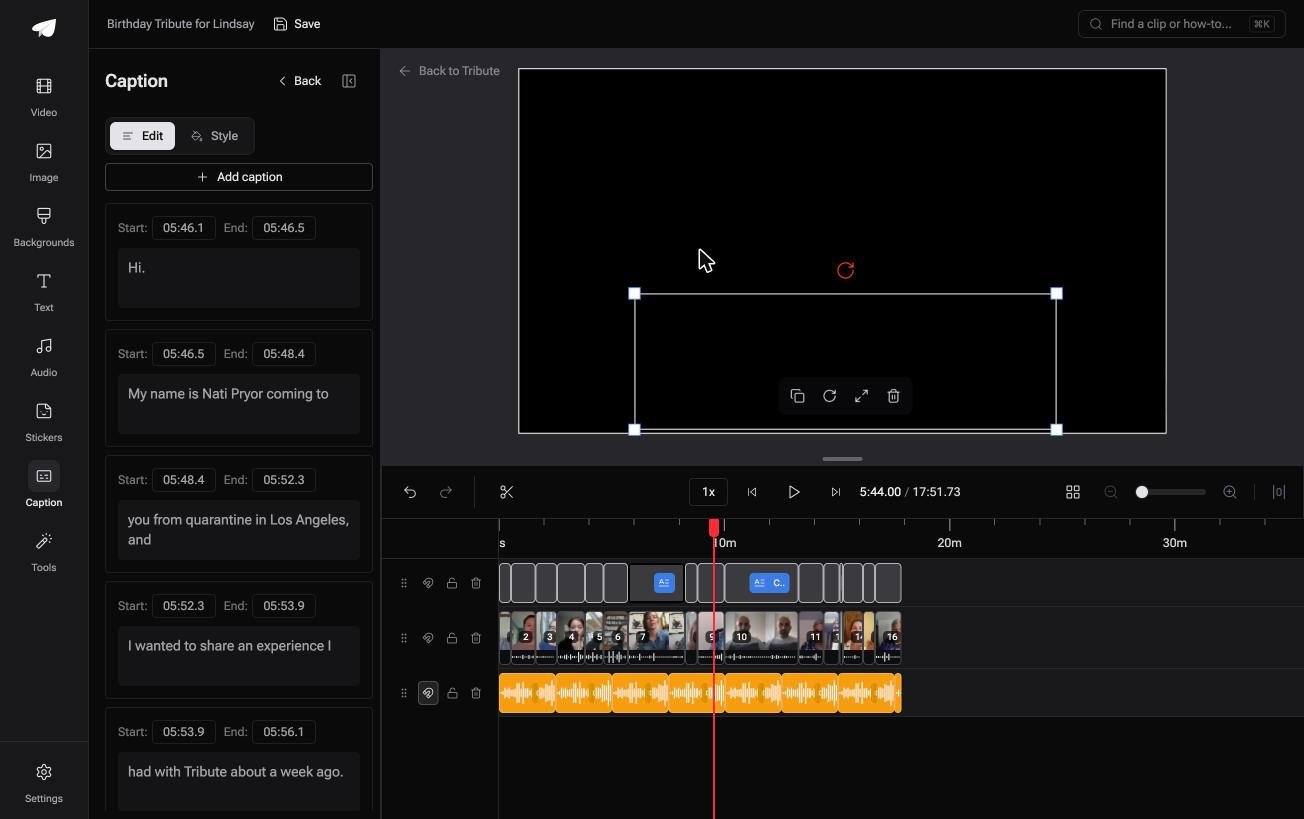
- Every line editable, with its own start and end timecode
- 39 licensed tracks across 11 genres, so the music under the words is cleared
Best for: A video where the words matter more than the picture and nobody wants to type them.
Why it works: The words on screen are the ones people said, so nothing has to be typed or timed by hand.
Can the words on screen be the ones people said?
Everything above exists because you chose a song and then chased its words across a timeline.
There is a case where the words arrive with the footage.
The case: several people recording for one person
A grandmother turning eighty. A teacher retiring. A memorial where the people who should speak live four time zones apart.
Each person records a message on their own phone, and what they say is the content. Nobody is lip syncing to a track, so there is no lyric to time.
Which means the search that brought you here, a video song lyrics maker, is aimed at a different job from the one in front of you.
Why the timing work disappears
Because the text is generated from the speech, not typed against the beat.
One switch captions every clip on the timeline, in a style you pick, with each line carrying its own timecodes if a word came out wrong. The Tribute video editor treats captions as a default rather than a project.
What you do not have to do
Send one link, and the timing work never reaches you.
- No stopwatch. One switch captions every clip on the timeline.
- No retyping. On a Concierge Tribute, Eve fixes a misspelled name or a line that lands late, across every clip.
- No build. Tribute's own editors make the video on that same tier.
- No export settings. The preview matches the video that comes back.
When this is the wrong answer: you want a commercial song's lyrics on screen as the whole point of the video. That is a lyric video, and the hand timed method above is how it gets made.
Frequently Asked Questions
How do I time lyrics to a song without special software?
Play the track, write down the timecode where each line starts, then set each text box to those numbers. Any editor with a timeline will take them.
How many words should be on screen at once?
Between four and seven. More than that and the viewer is still reading when the next line arrives.
Can I add song lyrics to a video automatically?
Speech recognition will try, and it struggles with singing over instruments. Use it on spoken words or your own recorded vocal, then correct the result.
Is it legal to put a song on video for a private gift?
Using a commercial track at a private event is a different situation from publishing it, and the rules depend on the song and the country. Cleared library music removes the question.
What is the best way to put song lyrics over photos?
Lay the track down, set each photo to about four seconds, then put one line of text on each image. The music decides the pace and the pictures follow it.
Why do my captions look cut off on a phone?
Players crop the edges, and some overlay their own controls low in the frame. Keep text inside the middle eighty percent of the picture.
Can I make a lyric video on a phone?
Yes. CapCut and Canva both run on a phone with text layers you can drag on a timeline, which is all this job needs.
👉 Caption every clip from one switch if several people are each recording a message for one person, and no line is timed by hand.
