
Photo Video Maker With Song Online: Three Browser Routes That Work
Any photo video maker with song online does the same three things: orders your pictures, sets how long each one holds, and lays a track underneath. Clipchamp, Google Photos and the YouTube Audio Library cover almost every version of the job.

Which photo video maker with song online should you use?
The one that matches how much control you want over the timing.
| Tool | Best for | The catch |
|---|---|---|
| Clipchamp | Setting each photo's length by hand | Needs a Microsoft account |
| Google Photos | Pictures that are already in your library | The template picks the pacing |
| YouTube Audio Library | Finding a track you may publish | Music only, no editor |
To add song to video online, you need two things: the photos in an order you chose, and a track you are allowed to use. Most of the frustration people hit comes from solving the second one last.
How do you make a photo video with song online in Clipchamp?
Import the pictures, drag them onto the timeline, then drop a track underneath and trim it to length.
Microsoft's own page on adding audio or music to videos gives two routes for the sound, and they differ in who owns the track.
- Click My media in the left sidebar, then Import media, and pick your photos. The arrow beside it pulls from OneDrive, Google Drive, Dropbox or Box.
- Drag the photos onto the timeline in the order you want them seen. Drag the edge of each one to set how long it holds.
- Click Content library, then Music, choose a mood or genre and click the + on a track to drop it under the pictures.
- Or import your own audio the same way as the photos, and hover over it to use the add to timeline button.
- Trim the track so it ends when the last photo does, then export.
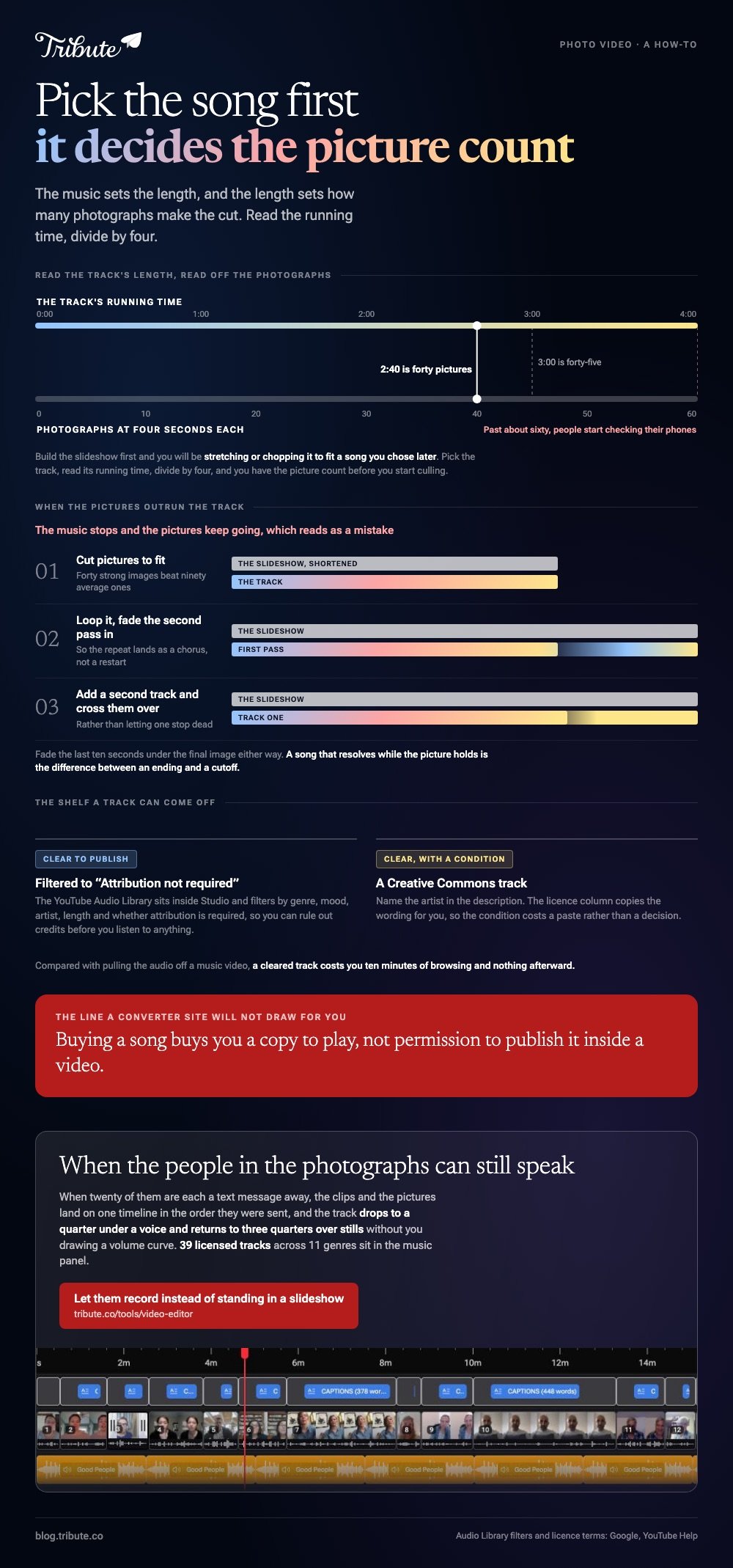
Four seconds a photo is the number that works. Forty pictures at four seconds is two minutes forty, which sits under most songs with room for a title card.
Why the song goes first
Because the music decides the length, and the length decides how many photos make the cut.
Pick the track, read its running time, divide by four, and you have your picture count before you start culling. Build the slideshow first and you will be stretching or chopping it to fit a song you chose later.

Can Google Photos make a photo to video maker with song online unnecessary?
Often, if the pictures already live there.
Google's help page on making creations in Google Photos describes a Highlight video that arrives with music, text and beat matching in place.
- On a computer, open photos.google.com, click Create, then Highlight video.
- Type a subject such as a name or a place to let it gather the pictures, or choose to build your own.
- Click Edit, then Music to swap the track, and Save when it sounds right.
- On a phone, open the Create tab, tap Highlight video, then Add Music and pick a mood: Bright, Chill, Romantic, Inspirational, Funky, Dramatic or Sad.
Unlike Clipchamp, Google Photos chooses the pacing for you and cuts to the beat. That is the whole appeal when you have an hour, and the whole problem when one picture deserves to hold.
From the Edit screen you can change which part of the song plays, trim it, move the volume or drop the soundtrack altogether.
Where do you get a song you are allowed to publish?
Use a library that states its terms, rather than a track you own a copy of.
Searches for a youtube song editor online mean one thing most of the time: the track you want sits on YouTube and you want it under your pictures. Lifting the audio is the part that goes wrong.
YouTube's own Audio Library lives in YouTube Studio and holds royalty free production music. You can filter by genre, mood, artist, length and whether attribution is required.
- Attribution not required is a filter, so you can rule out credits before you listen
- Creative Commons tracks need the artist named in the description
- Buying a song buys you a copy to play, not permission to publish it inside a video
Compared with pulling audio off a music video, a cleared track costs you ten minutes of browsing and nothing afterward. More on words and timing in making a lyrics video.
What breaks when the video is longer than the song?
The music stops and the pictures keep going, which reads as a mistake.
A video song joiner online will not fix that for you, because the join is not the problem: the running time is. Three answers work, in this order.
- Cut pictures until the slideshow fits the track. Forty strong images beat ninety average ones.
- Loop the song and fade the second pass in, so the repeat lands as a chorus rather than a restart.
- Add a second track and cross the two over rather than letting one stop dead.
Fade the last ten seconds under the final image either way. A song that resolves while the picture holds is the difference between an ending and a cutoff.
Related jobs are covered in photo video makers that cost nothing, photo and video collages and making a video montage.
What if the pictures are not the point?
Sometimes the photos are a stand-in for the people who could not be in the room.
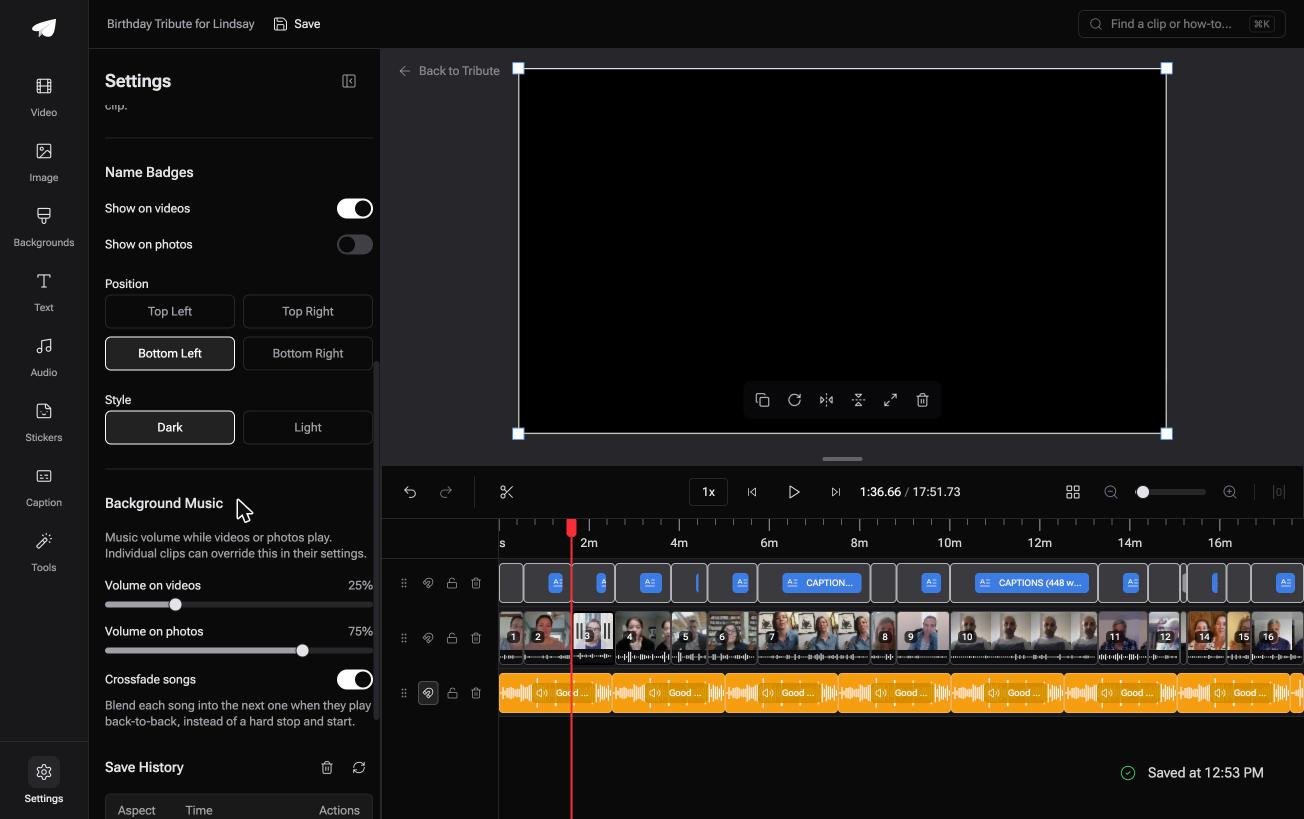
The Tribute video editor is a browser-based group video editor: contributors record clips on their phones and Tribute assembles them on a timeline with the music balanced under the voices.
It is ours, and it is the last thing on this page.
- 39 licensed tracks across 11 genres, plus a YouTube link import and your own MP3, WAV, M4A or FLAC
- Music at 75% under photos and 25% under anyone speaking, by default, and changeable per clip
- 9 3D layout effects for stills, including Tilt, Book, Floating and Billboard
- 83 occasion backgrounds grouped as Celebration, Retirement and Love

Best for: A slideshow that keeps the photographs and adds the voices of the people in them.
Why it works: The two volumes a slideshow needs, one under speech and one under stills, are already set apart.
What if the photos could speak for themselves?
A slideshow is what you make when the people cannot all be there.
You gather pictures, put them in order, choose a song that carries the mood, and the song does the emotional work because a photograph cannot talk. There is one case where it does not have to.
The case: the people are reachable, just scattered
That case turns up when the twenty people in those photographs are all still a text message away.
A sixtieth birthday. A retirement after thirty years. Cousins in three states who would each say something if someone asked them to.
Each person records thirty seconds on their own phone. The pictures become the punctuation rather than the whole piece.
Why the song stops carrying the video
Because voices carry it instead, and the track moves underneath them.
The music in the Tribute video editor drops to a quarter of its level while someone is talking and comes back up to three quarters over stills, without you drawing a single volume curve.
What you do not have to arrange
- Not the running order. Clips and photographs land on one timeline in the order they were sent.
- Not a volume curve. The track drops to a quarter under a voice and returns to three quarters over stills.
- Not a regrouping by hand on a Concierge Tribute: ask Eve, the assistant inside the editor, to put the cousins together and it reorders them.
- Not the build at all on Concierge, where Tribute's editors turn the twenty messages into the video.

When this is the wrong answer: the photographs are the point, nobody is recording anything, and you want the slideshow you pictured. Then Clipchamp or Google Photos is the better tool and this page already told you how.
Frequently Asked Questions
How long should each photo stay on screen?
About four seconds. Shorter feels rushed with a slow song, longer turns a slideshow into a queue. Hold the last image a beat past the final note.
Can I add song to video online without installing anything?
Yes. Clipchamp and Google Photos both run in a browser, and both carry music you may use inside them. Neither asks you to install software.
Can I use a song from YouTube in my slideshow?
Only if the track is cleared for it. The YouTube Audio Library is the safe shelf, and it marks which of its tracks need the artist credited in your description.
How many photos is too many?
Past about sixty, people start checking their phones. If you have two hundred pictures, cut to the ones with faces in them and save the scenery for an album.
What file should I export?
MP4. It plays on phones, televisions and every upload form, and it is what both browser tools produce by default.
Why does my music cut off at the end?
The slideshow outran the track. Trim pictures until the two match, or fade the song out under the last image rather than letting it stop mid-phrase.
Can I make a photo video with song online on a phone?
Google Photos does it from the Create tab with Highlight video. Clipchamp's browser editor expects a keyboard, so a laptop is kinder for anything you want to time by hand.
👉 Let them record instead of standing in a slideshow if the twenty people in the photographs are still reachable, and the song stops having to do all the talking.
