
Clip Cut Video Editor: Which One to Open and Where to Make the Cut
A clip cut video editor needs to do three things: trim the ends, split a clip in two, and remove the middle without leaving a gap. Photos, Clipchamp and CapCut all manage it, so the choice comes down to where the footage already sits.

| Tool | The cut it does best | The catch |
|---|---|---|
| Photos on iPhone | Trimming the two ends | No split, no second track |
| Clipchamp | Splitting and deleting the middle | Sign in before you export |
| CapCut | Many cuts in a row | Delete the branded ending clip |
| HandBrake | Exporting one range, no editor | Not frame accurate |
What should a clip cut video editor do?
Three operations cover almost every job.
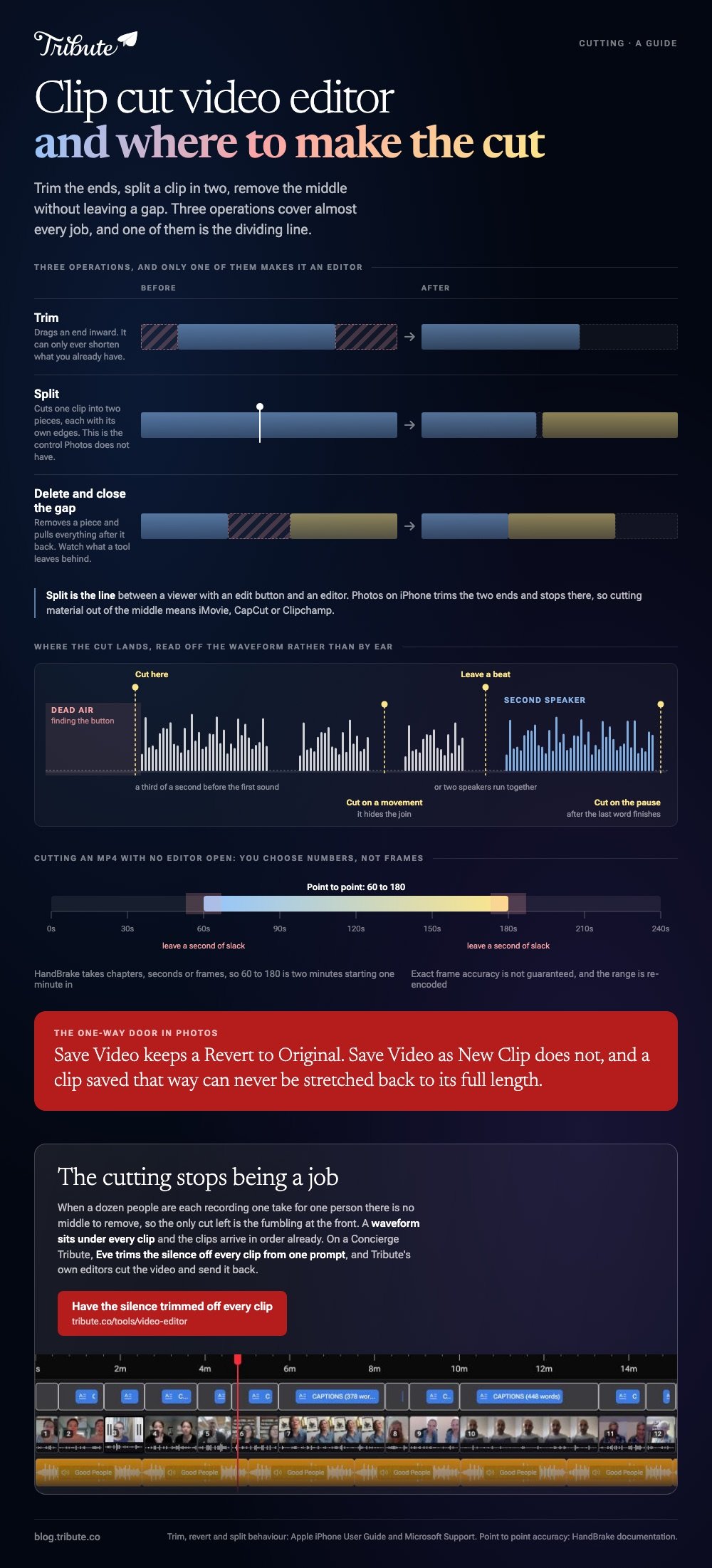
Trim drags an end inward and shortens the clip. Split cuts it into two pieces, each with its own edges. Delete and close the gap removes a piece and pulls everything after it back.
Unlike a split, a trim can only ever shorten what you already have, so a tool that trims alone will get you a tidy start and end and no more.
Cutting video out of the middle needs split as well, and that is the line between a viewer with an edit button and an editor.
Watch how a tool handles the gap. If removing a piece leaves a black hole on the timeline, you will spend the rest of the session dragging clips back into place by hand.
How do you cut a clip on an iPhone?
In Photos, for the ends, with no download and no account.
- Open the video in Photos and tap the Edit button.
- Drag the sliders at either side of the timeline to set a new start and end. Tap play to check.
- Tap Done, then choose Save Video or Save Video as New Clip.
Those last two options matter. Apple's guide to editing videos on iPhone explains that Save Video keeps the trimmed version alone, while Save Video as New Clip leaves the original in place and adds a copy.
Reverting works on the first option: open the clip, tap Edit, tap Revert, then Revert to Original. A video saved as a new clip cannot be stretched back to its full length.
Photos stops at the ends, though. To cut clip material out of the middle you want iMovie or CapCut, both of which split on the phone.
Which clip cut video editor works in a browser?
Clipchamp, and the split control is the whole reason to open it.
- Bring the video in with the import media button and drag it to the timeline.
- Click the clip so it is highlighted.
- Move the seeker, the white vertical line with a circle on top, to the frame where the cut belongs.
- Click the split button on the editing toolbar.
- Click the piece you do not want and delete it.
- Drag the green bars at either end of what remains to tidy the join.
Microsoft's own guide to trimming and splitting treats split as a form of trimming, which is a fair description of how it gets used.
Windows users looking for something installed rather than in a tab have the desktop options compared here, and colorists who want a full cut page can read about cutting a clip in DaVinci Resolve.

Where should the cut land?
On the breath before the first word, not on the word itself.
Phone recordings start with two or three seconds of someone finding the button and composing themselves. Cutting that away is the single change that makes amateur footage feel edited.
Use the waveform rather than your ears. Silence is visible as a flat line, speech is a block, and the first spike is the first consonant.
- At the start: cut about a third of a second before the first sound
- At the end: let the last word finish, then cut on the pause
- In the middle: cut on a movement, which hides the join
- Between people: leave a beat, or two speakers run together
Cut harder than feels polite. Nobody has ever complained that a message from a relative was too brisk.
Can you cut an MP4 without opening an editor?
Yes, if one continuous range is all you need.
HandBrake will encode a section rather than the whole file. Its point to point controls take chapters, seconds or frames: a range of 60 to 180 gives you two minutes starting one minute in.
Its documentation warns that exact frame accuracy is not guaranteed, so leave a second of slack where the cut has to land on a word.
Compared with an editor, you are choosing numbers rather than watching the frame. A cut mp4 produced this way is re-encoded, which costs a generation of quality.
Cutting footage in After Effects is a different proposition again: it splits layers for compositing work rather than assembling a sequence, and using it to shorten a clip is a long way around.
Assembly belongs in a montage editor, and the sound that goes with it in adding audio to a video clip.
What if the clips came from a dozen different people?
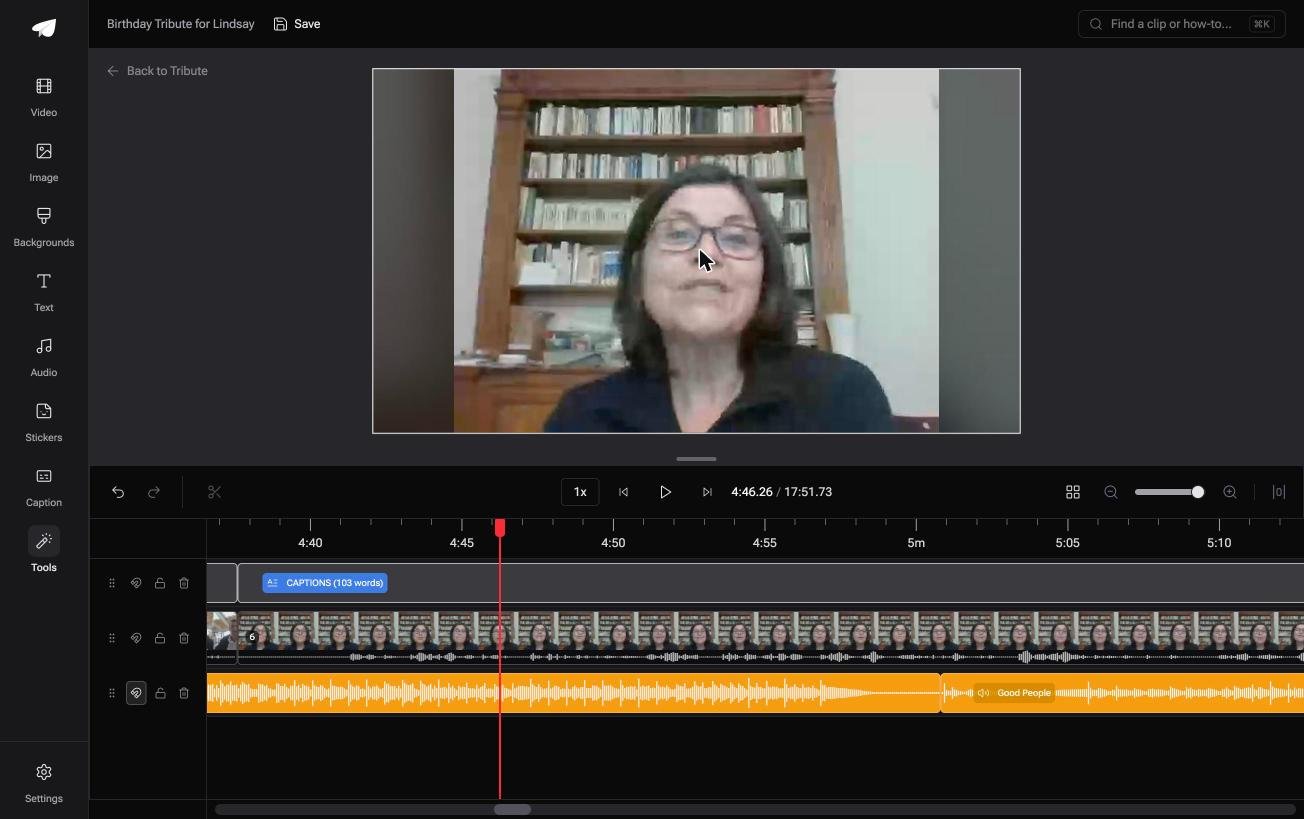
The Tribute video editor is a browser-based group video editor: contributors record clips on their phones and Tribute assembles them on a timeline with the music balanced under the voices.
It is ours, and it is the last thing on this page.
- A waveform under every clip, so the silence before the first word is visible before you drag the edge in
- Clips arrive on the timeline in order, with a tick showing which are already placed
- A Reorder media window with every clip numbered, plus move to front, move to back and bulk remove
- Autosave and restorable history, so a removed clip can come back
Best for: A pile of clips that each start three seconds before anyone speaks.
Why it works: The cuts that remain are the ones worth making, since nothing has to be found, imported or lined up first.
Can the cutting come down to one trim per clip?
Everything above assumes footage you have to shape.
There is a case where the shaping is already done and only the ends are left.
The case: several people recording for one person
A colleague leaving after fifteen years. A grandmother turning ninety. A memorial where the people who should speak live four time zones apart.
Each one records a message on their own phone, says their piece, and stops. Nobody is shooting coverage, so there is no middle to remove.
Which turns the search that brought you here into a much smaller job: trim the fumbling at the front, leave the rest alone.
Why the splitting never starts
Because every clip is one take of one person.
The clips land in the order they arrived, each with its waveform underneath, so the work is dragging an edge in to the first word. The Tribute video editor is built around that single move rather than around a blade.
On a Concierge or Concierge Deluxe Tribute, Eve, the AI assistant inside the editor, makes that move for you and trims the silence off every clip from one prompt.
What you do not have to do
A Concierge Tribute takes the cutting off you altogether.
- Not the collecting. Each person records from a link on their own phone.
- Not the ordering. The clips sit on the timeline in sequence before anyone opens it.
- Not the trims. Eve takes the silence off every clip from one prompt.
- Not the edit. Tribute's editors cut it and send the finished video back.

When this is the wrong answer: you shot the footage yourself and the edit is a real cut, with pacing and coverage to build. Then open one of the editors above and use the split control.
Frequently Asked Questions
What is the difference between trimming and splitting?
Trimming moves the start or end of a clip inward. Splitting cuts one clip into two, which is what you need before removing a section from the middle.
Can I cut a video without losing quality?
Only with a tool that copies the stream rather than re-encoding it, and browser editors re-encode. For one straight cut, a trim on the phone is the gentlest route.
How do I undo a trim I already saved?
On an iPhone, open the clip, tap Edit, then Revert to Original. This works unless you saved the trim as a new clip, which keeps both versions instead.
What is the quickest way to cut a long recording down?
Watch it once and note the timecodes worth keeping. Then split at those points and delete the rest, which beats scrubbing back and forth.
Does cutting a clip change its audio?
The sound is cut with the picture, so a cut mid word sounds wrong even when it looks fine. Move the cut to the nearest pause.
Can one tool cut video and add music?
Clipchamp, CapCut and iMovie all do both on one timeline. Photos on iPhone cuts but has no audio track to add a song to.
How short should each clip be in a group video?
Between twenty and forty seconds holds attention, and the trim at the front buys you most of that on its own.
👉 Have the silence trimmed off every clip for you if a dozen people are recording for one person, and the cutting stops being a job.
