
Put Text on Video Online: Which Browser Tool Does It Best?
To put text on video online, open the clip in a browser editor, click the Text panel, drag a style onto the row above your video, then type. Clipchamp, Canva and Kapwing all do it without an install. The hard part is placement, not typing.

Put text on video online: which tool should you use?
The one that matches what the words are for.
A title card, a lower third and a caption track are three different jobs, and the tool that does one well often makes another awkward.
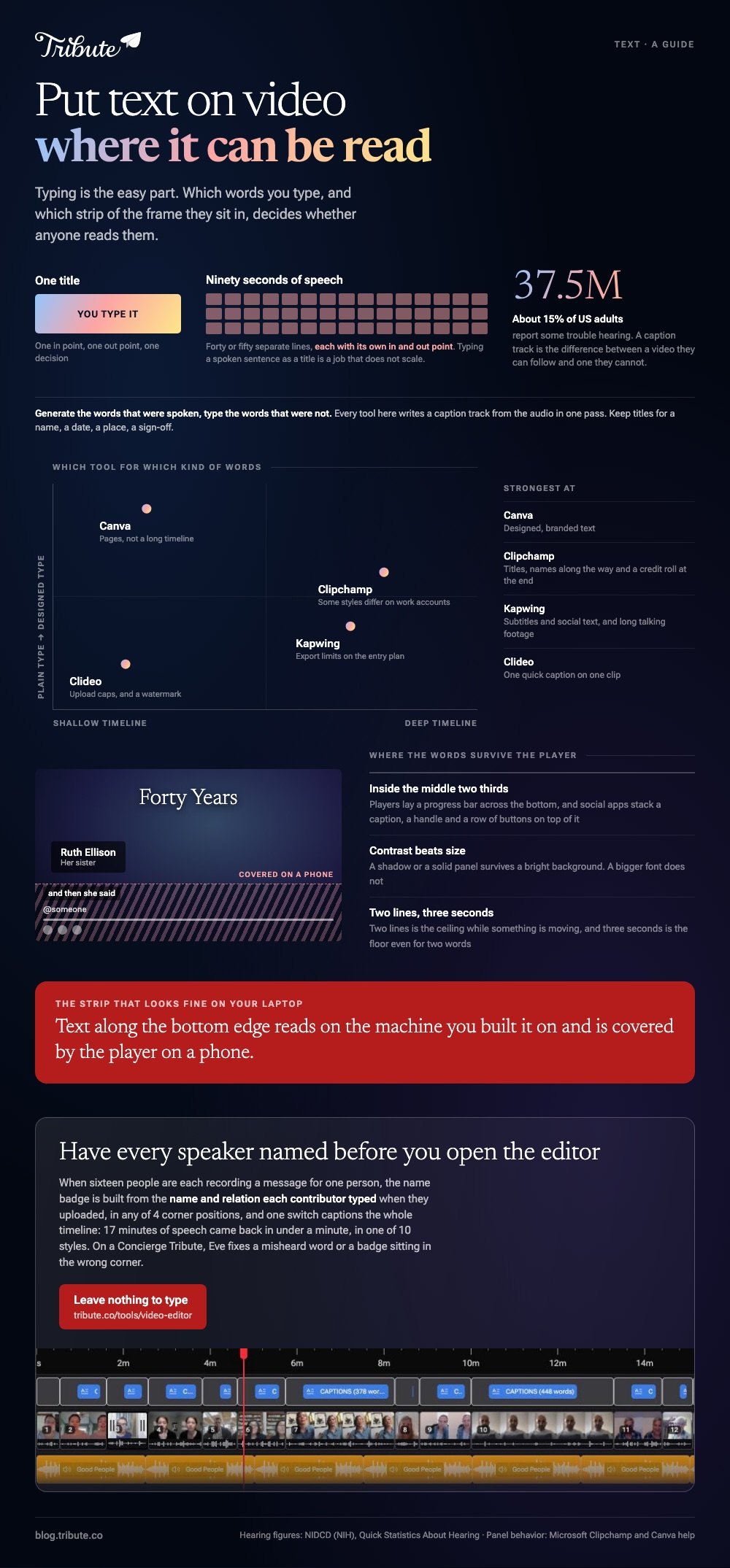
| Tool | Strongest at | Watch out for |
|---|---|---|
| Clipchamp | Titles and credit rolls | Some styles differ on work accounts |
| Canva | Designed, branded text | Built around pages, not a long timeline |
| Kapwing | Subtitles and social text | Export limits on the entry plan |
| Clideo | One quick caption on one clip | Upload caps, and a watermark to check for |
Every online video editor with text effects groups them the same way: a list of ready-made looks on the left, a property panel on the right, and the words themselves on a row above the clip.
How do you add text to a video in Clipchamp?
Clipchamp keeps text in its own tab on the toolbar, and a title lives on the timeline like any clip.
- Click the Text tab on the toolbar to browse and preview the options.
- Click add to timeline, or drag the style onto the row above your video.
- Select the text field in the property panel and type your words.
- Change font, size, alignment and color in that same panel.
- Drag the trim handles on the title to decide how long it stays on screen.
Microsoft covers the whole panel in its guide to adding text and titles to a video, including swapping a title by dropping a new style on top of the old one and searching for a credits roll.
One caveat from the same page: some text options have not reached the work and school version of Clipchamp yet, so a style you saw in a tutorial may be missing from a company account.
Best for: A title at the front, names along the way and a credit roll at the end.
Why it works: Because a title is a timeline object, its length is a drag rather than a number you type into a box.
How do you add text in Canva, Kapwing or Clideo?
Each one keeps the control in a different place, and the shape of the work is the same.
In Canva, open Text in the side panel or press T to drop a box onto the page, then format it from the toolbar.
Canva sets out the size controls on its page about formatting text: font size is a preset, a typed value, or the plus and minus buttons.
Kapwing and Clideo both work upload first. Send the clip up, add a text layer, drag it where it belongs, then export and download.
An online video editor to add text will also let you keep that layer across several clips, so a name card does not have to be rebuilt for each one.
Compared to Clipchamp, Canva gives you better looking type and a weaker timeline. Compared to Canva, Kapwing is built around subtitles and handles long talking footage better.
Put text on video online, or generate captions instead?
Captions, whenever the text is what someone said.
Typing a spoken sentence as a title is a job that does not scale: ninety seconds of speech is forty or fifty separate lines, each needing its own in and out point. Every tool above will generate those from the audio in one pass.
Around 15% of US adults report some trouble hearing, about 37.5 million people, according to NIDCD quick statistics on hearing. A caption track is the difference between a video they can follow and one they cannot.
Keep titles for the things nobody says out loud: a name, a date, a place, a sign-off.
Where should the words sit so people can read them?
Inside the middle two thirds, and never along the bottom edge.
Players put a progress bar across the bottom of the frame, and social apps stack a caption, a handle and a row of buttons there.
A text overlay placed in that strip on any online video editor is readable on your laptop and covered on a phone.
- Contrast beats size. A shadow or a panel behind the words survives a bright background, and a bigger font does not.
- Two lines is the ceiling for anything a viewer reads while something is moving.
- Three seconds minimum on screen, even for two words.
Once the words are settled, putting music into the video and putting music over a video online are the next pass.
What if the clips came from a dozen different people?
Then the text is names, over and over, and you are typing the same label fifteen times.
The Tribute video editor is a browser-based group video editor: contributors record clips on their phones and Tribute assembles them on a timeline with the music balanced under the voices.
- A Text panel of ready-made styles grouped Simple, Title and Styles, rather than a raw font list
- Name badges built from each clip's uploader name and relation, in 4 corner positions, dark or light
- 10 caption styles with the spoken word highlighted as it is said
- Every caption line editable, with its own start and end timecode
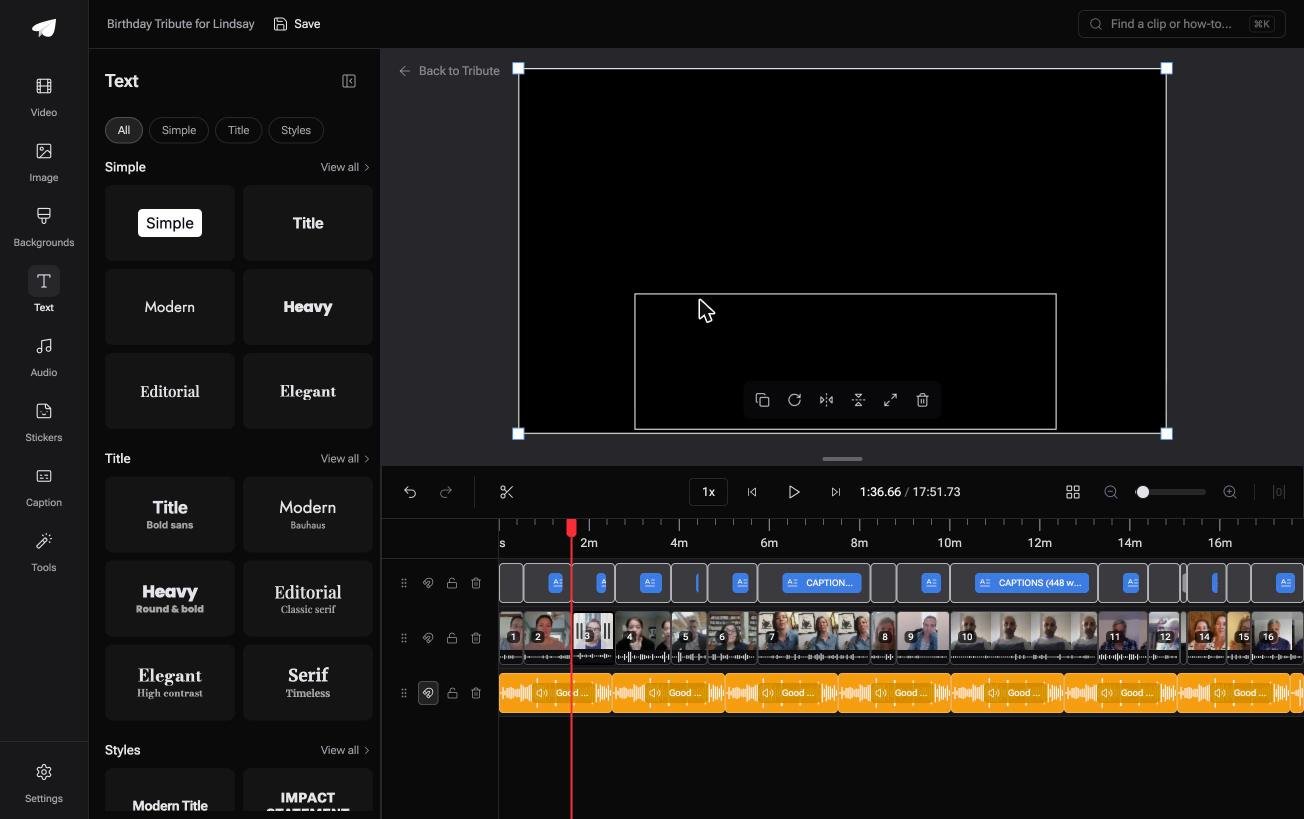
Best for: Fifteen speakers whose names belong on screen, typed once rather than fifteen times.
Why it works: A name badge is generated from the name the contributor typed, so the label is already right before you look at it.
What if the words were already on the screen?
Each tool above asks you to type the words yourself.
For one title that is nothing. For sixteen speakers, each needing a name, a relation and a caption track, it is the longest part of the edit. There is one case where almost none of it is typed.
The case: the clips were recorded for one person
You are in it when several people each record a message for the same person.
A grandmother turning eighty. A head of department leaving after twenty years. Half the people in it are strangers to the other half, which is why the names matter.
If you are putting one title on one clip, Clipchamp above does it in two minutes and this section is not for you.
Why the typing stops
Because the words come from the recording and from the person who sent it.
Captioning every clip is one switch: sixteen contributors and seventeen minutes of speech came back captioned in under a minute. Name badges in the Tribute video editor are built from the name and relation each person typed when they uploaded.
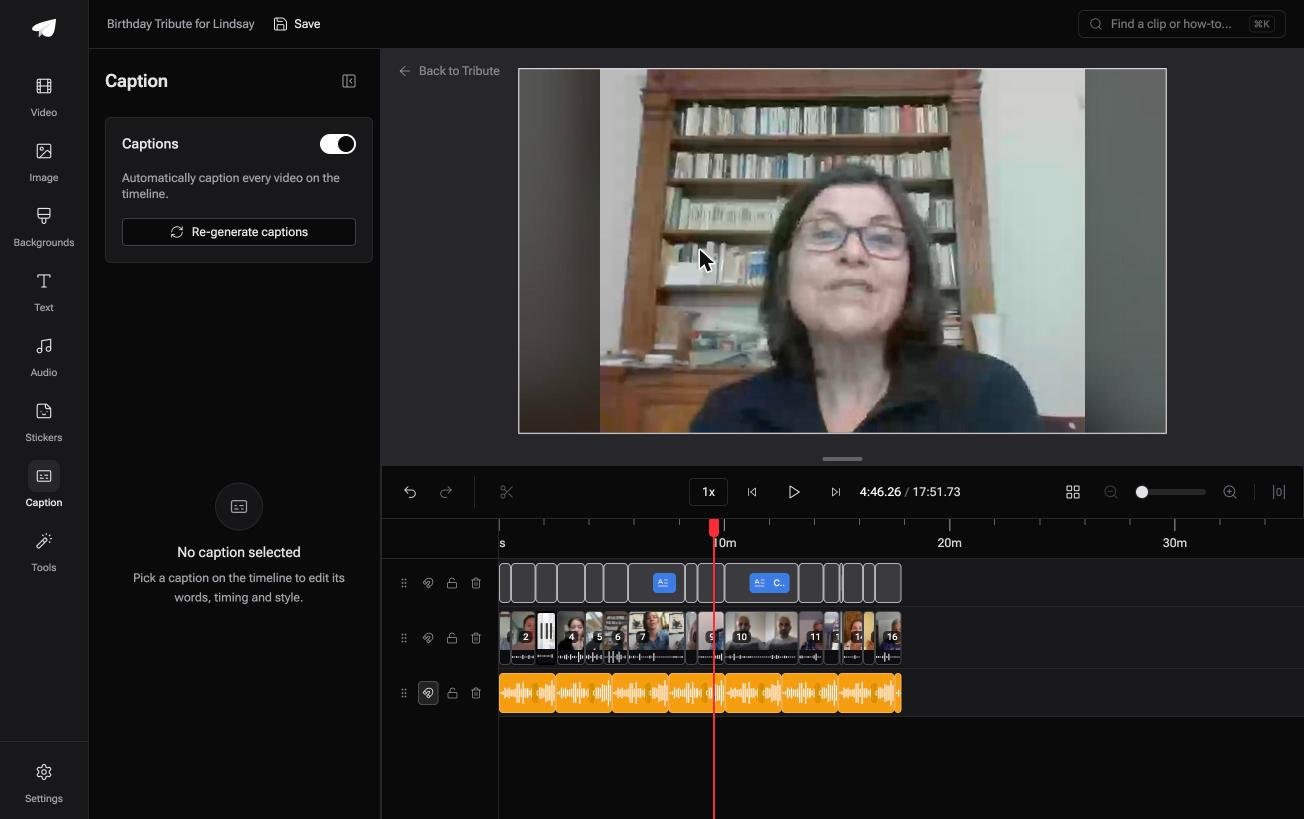
What you do not have to do
Four jobs, and typing names is not one of them.
- Not the chasing. Each person records from the link and types who they are.
- Not the badges. The name and the relation arrive attached to the clip.
- Not the captions. One switch writes them for the whole timeline.
- Not the corrections. On a Concierge Tribute, Eve, the AI assistant inside the editor, fixes a misheard word or a badge sitting in the wrong corner.

When this is the wrong answer: the text is the design, and you want a particular font doing a particular thing. Then Canva, every time. The editor is not a standalone titler either: it lives inside a paid Tribute.
For the wider job, see putting videos together and making a video montage.
Frequently Asked Questions
Can I put text on a video online without watermarks?
Clipchamp exports at up to 1080p at no cost and does not stamp the picture. Smaller browser tools sometimes do, so check the export screen before you build the edit.
What is the difference between a title and a caption?
A title is text you wrote, placed where you want it. A caption is a transcript of speech, timed to the audio. Tools generate the second and ask you to type the first.
How do I keep text on screen for the whole video?
Drag the right-hand trim handle of the text layer to the end of the timeline. In page-based tools like Canva, copy the text box onto every page instead.
Which font reads best on a phone?
A heavy sans serif with a shadow or a solid panel behind it. Thin type and script faces break up against moving footage, whatever size you set them to.
Can I add text to a video on my phone browser?
Most browser editors load on a phone and are painful to use there, since the timeline needs precision a thumb does not have. The phone apps are a better route.
Why does my text look blurry after exporting?
The export resolution is below the project resolution, so the type was scaled down. Set the export to 1080p and check the project is not sized at 720p.
Can I edit the wording of auto captions?
Yes, in every tool that generates them. Names and places are where machine transcripts go wrong, so read those lines before you publish.
👉 Have every speaker named and captioned before you open the editor if sixteen people are recording messages for one person, and there is nothing left to type.
