
Cut Video Windows: Which Tool Is Already on the PC
On Windows 11, Clipchamp is the cutter and it is already installed. Drop the clip on the timeline, move the seeker to the cut point, press S to split, then select the piece you do not want and press Delete.

Which cut video Windows tool is already installed?
Clipchamp, on any Windows 11 machine, with Photos beside it for a single trim.
- Open Clipchamp and drag the file onto the timeline.
- Click the clip so it is highlighted, then move the seeker to the cut point. The timecode above the timeline is your guide.
- Click the split button, the scissors icon, or press S.
- Select the piece you want gone and press Delete or Backspace.
- Drag the clips together so there is no gap, then click Export.
The Windows video editor will cut out parts from the middle of a clip, and the split button is what does it. Split at both ends of the section, delete the middle, close the gap.
Audio attached to a clip splits with it. That is what keeps a voice in sync after a cut, and it is the thing a cruder tool gets wrong.
What about trimming instead of splitting?
Dragging the end of a clip inwards is the lighter move.
Microsoft describes it as dragging the sides of a media asset in to shorten it or out to lengthen it. Nothing is thrown away: the frames sit outside the clip and come back if you drag the edge out again.
Trim the ends, split the middle. Using split for both leaves you deleting pieces you could have hidden.

Can you cut video Windows Media Player style?
No. Media Player plays, and hands the job to something else.
There is no trim, no split and no save-as-shorter anywhere in it. What it does have is a shortcut that opens the clip in Clipchamp, which is the whole of its editing story.
The Photos app is the other short route. It keeps a one-cut trim for a single file and a button that passes the clip over when you want more than that.
| App | What it cuts | Reach for it when |
|---|---|---|
| Clipchamp | Anywhere, through split | More than one cut, or more than one clip |
| Photos | The start and the end | One file, one trim, no project |
| Media Player | Nothing | Never, for this |
| VLC | A recording of playback | Never, for this either |
Unlike Clipchamp, VLC writes files with timing that other editors misread, so a clip cut there can refuse to behave later: see cutting video with VLC.
Does any of this work on Windows 10?
Yes, with one extra step at the start.
Clipchamp is not preinstalled there. Take it from the Microsoft Store, or use the browser version, which is the same editor in a tab and asks nothing of the machine.
A Windows video cutting tool you have to pay for is hard to justify for a cut and an export. The paid tiers buy higher export quality and stock material, not a better split.
Compared to a desktop installer, the browser version has one real advantage on an old laptop: the work happens in the tab, so a fifteen year old PC is still fast enough to do it.
What should you cut, and where?
Less than you think, and at the start more than anywhere else.
- The front. The reach for the button, the glance at the lens, the first breath.
- The dead middle. The pause where somebody loses the thread and finds it again.
- The back. Cut on the last word, not on the wave.
Cut on a sound rather than on a silence where you can. A cut that lands as somebody starts a word is invisible; a cut into half a second of room tone is the one people notice.
Watch the result once without stopping before you export. Cuts that felt right while you were making them are the ones that read as abrupt on a second pass.
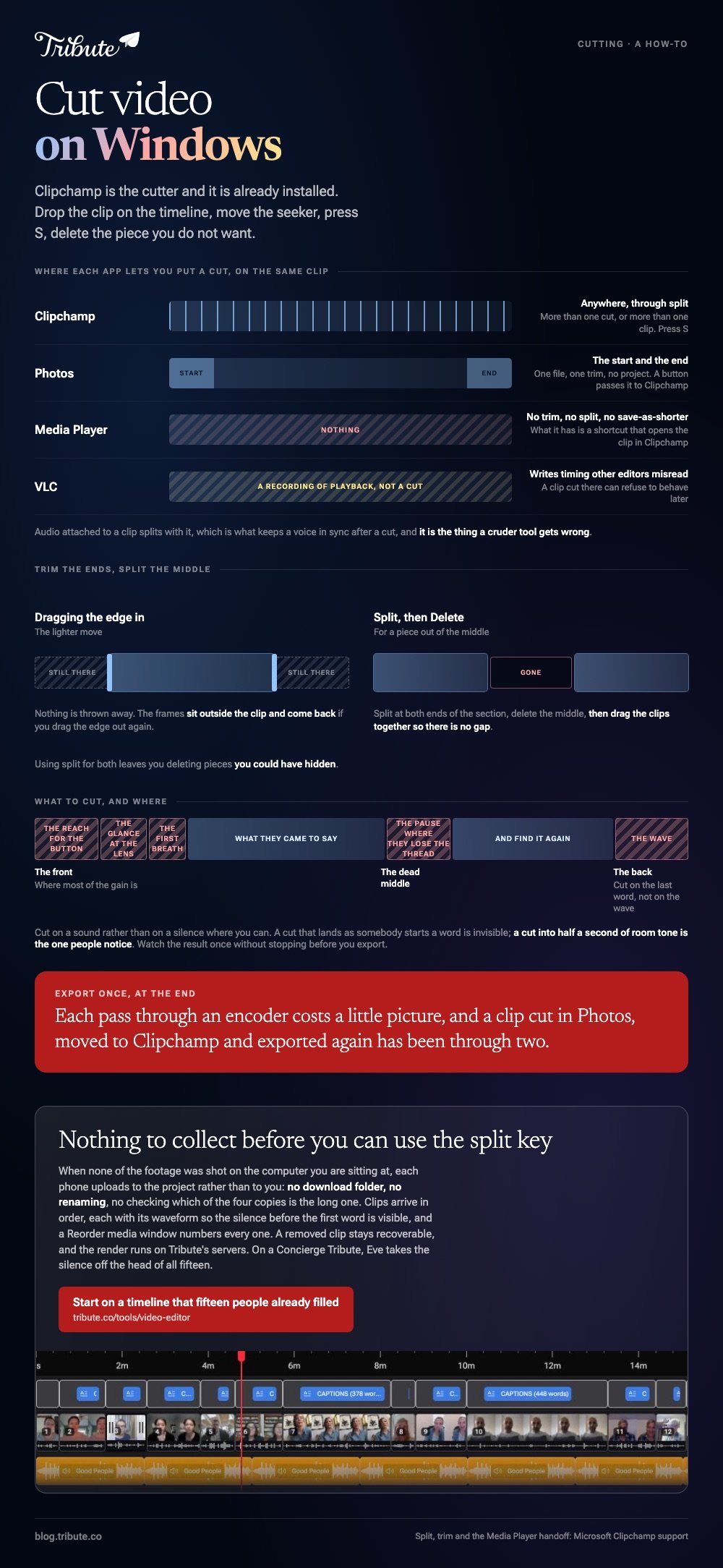
Export once, at the end. Each pass through an encoder costs a little picture, and a clip cut in Photos, moved to Clipchamp and exported again has been through two.

Browser-side versions of the same job are in clip and cut video editors. The wider comparison sits in video editors for Windows.
What if fifteen people each sent a clip to cut?
The Tribute video editor is a browser-based group video editor: contributors record clips on their phones and Tribute assembles them on a timeline with the music balanced under the voices.
It is ours, and it is the last thing on this page.
- Clips arrive in order on the timeline, each with a tick once it is placed
- A waveform under every clip, so the silence before the first word is visible rather than guessed
- Reorder media, with every clip numbered and bulk moves to front, back or any position
- A Tools panel that renders the final video, finds duplicate photos and loops music to fill the timeline
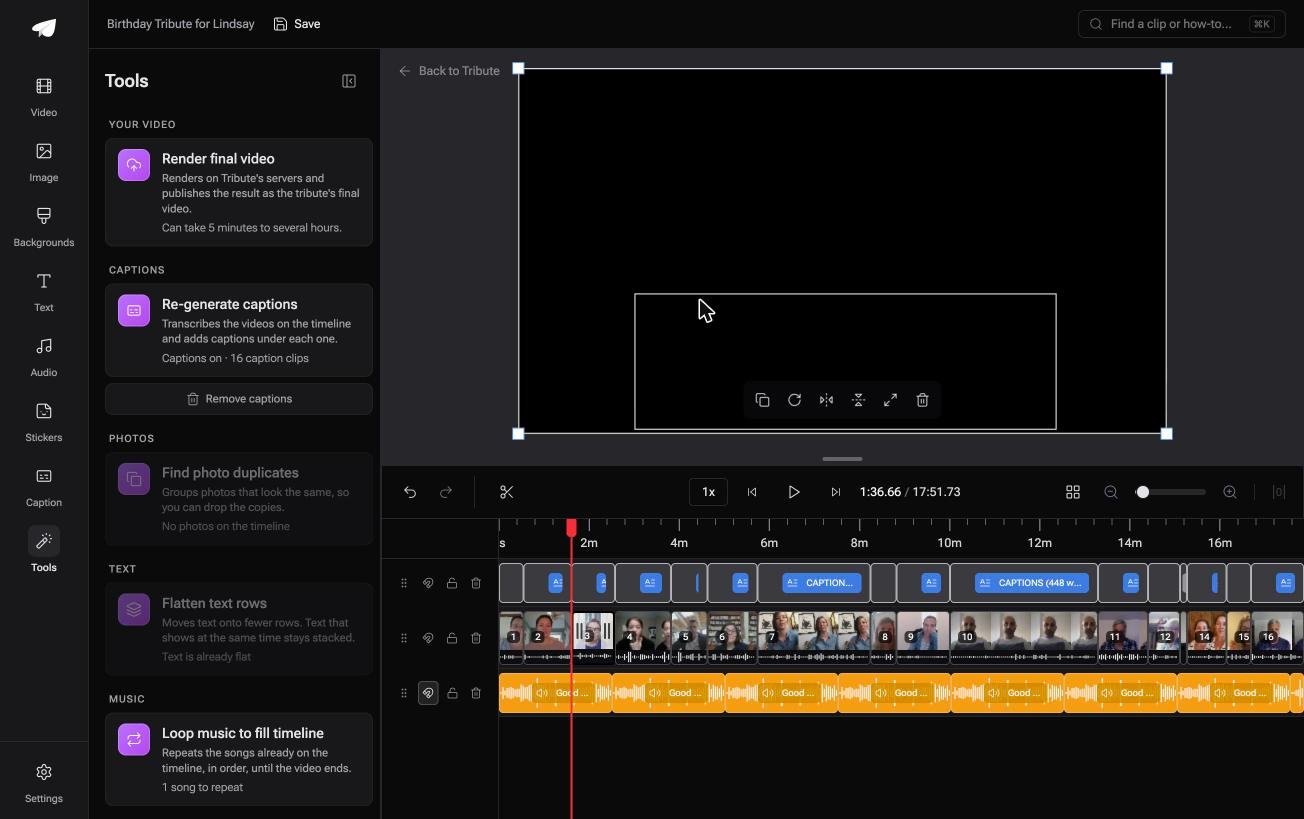
Best for: Fifteen clips recorded on fifteen phones, none of which were ever on this PC.
Why it works: There are no files to gather first, so the cutting starts on a timeline that is already built.
What if Windows were not part of this at all?
Every step above assumes the footage is sitting on the machine in front of you.
That holds for a screen recording or a camera card. It falls apart when the clips are on other people's phones. There is one case where no PC is involved at any point.
The case: fifteen phones and no shared drive
You are in it when none of the footage was shot on the computer you are sitting at.
A grandmother turning eighty. A colleague leaving after fifteen years. Fifteen files arriving by text, by email and by a link somebody forgot to set to public.
Why nothing has to be gathered first
Because each phone uploads to the project rather than to you.
There is no download folder, no renaming, no checking which of the four copies of the same clip is the long one. The timeline exists before you open it.
That is how the Tribute video editor handles a scattered pile: not a better split key, but nothing to collect before you can use one.
What you do not have to do
- No transfers. Fifteen phones upload without anything touching this PC.
- No cut per clip. Eve takes the silence off the head of all fifteen.
- No fear of the wrong cut. A removed clip stays recoverable rather than deleted.
- No render here. Tribute builds the video on its servers.
The second item needs a Concierge or Concierge Deluxe Tribute. Eve, the AI assistant inside the editor, works across the whole timeline, and on that tier Tribute's own editors will build the video instead.
When this is the wrong answer: you have one long recording on the PC and want four minutes out of the middle. Clipchamp does that with two presses of S. The editor is not a general cutter: it lives inside a paid Tribute.

Frequently Asked Questions
How do I cut a video on Windows 10 without installing anything?
Use the browser version of Clipchamp. It runs in a tab, handles the same split and trim, and leaves nothing on the machine.
What is the keyboard shortcut for splitting in Clipchamp?
S, with the clip selected and the seeker parked where you want the cut. The scissors icon on the timeline does the same thing.
Can the Photos app cut a section out of the middle?
Not on its own. It trims the start and the end, and there is a button that passes the clip to Clipchamp when you need more.
Does cutting a video on Windows reduce the quality?
The export re-encodes what you kept, so one pass costs a little. Keep everything in one editor and export once rather than twice.
Why will my cut clips not line up on the timeline?
Deleting a piece leaves a gap rather than closing it. Drag the right-hand clip left until it snaps against the one before it.
What is the fastest way to cut a dozen clips from other people?
Get them onto one timeline before you start, rather than cutting each file on its own, as in making a video montage.
👉 Start on a timeline that fifteen people already filled if none of their clips was ever on this PC, and the cutting is the only part left.
