
Cut Video With VLC Player: What Works, What Does Not, and the Faster Route
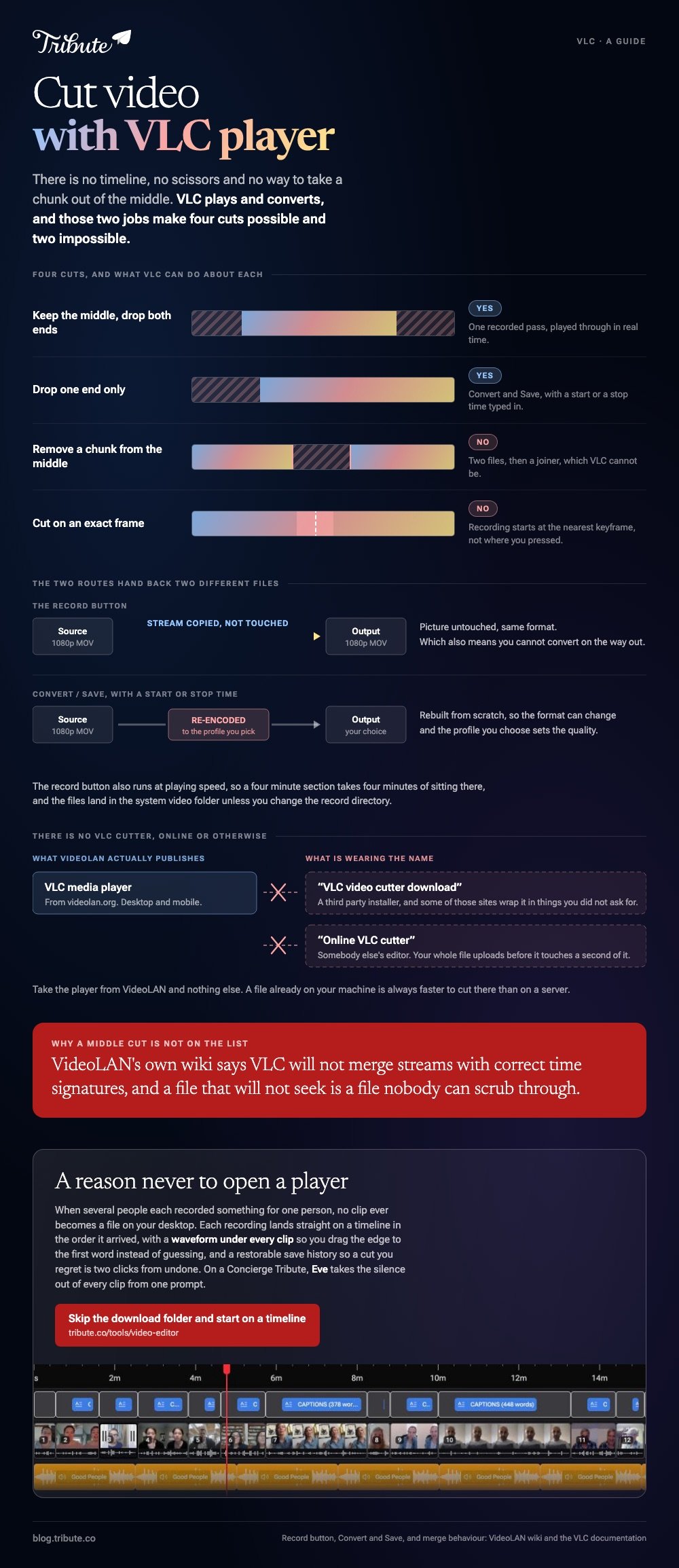
You can cut video with VLC player, but only by recording a stretch of playback to a new file. There is no timeline, no scissors and no way to take a chunk out of the middle. For one cut at one end it is fine.

Can you cut video with VLC player?
Yes, with the record button, and no, with anything else.
VLC plays and converts. Those two jobs give you two ways to produce a shorter file: record while the part you want plays, or set a start and stop time in the conversion dialog. Neither one is editing.
| What you want | Can VLC do it? | What it takes |
|---|---|---|
| Keep the middle, drop both ends | Yes | One recorded pass in real time |
| Drop one end only | Yes | Convert/Save with a start or stop time |
| Remove a chunk from the middle | No | Two files, then a joiner VLC cannot be |
| Cut on an exact frame | No | Any editor with a timeline |
How do you cut MP4 with VLC, step by step?
The record button is hidden until you turn on the second row of controls.
- Open the file with Media > Open File.
- Turn on View > Advanced Controls on Windows or Linux. On a Mac, the record command sits in the Playback menu.
- Drag the seek bar to a moment before your in point and pause there.
- Press play, then hit the red Record button at your in point.
- Hit Record again at your out point. VLC writes the file and stops.
When you cut MP4 with VLC this way, VLC copies the stream instead of re-encoding it, so the picture quality is untouched and the output keeps the source format. That also means you cannot convert on the way out.
Two things will surprise you. The recording runs in real time, so a four minute section takes four minutes. And the cut lands near a keyframe rather than on the frame you pressed, which can add a second at the front.
Your files land in the system video folder unless you change the record directory in Tools > Preferences > Input & Codecs. The VLC trimming walkthrough covers that setting and the Convert/Save timings in detail.

How do you cut a section out of the middle of a clip?
You cannot, and this is where VLC stops being an option.
Removing a chunk means producing the part before it and the part after it, then joining those two pieces back together. VLC will record the two pieces. It will not join them in a state you can use.
VideoLAN says so on its own wiki: none of the ways VLC offers to combine streams appears to merge them with correct time signatures, which causes seeking errors even when the result is played back in VLC.
A file that will not seek is a file nobody can scrub through.
So a middle cut needs a second tool. At that point the second tool may as well have made the first cut too.
Is there a VLC video cutter download, or an online one?
There is no separate cutter from VideoLAN, online or otherwise.
VideoLAN ships one thing, the player, from its own download page.
Anything calling itself a VLC video cutter download is a third party product borrowing the name, and some of the sites carrying those installers wrap them in things you did not ask for.
Take the player from VideoLAN and nothing else.
An online VLC video cutter is the same story with a browser attached. What those pages run is their own editor, not VLC, and the result lives on someone else's server until you download it.
Worth knowing: a browser cutter uploads your whole file before it can touch a second of it, so a phone video of any length is slower to cut online than on the machine it is already sitting on.
Should you cut video with VLC player, or open an editor?
Use VLC when the file is already open in VLC and the cut does not have to be tidy.
Microsoft Clipchamp runs in a tab and gives you what VLC never will: handles and a split.
You drag the clip onto the timeline, click it, and drag the green bars back and forth, or park the seeker where you want the break and press the split button.
That split is the middle cut VLC cannot perform.
Compared with a timeline, a VLC cut is a reflex test. You are pressing a button against a moving clip and hoping. Unlike the recording method, a timeline shows you the frame before you commit to it.
VLC earns its place as free software that plays anything. It is the wrong default for a video somebody else is going to watch.
More on reshaping the picture in cropping a video in VLC, and on putting the pieces together in making a video montage.
What if a dozen people each sent you a clip?
Then cutting is the small part of the job, and doing it one file at a time in a player is the slow way to spend a weekend.
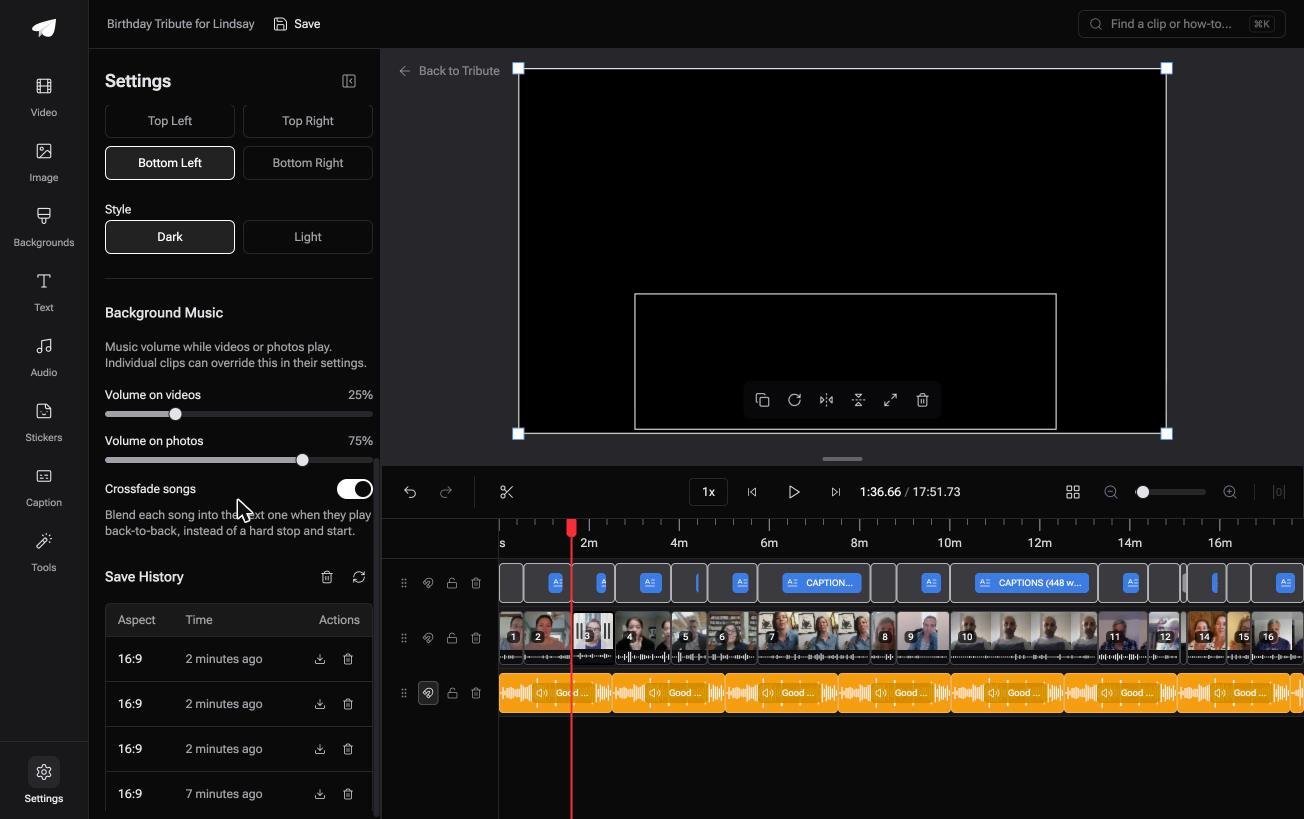
The Tribute video editor is a browser-based group video editor: contributors record clips on their phones and Tribute assembles them on a timeline with the music balanced under the voices. It is ours, and it is the last thing on this page.
- Clips arrive in order, each one already placed, with a tick against the ones on the timeline
- A waveform under every clip, so you drag the edge to the first word instead of guessing
- Reorder media: every clip numbered, with move to front, move to back and move to position
- Autosave and a restorable save history, so a cut you regret is two clicks from undone

Best for: A Saturday spent cutting clips one file at a time inside a media player.
Why it works: Nothing has to be assembled first, so cutting is the whole job rather than the last step of four.
Can you skip the cutting altogether?
Every step above exists because the clips are loose files.
They came in over text, email and a messaging app, they sit in a download folder, and each one has to be opened, cut and saved before anything can be built from them. There is one case where that pile never forms.
The case: you are collecting, not shooting
That case arrives when several people each record something for one person.
A grandmother turning eighty. A colleague leaving after fifteen years. A memorial where the people who should speak are in four time zones. Nobody is shooting footage: everyone is recording a message.

Why the VLC question never comes up
Because no clip ever becomes a file on your desktop.
Each recording lands straight on a timeline in the order it arrived. That is how the Tribute video editor handles it: not a better way to cut a video with VLC media player, but a reason never to open one.
What you do not have to do
- Not the collecting. Each person records from the link on their own phone.
- Not the trimming. Eve, the AI assistant inside the editor, takes the silence out of every clip from one prompt.
- Not the naming. A badge carries the name and relation each person sent with their clip.
- Not the render. Tribute does that on its servers, and the preview matches what arrives.
Eve is there on a Concierge or Concierge Deluxe Tribute, where the cut is not yours either: Tribute's own editors build it and you watch the result.
When this is the wrong answer: you shot the footage and want one file shortened. Then the record button at the top of this page is the cheapest thing you own.
The Tribute editor is not a standalone cutter: it lives inside a paid Tribute. For the wider picture, see what a video tribute involves.
Frequently Asked Questions
How do I cut a video in VLC player?
Turn on Advanced Controls under the View menu, play the clip, and press the red record button at the start and again at the end of the part you want. VLC writes that stretch to a new file.
Can I cut MP4 with VLC without losing quality?
Yes. The record button copies the stream rather than re-encoding it, so the output matches the source. The Convert/Save route rebuilds the file and the profile you choose sets the quality.
Why does my cut start a second early?
Recording begins at the nearest keyframe rather than the frame you pressed on. Keyframes in a phone video can sit a second or two apart, which is why a VLC cut is never exact.
Is there an official online VLC video cutter?
No. VideoLAN publishes a desktop and mobile player and nothing else. Any site offering a browser based VLC cutter is running its own editor under a borrowed name.
How do I remove the middle of a video?
Not in VLC. Use an editor with a split control, cut at both ends of the part you want gone, delete it and close the gap. Clipchamp, iMovie and CapCut all have one.
Does VLC cut audio files too?
The same record button works on an audio file, with the same real time wait and the same imprecision at both ends. A dedicated audio editor is a better answer for anything you plan to publish.
👉 Skip the download folder and start on a timeline if several people sent clips for one person, and the cutting becomes a few drags instead of a file-by-file evening.
