
VLC Media Player Crop Video: The Two Settings You Have to Set Twice
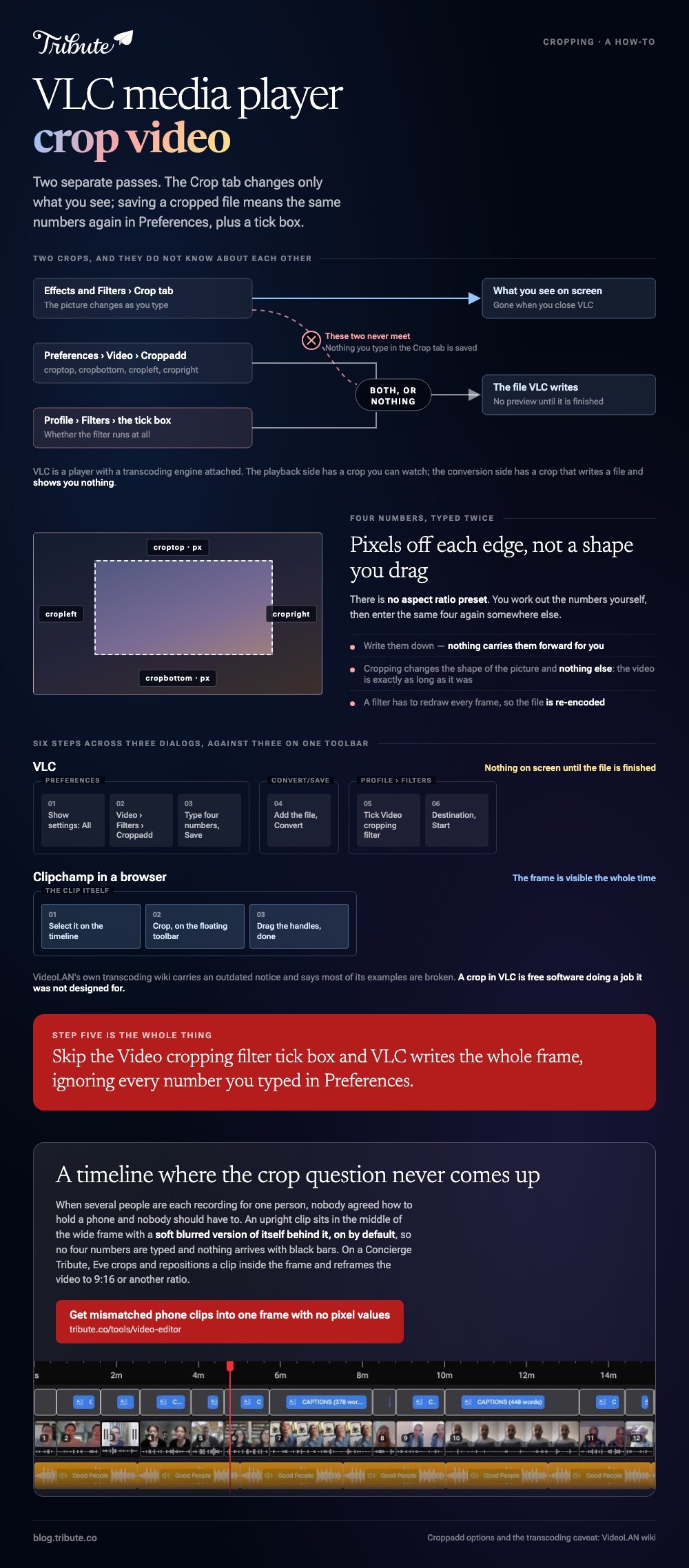
Cropping in VLC takes two separate passes. The Crop tab under Effects and Filters changes only what you see on screen; saving a cropped file means entering the same numbers again in Preferences and then ticking a filter inside the conversion profile.

Can VLC media player crop video, or only display it cropped?
Both, through two different settings that do not know about each other.
VLC is a player with a transcoding engine attached. The playback side has a crop you can see moving as you type numbers into it, and the conversion side has a crop that writes a file and shows you nothing.
| Where you set it | What it changes | Survives a save? |
|---|---|---|
| Effects and Filters, Crop tab | This playback session | No |
| Preferences, Croppadd | The values the filter uses | Only with the filter switched on |
| Profile, Filters tab | Whether the filter runs at all | Yes, this is the switch |
How do you preview a VLC crop before committing?
Through the Crop tab, where the picture changes as you type.
Open the video, then Tools, then Effects and Filters, then the Video Effects tab, then Crop. The four fields take pixels off the Top, Right, Bottom and Left of the picture.
Write the four numbers down. You need them again in two places, and nothing carries them forward for you.
Nothing has been saved at this point. Close VLC and the crop goes with it, which is the single thing that wastes the most time for people doing this the first time.
Why will VLC media player crop video only on screen?
Because the conversion path reads its settings from somewhere else.
The filter doing the work is a module VideoLAN documents as croppadd, with options named croptop, cropbottom, cropleft and cropright, each a number of pixels. The Crop tab feeds the player. The conversion feeds off Preferences.
Saving a cropped file, in order
- Open Tools, then Preferences, and click All under Show settings at the bottom left.
- Expand Video, then Filters, and select Croppadd.
- Enter your four numbers in the Top, Bottom, Left and Right crop fields, then Save.
- Choose Media, then Convert / Save, add the file, and click Convert / Save.
- Click the wrench beside the profile, open the Video codec tab, then the Filters sub-tab, and tick Video cropping filter.
- Save the profile, choose a destination file, and click Start.
Skip step five and VLC writes the whole frame, ignoring everything you typed in Preferences. That single checkbox is why most people conclude VLC cannot save a cropped video.
Check the output before you delete anything. There is no preview inside the conversion step, so the first time you see the crop is in the finished file.
A caution from VideoLAN's own documentation
The wiki page on transcoding carries a notice that it is outdated, and its own canvas and padding section says most of the examples in the wiki are broken.
Treat VLC's conversion features as useful rather than dependable. Unlike an editor, it was never built for this, and its own documentation is more candid about that than most vendors are.
Does a VLC crop change the video length?
No. Cropping changes the shape of the picture and nothing else.
Searches for a VLC crop video length are almost always after a trim: a shorter clip rather than a narrower one. VLC handles that through the record button or through start and stop times in Convert/Save, and neither is frame accurate.
To crop video length VLC is the wrong tool twice over, because both of its trimming routes work by capture rather than by editing.
Should you crop in VLC or open something else?
Crop in VLC when the file is already open in VLC and you want one quick look at a tighter frame.
For a file you are keeping, a browser editor finishes faster and shows you the result.
Microsoft's Clipchamp puts the control on the clip itself: select it on the timeline, click the crop button on the floating toolbar, drag the handles, and click done.
Compared with six steps across three dialogs, that is the honest comparison. A crop in VLC is free software doing a job it was not designed for.

More on the neighboring jobs in trimming in VLC, cutting a section out with VLC, cropping in a browser, and building a montage from the pieces.
Who does this when the clips come from fourteen people?
The Tribute video editor is a browser-based group video editor: contributors record clips on their phones and Tribute assembles them on a timeline with the music balanced under the voices.
It is ours, and it is the last thing on this page.
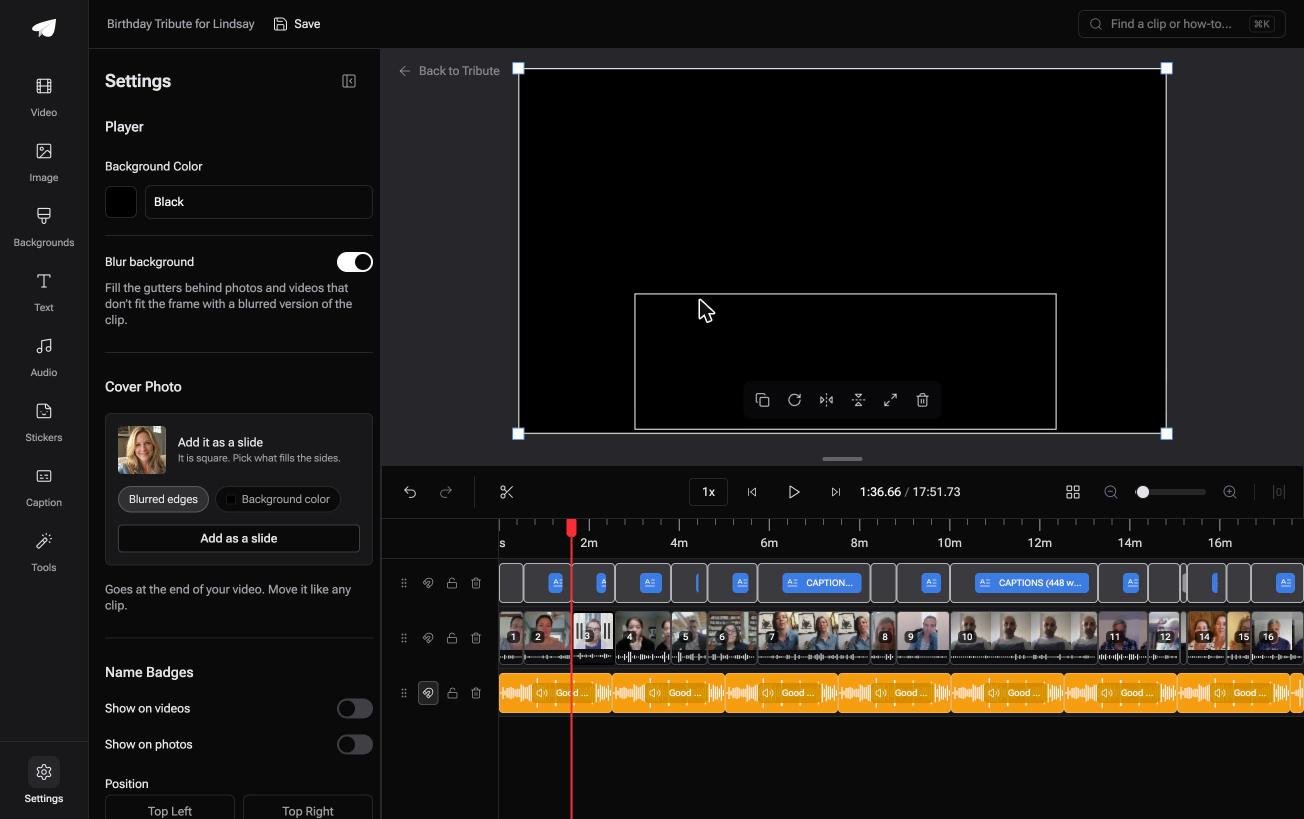
- Blurred edges fill the frame behind upright phone footage, on by default, so nothing arrives with black bars
- Autosave and a restorable save history, so a wrong setting costs nothing
- A waveform under every clip, so the silence before the first word is visible rather than guessed at
- Music at 25% under speech and 75% under photos, overridable per clip
Best for: A crop that has to survive being saved, not one that only looks right in the player.
Why it works: Nothing is typed twice, because the settings that change the preview are the settings that get rendered.
Who fixes the frame when it is not your footage?
Three dialogs for one crop is tolerable on one file.
Clip number fourteen is where that stops being true, each a different shape, each needing its own four numbers. One kind of video takes that whole pass off the table.
The case: the clips arrive, they are not collected
It starts when several people each record something for one person.
A grandmother turning eighty. A colleague leaving after fifteen years. A memorial where the people who should speak are in four time zones. Nobody agreed how to hold a phone, and nobody should have to.

Why no crop numbers get typed
Because the mismatch is filled instead of cut.
An upright clip sits in the middle of the wide frame with a soft blurred version of itself behind it, on by default.
That is how the Tribute video editor deals with mixed footage: not a better way to crop in VLC, but a timeline where the crop question never comes up.
What you do not have to do
- Not the collecting. Each person records from the link, however they hold the phone.
- Not the four numbers. The blur fills in behind every upright clip with nothing typed.
- Not the ordering. The clips arrive in sequence, a tick against the ones already placed.
- Not the edit. On a Concierge Tribute, Tribute's own editors trim, name and finish it.
It can also arrive as a video book, a hardcover case with a screen inside that plays when the cover opens.

When this is the wrong answer: you have one file and VLC is already open. Then go back up this page and type the numbers twice. A DIY Tribute has no crop control of its own, and it lives inside a paid Tribute.
On a Concierge or Concierge Deluxe Tribute, Eve crops and repositions a clip inside the frame, and reframes the video to 9:16 or another aspect ratio.
Frequently Asked Questions
Why does my crop disappear when I restart VLC?
The Crop tab under Effects and Filters applies to the current playback session only. Values that survive go in Preferences, under Video, Filters, Croppadd.
How do I save a cropped video in VLC?
Set the pixel values in Preferences, then tick Video cropping filter inside the conversion profile before you start the convert. Without that checkbox the output keeps the full frame.
Where is the crop tool in VLC?
Under Tools, Effects and Filters, on the Video Effects tab. The Crop tab there takes pixels off the top, right, bottom and left of the picture.
Can VLC crop to a set aspect ratio?
Not as a preset. You work out the pixel numbers yourself, which is one of the places a browser editor with drag handles saves real time.
Does cropping in VLC re-encode the file?
Yes, because a filter has to redraw every frame. The profile you choose in Convert/Save decides the quality of what comes out.
Can I crop and trim in the same pass?
You can add start and stop times in the Convert/Save dialog while the cropping filter is on. Check the result, because VideoLAN's own trackers carry reports of those times being ignored.
Is there a simpler option for one clip?
A browser editor or the Photos app on your phone. Both show you the frame while you drag, which is the one thing VLC never does during a convert.
👉 Get mismatched phone clips into one frame without typing a pixel value if several people are each recording for one person, and the crop dialogs stay closed.
