
Edit Both for Free: Which Free Video and Audio Editor Do You Need?
Clipchamp is free to use, and it is the free video and audio editor most people should open first: one browser tab, picture and sound on the same timeline. CapCut covers the phone. Audacity handles sound on its own.

Which free tool is the best free video and audio editor?
It depends on whether the sound is the problem or the picture is.
Most people searching this want one program that does both, so they stop juggling an editor and a separate audio app. Three tools cover almost all of it.
| Tool | Runs on | Use it when |
|---|---|---|
| Clipchamp | A browser, Windows | Video and sound on one timeline |
| CapCut | Phone, desktop, web | The clips are on a phone |
| Audacity | Windows, Mac, Linux | The audio needs real repair |
| OBS Studio | Windows, Mac, Linux | You have to record the screen first |
Microsoft says the personal version of Clipchamp includes a free plan that exports at up to 1080p at no cost, which is above what most of these videos need.
How do you edit video and audio together in Clipchamp?
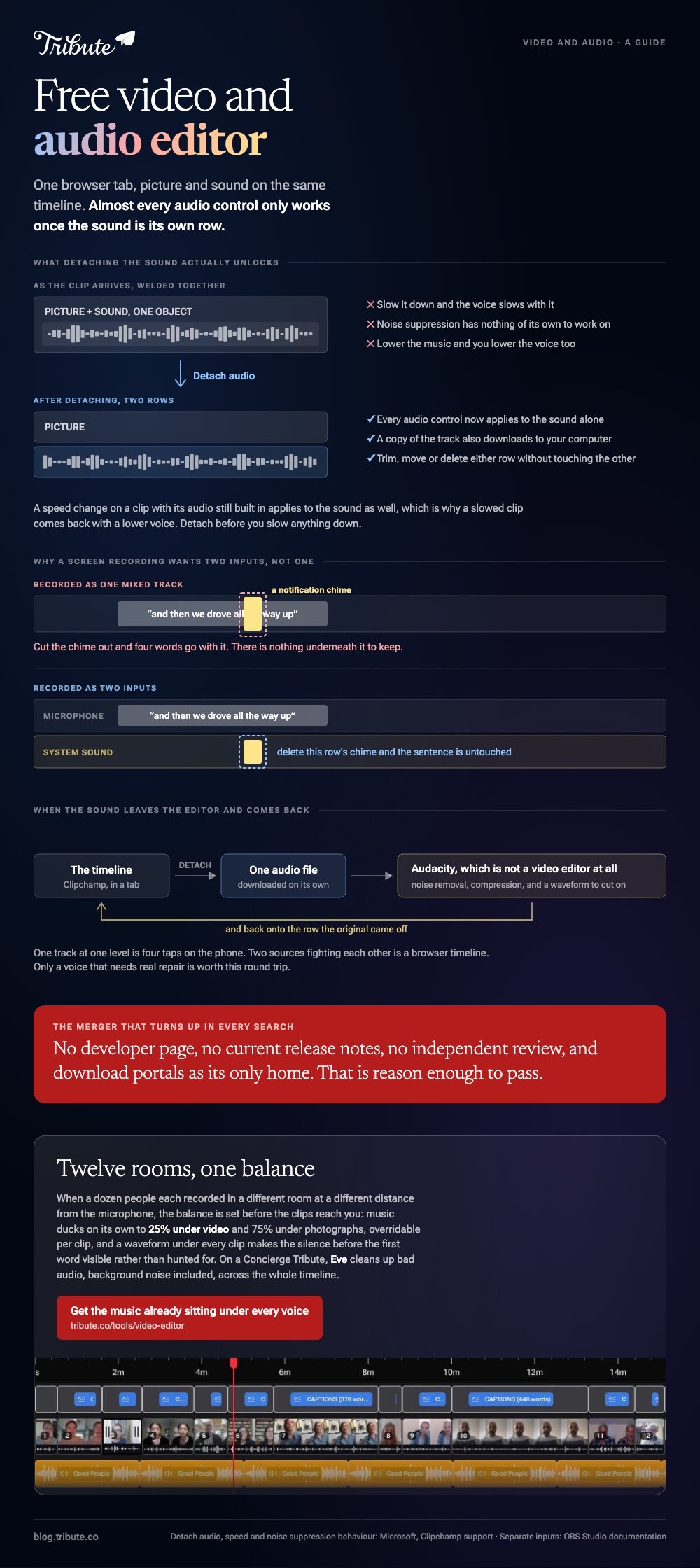
Split the sound off the picture first, then treat it as its own clip.
- Drop the clip on the timeline and select it.
- Open the Audio tab in the property panel and click detach audio. Right-clicking the clip and choosing detach does the same thing.
- The sound appears as a separate clip on a new row, and a copy downloads to your computer.
- Trim, move or delete either row without touching the other.
- Use the speaker icon on a clip to mute it rather than separating it, when silence is all you want.
Microsoft sets this out in its guide to muting, separating and deleting audio from video, with one warning worth repeating. A speed change on a clip with embedded sound applies to the sound too, so detach before you slow anything down.
Noise suppression works the same way: on a clip with its audio still built in, separate the track first.
Best for: A recording where the voice is good and the room is not.
Why it works: Once the sound is its own row, every audio control applies to it and none of them touch the picture.
What should you use on a phone, or on sound alone?
CapCut on the phone, Audacity on the desk.
A free app to mix audio and video on a phone is CapCut, which keeps a clip's own sound and an added track on separate rows.
Both it and Clipchamp ship with royalty free audio clips cleared for use inside them.
Audacity is not a video editor at all. It opens the audio you detached, repairs it, and hands it back as a file you drop into the timeline where the original was.
Compared to an editor's volume slider, a real audio editor gives you noise removal, compression and a visible waveform to cut on.
More on that handoff in adding audio to a video clip and in clip and cut video editors.
Is there free software to combine audio and video files?
Yes, and one name that comes up in search is worth skipping.
A free tool called X2X Free Video Audio Merger turns up across download portals as a Windows program that joins a sound file to a video file.
We could find no developer page for it, no current release notes and no independent review. Download portals are its only home, which is reason enough to pass.
Do the same job in Clipchamp instead. Drop the video on one row, the audio on the row below, line them up, export.
Unlike a single-purpose merger, an editor lets you fix the thing you discover while merging: the music is too loud, the clip starts two seconds early, the second half is quieter than the first.
How do you record the screen with sound?
With a recorder rather than an editor, and then edit what it gives you.
A free tool is also the best free screen video recorder with audio, and it is not an editor at all: OBS Studio captures the screen, the system sound and a microphone as separate inputs.
Clipchamp has a simpler screen recorder built in, and QuickTime Player records a Mac screen with no install.
Record the microphone and the system sound as two tracks where the tool allows it. Mixed into one, a notification chime cannot be removed without taking a word out with it.
With 91% of US adults owning a smartphone, according to the Pew Research Center mobile fact sheet, the other common recorder is already in your pocket and all three of these are available for free.
Do you even need a free video and audio editor?
Often not, and that is worth testing before you install anything.
If the job is one song under a run of clips, the app on the phone does it in four taps. If the job is removing a cough, a trim does it.
An editor earns its place when the sound and the picture need different decisions.
- One track, one level: use the phone.
- Two sources fighting each other: use Clipchamp.
- A voice that needs repair: detach, fix in Audacity, drop it back.
The Windows side of this is covered in video editors for Windows.
What if the clips came from a dozen different people?
Then the sound is twelve problems, not one. Twelve rooms, twelve distances from the microphone, twelve levels to set.
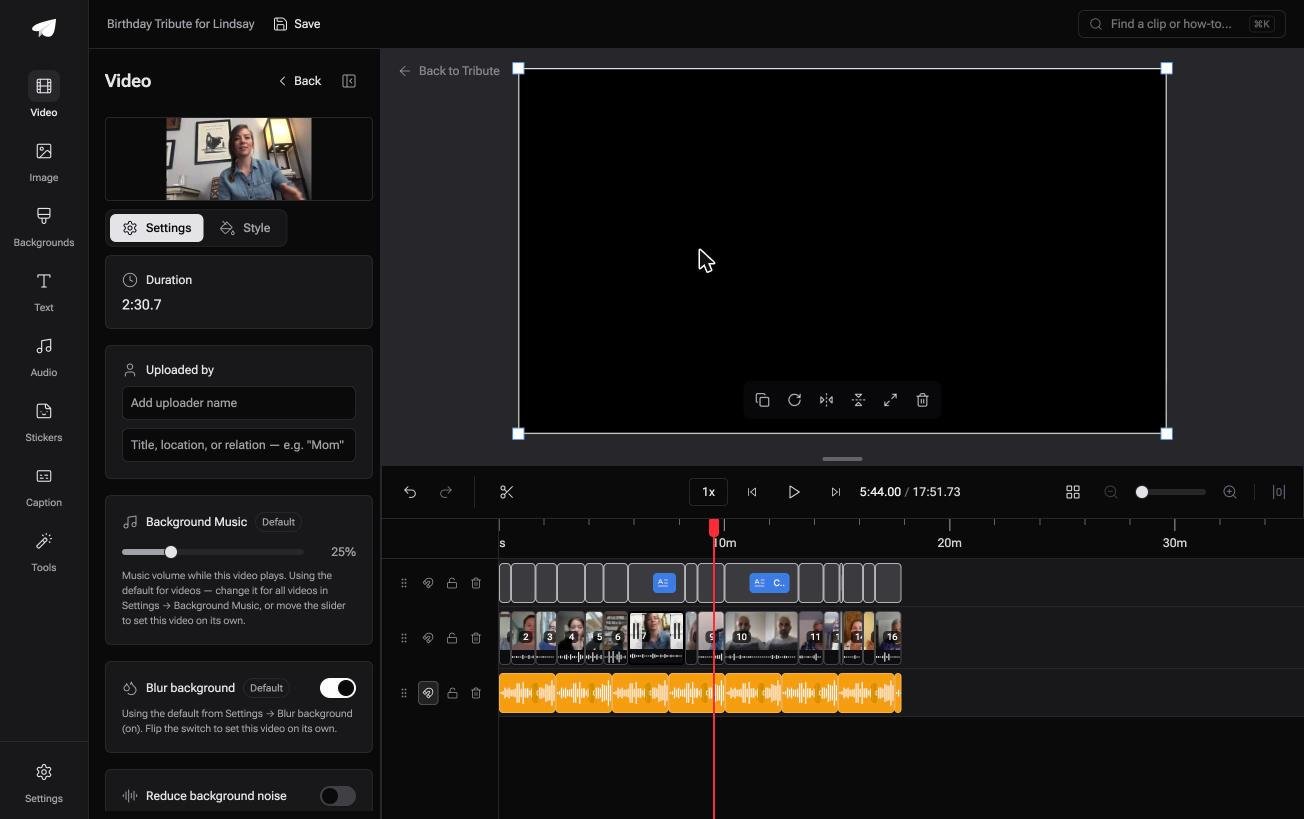
The Tribute video editor is a browser-based group video editor: contributors record clips on their phones and Tribute assembles them on a timeline with the music balanced under the voices.
- Music ducks on its own to 25% under video and 75% under photos, and you can override it per clip
- 39 licensed tracks across 11 genres, plus a YouTube link or your own MP3, WAV, M4A or FLAC
- A waveform under every clip, so the silence before the first word is visible rather than hunted for
- A Crossfade songs switch that blends one track into the next when the video outlasts a song
Best for: Voices recorded in twelve kitchens, where the sound needs more work than the pictures do.
Why it works: A per-clip level means one quiet uncle gets fixed on his own clip rather than by lifting the whole timeline.
What if the sound was already mixed when you opened it?
Two tracks, two sets of controls, one person doing both jobs.
That is the shape of every tool above, and it is a fair trade for one video. It stops being fair at fifteen clips, where the same four decisions repeat on each one. There is a case where they are made before you arrive.
The case: the clips were recorded for one person
You are in it when several people each record a message for the same person.
A grandmother turning eighty. A head of department leaving after twenty years. Nobody is shooting a scene and nobody is mixing anything: they are talking to a phone held at arm's length.
If you are editing one recording of your own, Clipchamp above is where this page ends for you.
Why the second track stops being your problem
Because the balance is set before the clips reach you.
Music sits under speech at a quarter of its level and lifts over photos, so the loud speaker and the quiet one both come through. The Tribute video editor keeps that override on each clip, which is the only place it tends to be needed.

What you do not have to do
Three jobs come off the list, and mixing is the first.
- No second track to balance. Music ducks to 25% under every voice on its own.
- No noise pass. On a Concierge Tribute, Eve cleans up bad audio, background noise included, across the whole timeline.
- No edit. Tribute's own editors build the video on that same tier and send it back.

When this is the wrong answer: the audio needs real repair, or the video is yours and the mix is the craft. Then Audacity and Clipchamp, in that order. The editor is also not a standalone audio tool: it lives inside a paid Tribute.
For the wider job, see making a video montage.
Frequently Asked Questions
Can I edit video and audio in the same program at no cost?
Yes. Clipchamp, CapCut and DaVinci Resolve all put picture and sound on one timeline. Clipchamp is the quickest to start, since it opens in a browser tab.
How do I separate audio from a video?
In Clipchamp, select the clip, open the Audio tab in the property panel and click detach audio. The sound lands on its own row and a copy downloads to your computer.
Why does slowing a clip change the voice pitch?
Because the speed change applies to the built-in audio as well as the picture. Detach the sound first, then slow the video on its own.
What removes background hiss from a recording?
Noise suppression inside the editor for a light case, Audacity for a hard one. Either way, separate the audio from the clip before you treat it.
Is Clipchamp limited on the no-cost plan?
Microsoft says the personal version exports at up to 1080p at no charge. Some stock content and features sit behind a paid plan, so check the item before you build around it.
Can I add music without ruining the voice underneath?
Set the music to about a quarter of full volume wherever someone speaks, and raise it where nobody does. Doing it per clip beats one setting for the whole timeline.
Which tool records a meeting with clean sound?
OBS Studio, because it captures the microphone and the system sound as separate inputs. Two tracks let you remove a notification without losing a word.
👉 Get the music already sitting under every voice if fifteen people each recorded a message for the same person, and there is no second track to mix.
