
Trim Instagram Video: Cutting a Reel Before and After You Post
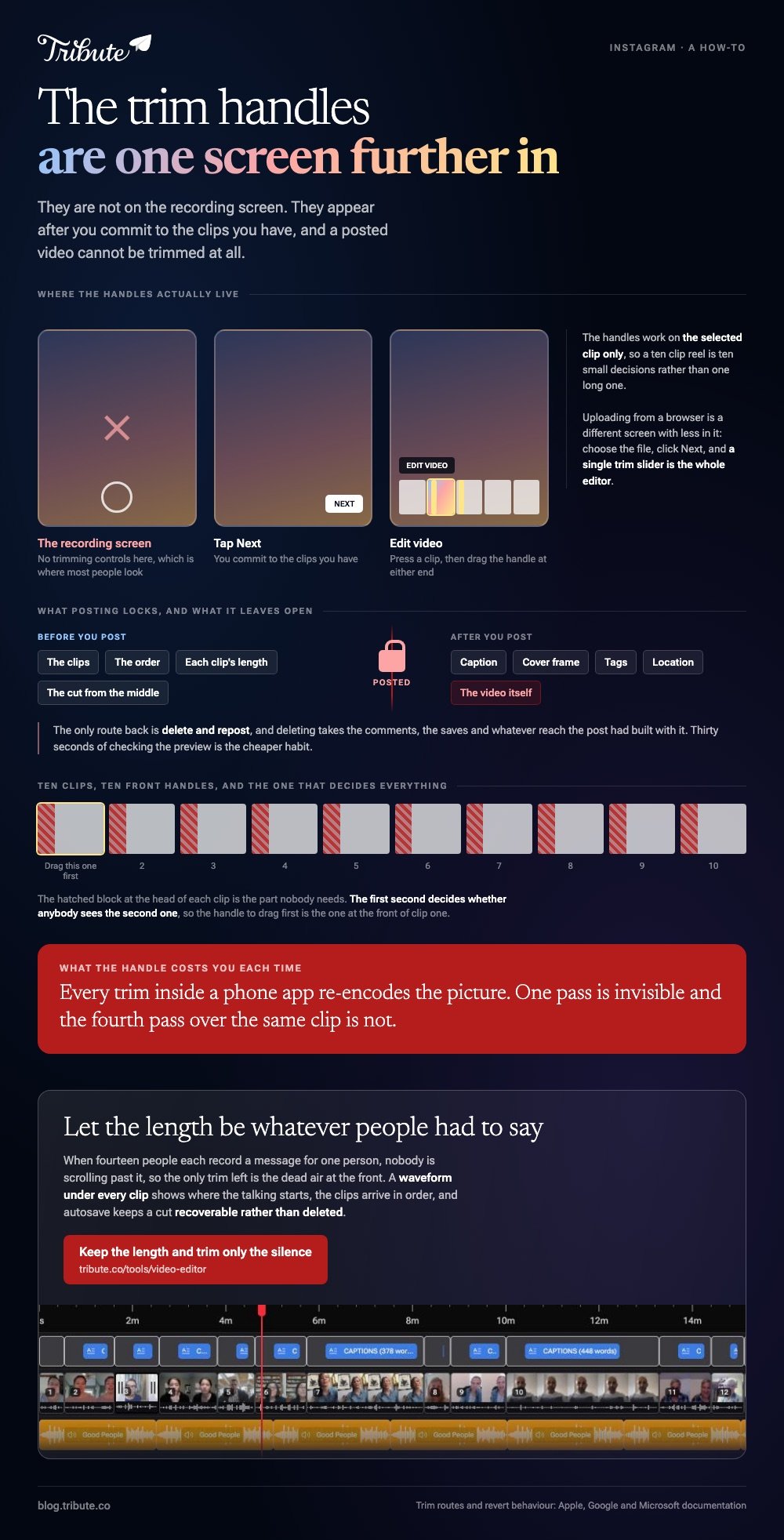
You trim Instagram video on the Edit video timeline: tap Next after choosing your clips, then drag the handles on each clip. Trimming before you upload gives you more control, and a posted video cannot be trimmed at all.

How do you trim Instagram video inside the app?
On the clip timeline, one clip at a time.
Instagram hides this behind a step most people tap past. The trimming controls are not on the recording screen: they appear after you commit to the clips you have.
- Record or select your clips, then tap Next.
- Tap Edit video at the bottom left to open the clip timeline.
- Press a clip to select it, then drag the handle at either end to shorten it.
- Drag a clip left or right to change where it sits in the running order.
- Tap the preview to check the join, then move on to audio and text.
The Instagram trim video handles work on the selected clip only, so a ten clip reel is ten small decisions rather than one long one.
Uploading from a browser is a different screen with less in it. After you choose the file and click Next, a single trim slider appears and that is the whole editor.
Stories and the length question
A long upload is cut into consecutive story cards rather than refused.
How long one card runs has changed more than once, and so has the cap on a reel. Read the length your own app shows rather than a number from a blog.
Which Instagram video trimmer should you use before uploading?
The one already holding the video.
Trimming before the upload is the better habit, because an app that is not Instagram gives you frame handles, an undo and a copy of the original.
On an iPhone, in Photos
- Open the clip and tap Edit.
- Drag either end of the frame viewer at the bottom to set the new start and stop.
- Tap Done.
- Choose Save Video to keep the short version, or Save Video as New Clip to keep both.
Apple's guide to editing videos on iPhone, iPad and Mac notes the recovery path: reopen the clip, tap Edit, then Revert. A clip saved as a new clip cannot be reverted, which is a reason to use that option.
On Android, in Google Photos
Open the video, tap Edit, drag the white handles at each end of the strip, then tap Save copy. The original stays where it was.
In a browser, in Clipchamp
Click the clip on the timeline and drag the green bars inward. To cut from the middle, move the seeker to the cut point and click split, then delete the part you do not want.
Microsoft's editing guide for Clipchamp covers both moves on one page.

Can you trim Instagram video after posting it?
No. The caption, the cover frame, the tags and the location are editable. The video is not.
Your options are to leave it or to delete and repost, and deleting takes the comments, the saves and whatever reach the post had built with it.
| Where you trim | What it costs | Best used for |
|---|---|---|
| Instagram, before posting | Nothing, but handles are coarse | A quick tidy of the first second |
| Photos or Google Photos | Nothing, keeps the original | Cutting dead air off both ends |
| Clipchamp in a browser | An account and an export | Cutting from the middle |
| After posting | The post's comments and reach | Nothing. Delete and repost is the only route |
Compared to a repost, thirty seconds of checking the preview is a cheap habit.
How do you trim a long clip without losing quality?
Cut on a keyframe and copy the streams rather than re-encoding them.
Every trim inside a phone app re-encodes the picture. One pass is invisible, and the fourth pass over the same clip is not.
- A command line copy keeps the original data untouched: see trimming with FFmpeg.
- A desktop player can do it without a command line: see trimming in VLC.
- The general version of this job, across phones and browsers, is in how to trim a video.
Unlike a re-encode, a stream copy cannot land the cut between keyframes, so your start point may move by a fraction of a second. On a talking clip that is a trade worth making.
One cut matters more than the rest. The first second decides whether anybody sees the second one, so the handle to drag first is the one at the front.
What if fourteen people each sent you thirty seconds?
Then trimming stops being one decision and becomes fourteen, which is where a feed tool runs out.
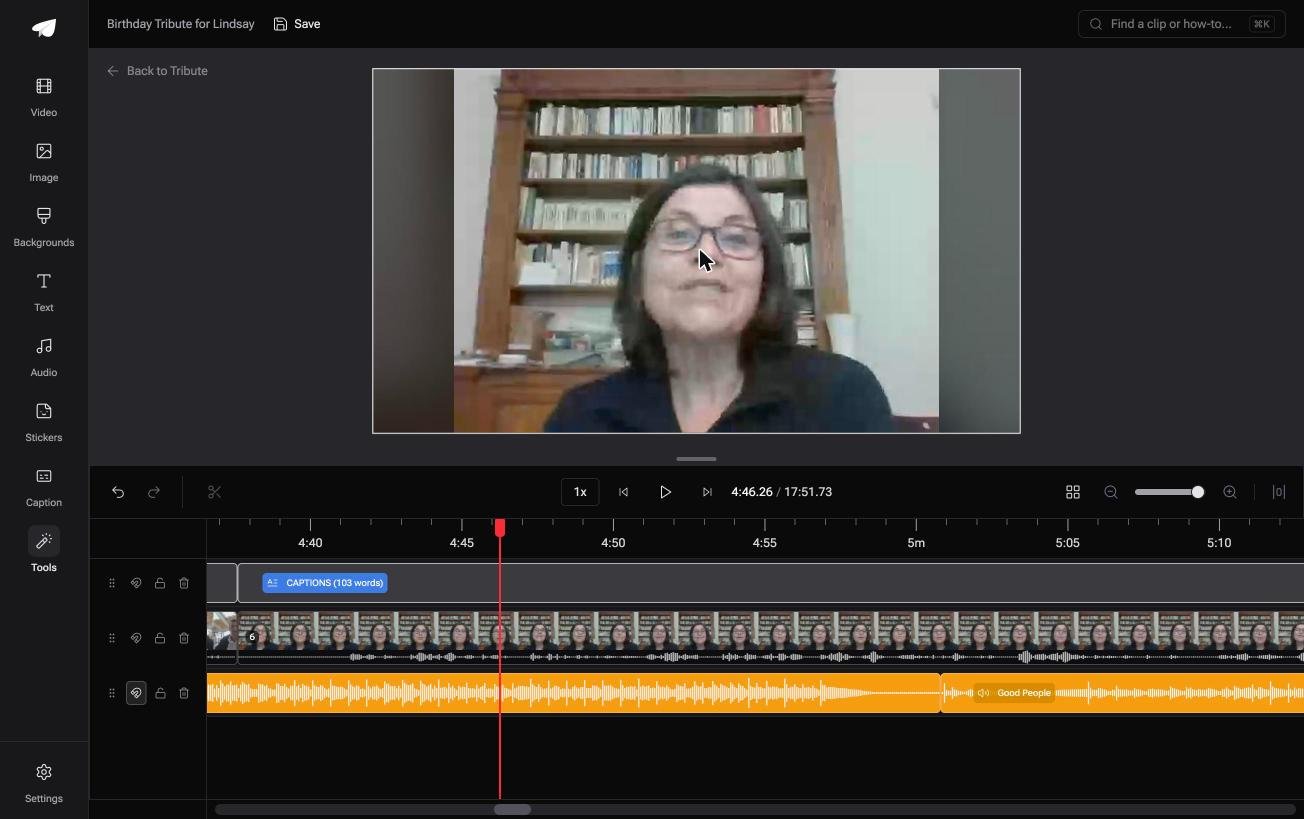
The Tribute video editor is a browser-based group video editor: contributors record clips on their phones and Tribute assembles them on a timeline with the music balanced under the voices. It is ours, and it is the last thing on this page.
- A waveform under every clip, so the silence before the first word is visible before you drag anything
- Clips arrive in order on the timeline, with a tick against the ones already placed
- A Reorder media window with numbered clips, move to front, move to position and bulk remove
- Autosave and restorable version history: a clip you cut is recoverable rather than deleted
Best for: A video made for one person's living room rather than a feed, where length was never the constraint.
Why it works: Seeing where the talking starts turns fourteen judgement calls into fourteen drags of two seconds each.
What length is right when nobody is scrolling?
Every cut above serves a length somebody else decided on.
You trim to the cap, then trim again for the scroll, because a feed is a place people are passing through.
There is one kind of video that is not passing through anything.
The case: the clips are messages, not content
You are in it when several people each record something for one person.
A grandmother turning eighty. A colleague leaving after fifteen years. A memorial where the people who should speak are in four time zones.
Nobody is posting. Each person is talking to one named human being, and the audience for the result is the size of a kitchen.

Why the length rule stops applying
Because nobody is scrolling past it.
A video somebody sat down to watch, because it is about them, holds for seventeen minutes in a way no reel does for thirty seconds. The trimming that remains is about dead air at the start of a clip, not about a cap.
That is how the Tribute video editor frames it: trim to the first word, leave the rest, and let the length be whatever fourteen people had to say.
What you do not have to cut
- Not to a cap. Nobody is scrolling past it, so the length is whatever fourteen people had to say.
- Not every head by hand on a Concierge Tribute: Eve, the assistant inside the editor, takes the silence off every clip.
- Not a second version, unless you want one: on that tier Eve cuts a shorter edit from the same timeline.
- Not the trimming at all on Concierge, where Tribute's editors cut and order it for you.

When this is the wrong answer: you are posting to a feed and the cap is the whole constraint. Then the in-app trimmer above is the right tool and it costs you nothing.
The editor is also not a reel maker: it lives inside a paid Tribute, and it has no aspect ratio switcher.
Frequently Asked Questions
Why can I not find the trim handles on Instagram?
They live behind Edit video on the screen after Next, not on the recording screen. If you uploaded from a browser instead, you get one trim slider and no clip timeline.
Does trimming on Instagram reduce quality?
The upload is re-encoded either way, so one trim inside the app costs little. Repeated trims on an already compressed copy are what show.
Can I trim a reel I already posted?
No. Caption, cover and tags can change after posting. The video itself cannot, which leaves delete and repost.
What is the best Instagram video trimmer on a desktop?
Clipchamp in a browser for a drag-and-drop cut, or VLC when you want the same codec out that went in. Both avoid the phone's small handles.
How do I cut a section out of the middle?
Split the clip at both edges of the section, then delete the middle piece. Instagram's own timeline cannot do this, so it happens before the upload.
Why does my trimmed video look shorter than I set?
A stream copy snaps the cut to the nearest keyframe, which can move the start by a fraction of a second. Re-encoding lands on the frame you chose.
👉 Keep the length and trim only the silence if fourteen messages each deserve their full thirty seconds, instead of cutting people to fit a feed.
