
FFmpeg Trim Video: The Two Commands and Why One Drifts
Two commands cover almost every trim in FFmpeg. One copies the streams and finishes in a second but can start on the wrong frame; the other re-encodes and lands where you asked. Which you want depends on whether the cut has to be precise.

Which ffmpeg trim video command should you use?
Start with the stream copy and only move on when it misses.
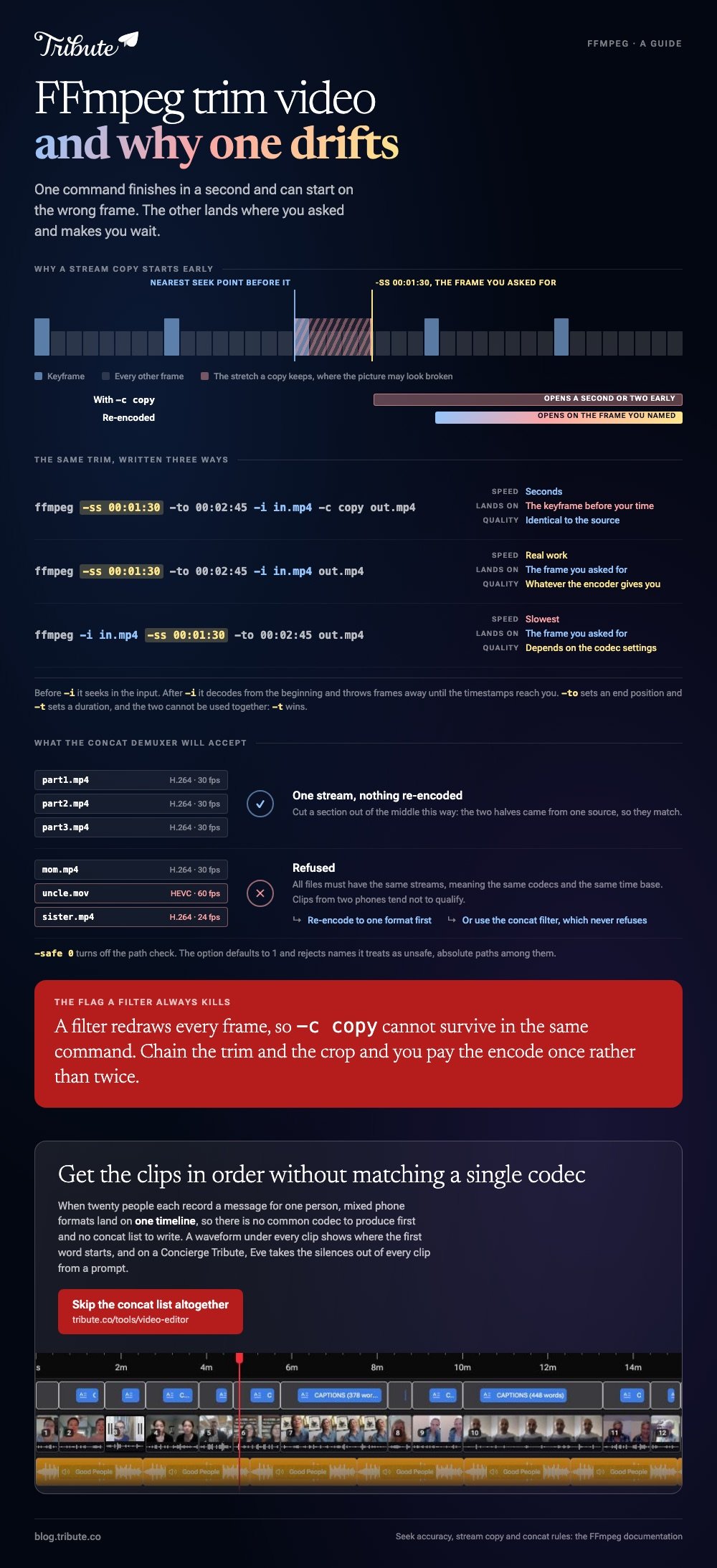
Putting -ss before -i tells FFmpeg to seek in the input before it reads anything, which is why the copy version returns almost at once.
Dropping -c copy makes FFmpeg decode and re-encode, which costs time and gives you the frame you named.
| Version | Speed | Accuracy | Quality |
|---|---|---|---|
With -c copy | Seconds | Nearest seek point before your time | Identical to the source |
| Without it | Real work | The frame you asked for | Whatever the encoder gives you |
-ss after -i | Slowest | The frame you asked for | Depends on the codec settings |
What the flags mean
- -ss before -i seeks in the input file to that position.
- -ss after -i decodes and throws away input until the timestamps reach the position.
- -to stops writing the output at that position. -t sets a duration instead, and the FFmpeg documentation notes that the two cannot be used together and -t wins.
- -c copy marks the stream as not to be re-encoded, which the docs describe as very fast with no quality loss.
Why does an ffmpeg trim video cut start in the wrong place?
Because a stream copy can only begin on a keyframe.
FFmpeg's command documentation says that in most formats it is not possible to seek to a precise position, so FFmpeg goes to the closest seek point before the one you gave.
With accurate seek on, which is the default, the extra stretch is decoded and discarded.
Stream copy has no decoder in the path, so that stretch is kept instead. A clip asked to start at 90 seconds can open a second or two early, and the first frames may look broken until the next keyframe arrives.
Three ways around it
- Re-encode the trim. Drop -c copy and accept the encode time. This is the fix when the cut has to be on a word.
- Move your in point. Shift it back to the nearest keyframe and lose a fraction of a second rather than fighting the format.
- Re-encode once, trim many times. If you are cutting one long recording into twenty pieces, write a version with frequent keyframes first and copy from that.
Compared with a timeline editor, none of this is visible while it happens. You find out after the file is written, which is why a five second test cut before the real one saves the most time.
How do you ffmpeg merge video files after trimming?
With the concat demuxer and a text file listing the parts.
To combine video files FFmpeg treats as siblings, nothing is re-encoded: the demuxer reads the list and writes one stream.
The list is plain text, one directive per line, and FFmpeg's format documentation says special characters and spaces have to be escaped with a backslash or single quotes.
That safe option defaults to 1 and rejects file names it considers unsafe, so -safe 0 is what lets absolute paths through.
The condition everyone trips over: the documentation states that all files must have the same streams, meaning the same codecs and the same time base.
Clips from two different phones tend not to qualify, so a list that looks right can still be refused.
When they do not match, you re-encode them to a common format before you concat videos FFmpeg can join, or you use the concat filter and let it do the encoding.
No route exists to join videos FFmpeg sees as different formats without one of those two. Unlike the demuxer, the filter never refuses the job.

Can you crop in the same pass?
Yes, and it ends the stream copy.
To crop video FFmpeg uses a filter, described in the filter documentation as cropping the input video to given dimensions. The order is width, height, then the x and y of the top left corner.
Leave x and y out and the crop centers itself, because they default to the middle of the frame. Width and height default to the input size.
A filter has to redraw every frame, so -c copy cannot survive in the same command. Combine a trim and a crop and you pay the encode once rather than twice, which is the one good reason to chain them.
More on the same jobs without a terminal in trimming a video, trimming in VLC, trimming a YouTube video you uploaded, and building a montage from the pieces.
What if the files are twenty messages from twenty people?
The Tribute video editor is a browser-based group video editor: contributors record clips on their phones and Tribute assembles them on a timeline with the music balanced under the voices.
It is ours, and it is the last thing on this page.
- Mixed phone formats land on one timeline, so there is no common codec to produce first
- A waveform under every clip, so the silence before the first word is visible rather than guessed at
- Reorder media, with every clip numbered and bulk moves to front, back or any position
- Autosave and a restorable save history, so a bad cut costs nothing

Best for: Twenty phone files that concat refuses because none of them match.
Why it works: The matching problem that makes concat fail is handled on the way in, before anything reaches a timeline.
What does this job look like without a terminal?
FFmpeg is the right tool when you know what you want and want it repeated.
Judgment is where it stops helping: which four seconds of this message, in what order, under which song. One kind of video is all judgment and no batch.
The case: the clips are messages, not footage
It begins when several people each record something for one person.
A grandmother turning eighty. A colleague leaving after fifteen years. A memorial where the people who should speak are in four time zones. Twenty files, twenty phones, twenty encoders, and not one of them agreed with another.

Why the format mismatch never surfaces
Because the clips are normalized before they reach you.
They arrive on a timeline in order, with a tick against the ones already placed, and a waveform under each one.
That is how the Tribute video editor handles it: not a friendlier way to ffmpeg trim video files, but a route where no concat list is written.
What you do not have to do
- No concat list. No text file, no codec matching, no re-encode.
- No frame hunting. The waveform shows where the first word starts.
- No trim pass. On a Concierge Tribute, Eve takes the silences out of every clip from a prompt.
- No edit of your own. Tribute's editors build the video on that same tier.
Where the result lands
On a timeline you can see, which is the thing a terminal never gives you. It can also arrive as a video book, a hardcover case with a screen inside.

When this is the wrong answer: you are batching a hundred files, or scripting something that has to run again next week. Then stay in the terminal. The Tribute editor is not a general purpose transcoder: it lives inside a paid Tribute.
Frequently Asked Questions
Does trimming with FFmpeg lose quality?
Not with -c copy, which the documentation describes as having no quality loss because nothing is decoded or encoded. Drop that flag and the result is only as good as the encoder settings you leave at their defaults.
Should -ss go before or after -i?
Before -i for speed, after it for accuracy. Before the input it seeks and starts reading there; after the input it decodes from the beginning and discards everything up to your time.
Why is my trimmed clip a few seconds too long?
Stream copy keeps the material between the nearest earlier keyframe and the time you asked for. Re-encode the trim, or move your in point to a keyframe.
How do I cut a section out of the middle?
Write the part before and the part after as two files, then concat them. The two pieces come from the same source, so they share a codec and the demuxer accepts them.
Can I combine video files with different resolutions?
Not with the concat demuxer, which wants matching streams. Re-encode them to one resolution first, or use the concat filter, which re-encodes as part of the job.
What does -safe 0 do?
It turns off the path check in the concat demuxer. The option defaults to 1 and rejects file names it treats as unsafe, which includes absolute paths.
Is there a dry run before I overwrite something?
Write to a new file name every time and delete later. FFmpeg will not warn you twice, and a trim is cheap enough to repeat.
👉 Get the clips in order without matching a single codec if each one is a message somebody recorded for one person, and the concat list never gets written.
