
VLC Media Player Merge Videos: The Steps, and What VideoLAN Warns About
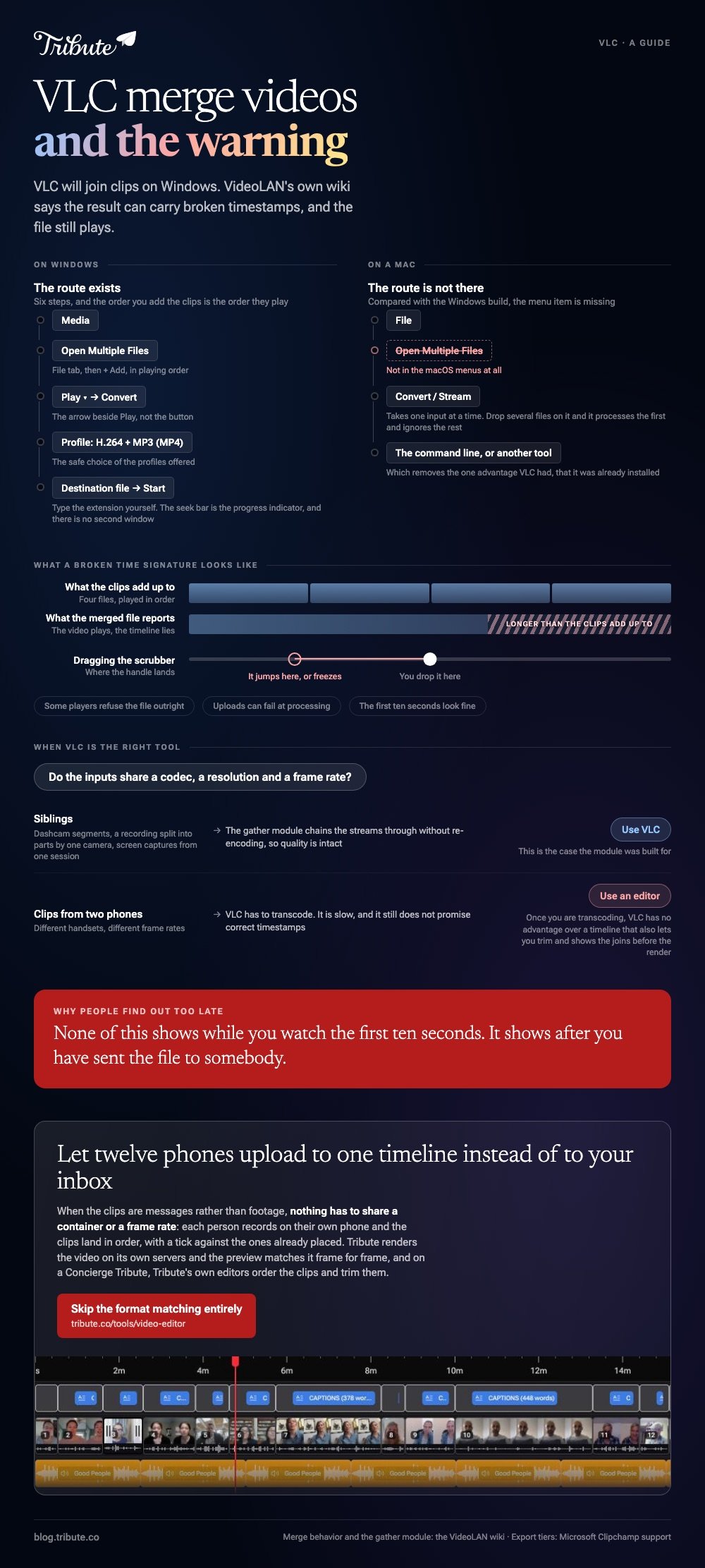
VLC can join clips through Media > Open Multiple Files > Convert on Windows. It often works, and VideoLAN's own wiki warns that the result can carry broken timestamps. Read the warning before you spend an hour on it.

Can VLC media player merge videos at all?
Yes, and with a caveat VideoLAN publishes itself.
The project's wiki states that none of the ways VLC offers to combine streams appears to merge them with correct time signatures, and that this causes seeking errors during replay. The same page suggests a tool outside VLC may work better.
That is the maker of the software telling you the feature is unreliable. It is not a rumor from a forum.
What a broken time signature looks like
The video plays. The timeline lies.
- The total length reads wrong, often much longer than the clips add up to
- Dragging the scrubber jumps to the wrong place or freezes
- Some players refuse the file outright, and uploads can fail at processing
None of that shows up while you watch the first ten seconds, which is why people find out after they have sent it to somebody.
How do you merge MP4 files in VLC on Windows?
Six steps, and the order of the clips is set by the order you add them.
- Open VLC and choose Media > Open Multiple Files.
- On the File tab, click + Add and select your clips in the order you want them to play.
- Click the small arrow beside Play at the bottom and choose Convert.
- Pick a profile. The H.264 + MP3 (MP4) one is the safe choice.
- Set a Destination file, with the extension included, and click Start.
- Watch the seek bar. It acts as the progress indicator; there is no separate progress window.
To merge MP4 files in VLC without artifacts, every input should share the same codec, resolution and frame rate. Phone clips from two different handsets seldom do, and a mismatch is the other common reason the output is wrong.

The command line version
Same engine, more control.
VideoLAN documents a gather stream output that chains the inputs into one file, with mux=ts as the container that behaves best.
The wiki warns that codecs must suit the chosen mux, and the flags have changed between releases, so copy the current line from that page rather than from a blog.
Transcoding on the way through is the documented fix for mismatched inputs. It is also slow, and it still does not promise correct timestamps.
Can you merge videos with VLC on a Mac?
Not through the menus. Compared to the Windows build, the Mac version is missing Open Multiple Files altogether.
macOS VLC offers File > Convert / Stream, which takes one input at a time. Dropping several files on it processes the first and ignores the rest.
That leaves the command line, or a different tool. For most people the second is the better trade, because the whole appeal of VLC merge video files was that it was already installed.
What should you use instead?
Something built to put clips in a row.
| You are on | Use | Why |
|---|---|---|
| Windows | Clipchamp | Built in, drag clips onto one timeline |
| Mac or iPhone | iMovie | Handles mixed formats without a transcode step |
| Any browser | An online joiner | Nothing to install, file size caps apply |
| Hundreds of files | FFmpeg | Scriptable, exact, no interface |
Clipchamp ships with Windows and exports up to 1080p on the free plan, with 4K reserved for a paid tier. Drag the clips onto the timeline in order, then export: that is the whole job.
Unlike the VLC route, an editor shows you the joins before you commit to a render. You see the moment one clip becomes the next, which is where a merge most often looks wrong.
More routes in merging videos online, merging video clips online and merging YouTube videos, and the wider list in video montage makers.
When does VLC media player merge videos without breaking them?
When the clips are siblings.
Dashcam segments, a recording split into parts by a camera, screen captures from one session: same codec, same resolution, same frame rate, created by the same device minutes apart. That is the case the gather module was built for.
Anything else, and you are transcoding. Once you are transcoding, VLC has no advantage over an editor that also lets you trim.
What if the clips came from a dozen different people?
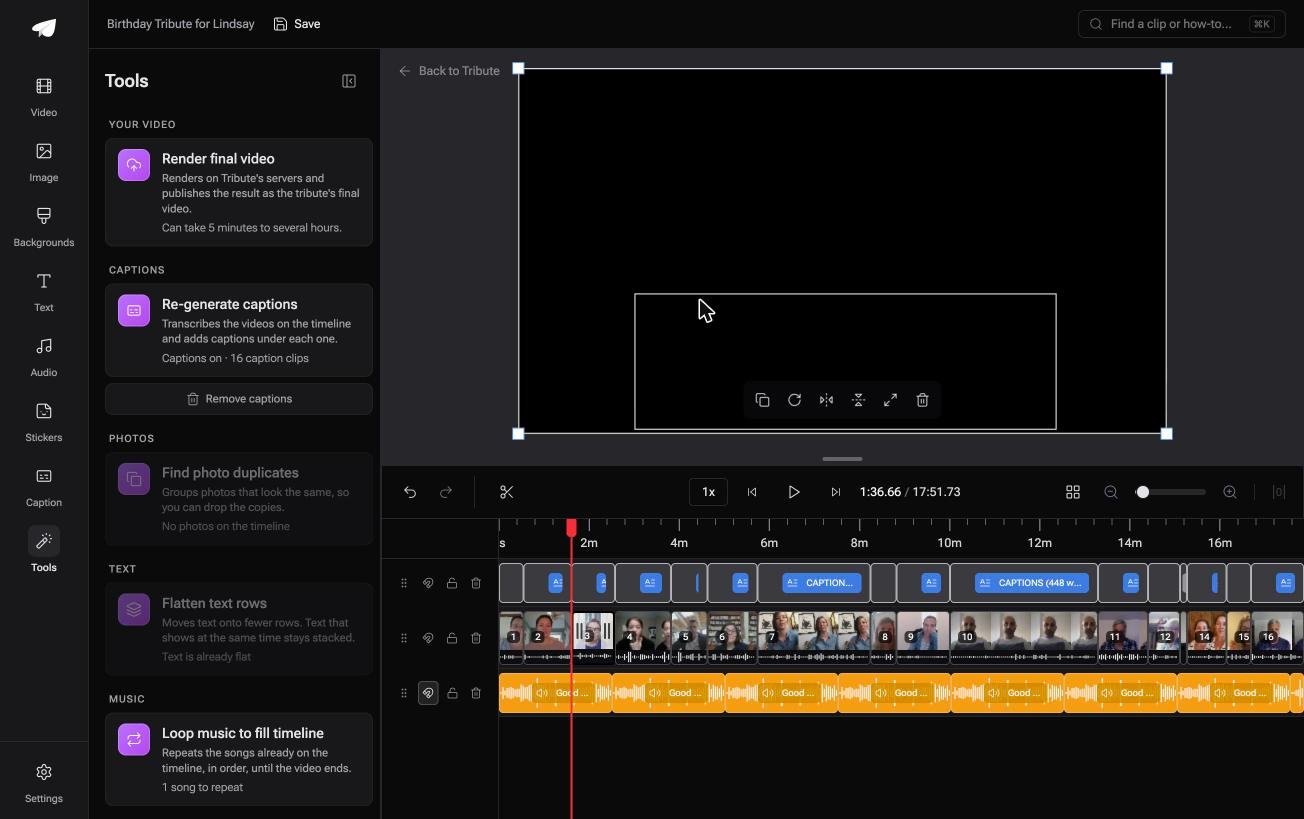
The Tribute video editor is a browser-based group video editor: contributors record clips on their phones and Tribute assembles them on a timeline with the music balanced under the voices.
It is ours, and it is the last thing on this page.
- Mixed formats are the normal case: clips arrive from different phones and land on one timeline in order
- Reorder media numbers every clip and offers move to front, move to back, move to position and bulk remove
- Blurred edges fill the frame behind upright footage, so a portrait clip does not sit in black bars
- Tribute renders the video on its servers, and the preview matches the result frame for frame

Best for: Recordings from a dozen phones that VLC would refuse to concatenate.
Why it works: The format mismatch that breaks a VLC merge is handled before you see the timeline.
Can you avoid the merge problem altogether?
Everything above starts with a folder of files you already have.
Somebody sent a clip over WhatsApp, somebody emailed one, somebody airdropped a third, and now you are matching frame rates at eleven at night. The merge is not the hard part. The twelve different sources are.
There is one case where the files never scatter.
The case: several people recording for one person
You are in it when each clip is a message rather than footage.
A colleague leaving after fifteen years. A grandmother turning eighty, with family in four states. Nobody is shooting a video: everyone is recording one, and your job is assembly, not conversion.
Why the format question disappears
The clips are uploaded, not collected.
Each person records on their own phone, and what arrives is laid out in order before you open anything. A tick marks which clips are already placed, so there is no folder to audit.
That is what the Tribute video editor does: not a better merge, but a reason never to run one.

What you do not have to do
Send one link to everyone who should record, and the rest of it stops being a job.
- No inbox to empty. Twelve phones upload to one timeline, not to you.
- No format check. Nothing has to share a container or a frame rate.
- No merge, and no edit. On a Concierge Tribute, Tribute's own editors order the clips, trim them and build the video.
- No render on your machine. Tribute does that on its servers.

When this is the wrong answer: you have four dashcam segments to stitch and nobody to ask for anything. Then fix the merge, or use FFmpeg. The Tribute editor is also not a standalone app: it lives inside a paid Tribute.
Frequently Asked Questions
Why does my merged VLC file show the wrong duration?
Because the timestamps did not carry across, which VideoLAN documents as a known limitation. Remux the output, or redo the join in an editor that writes a clean container.
Does VLC merge videos without re-encoding?
The gather module can pass streams through when every input matches, which keeps quality intact. The moment one clip differs in codec or frame rate, VLC has to transcode and the output is re-encoded.
Is VLC still worth using for this?
For identical camera segments, yes, and it is free to use and already installed. For phone clips from several people, no, because the mismatch work costs more than an editor would.
Can VLC join an MKV and an MP4?
Only with a transcode, and the result is the least reliable version of this job. Convert both to the same codec and container first, or use a tool built for the task.
Where did the Media menu go on my Mac?
macOS VLC has a File menu instead, with Convert / Stream in it. The multi-file merge route is a Windows feature and there is no Mac equivalent in the menus.
What is the safest alternative on Windows?
Clipchamp, because it is already installed and it shows you the joins before export. Drop the clips onto the timeline in order and export at 1080p.
👉 Let twelve people upload to one timeline instead of to your inbox if the clips are coming from twelve different phones.
