
Add Text to Video iPhone: Where Apple Keeps the Text Tool
To add text to video iPhone owners have to leave the Photos app. Photos trims, crops and filters, and Apple keeps titles in iMovie, a free app. CapCut is the step up when the text has to move.

Where does the iPhone keep its text tool?
In iMovie, not in Photos.
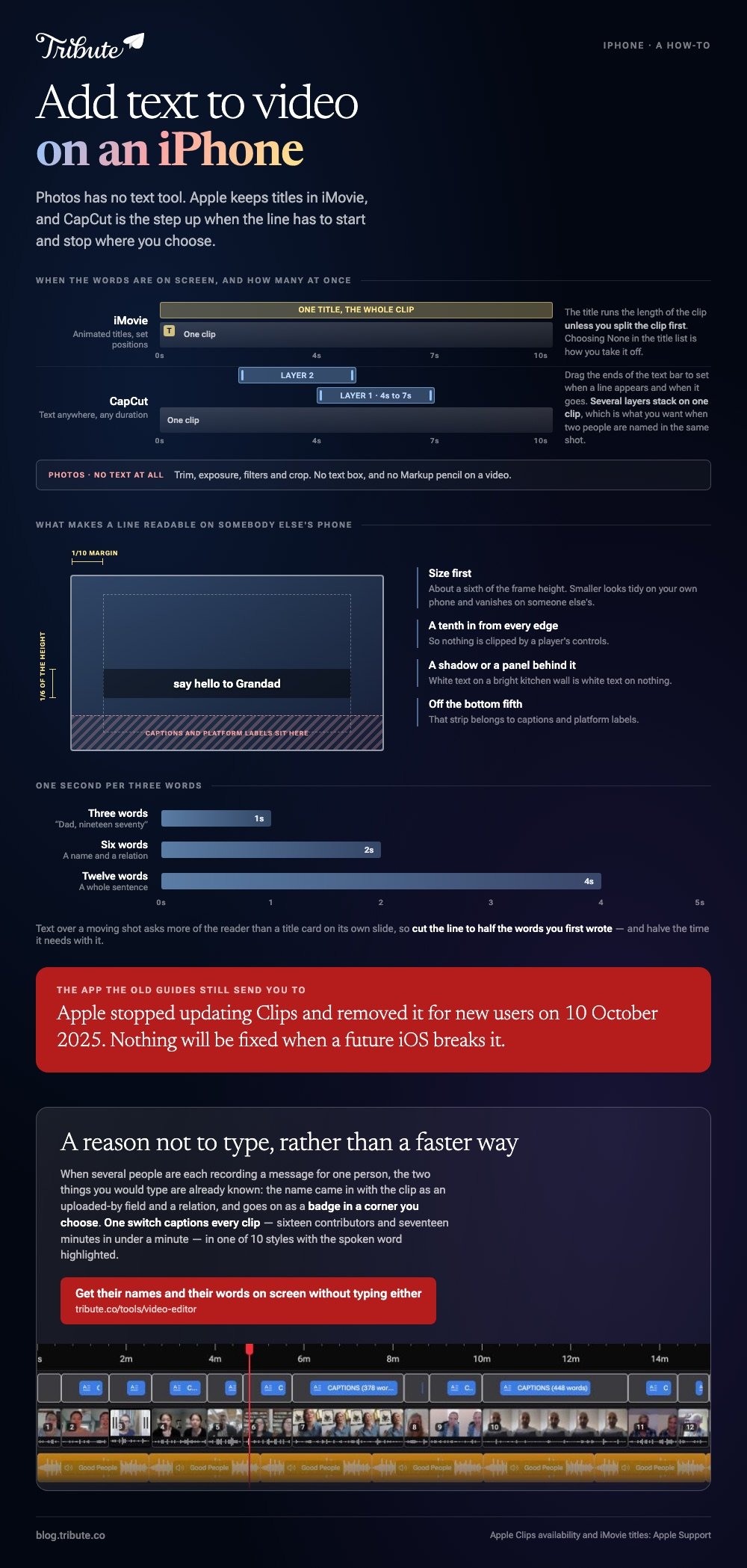
Open a video in Photos and the edit screen offers trim, exposure, filters and crop. There is no text box and no Markup pencil on a video, because Apple treats a title as an edit rather than an annotation.
Photos does have a caption field, reached by swiping up on a clip. It is a note for your own searching and nobody who watches the video ever sees it.
Three routes do the real job, and the one you want depends on whether the text sits still.
| Route | What you get | Time |
|---|---|---|
| iMovie | Animated titles in set positions | About 2 minutes |
| CapCut | Text anywhere, any duration, any length | 5 to 10 minutes |
| Photos | Trim and crop. No text at all | Not possible |
How do you add text to video iPhone clips in iMovie?
Six taps, and the slow part is choosing a style.
- Open iMovie, tap Start New Project, choose Movie, select your clip and tap Create Movie.
- Tap the clip in the timeline. The inspector opens along the bottom of the screen.
- Tap the Titles button, then tap a title to preview it in the viewer. Apple's guide covers the animated titles you can add to any clip, photo or background.
- Tap the sample title in the viewer, tap Edit, and type your words.
- Drag the title in the viewer to move it.
- Tap Done, then the Share button, then Save Video.
A clip carrying a title shows a small T in its top left corner in the timeline, which is how you find the one you already did.
Then the limits arrive. The title lands where the style puts it, it runs for the length of the clip unless you split the clip first, and choosing None in the title list is how you take it off again.
That suits a name, a date or an opening card. It does not suit a line that has to appear at four seconds and leave at seven.
What does CapCut do that iMovie will not?
It lets a line of text start and stop where you choose.
- Open CapCut, tap New project, select the clip and tap Add.
- Tap Text in the bottom bar, then Add text.
- Type the line, then work through the Style, Effects and Animation tabs.
- Drag the ends of the text bar under the timeline to set when the line appears and when it goes.
- Pinch and drag in the preview to size and place it.
- Tap the export arrow in the top right.
Menu names shift between CapCut versions. If Text is not in the bottom bar, tap the clip first and look again.
Unlike iMovie, CapCut will stack several text layers on one clip, which is what you want when two people are named in the same shot.
More on the wider job in building a video montage and adding text in Premiere Pro when the clip is headed somewhere serious.

Should you still add text to video iPhone clips in Apple Clips?
No, and the guides that tell you to are out of date.
Apple retired Clips. Its support page states that the app is no longer updated and stopped being available to new users on 10 October 2025, and it tells existing users to save their projects to Photos.
Apple's own replacement advice is iMovie, with InShot, VN Video Editor and GoPro Quik named as third-party options.
If Clips is still on your phone it opens, and nothing will be fixed when a future iOS breaks it. Start new work somewhere else.
What makes text on a phone video readable?
Size, position and time on screen, in that order.
Most people put text on video iPhone screens will show at about a sixth of the height of the frame. Smaller looks tidy on your own phone and vanishes on someone else's.
- Keep a margin. A tenth of the frame in from every edge, so nothing is clipped by a player's controls.
- One second per three words. Six words need two seconds on screen, not one.
- Put a shadow or a panel behind it. White text on a bright kitchen wall is white text on nothing.
- Stay off the bottom fifth. That strip is where captions and platform labels sit.
Compared to a title card on its own slide, text over a moving shot asks more of the reader, so cut the line to half the words you first wrote.
What if the clips came from a dozen different people?
The Tribute video editor is a browser-based group video editor: contributors record clips on their phones and Tribute assembles them on a timeline with the music balanced under the voices.
It is ours, and it is the last thing on this page.
- Ready-made text styles grouped as Simple, Title and Styles, so you pick a look rather than a font
- Name badges built from an uploaded-by name and a relation, in any of 4 corners, dark or light
- 10 caption styles with the spoken word highlighted, every line editable with its own start and end timecode
- 83 occasion backgrounds behind a title card, grouped by Celebration, Retirement and Love
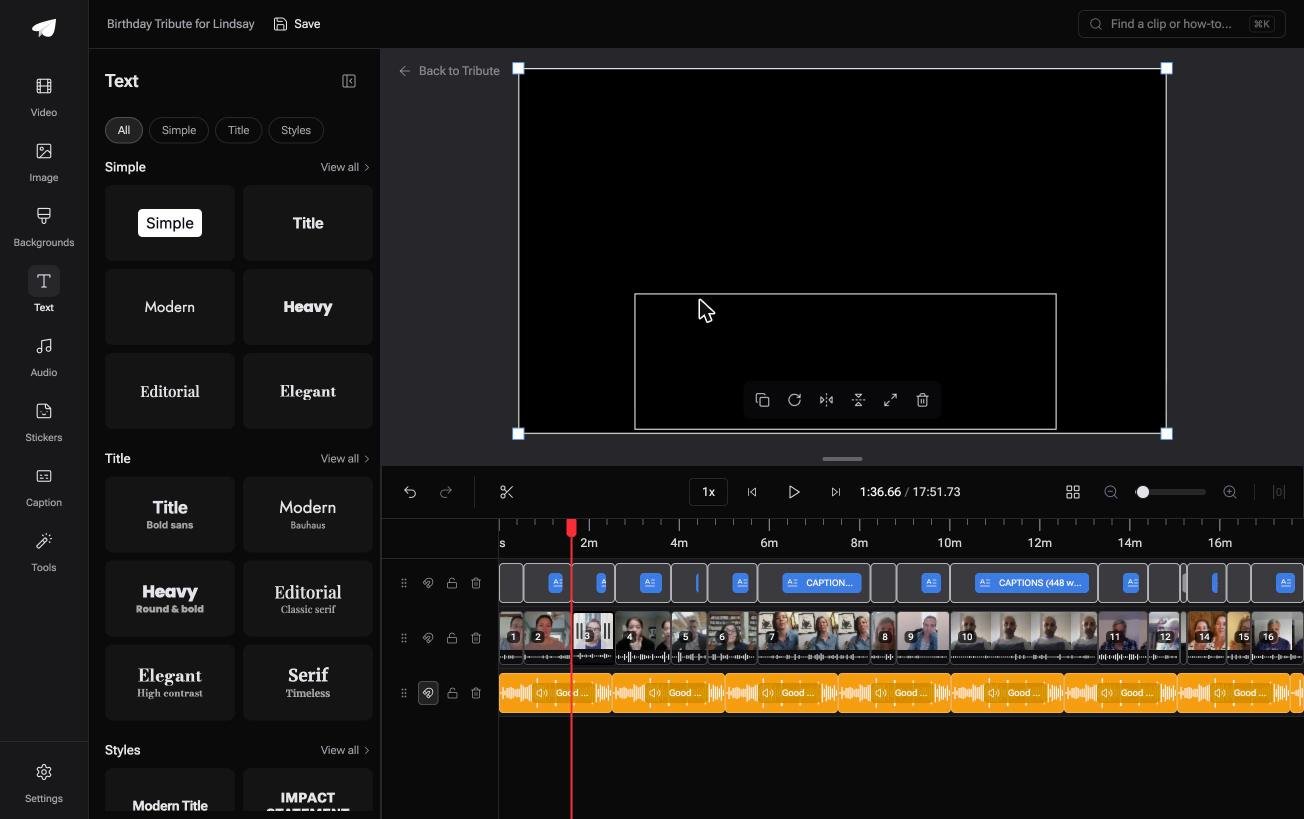
Best for: Twelve clips from twelve people, and every one of them needs a name on screen.
Why it works: The name under each face comes from a field the sender filled in, so you are not typing twelve titles from memory.
What if nobody has to type the words at all?
Every tap above was you typing something a viewer could have heard.
A name, a relation, a line of what somebody said. There is one case where all of it is already in the file.
The case: the words were spoken, not written
You are in it when several people each record a message for one person.
A grandfather turning ninety. A teacher leaving after twenty years. The people who should speak are in six kitchens in four states, and each of them says their own name in the first two seconds.

Why the typing never starts
Because the two things you would type are already known.
The name came in with the clip, as an uploaded-by field and a relation, and it goes on as a badge in a corner you choose.
Speech is the other half. One switch captions every clip on the timeline: sixteen contributors and seventeen minutes of video in under a minute.
That is how the Tribute video editor handles the add text to video iPhone problem: not a faster way to type, but a reason not to.
What you do not have to do
- No typing. The spoken words become captions from one switch, every line with its own timecode.
- No fixing by hand. On a Concierge Tribute, Eve corrects a misspelled name or a mistimed line across every clip.
- No style to build. Ten caption styles, with the word being spoken highlighted as it lands.
- No title card to design. A ready-made style over one of 83 occasion backgrounds opens the video.

When this is the wrong answer: you shot one clip yourself and want a joke across the middle of it. Then go back to CapCut. The editor is also not a standalone text tool: it lives inside a paid Tribute.
Frequently Asked Questions
Can you add text to a video in the iPhone Photos app?
No. The video edit screen covers trim, exposure, filters and crop. The caption field under a clip is a private note and never appears in the video itself.
Is iMovie a free app on iPhone?
Yes, iMovie is a free app from the App Store and there is no watermark on what it exports. It ships with animated title styles you can drop on any clip, photo or background.
How do I add text to only part of a clip in iMovie?
Split the clip at the point the text should start, then add the title to the second piece. iMovie runs a title for the whole clip it sits on, so splitting is the only control you have over timing.
What is the best app to put text on video iPhone users already have?
iMovie, if it is still on the phone. If the text has to move, change size or stack, CapCut gives you keyframes and layers that iMovie does not.
Why has Apple Clips disappeared from the App Store?
Apple stopped updating Clips and removed it for new downloads on 10 October 2025. People who had it can redownload it from their Apple Account, and Apple points everyone else at iMovie.
Will text burned into a video show up on Instagram and YouTube?
Yes, because it is part of the picture rather than a caption track. Keep it out of the bottom fifth of the frame, where both platforms put their own interface.
Can I add music under the titles at the same time?
You can. iMovie has an Audio tab in the same inspector, covered in adding music to a video on iPhone and the longer walk through the same job.
👉 Get their names and their words on screen without typing either if several people each recorded a message for one person, and the only title you write is the first.
