
Join YouTube Videos: What the YouTube Editor Will Not Do, and What to Use Instead
You cannot join YouTube videos on YouTube. The Studio editor trims and cuts one upload and has no command for joining two. Put the source files together in an editor, then upload the result once.

Can you join YouTube videos inside YouTube Studio?
No, and the help page is clear about the boundary.
YouTube's documentation for its editor lists trimming the start or end, cutting a section out of the middle with New Cut, typing exact times, previewing, undoing a cut and discarding changes. Joining two uploads is not on the list.
Face blurring is the one other tool, and on an unedited video past 100,000 views it may be the only edit offered.
So the editor is a pair of scissors. Everything about putting two things together happens before the upload.
How do you get the files back so you can join two videos?
Start with the originals on your own drive, if you still have them.
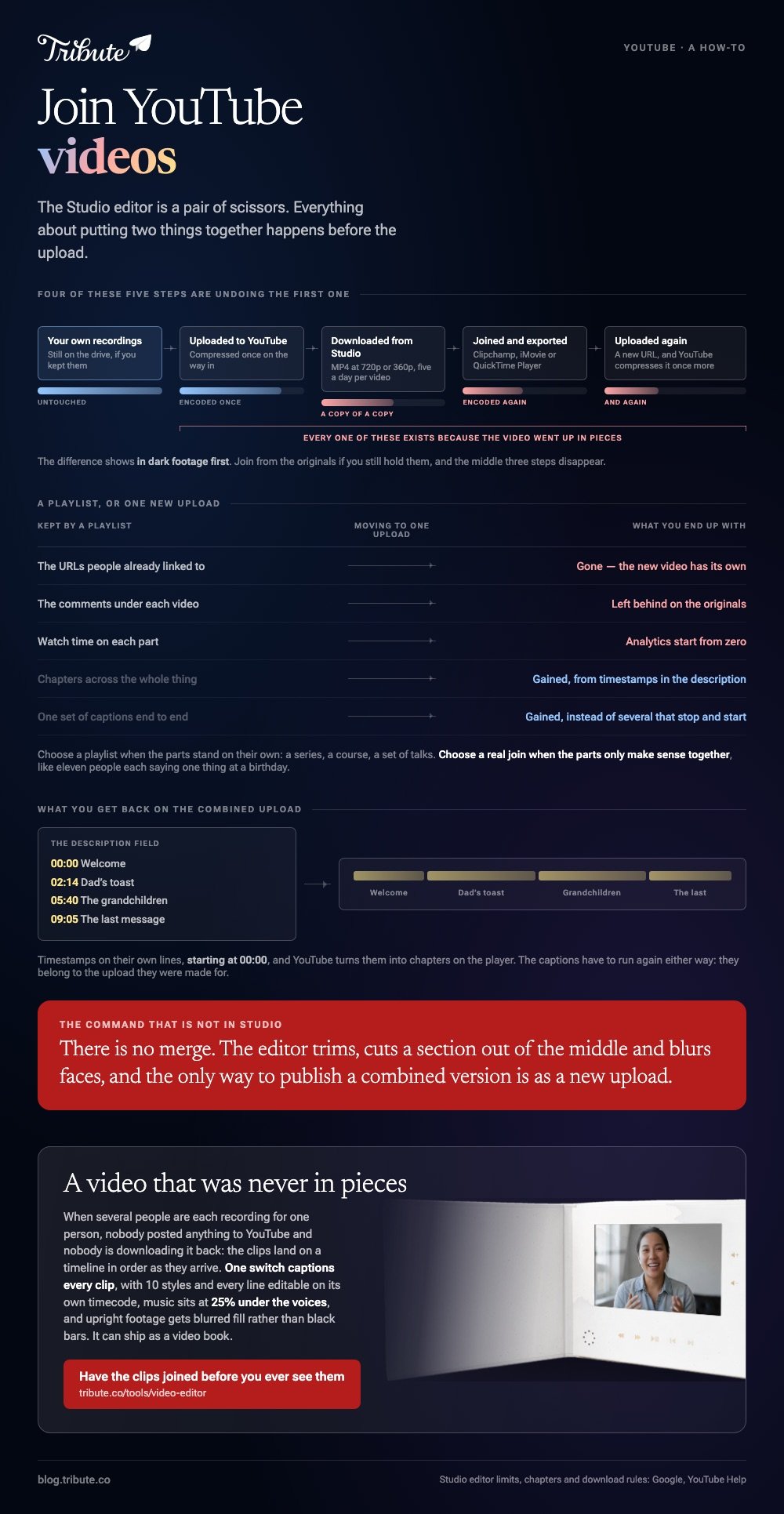
A YouTube upload has already been compressed once. Pulling it back down and re-encoding it gives you a copy of a copy, and the difference shows in dark footage first.
Your own uploads
YouTube hands your videos back from Studio.
- Sign in to YouTube Studio.
- Select Content in the left panel.
- Select the video, then Menu, then Download.
The file comes as MP4 at either 720p or 360p depending on its size, and YouTube caps this at five downloads of one video per day.
Removed videos, videos carrying a copyright or Community Guidelines strike and videos using a preapproved audio track are excluded, per YouTube's page on downloading your own uploads. Google Takeout pulls the whole set at once.
Somebody else's upload
Ask the person who posted it.
YouTube's Terms of Service say you may not access, reproduce, download, distribute, transmit or display any part of the Service or any Content except where the Service itself authorizes it, or with prior written permission from YouTube and the rights holders.
A download site is not that permission. The uploader sending you the original file is, and it is also a better file.
Which YouTube video joiner should you use?
Whichever one is already on the machine holding the clips.
| Tool | Where it runs | Good at | Watch out for |
|---|---|---|---|
| Clipchamp | Browser, Windows app | No install, exports to 4K | Gaps between clips |
| iMovie | Mac, iPhone, iPad | Per clip volume and color | Builds a library on disk |
| QuickTime Player | Mac | A plain append, four menu picks | No music, no titles |
Clipchamp, in a browser
- Open My media on the toolbar and use import media to bring the files in.
- Drag each clip onto the timeline, side by side on the same track, in playing order.
- Hover over any gap between two clips and press delete this gap. A gap renders as blank video.
- Trim with the handles on a clip, or hold Shift, select several, and drag the handles across all of them.
- Click Export at the top right and pick 480p, 720p, 1080p or 4K.
Microsoft's own instructions for combining videos in Clipchamp cover the gap warning, which is the single thing that most often spoils a first attempt.
Best for: A Windows machine, a borrowed laptop, or anyone who does not want an install.
Why it works: The export screen states the resolution before you commit, so the upload you send YouTube is the one you chose.
iMovie, on a Mac
Create a movie project, then select a clip in the browser and choose Edit > Add to Movie, which drops it at the end of the timeline.
Park the playhead and choose Edit > Insert to put one in the middle. Export with File > Share > File, then pick a resolution and click Next.
Unlike a browser tool, nothing uploads before the edit, which matters when a 4K clip runs to several gigabytes.
The step by step for two files is in joining two videos together, and the phone version in joining videos on iPhone.
Is a playlist a better way to join videos on YouTube?
Often, yes, and it costs nothing to try first.
A playlist plays the videos back to back with no editing, no re-upload and no second encode. Each video keeps its own URL, comments and watch time.

Choose the playlist when the parts stand on their own: a series, a course, a set of talks. Choose a real join when the parts only make sense together, like eleven people each saying one thing at a birthday.
What changes when you join YouTube videos into one upload?
You trade three things for one watchable piece.
- The old URLs. Links and embeds out in the world point at the originals, not the new one.
- The comments. They stay on the videos they were written under.
- The analytics. Watch time starts from zero on the combined upload.
Two things you gain back. Chapters, by putting timestamps in the description, and one set of captions over the whole thing rather than several that stop and start.
Compared to a playlist, a single upload is the better answer for anything a person will watch once, in order, in a sitting.
More routes for the same job are in joining multiple videos into one.
What if a dozen people each sent a clip for the same video?
The Tribute video editor is a browser-based group video editor: contributors record clips on their phones and Tribute assembles them on a timeline with the music balanced under the voices.
It is ours, and it is the last thing on this page.
- Clips arrive already in order, with a tick against the ones on the timeline
- One switch captions every clip, with 10 caption styles and the spoken word highlighted
- Every caption line is editable, with its own start and end timecode
- 39 licensed tracks across 11 genres, plus a YouTube link import or your own MP3
- Tribute renders the video on its servers, and the preview matches what comes back
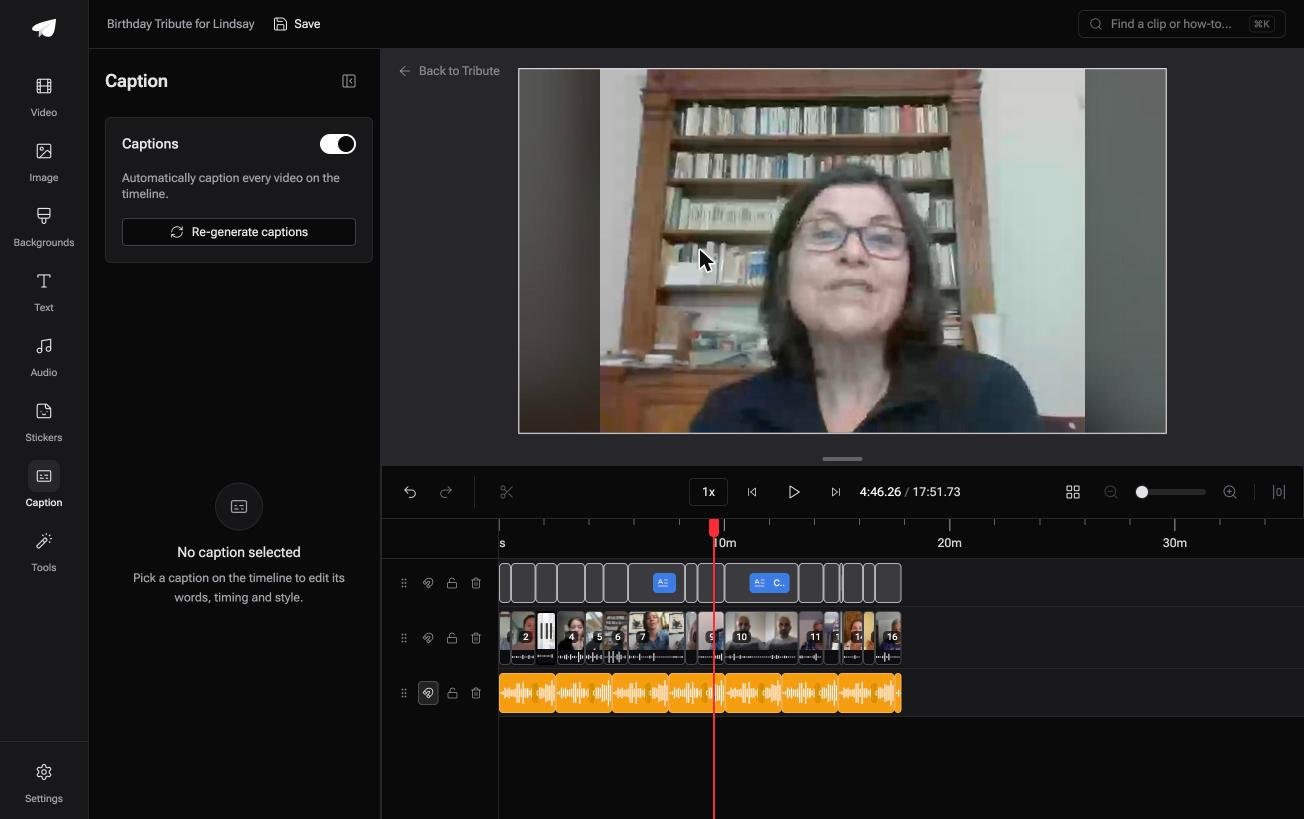
Best for: Uploads you would have to pull back off YouTube before anything could be joined.
Why it works: Captioning sixteen contributors takes one switch rather than sixteen passes through a caption editor.
Is there a video that never needed joining?
Both halves of that job exist because the video was published in pieces.
Pull it back down, stitch it, send it up again. Four of those steps are undoing the first one.
One kind of video never starts there.
The case: the clips were recorded for one person
You are in it when the footage was made to order.
A grandmother turning eighty. A colleague leaving after fifteen years. A memorial where the people who should speak are in four states.

Nobody posted anything to YouTube and nobody is downloading it back. Everyone recorded a message, and the material arrives as files, not as links.
Why the joining question never comes up
The clips land on a timeline in order as they arrive.
There is no joiner to pick, no gap to delete, no terms page to read about someone else's upload. Music sits under the voices at 25%, and upright phone footage gets blurred fill rather than black bars.
That is how the Tribute video editor handles it: not a better YouTube video joiner, but a video that was never in pieces on YouTube.
What you do not have to do
- Upload a thing to YouTube. Each person records from a link and the clip lands on the timeline.
- Work out the join. The clips arrive numbered and in order, with music under the voices.
- Caption or name anybody. One switch for captions, and a badge carrying each person's relation.
- Cut it yourself, on a Concierge Tribute. Tribute's editors do the edit, and Concierge Deluxe returns it as a video book, a hardcover case with a screen inside.

When this is the wrong answer: the videos you want joined are already published and the audience is a channel. Then download your own uploads from Studio and join them in Clipchamp. The editor runs inside a paid Tribute and is not a YouTube tool.
The wider craft is in making a video montage.
Frequently Asked Questions
Can I merge two of my own YouTube videos without re-uploading?
No. There is no merge command in Studio, and the only way to publish a combined version is as a new upload with a new URL. The originals stay where they are unless you delete them.
What quality do I get when I download my own YouTube video?
MP4 at 720p or 360p, chosen by YouTube based on the file's size. If you still hold the original recording, join from that instead, because a second encode of a compressed upload loses more than the first did.
Is it against the rules to download someone else's video to join it?
YouTube's Terms restrict reproducing or downloading Content except where the Service authorizes it or the rights holders give written permission. The clean route is to ask the uploader for the source file.
How do I join YouTube videos together on a phone?
Download your own uploads in the YouTube app, then open iMovie or CapCut, add both clips to one project and export. The join happens in the editor, never in the YouTube app itself.
Will joined videos keep their captions?
No. Captions belong to the upload they were made for, so a combined video needs one new pass. Auto captions run again on the new upload once it has processed.
Can I add chapters to the joined video?
Yes. Put timestamps on their own lines in the description, starting at 00:00, and YouTube turns them into chapters on the player.
What is the simplest YouTube video joiner for one quick job?
Clipchamp in a browser, because there is nothing to install and the export screen names the resolution. On a Mac with two matching files, QuickTime Player is faster still.
👉 Have the clips joined before you ever see them if several people are each recording for one person, and nothing has to come off YouTube at all.
