
Clideo Video Crop: How the Tool Works and What the Free Plan Costs
Clideo crops a video in a browser in three steps: upload the file, drag the selection box or pick a social preset, then download. Uploads on the free plan stop at 500 MB and the export carries a watermark.

Where is the Clideo video crop tool?
On one page, with no account and nothing installed.
The tool is Clideo's crop video page, and it takes AVI, MPG, MP4, MOV and WMV among others. Everything happens on their servers, which is why the file has to go up before anything happens.
That upload is the whole trade. You get a crop on a Chromebook, a work laptop or a borrowed machine, and you pay for it in minutes.
Check the length of the clip before you start. Anything over a couple of minutes is worth cropping on the device that shot it.
What are the steps to crop a video in Clideo?
Three, in the order the page lays them out.
- Select the video. Drag it in from the desktop, the phone or a cloud drive.
- Crop it. Drag the box to the area you want, or take a preset, then choose the output format.
- Save the result. Download it, send it back to cloud storage, or watch it in the browser first.
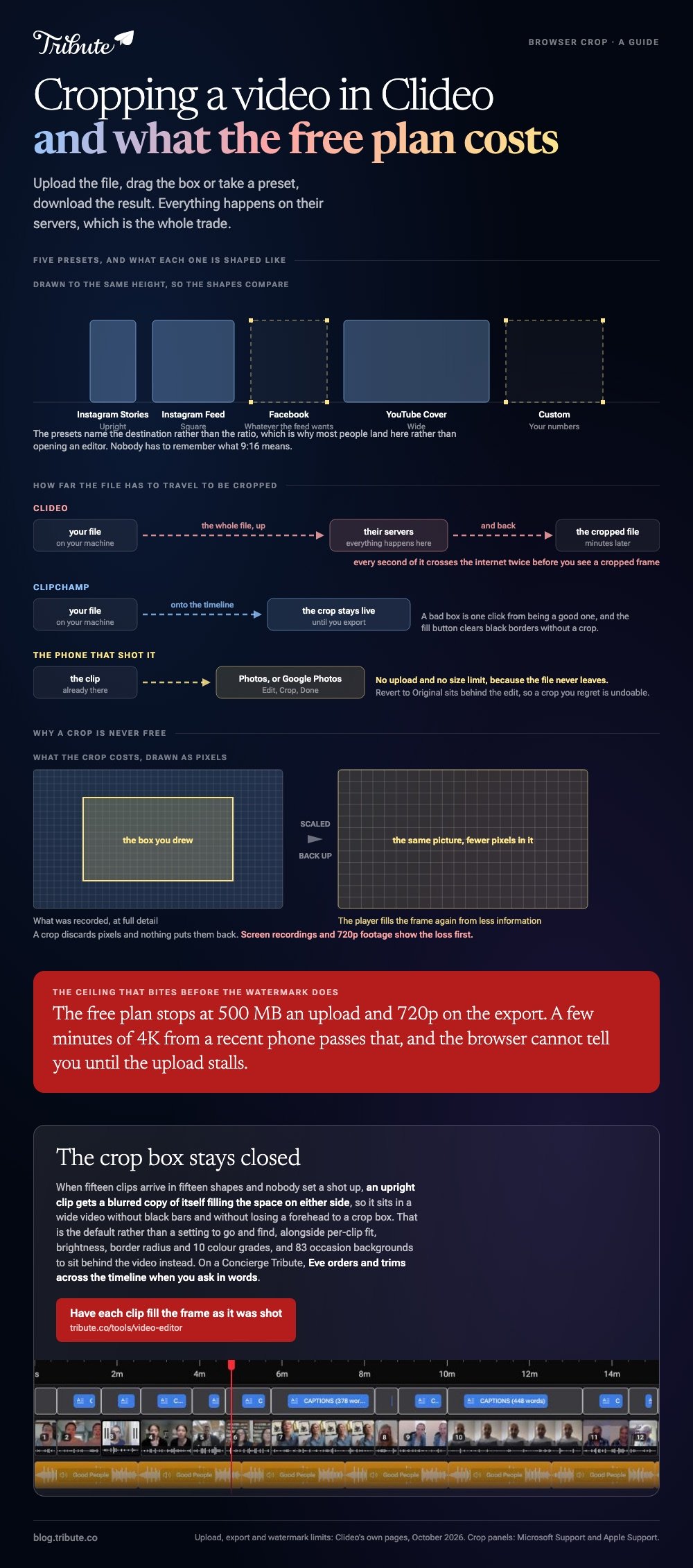
The presets are the reason most people land on this page rather than opening an editor.
| Preset | Shape | Use |
|---|---|---|
| Instagram Stories | Upright | Full-screen phone |
| Instagram Feed | Square | 1:1 in a scroll |
| Feed shape | Shared posts | |
| YouTube Cover | Wide | 16:9 uploads |
| Custom | Your numbers | Exact pixel sizes |
Best for: One clip that needs a different shape for one platform, today.
Why it works: The presets name the destination rather than the ratio, so nobody has to remember what 9:16 means.
Does the Clideo video crop tool add a watermark?
On the free plan it does.
Clideo marks exports made without a subscription, holds each upload to 500 MB and caps export quality at 720p. A paid plan lifts all three limits.
The 500 MB ceiling bites before the watermark does. A few minutes of 4K from a recent phone passes it, and the browser cannot tell you that until the upload stalls.
Unlike a tool running on your own machine, every second of that file crosses the internet twice before you see a cropped frame.
Can you crop the same clip in Clipchamp instead?
Yes, and nothing uploads to a third-party site to do it.
- Drag the clip onto the timeline and click it so it is selected.
- Click the crop button on the floating toolbar above the stage.
- Drag the handles on the sides, the top and the bottom of the preview.
- Click the done button, or the undo button to put it back.
Microsoft's guide to cropping videos or images in Clipchamp also covers the fill button, which stretches a clip to the project shape and clears the black borders.
Best for: Anything over a few hundred megabytes, or a job with more than one clip in it.
Why it works: The crop stays live on the timeline until you export, so a bad box is one click away from being a good one.
More browser options are compared in cropping a video online and the online crop tools worth using.

What about cropping on the phone that shot it?
The iPhone does it in Photos, with no app to install.
Open the clip, tap Edit, tap the crop icon, drag the corners or pick a ratio, then tap Done. Apple's guide to cropping, rotating and straightening photos and videos has the full panel.
Compared to any browser tool, this is the one route with no upload and no size limit, because the file never leaves the phone.
Android keeps the same job in Google Photos. Open the clip, tap Edit, then Crop, and save a copy rather than overwriting the original.
Revert to Original sits behind the edit, so the clip you shot survives a crop you regret. For a timeline-grade crop on a desktop, the Premiere route is in cropping a video in Premiere Pro.
What if the clips arrive from a dozen different phones?
Then cropping is the wrong tool twelve times over, because every clip is a different shape and every crop loses a face.
The Tribute video editor is a browser-based group video editor: contributors record clips on their phones and Tribute assembles them on a timeline with the music balanced under the voices.
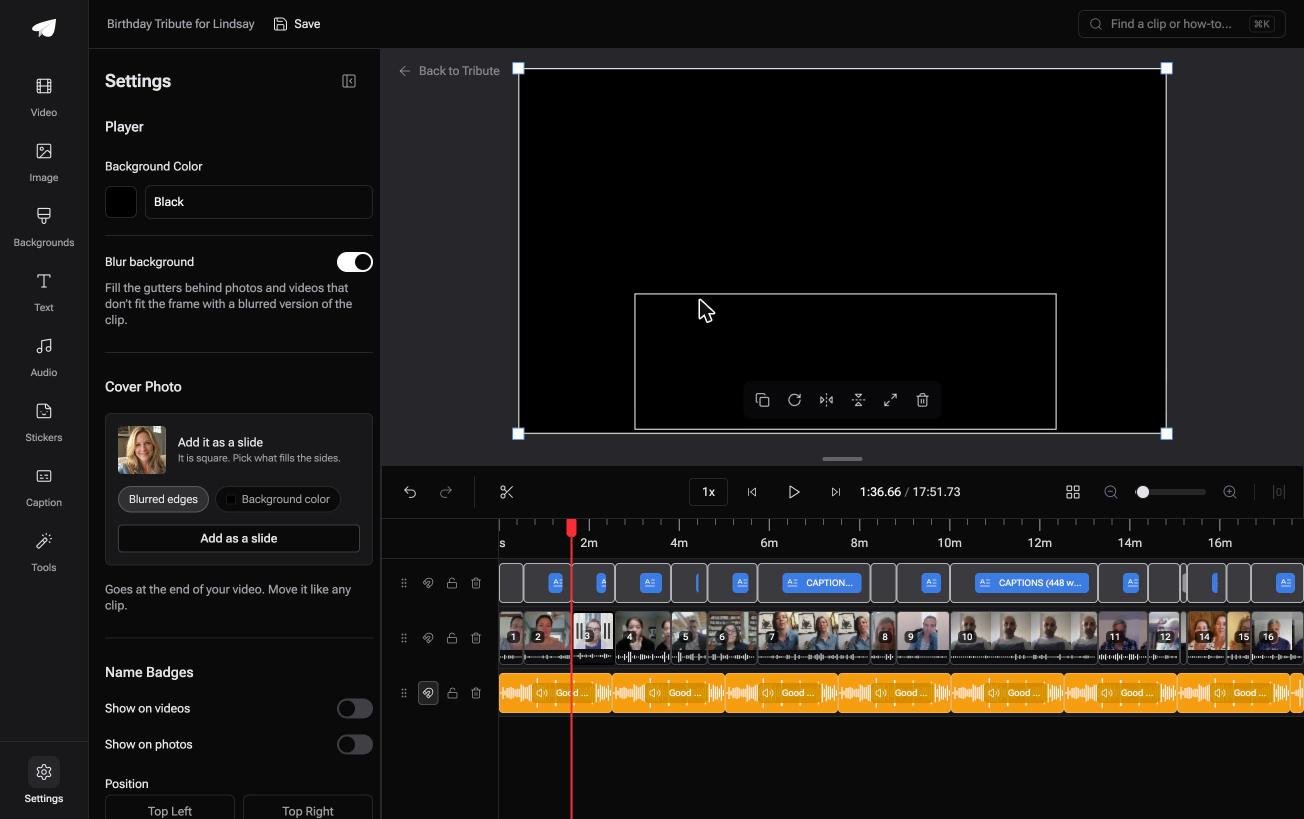
- Blurred edges on by default behind upright footage, so a tall clip fills a wide frame with no black bars
- Per-clip appearance controls for fit, brightness, border radius and 10 color grades
- 83 occasion backgrounds to sit behind the video instead of a crop
- Autosave and restorable history, so a change you dislike is recoverable
Best for: Fifteen clips that arrived in fifteen shapes, none of them yours to reshoot.
Why it works: Filling the frame behind an upright clip keeps every pixel that was shot, which a crop cannot do.
Is there a version of this with no crop step?
Each route above asks you to draw a box and decide what to throw away.
For one clip that is a thirty second decision. For fifteen clips that arrived in fifteen shapes, it is an evening of drawing boxes and a video that has lost somebody's chin.
One kind of video skips the step outright.
The case: nobody chose the framing
You are in it when several people each record a message for the same person.
An aunt turning seventy. A manager leaving after twelve years. Nobody set a shot up: each person held a phone at arm's length in their own kitchen, and the shapes are whatever their phone does.
If you are reframing one video of your own, the Clideo video crop page at the top is where this ends for you.

Why the framing question stops arising
Because the frame is settled before the clips reach your screen.
An upright clip gets a blurred copy of itself filling the space on either side, so it sits in a wide video without black bars and without losing a forehead to a crop box.
That is the default in the Tribute video editor, not a setting to go and find, and it holds whether the clip came from a new phone or an old one.
What the afternoon stops containing
Four jobs come off the list, and drawing a box is the first.
- No crop. Each clip fills the frame in the shape it was recorded.
- No look to set per clip. One grade and one background cover all fifteen.
- No order or trim pass. On a Concierge Tribute, Eve does both across the timeline when you ask in words.
- No build. Tribute's own editors make the video on that tier and send it back.

When this is the wrong answer: the clip is yours and the reframe is deliberate rather than damage control. Then the Clideo page above does it in three steps. The editor is not a standalone cropper either: it lives inside a paid Tribute.
For the wider job of turning many clips into one piece, see making a video montage.
Frequently Asked Questions
Is Clideo safe to upload a personal video to?
Files go to their servers and are deleted on a schedule set in their terms. For anything you would not email, crop on the device instead.
How do I remove the Clideo watermark?
Only a paid plan removes it. Cropping the mark out afterwards shrinks the frame again and costs more quality than it saves.
Does cropping lower the quality of a video?
It does. A crop discards pixels and the player scales what is left back up. Screen recordings and 720p footage show that loss first.
Can I crop a video to 9:16 for a phone?
Yes. Take the Instagram Stories preset in Clideo, or change the project shape in Clipchamp and use the fill button on each clip.
What is the largest file Clideo will take?
500 MB on the free plan. Above that, either compress the clip first or use an editor that runs on your own machine.
Can I crop several clips at once?
Not on the single-tool pages. A timeline editor is the shorter road once there are three or more clips to reshape.
👉 Have each clip fill the frame as it was shot if fifteen of them arrived in fifteen shapes, and the crop box stays closed.
