
Video Caption for Facebook: Burn It In or Upload an SRT
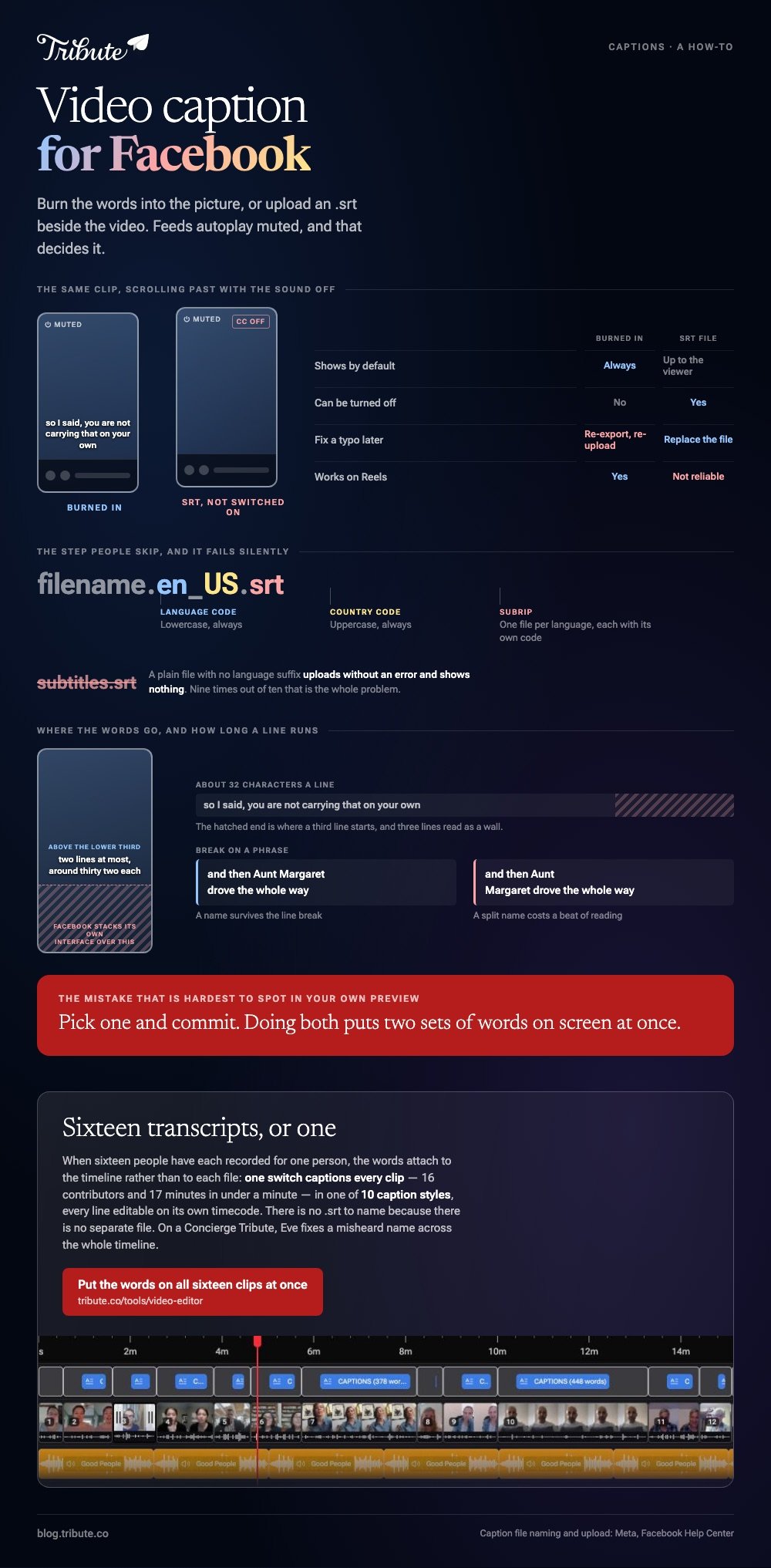
There are two routes to a video caption for Facebook. Burn the words into the picture before you upload, or upload a .srt file named filename.en_US.srt beside the video. Burned-in text always shows. An SRT can be switched off.

What is the best video caption for Facebook, burned in or an SRT?
Burned in, for anything going into a feed.
Feeds autoplay without sound, and a viewer who has to turn captions on has already scrolled past. The sidecar file wins in one place: a video somebody will sit down and watch on purpose.
| Burned in | SRT file | |
|---|---|---|
| Shows by default | Always | Depends on the viewer |
| Can be turned off | No | Yes |
| Fix a typo later | Re-export and re-upload | Replace the file |
| Works on Reels | Yes | Not reliable |
Pick one and commit. Doing both puts two sets of words on screen at once, which is the most common mistake in captions on Facebook video and the hardest to spot in your own preview.
How do you add a video caption for Facebook with an SRT file?
Get the file name right first. Everything else is four clicks.
Facebook's naming rule is the step people skip, and a file that breaks it uploads without error and shows nothing.
- The format is filename.[language code]_[country code].srt
- US English is filename.en_US.srt
- Language code lowercase, country code uppercase
- One file per language, each with a different code
Upload it next. Meta documents the path: open the video's edit options, click Add captions, choose to select a SubRip (.srt) file from your computer next to Upload captions, and click Save.
A plain subtitles.srt with no language suffix is the single most common reason a correct caption file does nothing after upload.
Where do you get the SRT in the first place?
From a browser editor that transcribes the audio and hands the file back.
Clipchamp does this in one pass and costs nothing to try, which makes it the shortest route to add captions to a Facebook video.
- Open My media, add the clip, and drag it onto the timeline.
- Turn on autocaptions from the captions icon in the video preview, or the captions tab in the property panel.
- Choose the transcription language, tick the offensive-language filter if you want it, then click transcribe media.
- Read the transcript in the captions tab and double-click any word to rewrite it.
- Click download captions for the .SRT, then rename it with the language suffix.
Microsoft lists two limits on its autocaptions page: the clip has to contain a voice, and you get one transcription language per video.
For burned-in text instead, a phone editor styles it and exports the words inside the picture. Steps for that are in CapCut auto captions, and a wider comparison in caption generators.

Is there a Facebook caption editor for a video you already posted?
There is a caption panel, not a timeline.
The video's edit options let you add or replace a caption file after the post is live, and the post keeps its URL and its reactions. What you cannot do there is retime a line or restyle the text.
Auto-generated captions are the gap. Availability moves between surfaces and account types, Meta does not publish one path that holds everywhere, and Reels do not behave like an ordinary video post.
So treat the Facebook caption editor as a place to attach a file rather than a place to write one. Compared with a browser editor, it gives you no waveform, no per-line timecode and no preview of how the text will sit in the frame.
How should a Facebook video caption look so people read it?
Big, high contrast, and clear of the bottom of the frame.
Facebook stacks its own interface over the lower part of a video. Text placed at the very bottom disappears behind a like count on a phone and nowhere else, which is why it survives your desktop preview.
- Two lines at most, around 32 characters each. Three lines read as a wall.
- White text with an outline or a shadow survives a bright background.
- Break on a phrase, not mid-name. A line that splits "Aunt / Margaret" costs a beat of reading.
- Sit the block above the lower third, clear of the interface.
Read the transcript once for names and numbers before you export. Unlike a sentence, a proper noun gives speech recognition nothing to guess from, and a misspelled name is the error every viewer notices.
What if the video is sixteen people and not one speaker?
Then captioning stops being one job and becomes sixteen transcripts to read.
The Tribute video editor is a browser-based group video editor: contributors record clips on their phones and Tribute assembles them on a timeline with the music balanced under the voices. It is ours, and it is the last thing on this page.
- One switch captions every clip on the timeline: 16 contributors and 17 minutes of video in under a minute
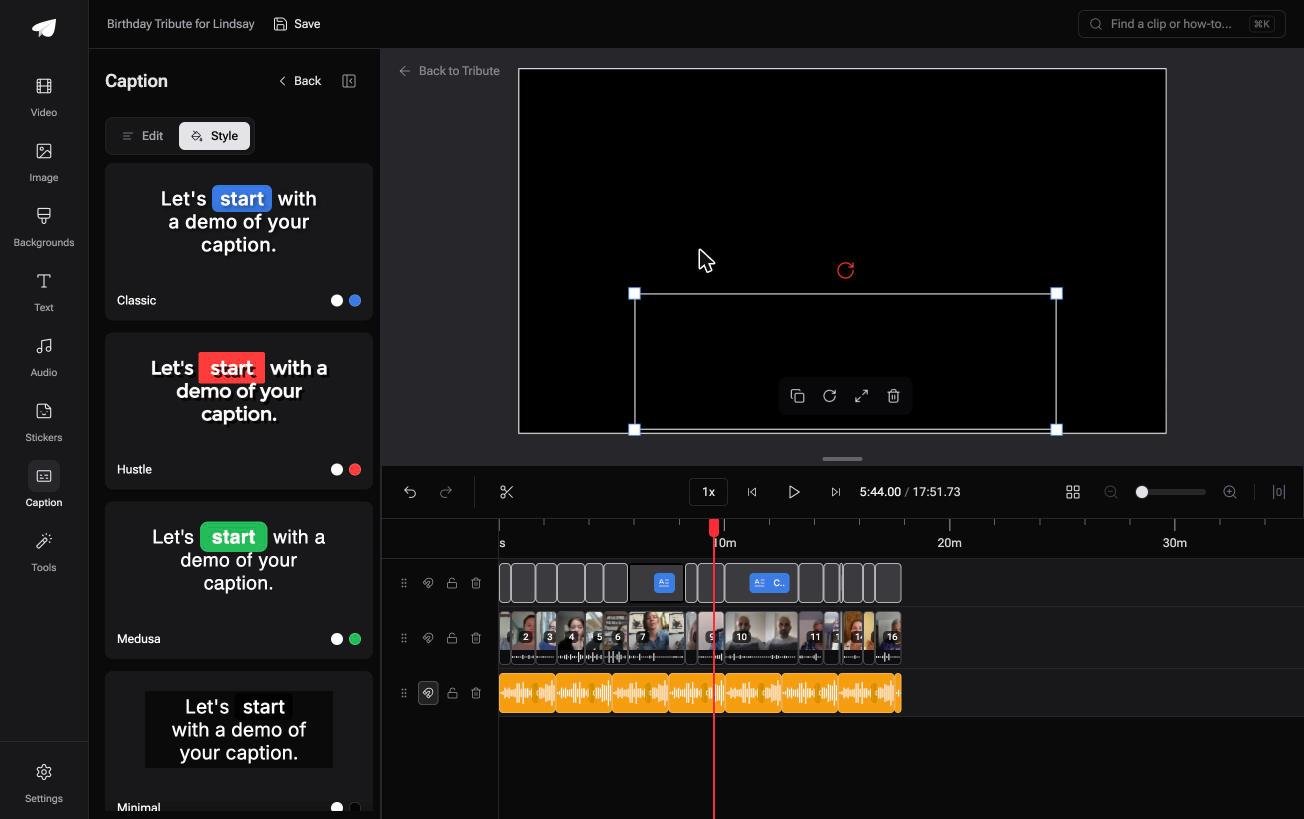
- 10 caption styles, with the word being spoken picked out as it is said
- Every line editable, with its own start and end timecode
- Re-generate captions and Remove captions are bulk actions in the Tools panel
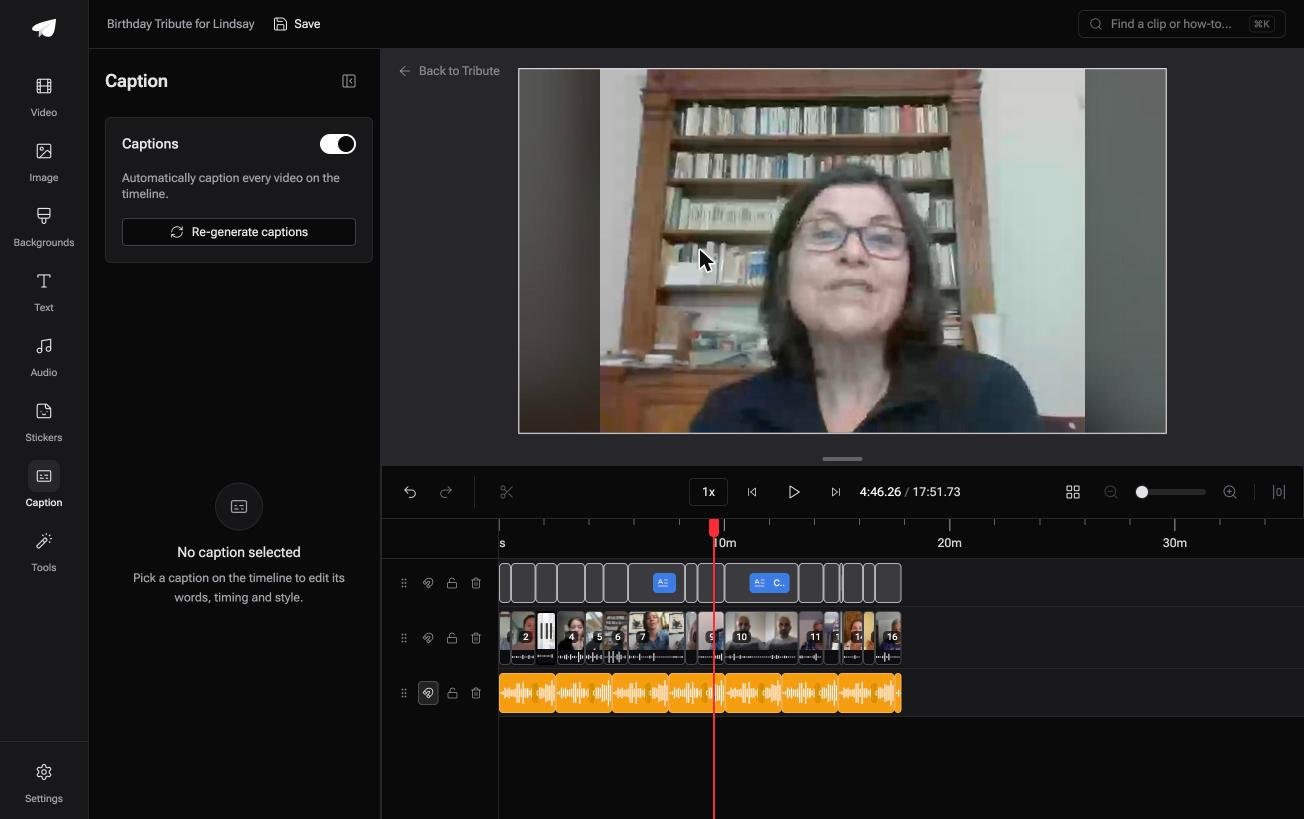
Best for: Sixteen clips headed for a Facebook feed where most people watch with the sound off.
Why it works: The correction pass is one read of one transcript instead of sixteen separate ones.
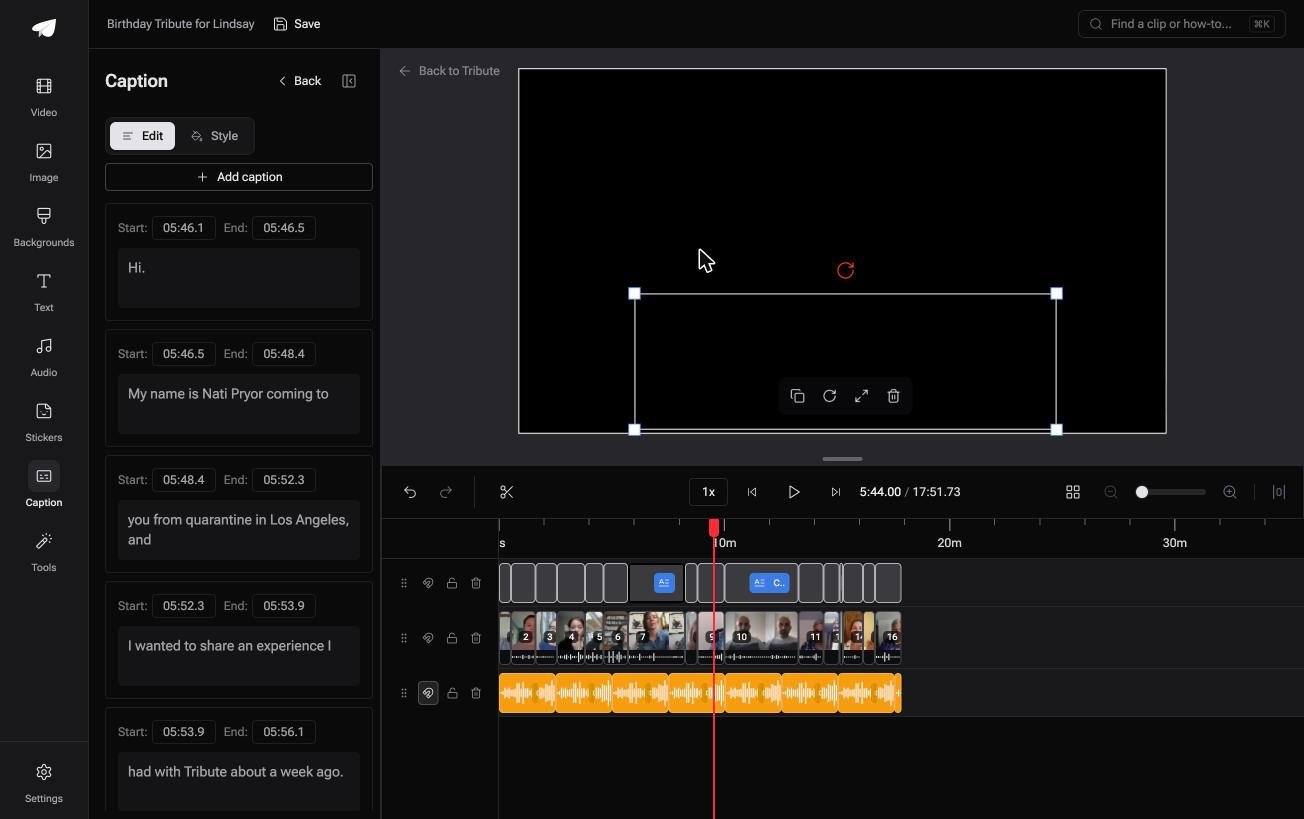
Could the words already be on the clips when you arrive?
Everything above assumes you are holding one finished video.
One clip, one transcript, one upload. That is a thirty minute job and the page you are reading covers it.
The case: the clips are arriving, not sitting on your desk
You are in it when several people each record something for one person.
A grandmother turning eighty. A colleague leaving after fifteen years. A memorial where the people who should speak are in four time zones.
Every message needs the same treatment, and sixteen of them is where a caption workflow stops being a workflow.
Why the file-naming question never arrives
Because the words are attached to the timeline rather than to each file.
Flip one switch and every clip on it is captioned at once, in one style, with one set of timing rules. That is how the Tribute video editor handles it: no .srt to name, because there is no separate file to name.
What you do not have to do
- No .srt to name. The captions live on the timeline, not in a file Facebook has to match.
- No per-clip pass. One switch captions every clip, in any of ten styles.
- No corrections to type. On a Concierge Tribute, Eve fixes a misheard name across the whole timeline.
- No edit at all, if you want none. Tribute's editors build the video on Concierge and hand it back.
When this is the wrong answer: you have one clip and one post to make. Then burn the captions in with a phone editor and upload, and the rest of this page is the whole job.
The editor is not a Facebook tool: it lives inside a paid Tribute. For an edit that mixes clips and photographs, see the video montage maker guide.
Frequently Asked Questions
Does Facebook add captions to video automatically?
Sometimes, and not in a way you can count on. Availability differs between video posts, Reels and account types, so upload your own file when the captions matter.
What file format does Facebook accept for captions?
SubRip, the .srt format, uploaded next to the video. The name has to carry a language and country code, as in filename.en_US.srt, or the file is ignored.
Can I add captions to a Facebook video after posting?
Yes. Open the video's edit options and upload the caption file there. The post keeps its URL, its views and its comments.
Why are my captions not showing on Facebook?
Nine times out of ten the filename has no language suffix. Rename it to filename.en_US.srt, remove the old file, and upload again.
Do captions help a Facebook video get seen?
They help it get watched, which is the part you control. Most feed playback starts muted, so a video with no words on screen has a few seconds to make sense without them.
Should Facebook video captions match the words word for word?
Match the meaning and tidy the speech. Cut the false starts and the repeated words, keep every name and number as spoken, and the lines stay readable at feed speed.
Can one video carry captions in two languages?
Yes, as separate SRT files with different language codes. The viewer's own language setting decides which one appears.
👉 Put the words on all sixteen clips at once if sixteen people each recorded for one person, and no .srt file has to be named for Facebook.
