
CapCut Auto Caption: The Steps on Phone, Desktop and Web
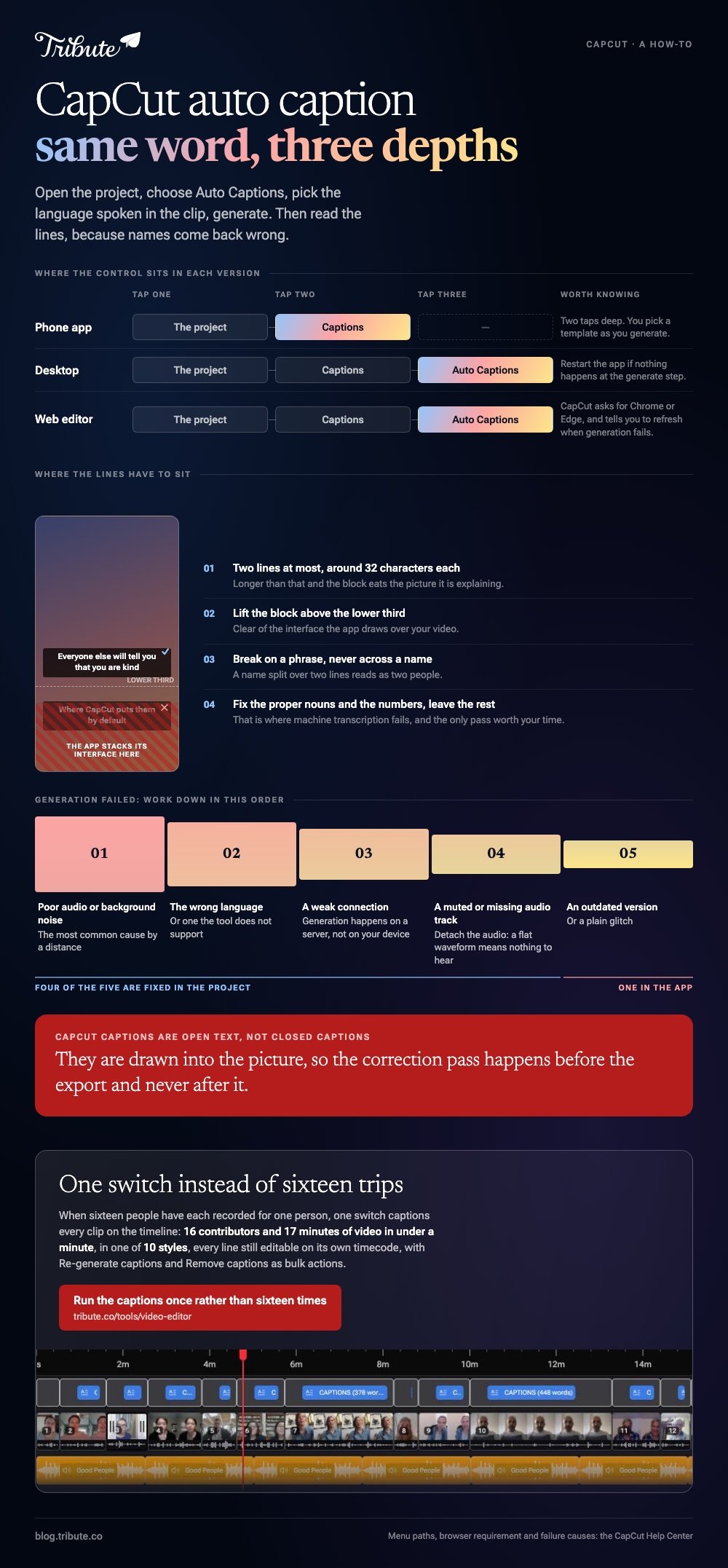
CapCut auto caption lives under Captions in all three versions. Open the project, choose Auto Captions, pick the language spoken in the clip, and click Generate. Then read the lines, because names come back wrong.

Where is CapCut auto caption in each version?
Behind the same word in all three, at a different depth.
The phone app puts Captions in the bottom menu. Desktop and the web editor both nest Auto Captions underneath it.
| Version | Path | Worth knowing |
|---|---|---|
| Phone app | Captions in the bottom menu | You pick a template as you generate |
| Desktop | Captions > Auto Captions | Restart the app if nothing happens |
| Web editor | Captions > Auto Captions | CapCut asks for Chrome or Edge |
One thing holds across all three. CapCut captions are burned into the picture, so the correction pass happens before export and never after it.
How does CapCut auto caption work on a phone?
Four taps, then a wait that scales with the length of the clip.
The mobile route is the one most people mean by CapCut captions, because the app was built phone first and the styling lives there.
- Open the CapCut app and load the project.
- Tap Captions in the bottom menu.
- Choose the language spoken in the clip and pick a template.
- Start generation and wait, then preview the result.
- Tap any line to correct it before you export.
If the app stalls at the generating step, CapCut's own advice is to update it from the App Store or Google Play rather than retry the same build.
What are the steps to add captions in CapCut on a desktop?
How to add captions in CapCut on a computer: the same four steps, with a menu instead of a bottom bar.
Adding captions in CapCut on a computer suits a longer video, because reading a transcript on a laptop is faster than reading it on a phone.
- Open the project and place the video on the timeline.
- Go to Captions, then Auto Captions.
- Select the language and confirm the settings.
- Click Generate and wait for the lines to appear.
- Click into each line and fix what the machine misheard.
In the web editor the path is identical, with one extra condition: CapCut recommends Chrome or Microsoft Edge, and tells you to refresh the page when generation fails.

Why did CapCut auto caption fail on your clip?
Five causes, and CapCut lists all of them.
Work down the list before you reinstall anything, because four of the five are fixed in the project rather than in the app.
- Poor audio or background noise. The most common cause by a distance.
- The wrong language selected, or one the tool does not support.
- A weak or unstable connection. Generation happens on a server.
- A muted or missing audio track on the clip you selected.
- An outdated version or a plain software glitch.
The silent track catches people out on a screen recording. Detach the audio and look at the waveform: a flat line means there is nothing for CapCut to hear.
Are CapCut closed captions the same as closed captions?
No, and the difference matters when you upload.
Closed captions in the proper sense are a separate track a viewer switches on and off. What CapCut produces is open text, drawn into the frame and part of the picture from then on.
That choice is right for a feed, where playback starts muted and nobody turns anything on. It is the wrong choice for a video somebody will watch on a television with their own caption preferences set.
Compared with a sidecar .SRT, burned-in text is fixed: a typo costs a re-export rather than a replaced file. Compared with no captions at all, it is the version more people finish watching.
How should the lines look once they are generated?
Short, high contrast, and clear of the bottom of the frame.
Every social app stacks its own interface over the lower part of a video, which is where the captions in CapCut sit by default.
- Two lines at most, around 32 characters each.
- Lift the block above the lower third, clear of the interface.
- Break on a phrase, never across a name.
- Fix the proper nouns and the numbers, and leave the rest.
For a sidecar file instead, Clipchamp generates captions and offers a download captions button for the .SRT. Microsoft notes on its autocaptions page that the clip has to contain a voice and that you get one language per video.
More routes in caption generators compared, the upload rules in captions for Facebook video, and the general version in how auto captions work.
What if there are sixteen speakers and not one?
Then CapCut is being asked to do a one-clip job sixteen times.
The Tribute video editor is a browser-based group video editor: contributors record clips on their phones and Tribute assembles them on a timeline with the music balanced under the voices. It is ours, and it is the last thing on this page.
- One switch captions every clip on the timeline: 16 contributors and 17 minutes of video in under a minute
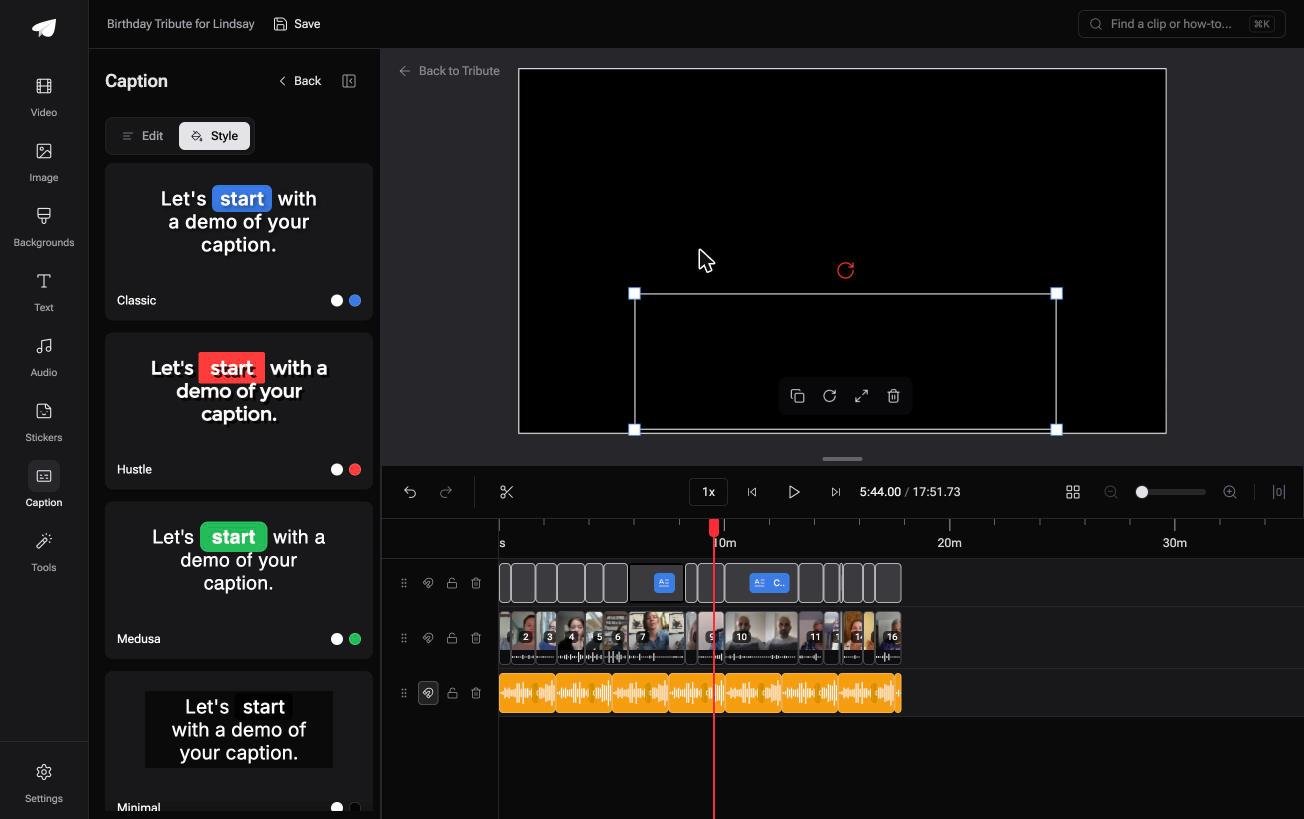
- 10 caption styles, with the word being spoken picked out as it is said
- Every line editable, with its own start and end timecode
- Re-generate captions and Remove captions are bulk actions in the Tools panel
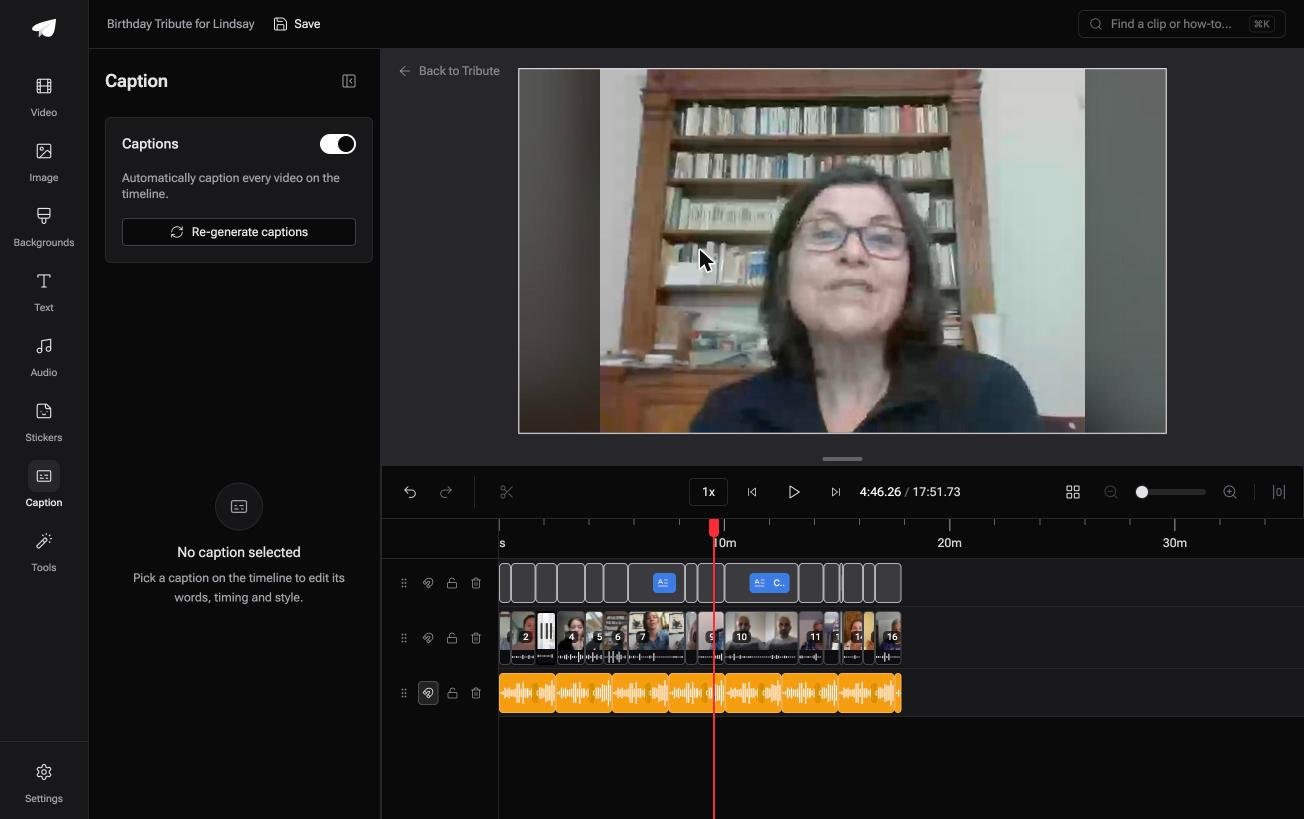
Best for: A folder of separate clips that would each need their own trip through CapCut.
Why it works: Sixteen imports, sixteen generations and sixteen exports collapse into one pass over one timeline.
Can one switch replace sixteen trips through CapCut?
Everything above is written for somebody holding a single clip.
Import, generate, correct, export. Four steps, twenty minutes, and a result worth having.
The case: the clips are coming to you
You are in it when several people each record something for one person.
A grandmother turning eighty. A colleague leaving after fifteen years. A memorial where the people who should speak are in four time zones.
Nobody is editing. Everyone is recording a message, and the twenty minutes becomes five hours.

Why the import loop never starts
Because the captioning is attached to the timeline, not to each file.
Flip one switch and every clip is captioned at once, in one style, under one set of timing rules. That is how the Tribute video editor handles it: not a faster version of the CapCut loop, but no loop.
What you do not have to do
- No sixteen imports. The clips are on one timeline before you open it.
- No sixteen caption passes. One switch covers the lot, in any of ten styles.
- No name corrections. On a Concierge Tribute, Eve fixes a misspelled name across every clip.
- No export per clip. The preview matches the delivered video.
It does not have to stay a file
The finished video can arrive as a video book: a hardcover case with a screen inside that plays when you open it.
Captions on a page that opens on the table are worth more than captions in a link nobody opens twice.
When this is the wrong answer: you have one clip going to one feed. Then CapCut is the right tool and this page is the whole job.
The editor is also not a phone app: it lives inside a paid Tribute. For an edit that mixes clips and photographs, see the video montage maker guide.
Frequently Asked Questions
Is CapCut auto caption included at no cost?
Auto captions sit in the standard editor on phone, desktop and web. CapCut gates some styling and effects behind a paid tier, so check the export screen before you build a workflow on one.
How accurate are captions on CapCut?
Good on clear sentences, poor on names. CapCut names noisy audio, the wrong language setting and a missing audio track as the things that break generation outright.
Can I export an .SRT file from CapCut?
CapCut's auto caption output is drawn into the picture rather than saved beside it. For a separate file, generate the captions in Clipchamp and use its download captions button.
Why are my CapCut captions out of sync?
Because the clip was trimmed after the lines were generated. Regenerate after every cut, or tap each line and move it, which is slower on a long video.
Can CapCut caption two languages in one clip?
Not in one pass. Generation runs against one selected language, and a bilingual clip comes back with half of it guessed as the other.
Does adding captions in CapCut change the video quality?
The export re-encodes the picture, so choose the same resolution you imported. The text is drawn at the export resolution, which is why small captions look soft on a downscaled copy.
👉 Run the captions once rather than sixteen times if sixteen people each recorded for one person, and CapCut never has to open.
