
Android Trim Video: The Handles in Photos, Gallery and CapCut
To trim a video on Android, open it in Google Photos, touch and hold the timeline, then drag the handles in around the part you want to keep and tap Save. Photos writes a copy and leaves the original where it was.

How does an Android trim video job work in Google Photos?
Two handles, one save, no project to manage.
- Open the clip in Google Photos and tap Edit.
- Touch and hold the filmstrip, then drag the trim handles to cover the stretch you want.
- Scrub inside the selection to check the first and last frame before you commit.
- Tap Save. The trimmed version lands beside the original rather than on top of it.
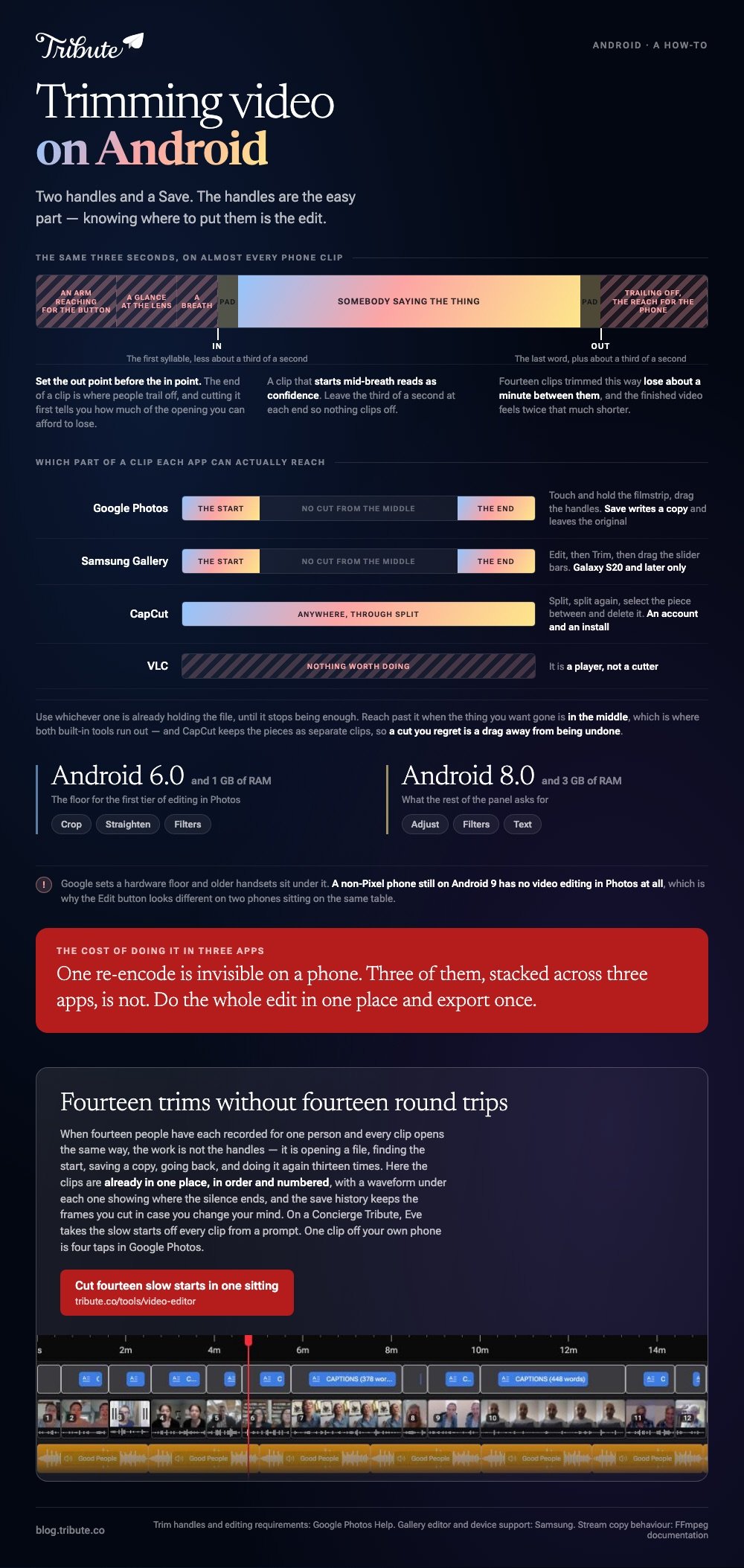
Set the out point before the in point. The end of a clip is where people trail off, and cutting it first tells you how much of the opening you can afford to lose.
Why the editor may be missing on your phone
Google sets a hardware floor and older handsets sit under it.
Crop, straighten and filters want Android 6.0 and 1 GB of RAM. Adjust, Filters and Text want Android 8.0 and 3 GB. A non-Pixel phone still on Android 9 has no video editing in Photos at all.
Which Android trim video app should you use?
Whichever one is already holding the file, until it stops being enough.
The best video trimmer app for Android is whichever one opens the clip in a tap. Reach past it when you need a cut from the middle, which is where the built-in tools run out.
| App | What it trims | Where it stops |
|---|---|---|
| Google Photos | The start and the end | No cut from the middle |
| Samsung Gallery | The start and the end | Galaxy S20 and later only |
| CapCut | Anything, through split | An account and an install |
| VLC | Nothing worth doing | It is a player, not a cutter |
On a Galaxy phone, open Gallery, tap the pencil Edit icon, tap Trim, then drag the slider bars to set the start and end points. Samsung lists the editor on the S20 and later.
CapCut is the one to install when the thing you want gone is in the middle. Park the playhead, tap Split, park it again at the other end, split again, then select the piece between and delete it.
Unlike the two built-in tools, CapCut keeps the pieces as separate clips, so a cut you regret is a drag away from being undone.

Can you trim a video without losing quality?
Only if nothing re-encodes it on the way out.
To trim video without losing quality on Android, you have to avoid the re-encode rather than the trim. A phone editor decodes the frames you kept and writes them again, and that second write is where the picture softens.
There is a route that does not touch the frames. A tool that copies the streams and cuts on a keyframe moves the file's start and end without decoding anything, which is what a stream copy means.
| Route | What happens to the picture | What it costs |
|---|---|---|
| Trim in Photos or Gallery | Re-encoded once | A little softness, no effort |
| Trim in CapCut and export | Re-encoded once, your settings | An install |
| Stream copy on a computer | Untouched | A command line and a cut on a keyframe |
One re-encode is invisible on a phone. Three of them, stacked across three apps, is not. Do the whole edit in one place and export once.
Compared to a crop or a filter, a trim is the cheapest edit there is: nothing is added, and the only cost is that second write.
The desktop versions of this job are in trimming with ffmpeg and trimming in VLC, and the general version is in how trimming a video should work.
Where should you cut, once you can?
At the first word, and not a frame before it.
Almost every phone clip opens with the same three seconds: an arm reaching for the button, a glance at the lens, a breath. None of it carries anything.
- Cut the front to the first syllable. A clip that starts mid-breath reads as confidence.
- Cut the back on the last word. Not on the wave, not on the reach for the phone.
- Leave about a third of a second at each end so nothing clips off.
Fourteen clips trimmed this way lose about a minute between them, and the finished video feels twice that much shorter.
What if fourteen people each sent a clip that starts too late?
The Tribute video editor is a browser-based group video editor: contributors record clips on their phones and Tribute assembles them on a timeline with the music balanced under the voices.
It is ours, and it comes at the end of this page.
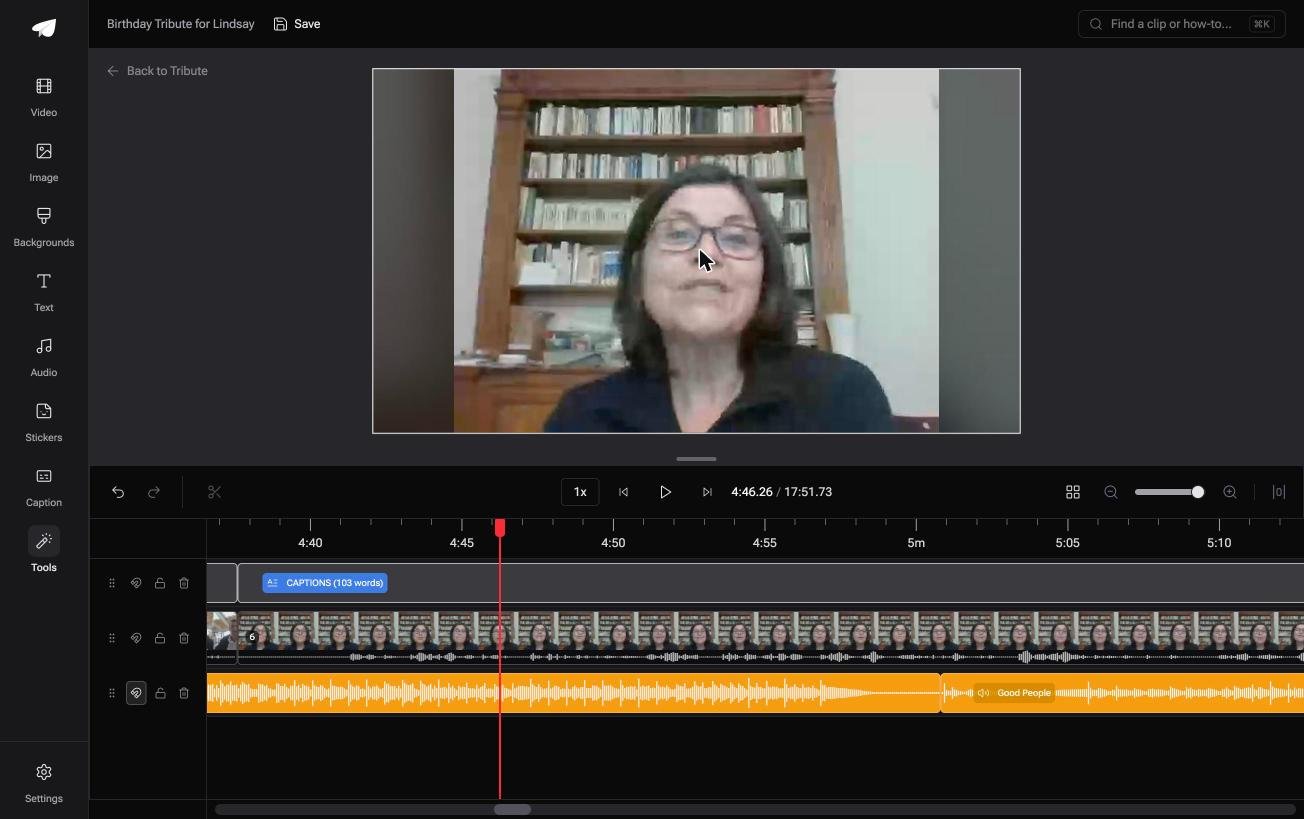
- A waveform under every clip, so the silence before the first word is visible rather than guessed
- Clips arrive in order on the timeline, each with a tick once it is placed
- Autosave and a restorable save history, which makes a trim something you can take back
- Reorder media, with every clip numbered and bulk moves to front, back or any position

Best for: A pile of phone clips that each open with four seconds of nobody saying anything.
Why it works: The clip edge is the only thing you drag, because the order and the sound were settled before you opened it.
How short is the job when the clips are not yours?
Trimming one clip is a minute. Trimming fourteen is an evening.
The work is not the handles. It is opening a file, finding the start, saving a copy, going back, and doing it again thirteen times. There is one case where that loop never forms.
The case: fourteen clips, one occasion
You are in it when the clips are not yours and there are more than ten of them.
A grandmother turning eighty. A colleague leaving after fifteen years. Every clip opens the same way, because everyone pressed record and then looked for the lens.
Why the loop never forms
Because the clips are already in one place, in order.
Nothing is saved, reopened or hunted for in a camera roll. You drag an edge, move to the next clip, and the version history keeps the frames you cut in case you change your mind.
That is how the Tribute video editor handles a long pile: not a faster trim, but fourteen trims without fourteen round trips.
What you do not have to do
- Save and reopen fourteen files. The clips sit on one timeline, numbered, in order.
- Guess where a clip should start. A waveform under each one shows where the silence ends.
- Trim at all, on a Concierge Tribute. Eve, the AI assistant inside the editor, takes the slow starts off every clip from a prompt.
- Finish the video. Concierge means Tribute's editors cut it, and Concierge Deluxe returns it as a video book.
When this is the wrong answer: you have one clip off your own phone and want ten seconds gone. Google Photos does that in four taps. The editor is not a standalone trimmer: it lives inside a paid Tribute.
Frequently Asked Questions
Does trimming in Google Photos delete the original?
No. Tapping Save writes a second file, so the untrimmed video stays in your library until you remove it yourself.
Can I cut a section out of the middle on Android?
Not in Photos or Samsung Gallery. Both shorten the start and the end only. Split the clip in CapCut and delete the piece between.
Why is my trimmed video a different size?
The save re-encodes what you kept, with the app choosing the bitrate. A shorter clip at a different setting can end up larger than you expect.
How do I trim a video someone sent me on WhatsApp?
Save it to the gallery first, then open it in Photos. Trimming inside a messaging app tends to send a second compressed copy.
Is there a trim that does not touch the picture at all?
Yes, on a computer. A stream copy moves the in and out points to the nearest keyframe and rewrites nothing, so the frames you keep are the frames you had.
What is the fastest way to trim a dozen clips from other people?
Get them onto one timeline before you start, rather than trimming each file on its own, as in making a video montage.
👉 Cut fourteen slow starts in one sitting if fourteen people are each recording for one person, and nothing gets saved and reopened fourteen times.
