
Birthday Video Music: Choosing a Track and Setting It Under the Voices
Birthday video music should be one instrumental track, chosen for tempo before meaning, and set low enough that nobody notices it. Pick it before you cut, because the music sets the rhythm and recutting to a new song means doing the edit twice.

| Under | Level | Why |
|---|---|---|
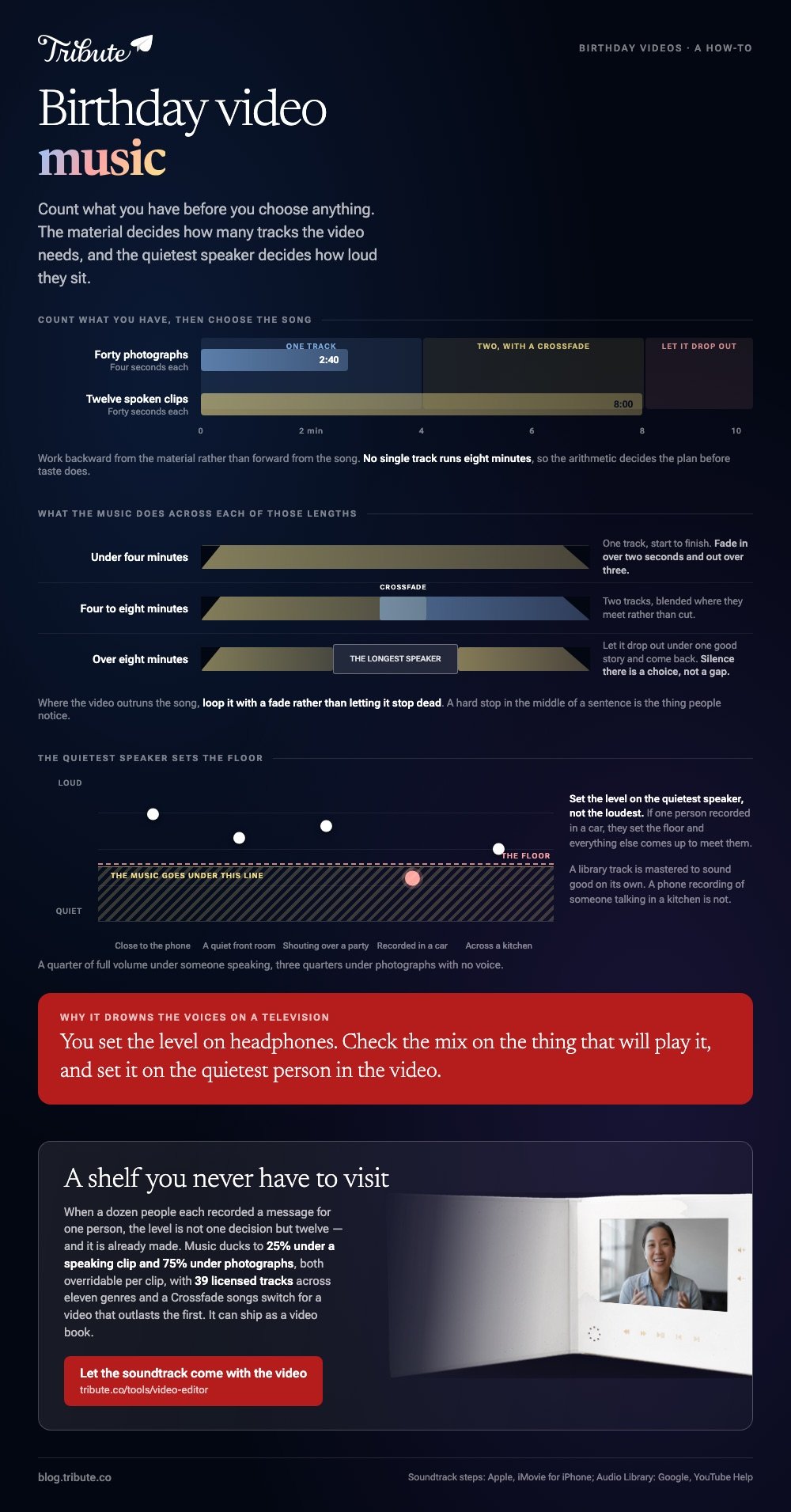
| Someone speaking | A quarter of full | Phone audio is quiet and the voice has to win |
| Photographs, no voice | Three quarters | The track is carrying the section on its own |
| The opening title | Full, then down | Sets the tone before anyone has seen a face |
| The last photograph | Let it resolve | A song cut off mid-bar reads as a mistake |
What birthday video music works, and what fights the clips?
Instrumental wins, every time, wherever anyone speaks.
Lyrics and speech compete for the same part of a listener's attention, and the speech loses. A song with words is fine under a run of photographs and wrong under a message from someone's brother.
Tempo matters more than sentiment. A track at a walking pace suits pictures held for four seconds; something fast turns the same pictures into a queue and makes the viewer feel behind.
Then there is the song they love. It is the obvious choice and often the wrong one, because the version in your head has a meaning that the video has not earned yet. Save it for the party.
Where do you get birthday video music that is cleared?
Three sources cover almost everyone, and two of them cost nothing.
The library inside your editor
iMovie, CapCut, Clipchamp and Canva all ship with tracks cleared for use inside them. A birthday wishes photo video maker with music built in settles the licensing question before you start, which is the whole reason to use one.
Best for: Anyone who does not want to read a license today.
Why it works: The clearance travels with the editor, so a track you pick there is a track you can publish.
The YouTube Audio Library
Inside YouTube Studio, and worth the detour if the video is going on YouTube anyway. Google describes it as royalty-free production music and lets you filter for tracks that need no credit.
Compared with an editor's built-in shelf, the catalog is far wider and you have to download and import the file yourself.
A chart song
It plays at the party and it is a risk anywhere public. An upload may collect a copyright claim, which leaves the video up while somebody else takes the ad revenue, and in some countries blocks it outright.
On a video nobody is monetizing, the real cost is the chance it does not play for an aunt in another country.
How long should the track be?
Work backward from the material rather than forward from the song.
Count what you have, then do the arithmetic before you choose anything. Forty photographs at four seconds each is two minutes forty. Twelve spoken clips at forty seconds each is eight minutes, and no single track runs that long.
- Under four minutes: one track, start to finish
- Four to eight minutes: two tracks with a crossfade between them
- Over eight minutes: let the music drop out under the longest speaker and return
Where the video outruns the song, loop it with a fade rather than letting it stop dead. A hard stop in the middle of a sentence is the thing people notice.

How do you build a birthday slideshow with music?
Add the pictures first, the track second, then set the level per section.
On an iPhone, iMovie is the shortest route and Apple documents the step in its guide to adding music and soundtracks.
- Open the project and tap the plus button, then Audio.
- Choose Soundtracks for a cleared track, or My Music for something already on the phone.
- Tap a track to preview it, then tap the plus beside it to add it under the whole timeline.
- Tap the green music bar, tap the volume control, and bring it down.
- Tap each clip where someone speaks and lower the music further for that stretch.
- Tap Done, then Share, then Save Video.
In CapCut the same job runs through Audio, then Sounds, with a per-clip Volume control that is the one thing a slideshow of mixed recordings needs most.
Best for: Thirty to fifty photographs and one or two short clips.
Why it works: Divide the track length by the number of pictures and you have every duration in one calculation.
How loud should birthday video music sit under the voices?
Lower than feels right while you are setting it.
A library track is mastered to sound good on its own. A phone recording of someone talking in a kitchen is not, so matching them by ear at a desk gives you a mix that buries the voice on a television.
Set the level on the quietest speaker in the video rather than the loudest. If one person recorded in a car, they set the floor, and everything else comes up to meet them.
Fade in over two seconds and out over three. Unlike a hard cut, a fade reads as a decision rather than as something that went wrong.
The wider build is covered in our main montage guide and in birthday video makers that start from photos.
What if the clips came from a dozen different rooms?
Then the level is not one decision, it is twelve.
The Tribute video editor is a browser-based group video editor: contributors record clips on their phones and Tribute assembles them on a timeline with the music balanced under the voices.
The clips are in order before you open it, with a tick against the ones already on the timeline.
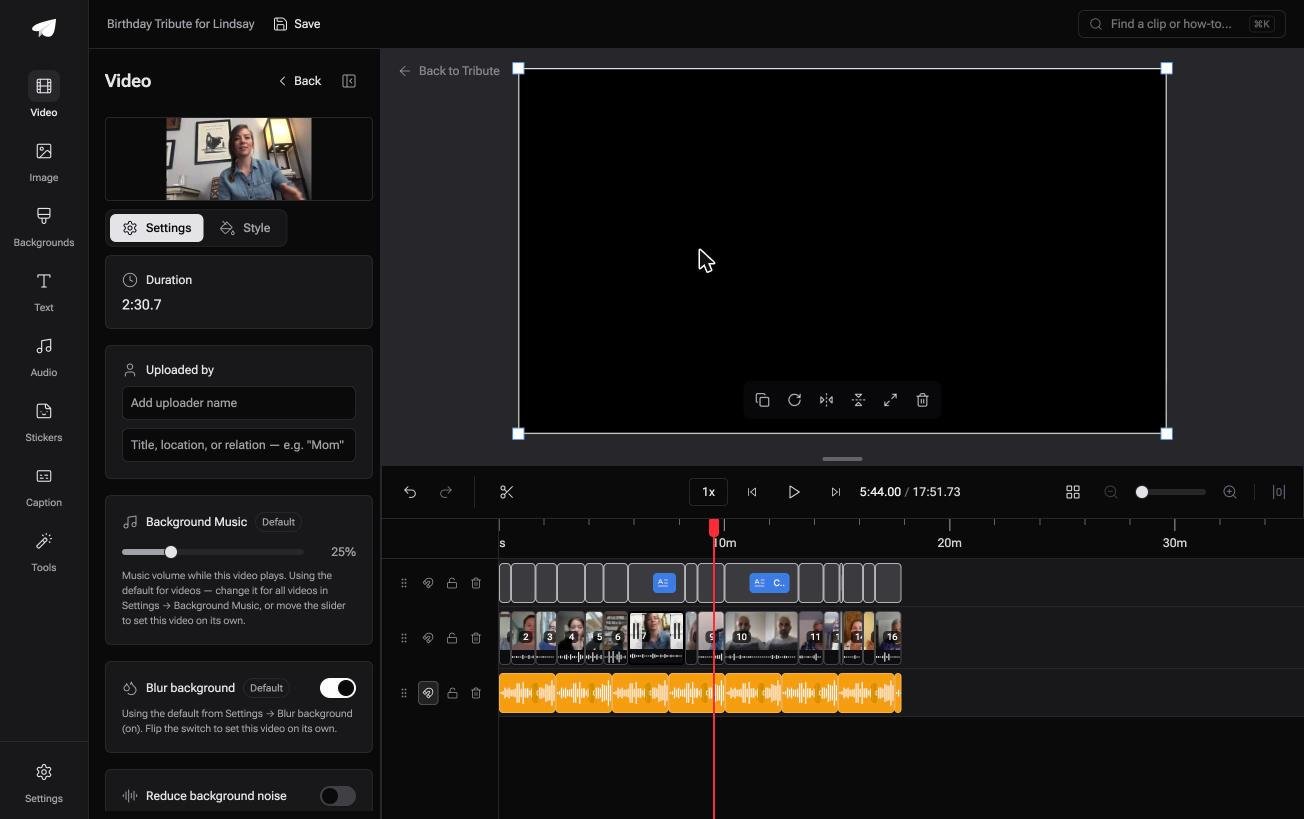
Music is already set when you arrive. It ducks to 25% under a speaking clip and 75% under photographs, both overridable per clip, and a Crossfade songs switch blends one track into the next.
There are 39 licensed tracks across eleven genres, plus YouTube link import and MP3, WAV, M4A and FLAC upload.

Best for: A birthday video where ten or more people each recorded in a different room.
Why it works: The default level is the one you would have set, so the per-clip pass becomes an exception rather than a routine.
Can you skip the music question altogether?
Everything above exists because you chose the track.
Going looking, checking whether it was cleared, setting a level under every voice in turn: all of that is the cost of choosing a song. There is one case where none of it arrives.
The case: several people, each recording for one person
You are in it when a dozen people each record a message for someone turning forty, or sixty, or eighty. A grandmother in one state, a brother in another, a colleague who left the company years ago.
Nobody is shooting a scene: everyone is saying something, and your job is assembly.
Which means the search that brought you here, birthday video music, is a question about a shelf you never have to visit.
What you do not have to choose
Three jobs vanish, and clearing a track is the first.
- No shelf to visit. 39 tracks are cleared inside the editor, or bring your own by link or upload.
- No level per voice. The track sits at 25% while anyone is speaking and lifts over photographs.
- No assembling on Concierge, where Tribute's editors turn the dozen messages into the finished video.
That is how the Tribute video editor handles it: not a fourth place to find a song, but a way of never needing one.

When this is the wrong answer: you recorded the footage yourself, or one specific commercial song is the point of the video. Then go back to the three sources above. More ideas in fun birthday videos.
Frequently Asked Questions
Can I use a song from my own library?
On a laptop at a party, yes. Buying a copy grants the right to listen, not to publish it inside a video, so a public upload is a separate question with a separate answer.
Should the music change between clips?
No. Switching songs draws attention to the joins, which is the opposite of what a montage wants. One track, or two with a crossfade on a long video.
What tempo suits a birthday video?
Something at a walking pace for photographs, slower where people speak. Match the track to the age of the person if you can: a sixtieth and a first birthday want different rhythms.
Do I need to credit the artist?
Only where the license says so, and it will say so in plain words. Creative Commons tracks often require it, the YouTube Audio Library flags which of its tracks do, and most paid libraries do not.
Why does my music drown out the voices on a television?
Because you set the level on headphones or a laptop speaker. Check the mix on the thing that will play it, and set the level on the quietest person in the video.
Where should the finished video go?
Upload it and send a link. Pew puts YouTube use at 84% of US adults and 65% of adults aged 65 and over, so an unlisted link opens for almost everyone on the guest list.
What if the video is longer than every track I like?
Loop the track with a fade, or let the music drop out under the longest speaker and come back after. Silence under one good story is a choice, not a gap.
👉 Let the soundtrack come with the video if a dozen people each recorded something for one person, and choosing birthday video music stops being a job.
