
Windows Video Trim: Clipchamp, Photos Legacy and the Lossless Route
Windows video trim lives in Clipchamp, the editor Microsoft ships with Windows 11. Windows Media Player cannot trim at all, and the Photos video editor Microsoft still documents belongs to Photos Legacy.

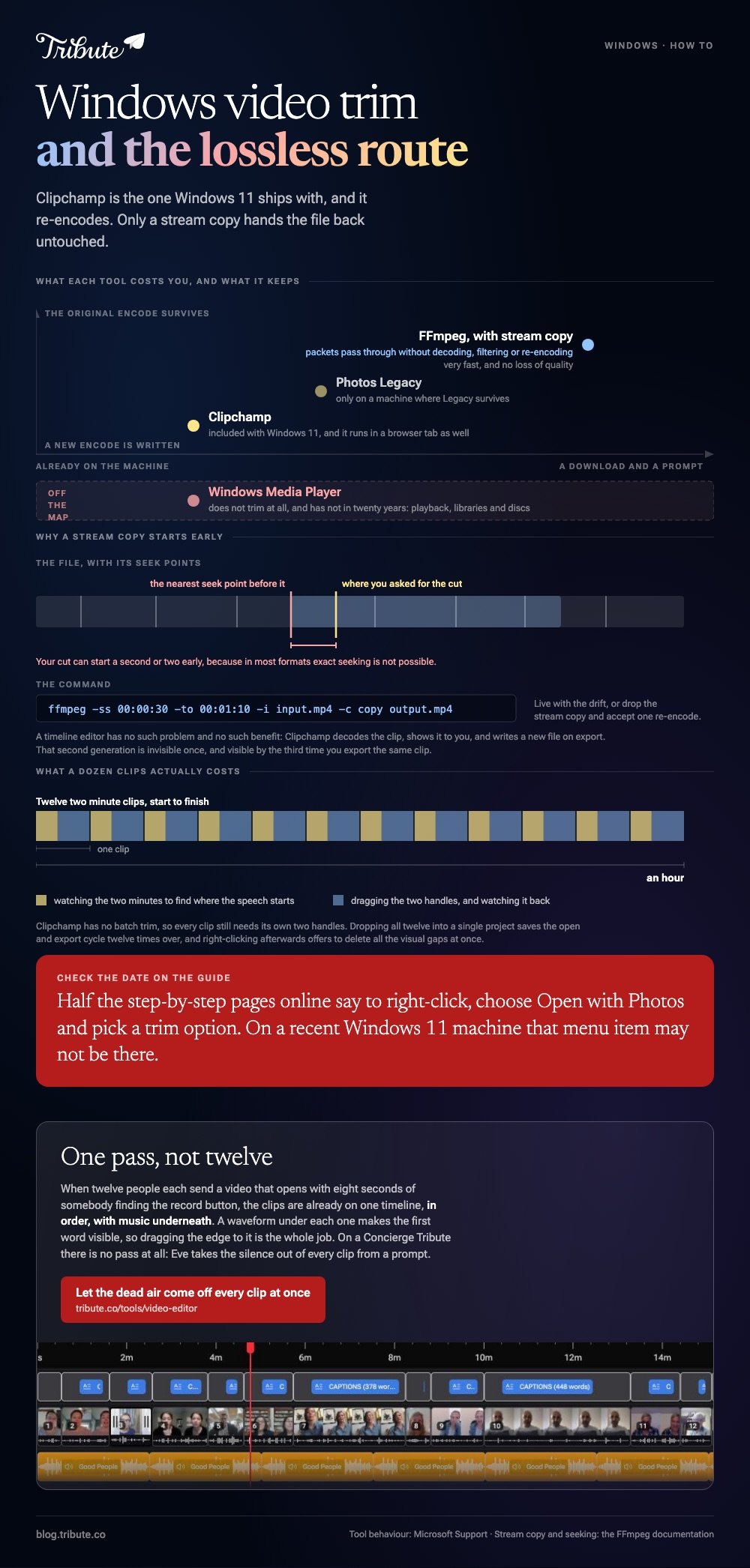
| Tool | Trims video | Keeps the original encode | Where it is |
|---|---|---|---|
| Clipchamp | Yes | No, it re-encodes | Included with Windows 11 |
| Photos Legacy | Yes | No | Only where Legacy survives |
| Windows Media Player | No | Not applicable | Playback only |
| FFmpeg | Yes | Yes, with stream copy | A download and a prompt |
Which Windows video trim tool ships with the operating system?
Clipchamp, and Microsoft names it as the built-in video editor for Windows 11.
Searching for a video trimmer Windows provides, or for a Windows 10 video trimmer, lands you on two apps, and one of them has changed its name since.
- Open Clipchamp and start a project, then bring the clip onto the timeline.
- Click the clip to highlight it. Handles appear at both ends.
- Drag a handle inward to shorten the clip. Drag it outward to lengthen it, as far as the source allows.
- Cut too much and you drag the handle back out to recover it.
- Export when the clip is the length you want.
For a section out of the middle, Microsoft points at splitting, which cuts a clip in two at a point so you can delete the part you do not want. Do it twice and the middle comes out.
Right-click after several trims and Clipchamp offers to delete all visual gaps, which saves dragging clips back along the timeline one at a time.

Can you trim video using Windows Media Player?
No, and the answer has not changed in twenty years.
Windows Media Player trim is the request Microsoft never built. The player handles playback, libraries and discs, and Microsoft publishes no editing steps for it in any version.
The plugins that once added a cut to the old player belong to an era of Windows that has moved on. Compared to opening Clipchamp, chasing one of them is a long way round to the same minute of work.
If a guide promises you a trim inside Windows Media Player, check the date on it before you follow the steps.
What happened to the Photos video editor?
It went with Photos Legacy.
Microsoft's own page attributes the video editor, slideshow creator and album maker to the Photos Legacy app. For the current Photos app it points at Clipchamp instead.
That matters because half the step-by-step guides online still describe right-clicking a video, choosing Open with Photos, and picking a trim option. On a recent Windows 11 machine, that menu item may not be there.
Check which Photos you have before you follow instructions written for the other one.
Can a Windows video trim keep the original quality?
Only when nothing is re-encoded, which rules out every timeline editor.
Clipchamp decodes your clip, shows it to you, and writes a new file on export. The result is a second-generation encode, which is fine once and visible by the third time.
The stream copy route
To trim video on Windows 10 without losing quality, FFmpeg copies the packets across rather than re-compressing them.
ffmpeg -ss 00:00:30 -to 00:01:10 -i input.mp4 -c copy output.mp4
The documentation describes stream copy as passing packets through without decoding, filtering or re-encoding: very fast, with no loss of quality.
There is a catch worth knowing. FFmpeg's own docs say that in most formats exact seeking is not possible, so it seeks to the closest seek point before your position and your cut can start a second or two early.
Live with the drift or drop the stream copy and accept one re-encode. The long version is in trimming with FFmpeg, and the player route in trimming in VLC.
How do you trim a dozen clips on Windows?
One project, one timeline, one pass.
Clipchamp has no batch trim, so each clip still needs its own two handles. Dropping all twelve into a single project at least means twelve drags instead of twelve open and export cycles.
Budget for it. A dozen two minute clips is an hour once you include watching each one to find where the speech starts.
More options for the same machine are in video editors for Windows.
What if the clips came from twelve different people?
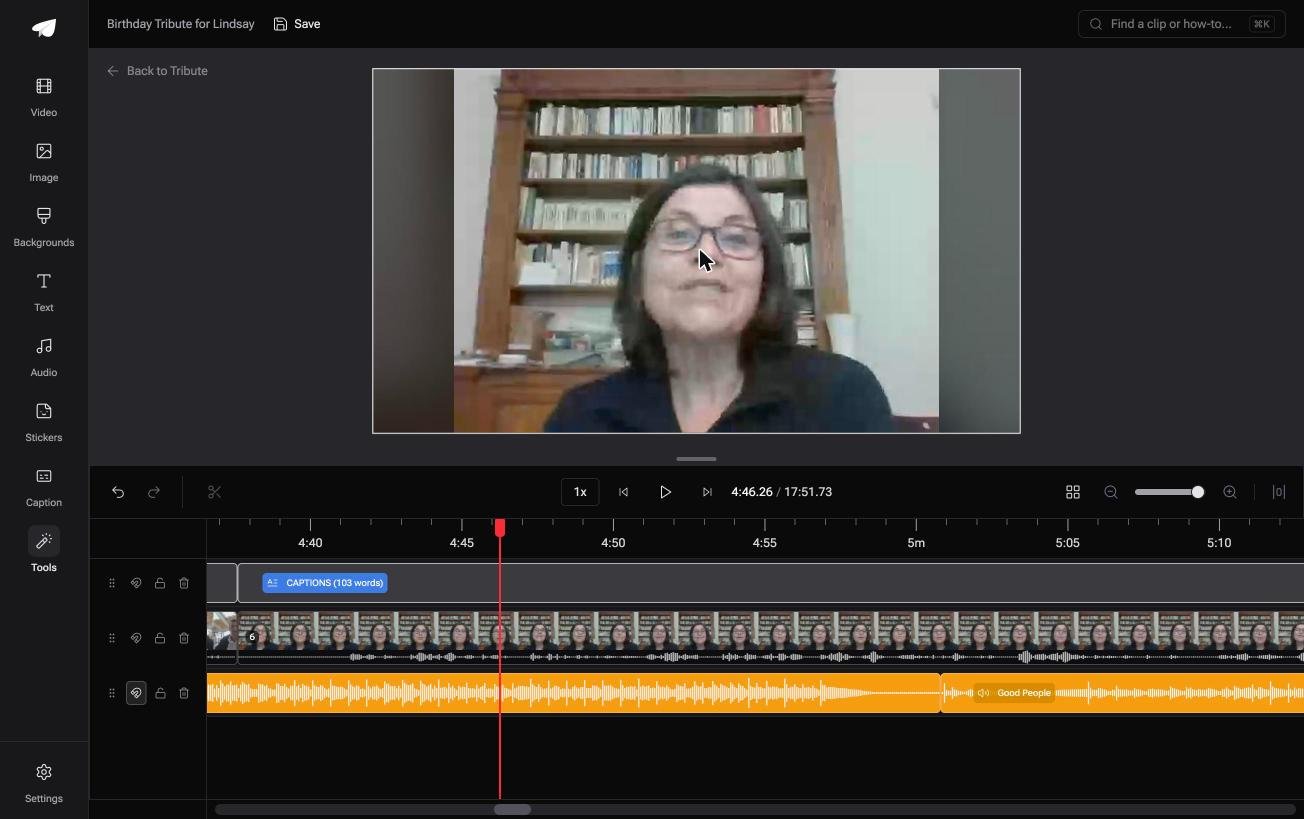
The Tribute video editor is a browser-based group video editor: contributors record clips on their phones and Tribute assembles them on a timeline with the music balanced under the voices.
It is ours, and it is the final section on this page.
- Clips arrive on the timeline in order, with a tick against the ones already placed
- A waveform under every clip, so you trim to the first word instead of scrubbing for it
- A Reorder media window that numbers every clip and moves one to the front, the back or a chosen position
- Autosave and restorable version history, and a removed clip is recoverable rather than gone
Best for: A Windows user sent a dozen clips who does not want a dozen projects.
Why it works: Unlike twelve separate projects in Clipchamp, one browser tab holds every clip and the silence is visible before you drag anything.
What if the trimming happened before you opened anything?
Trimming one clip on Windows takes a minute, and the number of clips is the real variable.
Twelve people sent you twelve videos, each with eight seconds of someone finding the record button. That is the version of this job most people arrive here with.
The case: twelve senders, one recipient
You are in it when several people each record a message for the same someone.
A seventieth birthday. A nurse retiring from the ward she opened. A memorial where half the people who should speak cannot be in the room. Nobody exports a file and nobody installs anything.

Why the trimming collapses into one pass
Every clip is already on one timeline, in order, with music underneath.
Dead air at the top is the one thing left, and the Tribute video editor draws the waveform so the first word is visible. Drag the edge to it and move to the next clip without leaving the page.
A Concierge or Concierge Deluxe Tribute does not need that pass at all: Eve, the AI assistant inside the editor, trims the silences out of all twelve clips from a prompt.
What you do not have to do
- No Windows needed. Each person records on their own phone and uploads from it.
- No trimming pass. On a Concierge Tribute, Eve takes the silence off every clip from a prompt.
- No export per clip. Tribute builds the video on its servers and the preview matches what comes back.
- No edit at all, if you want none. Tribute's editors cut it on Concierge and hand it back for approval.
What comes out the other end
On any screen, or as a video book: a hardcover case with a screen inside that plays when you open it.
The wider job is covered in building a video montage.

When this is the wrong answer: you have one clip, you shot it, and you want thirty seconds off the end. Open Clipchamp and drag a handle, or run the stream copy command above.
Frequently Asked Questions
Is there a video trimmer built into Windows 11?
Yes, Clipchamp. Microsoft describes it as the official Windows video editor and lists trim, crop, split and rotate among its tools.
How do I trim a video on Windows 10?
Install Clipchamp, or use Photos Legacy where your machine still has it. The current Photos app sends you to Clipchamp for video work.
Can Windows Media Player cut a video?
No. Microsoft documents playback and library features for it and no editing ones, in any release.
Does trimming in Clipchamp reduce quality?
Export writes a new encode, so there is some loss. It is invisible on a first pass and it builds up if you keep re-exporting the same clip.
How do I trim without re-encoding?
Use FFmpeg with stream copy. The cut may land a moment early because it snaps to the nearest seek point in the file.
Can I trim a video without installing anything?
Clipchamp runs in a browser as well as in the desktop app, so a machine without it installed can still do the job.
What is the quickest way to trim twelve clips?
Put them all in one Clipchamp project and work down the timeline. There is no batch trim, so each clip still needs its own handles.
👉 Let the dead air come off every clip at once if twelve people are each recording for one person, and no Windows app has to open.
