
Church Interiors Audio Video: How to Record a Service People Can Hear
Good church interiors audio video is first an audio problem. A sanctuary is built to carry singing, which is the same as being built to smear speech. The fix is a recording taken from the sound board, not a better camera.

What does church interiors audio video involve?
Three jobs, and congregations get them in the wrong order.
Capture the sound, capture the picture, then repair what the room did to both. Money tends to go to the picture. Sunday afternoons go to the repair.
| Job | What decides it | What it costs to get wrong |
|---|---|---|
| Sound | Where the microphone sits | People stop watching before the reading ends |
| Picture | What is lit behind the speaker | A silhouette against a bright window |
| Repair | Whether you kept a clean audio file | An hour of work per service, every week |
The audience for this is real and steady. Pew Research Center's Religious Landscape Study found that 23% of Americans watch religious services online or on TV at least once a month.
Why the room fights you
Plaster, stone and a high ceiling hold sound. That is what they were built to do, and a congregation singing in that room sounds enormous.
Speech in the same room arrives twice: once from the speaker, once from the wall a quarter second later. Your ears throw the second copy away. A microphone keeps both.
Why does church audio sound worse on the recording than in the room?
Because the camera microphone is sitting in the worst seat in the house.
It sits at the back, pointed at a person forty feet away, picking up every reflection on the way. Unlike your ears, it has no way to tell the voice from the echo of the voice.
Three things make the difference, in this order.
- Distance. Halving the gap between mouth and microphone does more than any amount of later processing.
- A board feed. If the speaker is already on a lapel or pulpit microphone, that signal is clean before it ever hits the room.
- A second recorder. One phone in a pocket near the pulpit is a backup that has rescued more services than any plugin.
What a board feed is, in one paragraph
Your mixing desk already has the preacher's voice on a channel. A cable from the desk output into a recorder, or into the camera's audio input, gives you that voice without the room attached.
Compared with a shotgun microphone on the camera, a board feed sounds close and dry. Set it quieter than feels right, because a recording that clips cannot be rescued.
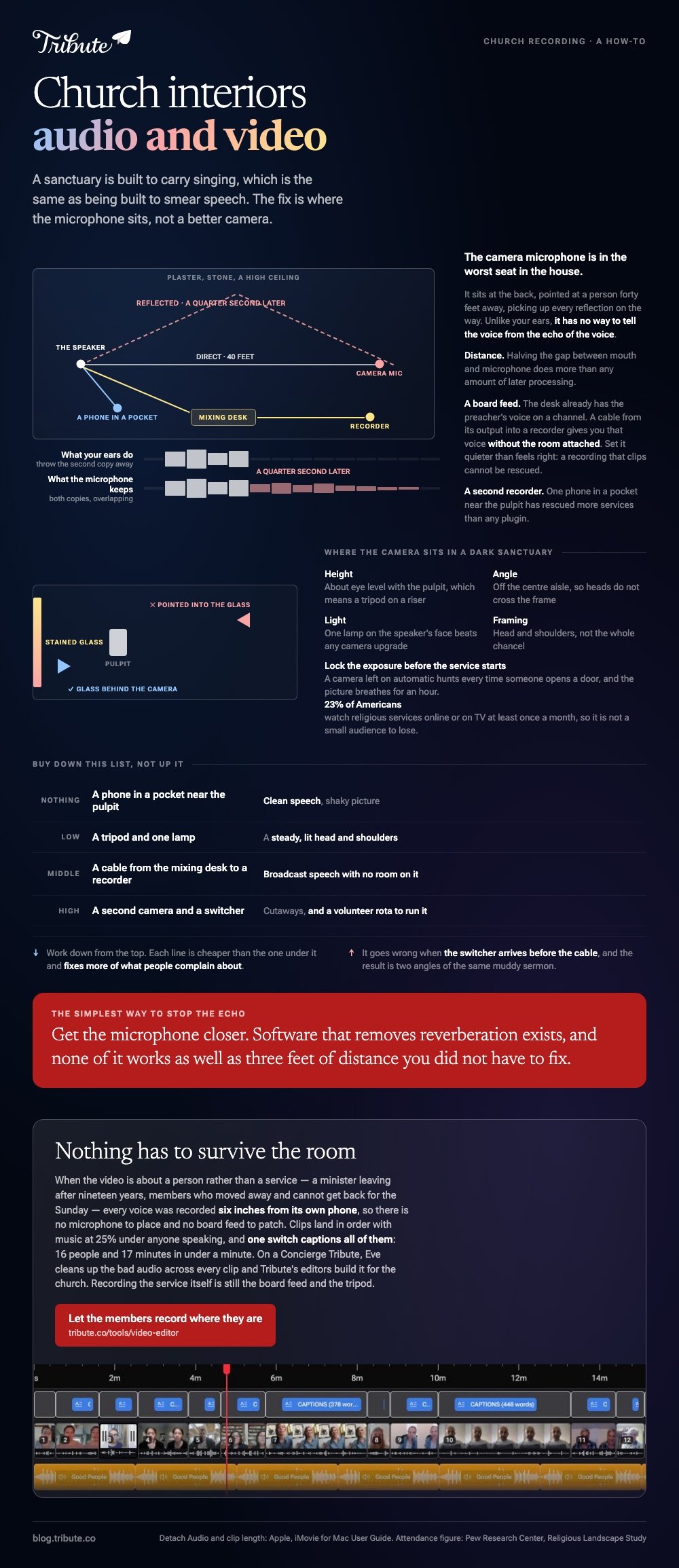
Where should the camera sit in a dark sanctuary?
Where the windows are behind it, never behind the speaker.
Stained glass at midday is many times brighter than a face. Point a camera into it and the face goes black while the glass glows.
- Height: about eye level with the pulpit, which means a tripod on a riser
- Angle: off the center aisle, so heads do not cross the frame
- Light: one lamp on the speaker's face beats any camera upgrade
- Framing: head and shoulders, not the whole chancel
Lock the exposure before the service starts. A camera left on automatic will hunt every time someone opens a door, and the picture breathes for an hour.
How do you repair a service recording afterward?
Replace the camera sound with the board recording, then trim.
Two apps cover almost every church audio video ministry that is doing this on a volunteer's laptop.
iMovie on a Mac
- Drop the camera video on the timeline, then drag the board recording underneath it.
- Select the video clip and choose Modify then Detach Audio, which Apple documents as Option-Command-B. The sound drops out as its own green bar.
- Delete the detached camera audio.
- Slide the board recording until a hand clap or a door bang lines up with the picture.
- Trim the dead time at each end by dragging the clip edge inward.
- Export with Share, then Share Video, then Save Video.
Apple's minimum clip length on a Mac is a tenth of a second, so you can nudge the sync frame by frame once you are close.
CapCut on a phone or laptop
- Start a project and import both the video and the board recording.
- Tap the video clip, then the Extract audio control, and delete the extracted track.
- Add the board recording as a new audio track.
- Drag it left or right until the lips match the words.
- Split and delete the announcements at the front if the sermon is what people came for.
If the sound disappears somewhere in the chain, the cause tends to be the file rather than the app, and a phone video with no audio has its own short list of causes.
Laying a separate track under picture is covered in adding audio to a video clip.
What does a church interiors audio video setup cost at each level?
Less than most quotes suggest, if you buy in the right order.
| Level | What you add | What it buys |
|---|---|---|
| Nothing | A phone in a pocket near the pulpit | Clean speech, shaky picture |
| Low | A tripod and one lamp | A steady, lit head and shoulders |
| Middle | A cable from the mixing desk to a recorder | Broadcast speech with no room on it |
| High | A second camera and a switcher | Cutaways, and a volunteer rota to run it |
Buy down the list, not up it. Audio video for churches goes wrong when the switcher arrives before the cable, and the result is two angles of the same muddy sermon.
For cutting a run of services into one piece, see making a video montage. For a video about one person rather than one Sunday, see putting together a video tribute.
What happens when the clips come from the pews instead of the booth?
The Tribute video editor is a browser-based group video editor: people record clips on their phones and Tribute lays them on a timeline with the music already balanced under the voices.
It is ours, and it is a different job from recording a service.
- Clips arrive in order, already assembled, with a tick against the ones on the timeline
- One switch captions everything: 16 people and 17 minutes in under a minute, in 10 caption styles
- Name badges from an uploaded-by name and a relation, in four corner positions
- Music sits at 25% under anyone speaking and 75% under photographs

Best for: A congregation marking a minister's retirement, a church anniversary or a farewell, where the voices matter more than the building.
Why it works: Compared with a service recording, nothing has to survive the room, because every voice was recorded a foot from a phone.
What if the people speaking were never in the building?
Every problem above comes from one decision: the sound starts forty feet away from the person making it.
Microphone placement, board feeds, dry speech, repair on a Sunday afternoon. All of it is distance management.
There is a case where the distance is never there.
The case: the congregation is the camera
You are in it when the video is about a person rather than a service.
A minister leaving after nineteen years. A church secretary nobody has thanked out loud. Members who moved away and cannot get back for the Sunday. Each of them holds a phone at arm's length in a quiet room and talks.

Why the sanctuary stops mattering
Living rooms are worse-sounding spaces than churches and far better recording spaces, because the mouth is six inches from the microphone.
Which means the search that brought you here, church interiors audio video, is answering a question this video never asks. The Tribute video editor is built around that assumption.
What you do not have to engineer
- No microphone placement. Every mouth is six inches from its own phone.
- No board feed to patch. The clips land in order on a timeline with music underneath.
- No repair pass on a Concierge Tribute: Eve, the assistant inside the editor, cleans up bad audio across every clip.
- No volunteer at all on Concierge, where Tribute's editors caption and build it for the church.
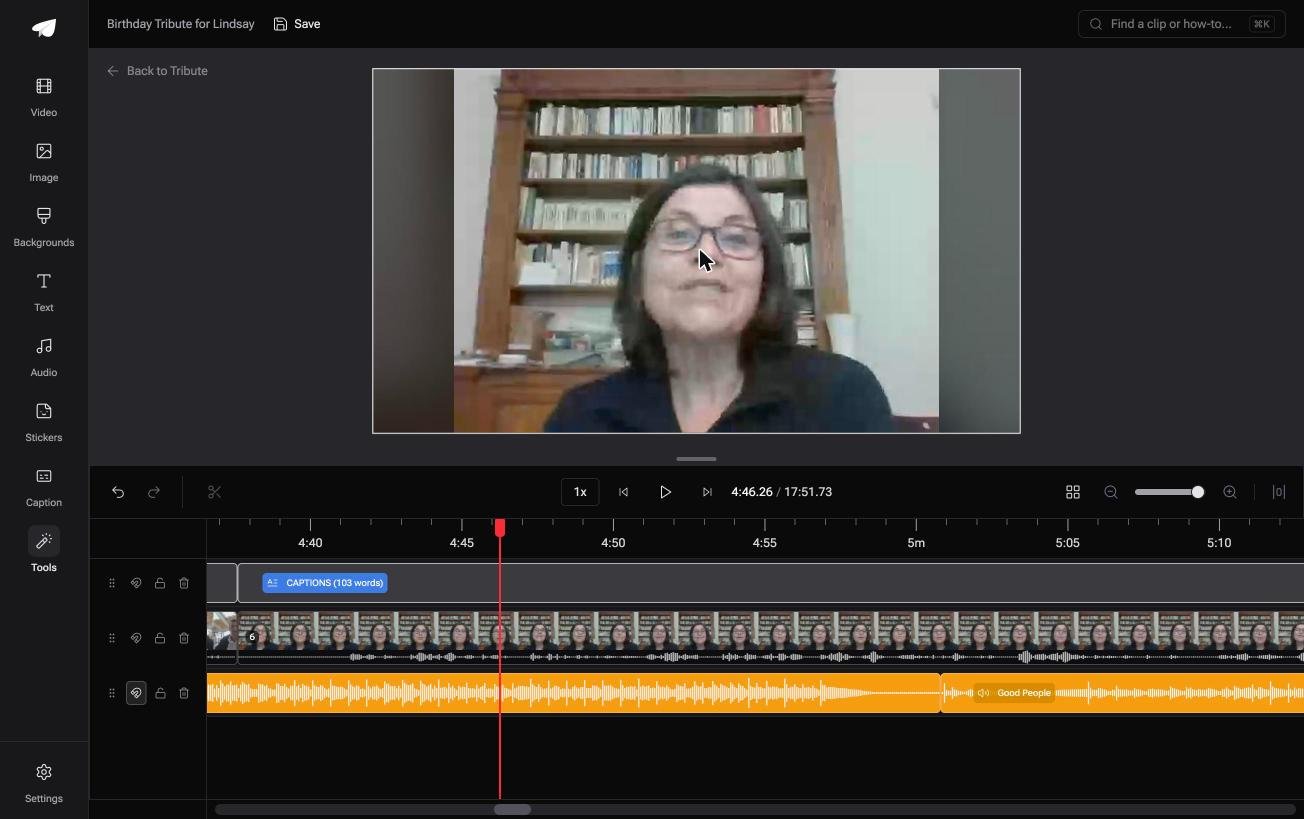
When this is the wrong answer: you are recording the service itself, week after week, for people who could not come. Then you are back to the board feed and the tripod. The editor lives inside a paid Tribute, not on its own.
Frequently Asked Questions
Do we need a sound engineer to record a service?
No. One volunteer who understands the cable from the mixing desk to a recorder will beat an expensive camera every week. The skill that matters is placement, not mixing.
Why does the singing sound better than the sermon?
Reverberation flatters music and ruins speech. The same reflections that make a hymn sound full arrive as blur behind a spoken sentence, which is why the two need different treatment.
Can a phone handle church audio and video on its own?
For the audio, yes, if it is near the speaker. For the picture, it needs a tripod and something other than a window behind the pulpit.
What is the simplest way to stop the echo?
Get the microphone closer. Software that removes reverberation exists, and none of it works as well as three feet of distance you did not have to fix.
Should the service be streamed live or posted afterward?
Posting afterward is kinder to a small team, because it lets you cut the gaps and fix the sound. Live is worth it when the congregation treats it as attendance rather than as a video.
How long should an uploaded service be?
Whatever is left after the announcements, the notices and the silence. Most congregations find the sermon and one reading carry the whole thing.
Who should own the recordings?
Decide before you start, and write it down. A volunteer's laptop is where church archives go to disappear, so agree on one shared location and back it up.
👉 Let the members record where they are if people in three states all want to say something to one person, and the sanctuary never has to be booked.
