
Video Collage Maker Online: Three Browser Tools and What Each One Costs
The quickest video collage maker online is Kapwing for a side by side grid, Canva for a designed layout, and PicsArt for photos only. All three run in a browser tab. The difference that matters is the export limit, not the layouts.

| Tool | Takes video | The limit on the free plan |
|---|---|---|
| Kapwing | Yes | 4 minute export, 720p, watermark |
| Canva | Yes | 30 minute export at 1920 by 1080 |
| PicsArt | Photos | Up to 10 images in a collage |
What does a video collage put on screen?
Two things, and people mean both.
A grid puts several clips on screen at the same time, the way a video call looks. A sequence plays them one after another, which is a montage. Any online video collage editor does one of these better than the other.
Pick the grid when the clips are short and the point is seeing everyone at once. Pick the sequence when each person is saying something and needs to be heard.
The thing that breaks a grid
Audio, every time.
Four clips in four cells play four soundtracks at once. Mute all but one before you touch anything else, or add a music track and mute the lot.
How do you make a video collage online in Kapwing?
Six steps, no install.
- Go to Kapwing's video collage tool and start a blank canvas, or open a side by side template.
- Set the output shape first: 16:9 for YouTube, 1:1 for a square post, 9:16 for a story.
- Add the clips. You can drag files in, paste a link, or pull them from Google Drive or Google Photos.
- Drag each clip into position and resize it from the corner handles. Leave a thin border between cells if the footage is dark.
- Fix the timing on the timeline. A short clip vanishes when it ends, so trim the long ones to match or loop the short one.
- Click Export, then download.
The Kapwing video collage maker is the fastest of the three for a plain grid, because the layout is the first thing it asks about rather than the last.
What the Kapwing collage costs
Nothing to try, something to finish.
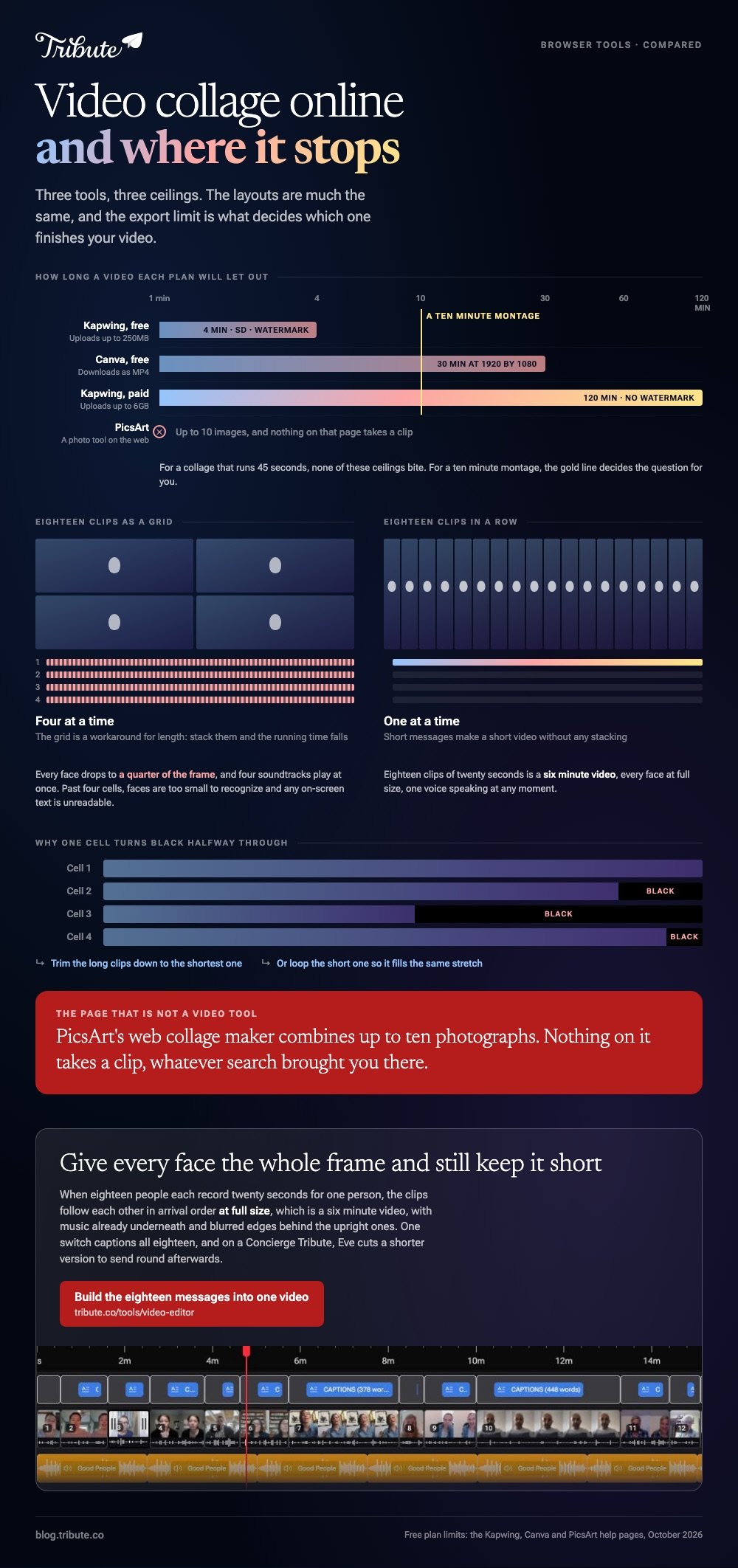
Kapwing states that free plan uploads are no larger than 250MB and exports are capped at 4 minutes in SD with a Kapwing watermark. Paid plans take 6GB uploads and 120 minute exports with no watermark.
For a collage that is 45 seconds long, that limit never bites. For a ten minute montage it decides the question for you.
How do you build one in Canva instead?
With a grid from the Elements tab.
- Create a design at Video size, 1920 by 1080.
- Open Elements, scroll to Grids, and click a layout with one cell per clip.
- Open Uploads, add the clips, then drag each one onto a cell. It crops to fill.
- Double-click a cell to zoom or reposition the clip inside it.
- Set every volume to zero except the one voice you want, then add a track from Audio.
- Click Share, then Download, then MP4 Video.
Canva's free plan downloads MP4 videos up to 30 minutes long at a maximum of 1920 by 1080, which is a longer leash than Kapwing gives you.
Compared to Kapwing, Canva is slower to lay out and better to look at, because the grid sits on a page you can design around.
More browser options in video collage makers and video montage makers.
Is PicsArt collage online a video tool?
No. Unlike Kapwing and Canva, it is a photo tool with a separate video app attached.
The PicsArt collage maker on the web combines up to 10 photos into grids, frames and shaped layouts. Nothing on that page takes a video clip.
Which matters when you came looking for a video collage maker online and landed on a photo grid. If the material is still images, PicsArt is a reasonable stop; if any of it moves, start at Kapwing or Canva.
For the photo route with a song under it, see making a picture collage with music and photo montage video makers.
What does a video collage maker online cost in time?
More than the tool pages suggest, and the cost is upstream.
Laying out four cells takes ten minutes. Getting four usable clips out of four people takes four days, and none of these tools help with that part.
| Step | Rough time |
|---|---|
| Asking people and chasing them | Days |
| Downloading and renaming what arrives | 30 minutes |
| Building the collage | 10 to 30 minutes |
| Exporting and sharing | 5 minutes |
What if the clips came from a dozen different people?
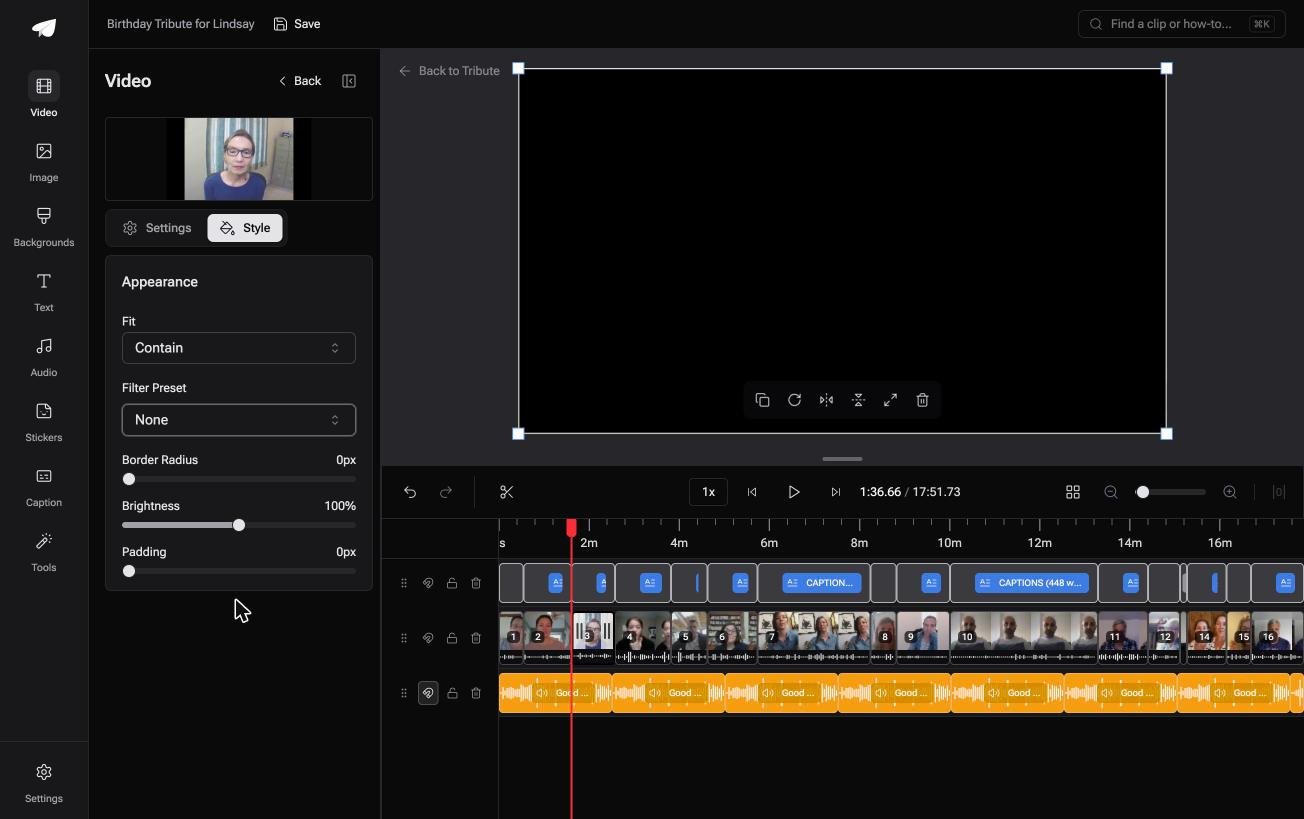
The Tribute video editor is a browser-based group video editor: contributors record clips on their phones and Tribute assembles them on a timeline with the music balanced under the voices.
It is ours, and it is the last thing on this page.
- Clips arrive in order on one timeline, with a tick showing which are already placed
- Blurred edges fill the frame behind upright phone footage, so a vertical clip is not a cropping problem
- Reorder media numbers every clip and offers move to front, move to back, move to position and bulk remove
- Music at 25% under speech and 75% under photographs, overridable per clip
Best for: A browser, no install allowed, and more contributors than a collage grid will hold.
Why it works: The collecting and the ordering are done before you open the editor.
Can you make a video collage without a collage at all?
The grid is a workaround for length.
Fifteen clips played end to end run long, so you stack four of them on screen to cut the running time. That trade costs every face three quarters of its size, and on a phone screen it costs the words too.
There is one case where you do not have to make the trade.
The case: short messages for one person
You are in it when each clip is somebody talking to one person rather than footage of a scene.
Twenty seconds each, eighteen people, a father retiring. Those clips do not want to share a frame: they want to follow each other, and your job is order, not layout.
Why the running time stops being a problem
Short clips make a short video on their own.
Eighteen clips of twenty seconds is a six minute video, and people watch six minutes about somebody they know. The Tribute video editor puts them in arrival order with the music already underneath, so nothing has to be squeezed into a cell.

What you do not have to do
- Not the layout. The clips follow each other in arrival order, each one at full size.
- Not the captions. One switch captions all eighteen, in any of 10 styles.
- Not the running time. On a Concierge Tribute the editors build it for you, and Eve, the assistant on Concierge and Concierge + Video Book, cuts a shorter version to send round afterwards.

When this is the wrong answer: you want clips visible at the same time, or the footage is yours and there is nobody to collect from. Then a browser collage tool is the right pick.

The Tribute editor is also not a standalone app: it lives inside a paid Tribute.
Frequently Asked Questions
Can you make a video collage online without an account?
You can build one in most browser tools without signing in, but downloading almost always asks for an account. Kapwing and Canva both let you work first and register at the export step.
What size should a video collage be?
Match the place it is going: 1920 by 1080 for YouTube or a TV, 1080 by 1080 for a square post, 1080 by 1920 for a story. Choose before you lay out the cells, because changing it later reflows everything.
How many clips fit in one grid?
Four is the practical ceiling for a phone screen and nine is the technical one. Past four, faces are too small to recognize and any on-screen text is unreadable.
Why is one cell black halfway through?
That clip ended before the others. Trim the longer clips to the shortest one, or loop the short clip so it fills the same stretch.
Can you add music to a video collage online?
Yes, in both Kapwing and Canva, from a built-in library or your own file. Mute the clip audio first, otherwise the track competes with four recordings at once.
Which online video collage maker handles vertical phone clips best?
Canva, because a grid cell can be set to any shape and the clip can be zoomed out inside it. Kapwing crops harder by default, so check each cell before exporting.
👉 Have the eighteen messages built into one video at full size if each of them is talking to the same person, and nobody gets a quarter of the screen.
