
How to Make a Picture Collage With Music People Can Watch
To make a picture collage with music you need a video, because a still image cannot carry sound. Two routes get you there: a slideshow that plays the pictures in turn, or a grid that moves. Both take under an hour.

Can you make a picture collage with music at all?
Not as a collage in the strict sense.
A collage in Google Photos takes up to nine photos and hands back a single picture.
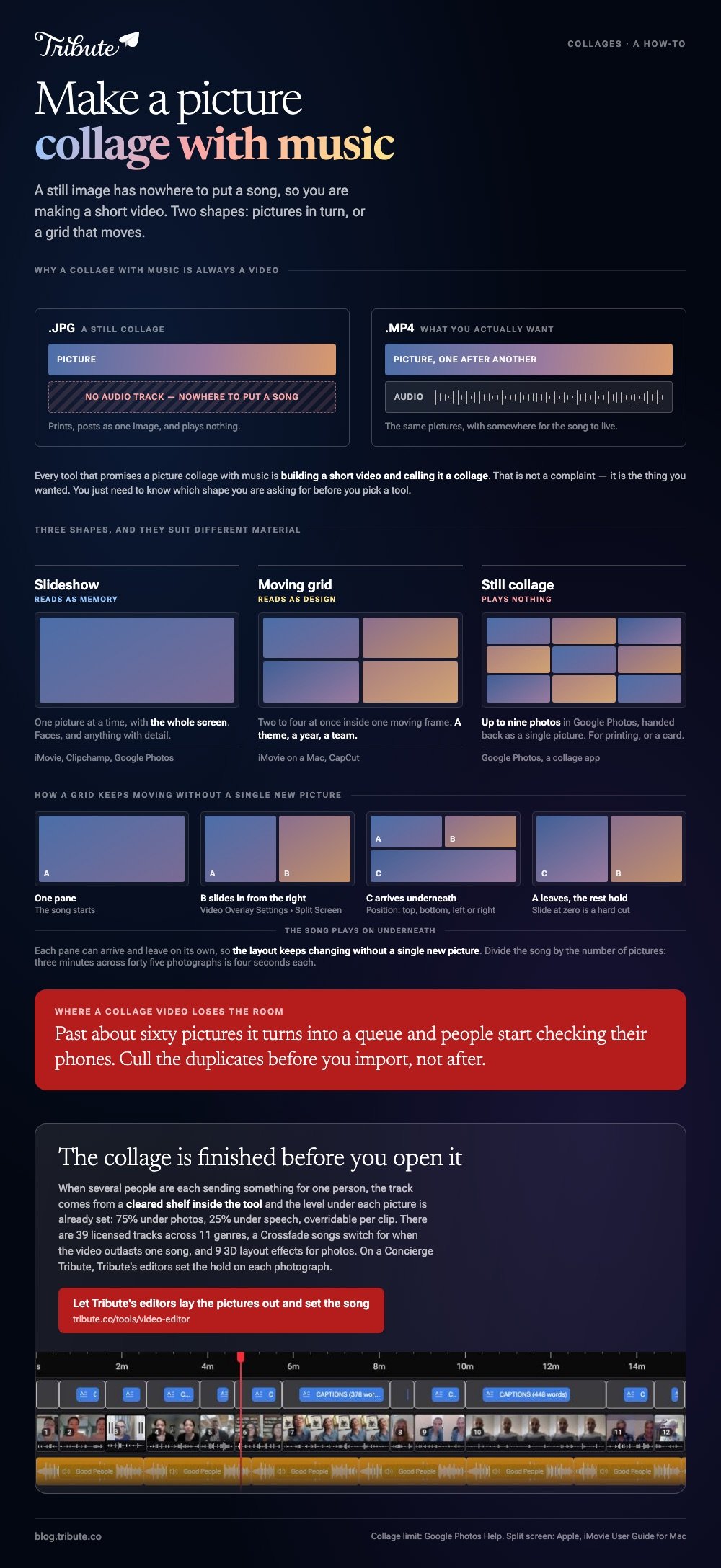
An image file has nowhere to put a song, so every tool that promises a picture collage with music is building a short video and calling it a collage.
That is not a complaint. It is the thing you wanted. You just need to know which of the two shapes you are asking for before you pick a tool.
What does a collage with music mean in practice?
One of two layouts, and they suit different material.
| Shape | What the viewer sees | Good for | Where to build it |
|---|---|---|---|
| Slideshow | One picture at a time | Faces, and anything with detail | iMovie, Clipchamp, Google Photos |
| Moving grid | Two to four at once | A theme, a year, a team | iMovie on a Mac, CapCut |
| Still collage | A single image | Printing, a card | Google Photos, a collage app |
A video collage with music shows several pictures at once inside one moving frame, which reads as design. A slideshow gives each picture the whole screen, which reads as memory. For a birthday or a memorial, the slideshow wins.
How do you build a slideshow with music on a phone?
iMovie, if the pictures are already in the camera roll.
- Open iMovie, tap Start New Project, then tap Movie.
- Tap each photo you want on the Moments screen. A blue checkmark marks your picks.
- Tap Create Movie. The pictures arrive in the order you tapped them.
- Tap a picture and drag its yellow edges to set how long it holds on screen.
- Tap Add Media, tap Audio, then choose from Soundtracks or My Music and tap Add Audio.
- Tap Done, tap Share, tap Share Video, then Save Video.
iMovie loops a soundtrack to fit the length of the video, so the song never stops dead halfway down the album.
Best for: Forty pictures and one song, finished in an evening on the sofa.
Why it works: The pictures never leave the phone, so there is nothing to upload and nothing to compress.
How do you make a picture collage with music that moves?
On a Mac, iMovie puts one clip or picture on top of another and splits the screen between them.
- Drag a picture above another one in the timeline. Release when the green Add icon appears.
- If the overlay controls are hidden, click the Video Overlay Settings button.
- Click the pop-up menu on the left and choose Split Screen.
- Click Apply.
- Use the Position pop-up menu to put the second picture left, right, top or bottom.
- Drag the Slide slider for a slide-in, or leave it at zero for a hard cut.
Apple documents the split screen controls. Stack a few of these and you have a grid that changes as the song plays, then drop the audio on the track underneath.
Best for: A theme that needs several pictures side by side, such as twenty years of the same holiday.
Why it works: Unlike a static collage, each pane can arrive and leave on its own, so the layout keeps changing without a single new picture.
Which collage maker with music should you pick?
The one that matches where the pictures live.
- iPhone: iMovie for a slideshow, and a Mac for a grid.
- Android: CapCut, which does both and writes captions as well.
- Browser: Clipchamp, with a wider timeline than any phone gives you.
- Already in Google Photos: a highlight video, as a first draft to improve.
Any video collage maker with music runs into the same two decisions, whichever you pick. How long each picture holds, and how loud the track sits.
Divide the song by the number of pictures. Three minutes across forty five photographs is four seconds each, which is the pace most people read as comfortable. Lift the music when nobody is speaking and drop it the moment anyone is.
Where it ends up matters too. YouTube is the usual destination, since 84% of US adults use it, per Pew Research Center, so an unlisted link opens for almost anyone without an account.
More in picking a slideshow app with music and building a video collage online.
What if the pictures came from a dozen different people?
The Tribute video editor is a browser-based group video editor: contributors record clips on their phones and Tribute assembles them on a timeline with the music balanced under the voices.
It is ours, and it is built for one case rather than for collages in general.
- 39 licensed tracks across 11 genres, cleared inside the editor, plus a YouTube link or your own MP3, WAV, M4A or FLAC
- Music at 75% under photos and 25% under speech by default, overridable per clip
- A Crossfade songs switch that blends one track into the next when the video outlasts a song
- 9 3D layout effects for photos, including Tilt, Book, Floating and Billboard

Best for: Pictures out of a shoebox and messages from relatives in four time zones.
Why it works: Compared to choosing and clearing a track yourself, the licensing question is settled before you open the music panel.
Can the pictures and the music arrive together?
In one case they do, and the collage builds itself while you wait.
Everything above starts with a folder you filled. Filling it is the fortnight of asking, and for one kind of project it is the only hard part.
The case: one person, many contributors
You are in it when several people each send something for the same person.
A grandmother turning eighty. A coach retiring after fifteen seasons. Everyone has a photograph and something to say, and none of it is on your phone.

Which means the search that brought you here, make a picture collage with music, is aimed at the easy half of the job.
Why the music question never comes up
The track is chosen from a cleared shelf inside the tool, and the level under each picture is already set.
Nobody reads a license page and nobody balances the volume twice. The Tribute video editor opens with the pictures in order and a song underneath them.

What you do not have to do
- Not the ordering. Every item arrives numbered, in the order it was sent.
- Not the building. On a Concierge Tribute, Tribute's editors set the hold on each photograph and the trim on each clip.
- Not a shorter version for the people who could not be there. Eve, the assistant on Concierge and Concierge + Video Book, cuts one from the same timeline.

When this is the wrong answer: the pictures are yours and you want a grid for a card or a print. Then a collage app makes the image in two minutes, and the editor cannot help, since it lives inside a paid Tribute.
Frequently Asked Questions
Can a pic collage with music be posted as one image?
No. A picture collage is a still, and sound needs a video file. Export the moving version as MP4 and post that instead.
What song length works for a collage video?
Three to four minutes, which carries about forty five pictures at four seconds each. Cut the song rather than the pictures if it runs long.
Can I use any song I like?
For a private video shared with family, in practice yes. For anything public, pick a cleared track, since a commercial song can get the upload claimed and the ad revenue reassigned.
How many pictures is too many?
Past about sixty the video turns into a queue and people start checking their phones. Cull duplicates before you import rather than after.
Does a collage app add a watermark?
Many do on a free tier, and the export screen is where it tells you. iMovie and Clipchamp both hand back the picture untouched.
Can I mix video clips into a picture collage?
Yes, and the mix holds attention better than stills alone. Drop the music under anyone speaking and lift it again over the photographs.
What is the quickest route if I have never edited video?
A Google Photos highlight video as a draft, then open it on a timeline and fix the order. Our guide to making a video montage covers the rest.
👉 Let Tribute's editors lay the pictures out and set the song if several people are each sending something for one person, and the collage is finished before you open it.
