
How to Stitch Videos Into One File on a Phone or a Laptop
To stitch videos, put every clip on one timeline track in the right order, close the gaps, and export once. iMovie does it on an iPhone, CapCut on Android, Clipchamp in any browser. The joining takes a minute; the ordering takes the evening.

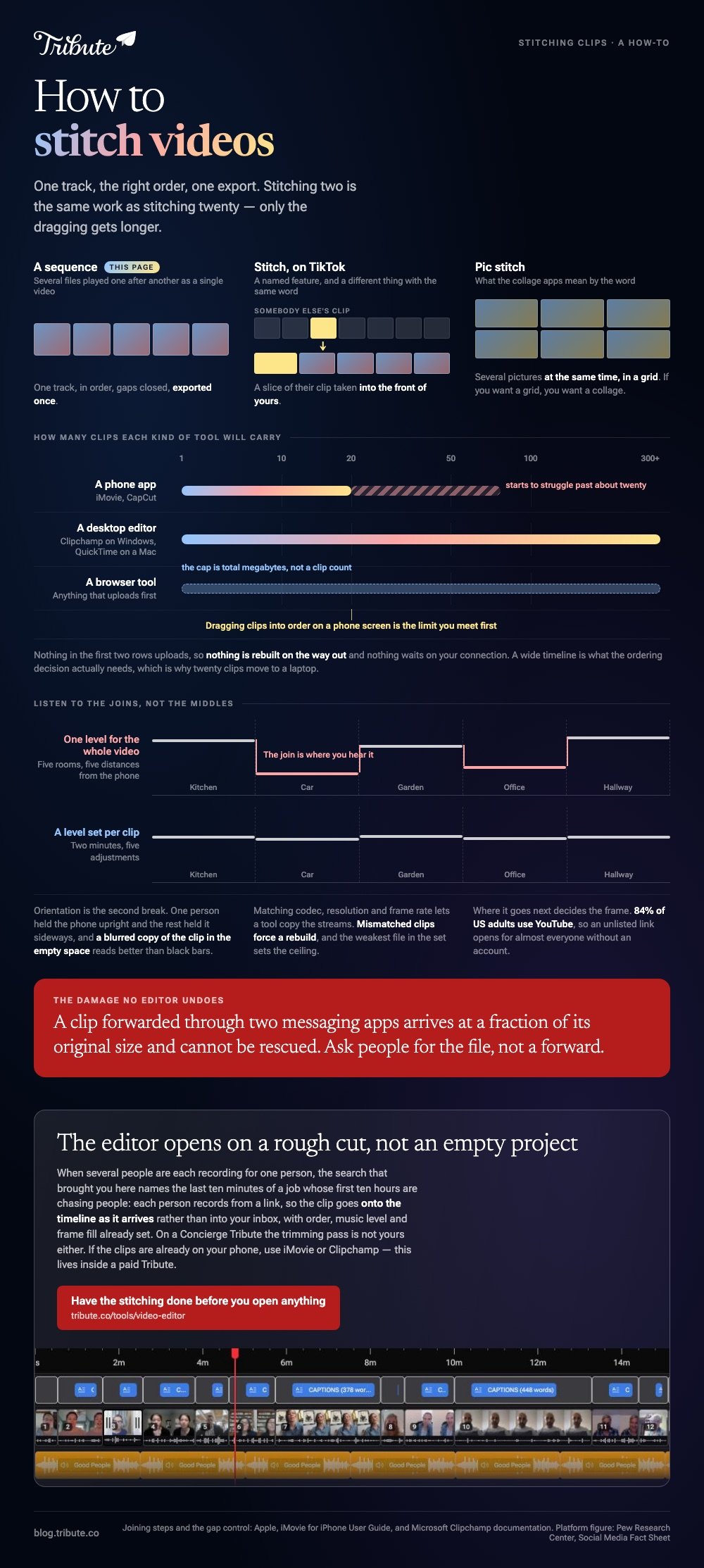
What does it mean to stitch videos?
Two different jobs share the word, and only one of them is on this page.
The job here is sequence: several separate files played one after another as a single video. On TikTok, Stitch is a named feature for taking a slice of someone else's clip into your own, which is a different thing with the same name.
Searches for pic stitch video land somewhere else again, in collage apps that build a grid of pictures rather than a sequence. If you want a grid, you want a collage. If you want one continuous video, read on.
| Where you are | Use | What it costs |
|---|---|---|
| iPhone | iMovie | Nothing, and no watermark |
| Android | CapCut | An account |
| Windows or browser | Clipchamp | A sign in |
| Mac | QuickTime Player or iMovie | Nothing |
How do you stitch two videos together on a phone?
On an iPhone the answer is iMovie, and it is not the Photos app.
- Open iMovie, tap Start New Project, then tap Movie.
- On the Moments screen, tap each clip. A blue checkmark marks your picks, and Media at the top switches to albums.
- Tap Create Movie. The clips land in the order you tapped them.
- Drag a clip sideways to move it, or drag a yellow edge in to cut the silence at its head.
- Tap Done, tap Share, tap Share Video, pick a resolution, then Save Video.
Apple documents the project steps in the iMovie for iPhone guide. On Android, CapCut takes the same shape: New project, select the clips, tap Add, then press and hold a clip to drag it into place.
To stitch 2 videos together the work is identical to stitching twenty: one track, the right order, one export. Only the dragging gets longer.
Best for: Up to about a dozen clips, on the phone that already holds them.
Why it works: Nothing uploads, so nothing is rebuilt on the way out and nothing is waiting on your connection.
How do you stitch multiple videos together on a computer?
Clipchamp is the one most people already own without knowing it, since it ships with Windows 11 and runs in a browser everywhere else.
- Select My media on the toolbar, then the import media button, and browse to your files.
- Drag the clips onto the timeline side by side on the same track.
- Select a clip and drag its trimming handles in. Hold shift to trim several at once.
- Move the cursor over any gap and press the delete this gap button.
- Export from the top right at the highest resolution offered.
Microsoft documents that gap button for Windows and Mac alike. On a Mac with no editor open, QuickTime Player appends files with Edit then Add Clip to End, which is five menu commands and a save.
Best for: Twenty or more clips, where ordering on a phone screen stops being bearable.
Why it works: A wide timeline shows you the whole video at once, which is the view the ordering decision needs.
Is there an app that stitches videos together without a watermark?
Several, and they are the ones that run on the device rather than on a server.
iMovie, CapCut, Clipchamp and QuickTime Player all hand back the picture untouched. Browser mergers are the ones to read with care, because a free tier is often paid for with a logo or a 720p cap. The export screen is where that appears.
One tool to leave out of the list. VideoLAN's own wiki says none of the ways VLC offers to combine streams appears to merge them with correct time signatures, and the result throws seeking errors even inside VLC.
It is a player, not a joiner.
What breaks when you stitch video clips together from different phones?
Three things, and each has a one minute fix.
Resolution. A clip forwarded through two messaging apps arrives at a fraction of its original size and cannot be rescued in an editor. Ask people for the file rather than a forward.
Orientation. One person held the phone upright and the rest held it sideways. A blurred copy of the clip in the empty space reads better than black bars, and resizing is covered in changing the size of a video.
Volume. A kitchen and a car are not the same room. Set a level per clip rather than one level for the whole video, and listen to the joins rather than the middles.

Where the video goes next decides the frame size. YouTube is the usual answer, since 84% of US adults use it according to Pew Research Center, so an unlisted link opens for almost everyone without an account.
What if the clips came from a dozen different people?
The Tribute video editor is a browser-based group video editor: contributors record clips on their phones and Tribute assembles them on a timeline with the music balanced under the voices.
It is ours, and it solves the collecting rather than the joining.
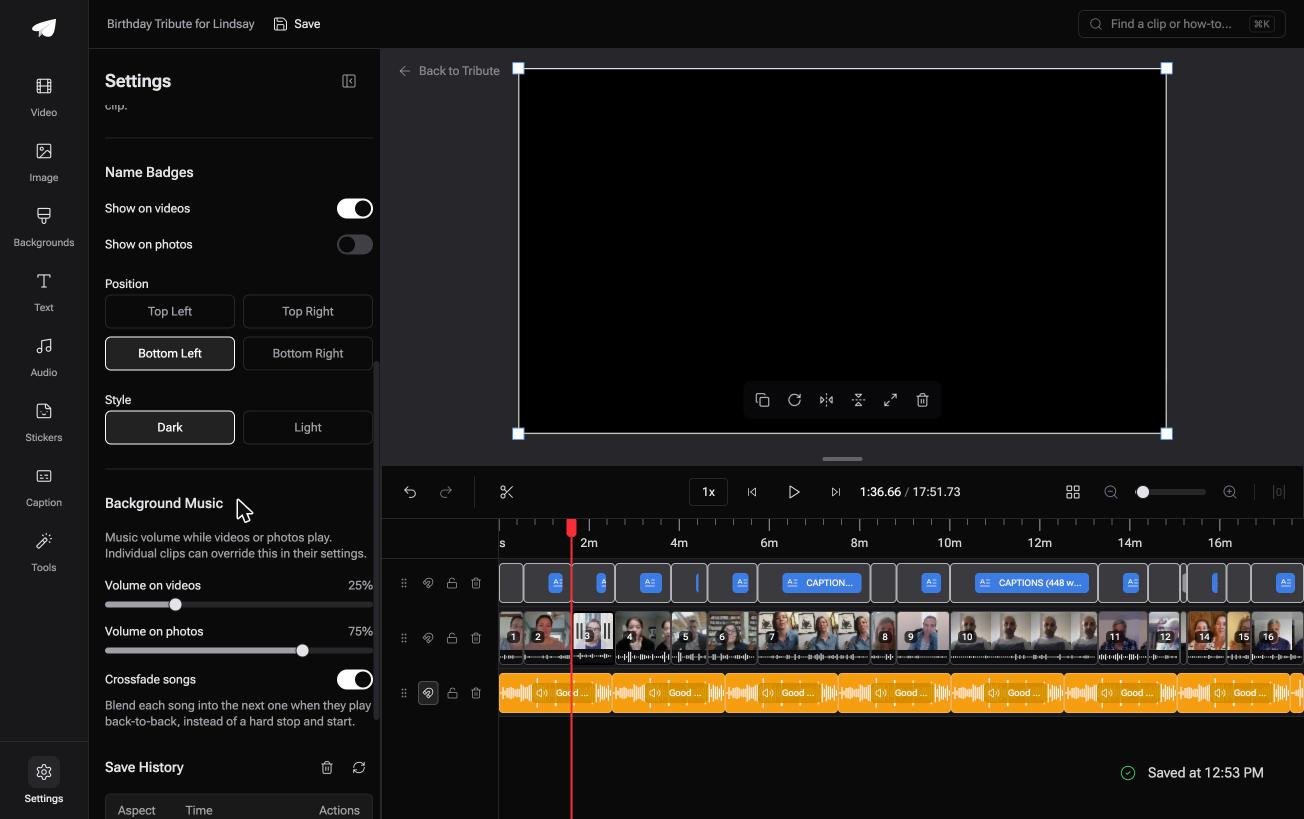
- Clips arrive in order, with a tick against the ones already placed on the timeline
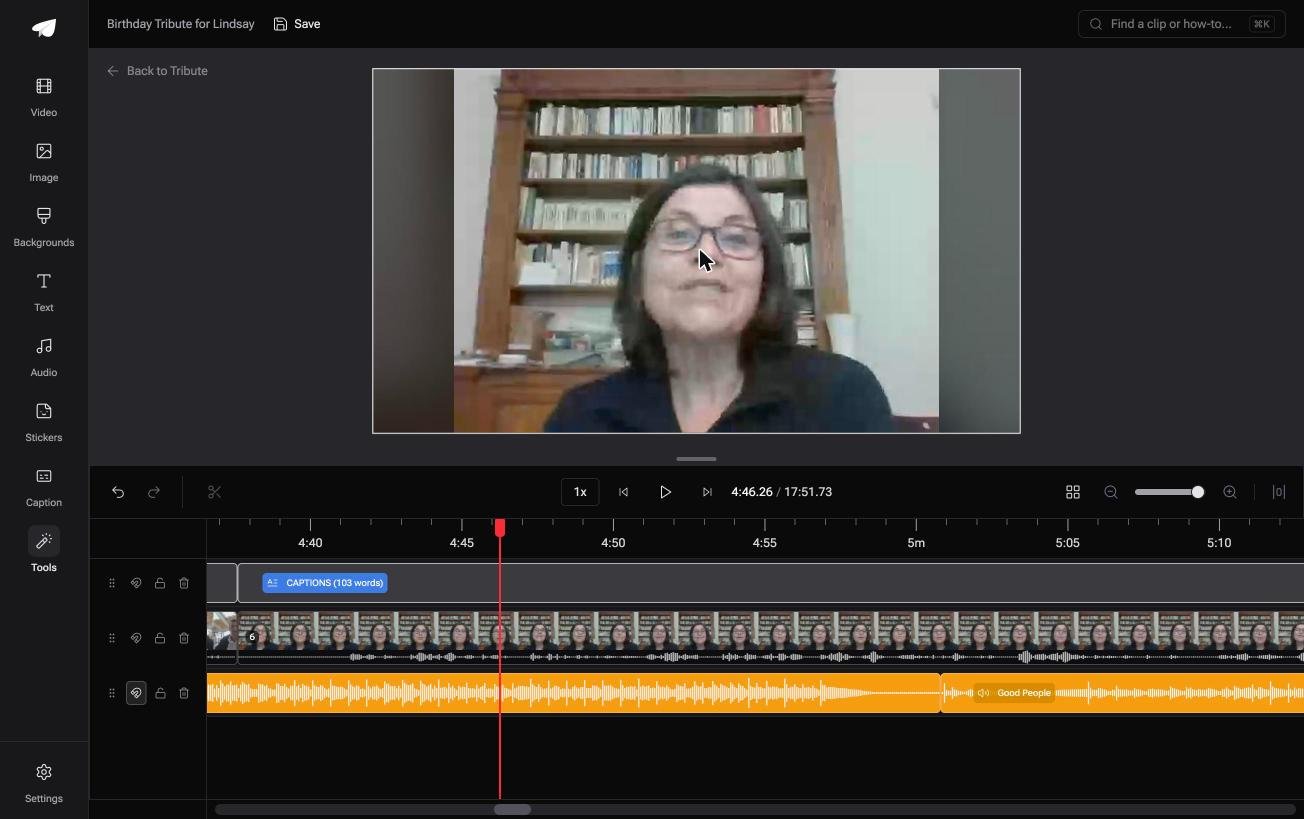
- A waveform under every clip, so you can see the silence and trim to the first word
- Blurred edges behind upright phone footage, switched on from the start
- Autosave and a restorable version history, with removed clips recoverable rather than deleted
Best for: Twenty clips to stitch, scattered across twenty separate inboxes.
Why it works: Compared to a folder of attachments, the order and the audio balance exist before you open the editor.
Can you stitch videos without doing the stitching?
Only when the clips were never yours to collect.
Every step above assumes the files are on your device. Getting them there is the part this page cannot shorten, and for one kind of project it is the whole job.
The case: one person, many recordings
You are in it when several people each record something for the same person.
A grandmother turning eighty. A colleague leaving after fifteen years. A memorial where the people who should speak are in four time zones. Nobody is shooting a video; everyone is recording a message.

Which means the search that brought you here, stitch videos, names the last ten minutes of a job whose first ten hours are chasing people.
Why the sequence is already there
Each person records from a link, so the clip goes onto the timeline as it arrives rather than into your inbox.
Order, music level and frame fill are set before you look at it. The Tribute video editor opens on a rough cut, not an empty project.

What you do not have to do
- No stitching. The clips are on one timeline in order before you open it.
- No trimming pass. On a Concierge Tribute, Eve takes the silence off every clip from a prompt.
- No naming. Each badge carries the name the clip came with, in any of four corners.
- No edit at all, if you want none. Tribute's editors build it on Concierge and hand it back for approval.
When this is the wrong answer: the clips are yours and already on the phone, or you need two files joined this afternoon. Then iMovie or Clipchamp is the tool, since the editor lives inside a paid Tribute rather than standing alone.
Frequently Asked Questions
What is the easiest way to stitch videos together?
Use whatever is already on the device holding the clips: iMovie on an iPhone, CapCut on Android, Clipchamp on Windows. Reaching for a new tool costs more time than the join saves.
Can I stitch videos without losing quality?
Close to it, when the clips share a codec, a resolution and a frame rate. Mismatched clips force a rebuild and the weakest file in the set sets the ceiling, so export at the highest setting offered.
How many clips can I stitch into one video?
Phone apps start to struggle past about twenty, desktop editors handle hundreds, and browser tools cap total upload size rather than the count. Dragging clips into order is the limit you meet first.
Is stitching the same as a collage?
No. Unlike a collage, which shows several pictures at the same time in a grid, stitching plays the clips one after another. Our guide to building a slideshow in Canva covers the grid style.
Can I stitch videos with music underneath?
Yes, and it is the step that turns a join into a montage. Add the track after the order is settled so you time it once, which making a video montage walks through.
Why is my stitched video sideways?
The project frame follows the first clip you added, so an upright opener makes the whole thing upright. Rebuild starting from a clip in the orientation you want, or rotate the odd one out.
What order should the clips go in?
Open with someone the viewer knows well and close with the person closest to them. Group the rest by relationship rather than by arrival time, and see putting together a video tribute for the longer version.
👉 Have the stitching done before you open anything if several people are each recording for one person, and the order is right when you arrive.
