
Android Video Editors Compared
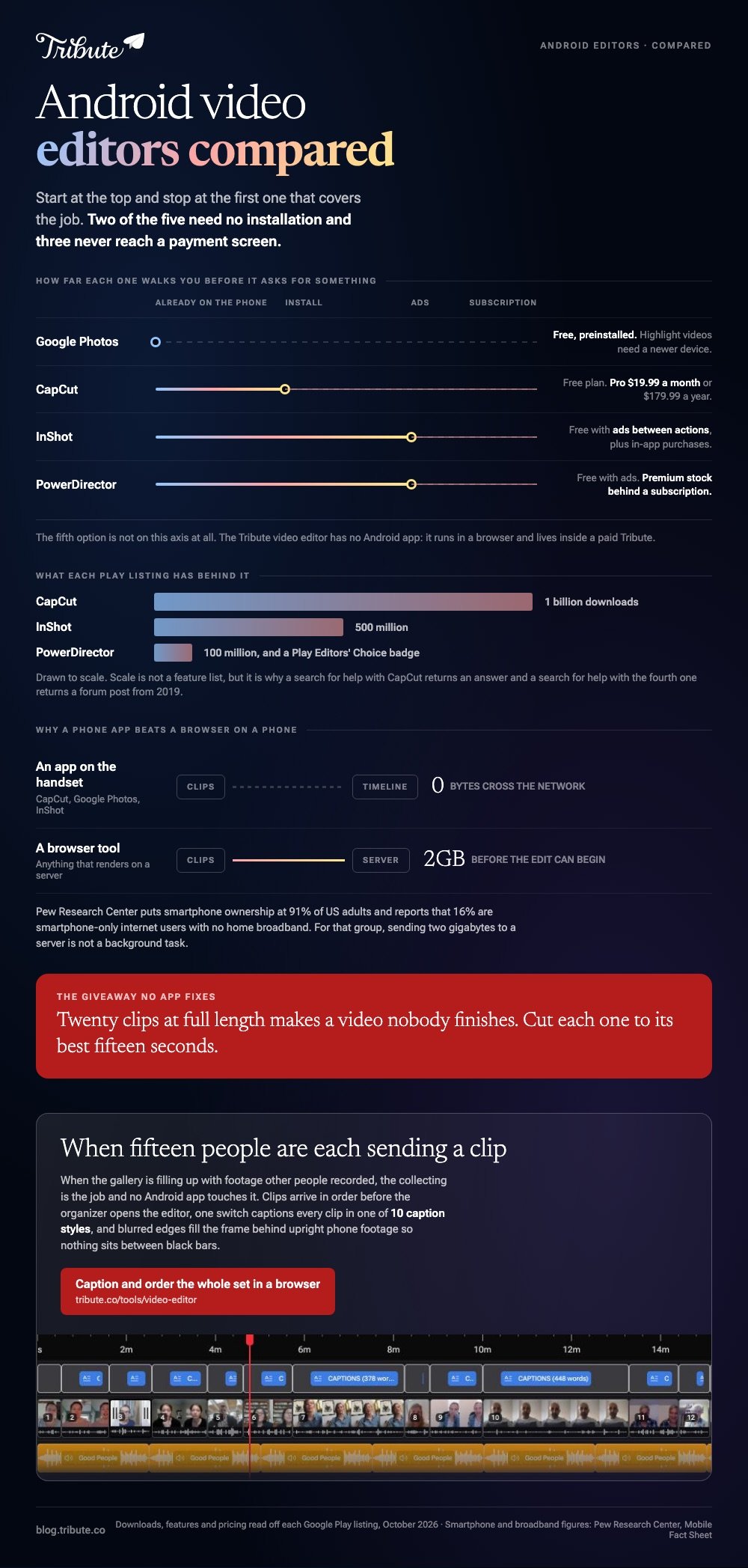
The best Android video editor is CapCut: it joins clips, sets volume per clip, captions speech and exports at 4K 60fps at no cost. Google Photos is already installed and builds a Highlight video with music from clips you tap. InShot and PowerDirector add layers and carry ads until you pay.

Which video editor app android phones handle best?
Everything below was read off each app's own Google Play listing or pricing page in October 2026. All four of the general apps run on the phone itself, so nothing uploads.
| App | Best for | Price (as of October 2026) | Watch out for |
|---|---|---|---|
| CapCut | Joining, captions, social clips | Free plan; Pro $19.99/month | Export rules not stated on the pricing page |
| Google Photos | A video from clips already on the phone | Free app, preinstalled | Highlight videos need a newer device |
| InShot | Layers, keyframes, picture in picture | Free app with ads; in-app purchases | Ads between actions |
| PowerDirector | Multi-track work on a phone | Free app with ads; in-app purchases | Premium stock behind a subscription |
| Tribute video editor | One video from many people's clips | Paid product | Browser, not an app |
Which android video editor should you install?
Start at the top and stop at the first one that covers the job. Two of the five need no installation at all, and three of the five will finish a family video without a payment screen.
CapCut
CapCut's Google Play listing passed a billion downloads and describes the features that matter for a home video: trim, split and merge clips, a multi-track timeline, stabilisation, automatic captions, text to speech and export at 4K 60fps with custom resolution.
- Tap New project and select every clip you want in the video.
- Drag the clips along the timeline until the order is right.
- Tap a clip, then Volume, and set a level for that clip on its own.
- Tap Captions to transcribe the speech, then correct the names it misheard.
- Tap Audio to add music, and pull its level well under the voices.
- Tap Export at the top right and choose a resolution.
Per-clip volume is the control that saves a video built from several phones. One person recorded in a kitchen, the next in a car, and a single level for the whole timeline leaves half of it inaudible.
CapCut also syncs projects through a cloud Space, so a cut started on the phone can be finished in the browser or on the desktop app.
That matters on a long video, where reordering twenty clips on a small screen is the slowest part of the evening.
- Look for: the export screen, since CapCut's pricing page states neither a watermark rule nor a resolution cap for the free plan.
- Price: free plan at $0; Pro $19.99 a month or $179.99 a year as of October 2026.
- Time needed: about fifteen minutes for eight clips with captions.
Best for: Clips from several phones where the sound levels do not match.
Why it works: Captions and per-clip audio are two taps each, and those are the two jobs people abandon.
Google Photos
Google Photos is on the phone already, and its Create tab does more than most people expect. Google's help page for making creations with Google Photos lists Highlight video alongside animations, collages and cinematic photos, and gives the steps.
- Open Google Photos and tap Create at the bottom, then Highlight video.
- Or select the clips and photos first, then tap Create, then Highlight video.
- Open the result and tap Edit.
- Touch and hold a clip to drag it into a different order, or tap a clip and choose Remove.
- Tap Add music, then Section to pick which part of the song plays.
- Tap Volume to balance "Video audio" against "Soundtrack".
- Tap Add text, then Save.
Google's separate page on editing videos covers the per-clip work: enhance or stabilise, crop or rotate, adjust, filters, speed, mute and add music. Crop, straighten and filters need an Android device with at least one GB of RAM running Android 6.0 or later.
- Look for: the device warning, since Google states that older phones may not be able to create Highlight videos.
- Price: free app, already installed on most Android phones.
Best for: A video from clips and photos that are already in your library.
Why it works: Unlike a dedicated editor, there is no import step, because the footage is already where the app lives.
InShot
InShot's Play listing passed 500 million downloads and reads like a feature list written for this job: trim and merge clips, add music, sound effects and voiceovers, adjust the ratio, automatic captions, keyframes, picture in picture and chroma key.
The app is a free app with ads and in-app purchases, which is the honest description of its pricing. Ads appear between actions rather than over your video, and the subscription removes them along with the stickers and filters marked premium.
- Look for: the export screen, where the resolution and frame rate choices sit together.
- Price: free app with ads; in-app purchases, as listed on Google Play in October 2026.
Best for: A clip that needs a second layer on top, like a logo or a reaction window.
Why it works: Keyframes and picture in picture on a phone cover most of what people open a laptop for.
PowerDirector
Cyberlink's PowerDirector is a Google Play Editors' Choice app with over 100 million downloads, and its listing describes a multi-track timeline with keyframes, chroma key, masks and blend modes, a video stabiliser, voiceover recording and export at up to 4K.
KineMaster sits in the same category with 4K at 60 frames per second.
Both carry ads and in-app purchases, and both put the Getty-backed stock libraries and automatic captions behind their premium tiers. That is a reasonable trade when the timeline below is doing real work.
- Look for: which features are marked premium, since the free app layer is the timeline rather than the assets.
- Price: free app with ads; in-app purchases, as listed on Google Play in October 2026.
Best for: Someone who wants desktop-style layers without a desktop.
Why it works: Compared with Google Photos, you control every track rather than accepting a generated cut.
Tribute, if several people recorded the clips
None of the four apps above is built for this. Fifteen people send fifteen files over text, WhatsApp and email, most of them compressed on the way, and the editing is the last and smallest part of the job.
Collecting them at full quality and putting them in order is the work.
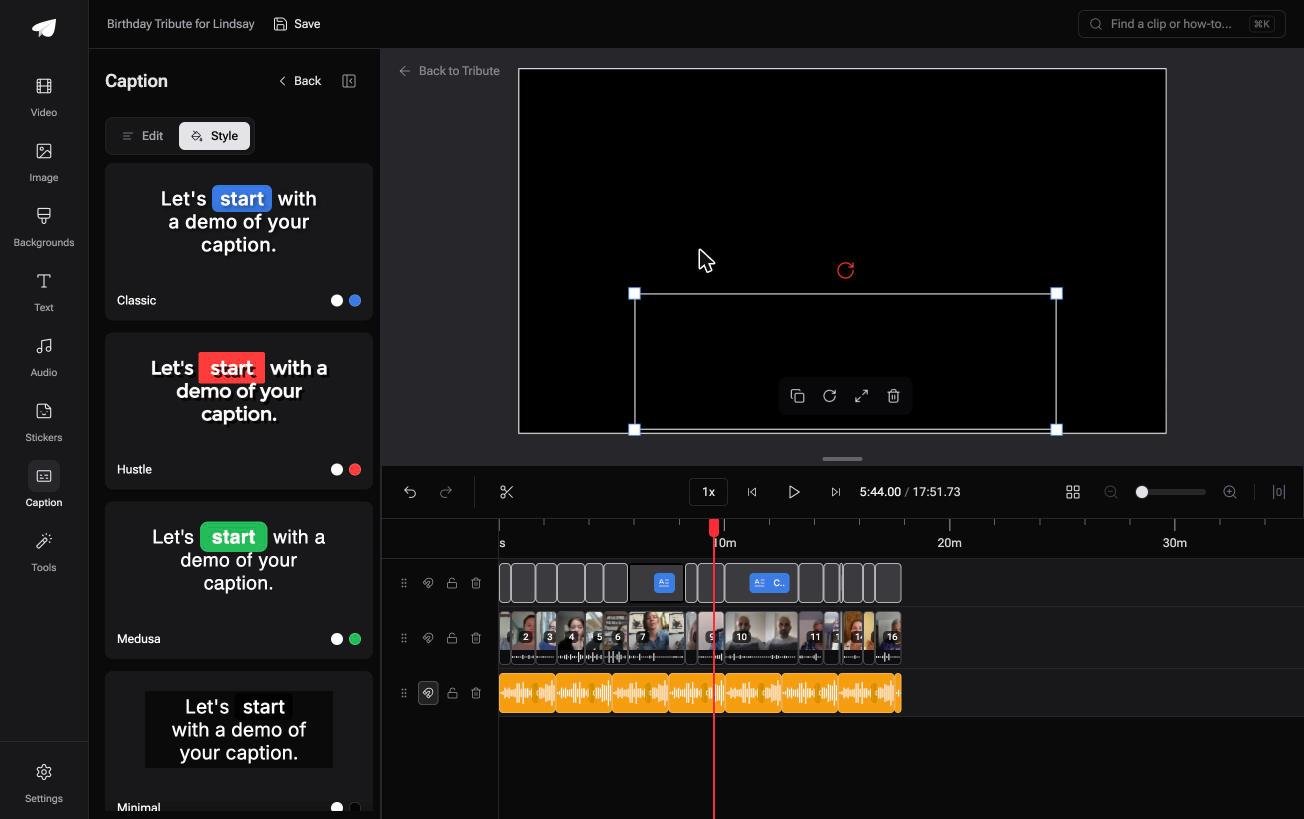
The Tribute video editor is a browser-based group video editor: contributors record clips on their phones and Tribute assembles them on a timeline with the music balanced under the voices.
Clips arrive in order before the organizer opens the editor, one switch captions every clip, and blurred edges fill the frame behind upright phone footage so there are no black bars.
It lives inside a paid Tribute and it will not open a video from your gallery.
- Look for: the ten caption styles, which highlight each word as it is spoken.
- Price: part of a paid Tribute; there is no Android app.
Best for: Clips that arrive from a group and never pass through your gallery at all.
Why it works: Unlike a gallery folder you fill yourself, the collecting, the ordering and the audio balance happen before the editing starts.
That case is covered in how a group video maker handles thirty phones and in our guide to making a video montage.

Is a phone app better than a browser on Android?
On a phone, almost always. The clips are already on the device at full quality, so nothing uploads and nothing is recompressed on the way in. A browser tool has to receive every byte before it can begin.
Pew Research Center reports that 91% of US adults own a smartphone and that 16% are smartphone-only internet users with no home broadband, according to its mobile fact sheet.
For that second group, sending 2 GB of footage to a server is not a background task.
A browser still wins when the footage sits on a laptop instead of a phone, or when you are editing on a Chromebook, where Android apps and web tools both run.
The browser wins when the footage sits on a laptop instead. We cover those tools in our roundup of online editors, the no-cost ones in free online editors compared, and the joining step alone in joining clips in a browser.

What makes an Android edit look unfinished?
Three things, and each takes about a minute to fix:
- Dead air at the front of every clip. People press record, look at the camera, then begin. Drag the clip edge in to the first word.
- Volume that jumps. Set a level per clip rather than one level for the video, and keep music under the speech.
- Black bars beside upright clips. Fill the space with a blurred copy of the clip, which most editors with a background setting will do.
Export at the highest setting the app offers, then watch the first and last thirty seconds before you share it. Upload rather than attach, because messaging apps compress video hard.
Length is the fourth giveaway. Twenty clips at full length makes a video nobody finishes, and nobody has ever said a tribute video was too short. Cut each one to its best fifteen seconds and the video improves without any new app.
YouTube set to unlisted is the safe default for a family video.
Pew's social media fact sheet puts YouTube use at 85% of US adults aged 50 to 64 and 65% of those 65 and over, so the person opening your link seldom has to learn anything new.

Frequently Asked Questions
What is the best android video editing app with no watermark?
Google Photos adds nothing to the image, and CapCut's listing makes no watermark claim either way for ordinary projects. Template-driven exports are the ones that have carried branding in the past, so check the export preview first.
Can Google Photos join two clips?
Yes, through Highlight video rather than through the video editor. Select the clips, tap Create, then Highlight video, and reorder them by touching and holding a clip in the editor.
Do these apps cost anything?
CapCut, Google Photos, InShot and PowerDirector all have a free app layer. InShot and PowerDirector carry ads, and all except Google Photos sell a subscription for premium assets and features.
Can Android export 4K?
Yes. CapCut's listing states 4K 60fps export, PowerDirector lists up to 4K and KineMaster lists 4K at 60 frames per second. The phone's own camera resolution sets the ceiling.
Why do captions get names wrong?
Automatic transcription is guessing at unfamiliar words, and family names are the hardest case. Every app here lets you edit the caption text, so fix the names before you export rather than after.
How many clips can a phone handle?
Dedicated editors manage twenty or thirty without complaint on a recent phone. Past that the problem stops being the app and becomes the reordering, which is tedious on a small screen whatever you install.
What if twenty people are each sending me a clip?
Then the editing is not the hard part. Gathering twenty files at full quality and putting them in a sensible order is the real cost, and most of those files will arrive squeezed by the app that delivered them.
That collection problem is what a group video tool exists to remove.
👉 Caption and order the whole set in a browser instead if the gallery is filling up with clips other people sent, and nothing has to be downloaded to the phone first.
